



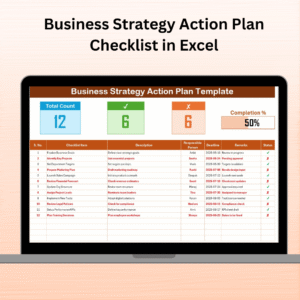
The Product Launch Action Plan in Excel is an essential tool designed to help businesses and marketing teams plan and execute a successful product launch. This Excel-based action plan provides a detailed roadmap for every phase of the product launch process, from ideation to post-launch analysis. By organizing tasks, timelines, and responsibilities, this tool ensures that every aspect of your product launch is well-coordinated and executed efficiently.
The template is perfect for marketing teams, project managers, and product owners who want to stay on top of launch activities and ensure that no critical tasks are overlooked. With sections dedicated to key milestones, marketing strategies, team responsibilities, and performance tracking, the action plan ensures a smooth and successful product launch.
Key Features of the Product Launch Action Plan in Excel
📅 Timeline Management & Milestone Tracking
Track the entire product launch timeline, from the planning phase to the post-launch activities. Set clear milestones, deadlines, and dependencies for each task to ensure timely completion.
📝 Task Assignment & Responsibility Tracking
Assign tasks to specific team members and track their progress. This feature ensures that everyone is on the same page and that no important tasks are left unassigned or forgotten.
📈 Marketing Strategy & Campaign Planning
Organize and track your marketing campaigns and strategies, including digital marketing efforts, advertising, social media engagement, and email marketing. Ensure all marketing initiatives are aligned with your product launch goals.
🎯 Launch Goals & KPIs
Set measurable goals and KPIs to track the success of your product launch. Whether it’s sales targets, website traffic, or customer acquisition rates, keep track of your performance and adjust strategies as needed.
📊 Progress Monitoring & Reporting
Monitor the progress of each task, campaign, and goal. Use the tracking system to identify bottlenecks and adjust resources to ensure the product launch stays on track.
⚙️ Customizable & Scalable Action Plan
This action plan is fully customizable to suit your unique product launch needs. Whether you are launching a small local product or a global product, this plan can be scaled to fit any project size.
Why You’ll Love the Product Launch Action Plan in Excel

✅ Streamline Your Product Launch
With clear timelines, task assignments, and progress tracking, you’ll be able to manage every aspect of your product launch seamlessly.
✅ Optimize Marketing Campaigns
Track and optimize your marketing efforts in real time. Ensure that your campaigns are aligned with your launch goals and driving the desired results.
✅ Ensure Team Accountability
Assign tasks and track team performance throughout the launch. This helps ensure that everyone is accountable and that no steps are missed.
✅ Data-Driven Decisions
Track KPIs and goals to measure the success of your product launch. Make informed decisions based on real-time data to adjust strategies and improve performance.
✅ Customizable & Scalable
Tailor the action plan to fit your product’s specific needs and scale it according to the complexity and size of your launch.
What’s Inside the Product Launch Action Plan in Excel?
Timeline Management & Milestone Tracking: Keep track of important launch dates and milestones.
Task Assignment & Responsibility Tracking: Assign and track tasks for the entire team.
Marketing Strategy & Campaign Planning: Organize and track all marketing campaigns related to the launch.
Launch Goals & KPIs: Set goals and track progress toward achieving them.
Progress Monitoring & Reporting: Monitor the progress of all tasks and campaigns.
Customizable Action Plan: Modify the plan to fit your specific product launch needs.
How to Use the Product Launch Action Plan in Excel
1️⃣ Download the Template: Instantly access the Product Launch Action Plan in Excel.
2️⃣ Set Up Key Milestones & Deadlines: Define your product launch timeline, including key milestones and deadlines.
3️⃣ Assign Tasks & Responsibilities: Assign tasks to team members and set deadlines for completion.
4️⃣ Track Marketing Campaigns & KPIs: Monitor your marketing campaigns and performance metrics to ensure alignment with goals.
5️⃣ Analyze Performance & Adjust Strategies: Track progress, measure KPIs, and make adjustments to strategies as needed.
Who Can Benefit from the Product Launch Action Plan in Excel?
🔹 Marketing & Product Teams
🔹 Project Managers & Launch Coordinators
🔹 Entrepreneurs & Startups
🔹 E-commerce & Retail Businesses
🔹 Digital Marketing Agencies
🔹 Large Enterprises with Product Launches
🔹 Consultants & Product Development Teams
Ensure your product launch is organized and successful with the Product Launch Action Plan in Excel. Plan, track, and execute every step of your launch, from pre-launch planning to post-launch analysis.
Click here to read the Detailed blog post
Visit our YouTube channel to learn step-by-step video tutorials
Youtube.com/@PKAnExcelExpert
Compatibility and Requirements
- Works in Microsoft Excel desktop (Excel 2016 or later, or Microsoft 365).
- Timelines, task lists and KPI figures are plain worksheet entries you can edit. Microsoft covers the basics in Excel for Windows training.
Frequently Asked Questions
What does the action plan cover?
It covers timeline and milestone tracking, task assignment, marketing strategy and campaign planning, launch goals and KPIs, and progress monitoring and reporting.
Can I assign tasks to team members?
Yes. You assign each task to a team member, set a deadline and track its progress, so every task has an owner.
What can I track as launch goals?
You can set measurable goals and KPIs such as sales targets, website traffic or customer acquisition rates, and follow progress toward them.
Can I change the plan to fit my launch?
Yes. The action plan is customizable and scalable, so you can adapt it to a small local product or a global one.
Is there a checklist or dashboard version?
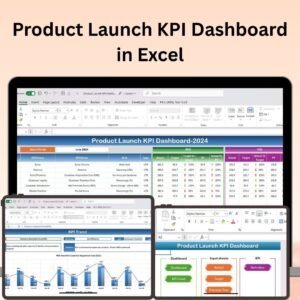
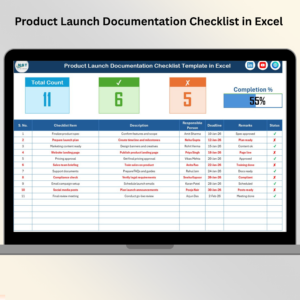
Yes. See the Product Launch Checklist Template in Excel and the Product Launch KPI Dashboard in Excel.
Related Product Launch Templates
- Product Launch Checklist Template in Excel: a checklist of launch steps
- Product Launch Planner Checklist in Excel: a planner in checklist form
- Product Launch Schedule in Excel: a schedule for launch dates
- Product Launch KPI Dashboard in Excel: a KPI view of launch results
- Product Launch Checklist in Google Sheets: the checklist in Google Sheets
Browse all Excel checklist templates.































Reviews
There are no reviews yet.