



The Anniversary Celebration Checklist in Excel is an essential tool for organizing and tracking all the tasks involved in planning and executing a memorable anniversary celebration. Whether it’s for a corporate anniversary, a wedding anniversary, or any other milestone event, this Excel-based checklist helps you stay on top of every detail, ensuring that no task is forgotten and the event runs smoothly.
From venue booking to guest list management, this template provides a comprehensive and customizable system for planning every aspect of the anniversary celebration. You can easily track decorations, catering, invites, and much more. With this checklist, you can stay organized, reduce stress, and ensure that your event is a success.
Key Features of the Anniversary Celebration Checklist in Excel
📅 Event Planning & Task Management
Track every task related to the event, from sending invitations to arranging entertainment, ensuring that each detail is completed on time.
📝 Guest List & RSVP Management
Manage your guest list efficiently by tracking invitees and RSVPs. Keep all the necessary details in one place for easy reference.
🎉 Budget Management
Stay on top of the budget by tracking expenses related to the venue, catering, decorations, gifts, and more. Ensure that the celebration stays within budget.
🎂 Event Timeline
Create a detailed event timeline with specific dates and deadlines to ensure that everything is completed well in advance of the anniversary celebration.
🎁 Gift & Special Arrangement Tracking
Track special gifts, favors, and any additional arrangements you plan to make for the event, such as personalized gifts or surprise elements.
⚙️ Customizable & Scalable
The checklist is fully customizable to suit your specific event needs. Whether it’s a small intimate gathering or a large corporate event, you can adjust the checklist to reflect the scale of your celebration.
Why You’ll Love the Anniversary Celebration Checklist in Excel

✅ Stay Organized
Keep track of every aspect of the celebration, from task assignments to budget management. No more last-minute scrambling!
✅ Track Guest List & RSVPs
Easily manage the guest list and keep track of RSVPs, ensuring you know exactly who is attending.
✅ Control Your Budget
Monitor expenses and avoid overspending with a detailed budget tracker that covers all event costs, from food to decorations.
✅ Save Time & Stress
By using this checklist, you can simplify the planning process and reduce stress, knowing you have a clear plan and timeline.
✅ Customizable to Fit Your Event
This checklist is flexible and can be adapted to fit the size and style of your celebration. It’s perfect for any type of anniversary event.
What’s Inside the Anniversary Celebration Checklist in Excel?
Event Planning & Task Management: Track all necessary event tasks and their completion.
Guest List & RSVP Management: Monitor invites and RSVP statuses.
Budget Management: Track expenses and keep your event within budget.
Event Timeline: Plan and schedule tasks and deadlines in advance.
Gift & Special Arrangements: Keep track of gifts, favors, and surprise arrangements.
Customizable Layout: Modify the checklist to suit your event needs.
How to Use the Anniversary Celebration Checklist in Excel
1️⃣ Download the Template: Access the Anniversary Celebration Checklist in Excel instantly.
2️⃣ Input Event Details: Add your event date, venue, and guest list information.
3️⃣ Track Tasks & Deadlines: Assign tasks, set deadlines, and monitor progress as you plan the celebration.
4️⃣ Monitor Budget & Expenses: Keep an eye on your budget to ensure you stay within your limits.
5️⃣ Prepare for the Big Day: Use the checklist to ensure everything is ready for the anniversary celebration, from guest arrivals to the final toast.
Who Can Benefit from the Anniversary Celebration Checklist in Excel?
🔹 Event Planners & Coordinators
🔹 Corporate HR & Event Planning Teams
🔹 Couples Celebrating a Wedding Anniversary
🔹 Families Planning Milestone Anniversaries
🔹 Business Owners & Managers Hosting Corporate Anniversaries
🔹 Anyone Organizing an Anniversary Celebration
Celebrate milestones and anniversaries stress-free with the Anniversary Celebration Checklist in Excel. Stay organized, stick to your budget, and make your event memorable for everyone involved.
Click here to read the Detailed blog post
Visit our YouTube channel to learn step-by-step video tutorials
Youtube.com/@PKAnExcelExpert
Compatibility and Requirements
- Works in Microsoft Excel desktop (Excel 2016 or later, or Microsoft 365).
- The checklist is fully customizable, so you can adjust it to a small gathering or a large corporate event. Microsoft explains Excel for Windows training if you want to learn the basics.
Frequently Asked Questions
What can I track with this checklist?
You can track event tasks and deadlines, the guest list and RSVPs, budget and expenses, an event timeline, and gifts or special arrangements.
Can I use it for a wedding anniversary?
Yes. It suits corporate anniversaries, wedding anniversaries and other milestone events, and you can adjust it to the size of your celebration.
How do I keep the event within budget?
Enter your expenses for the venue, catering, decorations and gifts in the budget section. You can then compare spending against your limit as you plan.
How do I manage RSVPs?
Add each invitee to the guest list and update their RSVP status as replies come in, so you know who is attending.
Is there a Google Sheets option for anniversary dates?
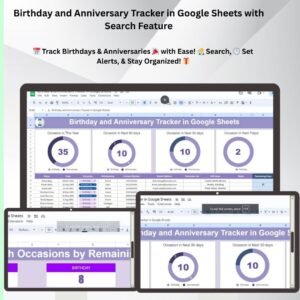
Yes. The Birthday and Anniversary Tracker in Google Sheets with Search Feature keeps track of dates in Google Sheets.
Related Checklist Templates
- Birthday and Anniversary Tracker in Google Sheets with Search Feature: track anniversary and birthday dates in Google Sheets
- Product Launch Checklist Template in Excel: another event-style plan with tasks and deadlines
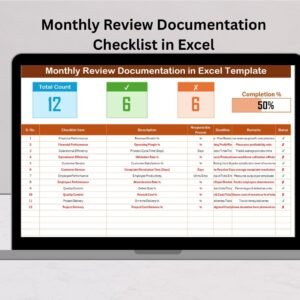
- Monthly Review Checklist in Excel: a recurring checklist for regular reviews
- Daily Work Schedule Checklist Template in Excel: plan day-to-day tasks in Excel
- Checklist & SOP Pack: 12 Excel and Google Sheets checklist templates in one download
Browse all Excel checklist templates.
































Reviews
There are no reviews yet.