



The Freelancer KPI Dashboard in Excel is an essential tool for freelancers and independent contractors to track their performance, manage projects, and assess their business growth. This Excel-based dashboard is designed to help freelancers monitor key metrics like project deadlines, earnings, client satisfaction, and time management, enabling them to make data-driven decisions and improve productivity.
Whether you’re a designer, writer, developer, or any other type of freelancer, this customizable KPI dashboard allows you to track your goals, manage your projects efficiently, and stay on top of important tasks. With the Freelancer KPI Dashboard, you can streamline your workflow, optimize client relationships, and boost your freelancing business to the next level.

Key Features of the Freelancer KPI Dashboard in Excel
📊 Project & Deadline Management
Track your active projects, monitor deadlines, and ensure timely delivery. This feature helps you stay on top of multiple projects and ensures that you never miss important milestones.
💰 Earnings & Income Tracking
Keep track of your earnings from different clients, jobs, and projects. The dashboard provides a clear overview of your monthly or yearly earnings, helping you manage your finances and forecast future income.
🌟 Client Satisfaction Monitoring
Measure client satisfaction based on feedback and project outcomes. Monitor ratings, reviews, and client retention rates to improve your services and ensure long-term business growth.
⏱ Time Management Tracking
Track how much time you’re spending on each project and task. This feature helps identify areas where you can improve efficiency and maximize billable hours.
📅 Customizable Time Periods
Analyze your performance over different periods (weekly, monthly, or yearly) to understand trends, seasonal variations, and areas for improvement.
📈 KPI Visualization & Reporting
Use graphs, charts, and visual aids to represent your key performance indicators (KPIs). This feature makes it easy to analyze your data and share insights with clients or stakeholders.
Why You’ll Love the Freelancer KPI Dashboard in Excel
✅ Track Performance Across Multiple Projects
Easily monitor the progress of your ongoing projects and ensure timely delivery. This feature helps you manage multiple clients and projects with ease.
✅ Maximize Earnings & Financial Planning
Monitor your income from different sources, track unpaid invoices, and forecast earnings for better financial planning and budgeting.
✅ Improve Client Relations
By tracking client satisfaction, you can identify areas to improve your services and ensure repeat business. Foster strong client relationships by staying on top of feedback and ensuring high-quality deliverables.
✅ Increase Time Efficiency
Track the time spent on each project and task to optimize your workflow and increase your productivity. Identify areas where you can be more efficient and allocate time more effectively.
✅ Customizable for Any Freelancer
Whether you’re a writer, designer, developer, or any other freelancer, the dashboard can be customized to suit your specific needs and business model.
What’s Inside the Freelancer KPI Dashboard in Excel?
- Project & Deadline Management: Keep track of ongoing projects and deadlines.
- Earnings & Income Tracking: Track income and forecast earnings based on project completion.
- Client Satisfaction Monitoring: Measure client feedback and satisfaction with your services.
- Time Management Tracking: Monitor time spent on each task to improve efficiency.
- Customizable Time Periods: Analyze your performance over different time periods.
- KPI Visualization: Use charts and graphs for a visual representation of your performance.
How to Use the Freelancer KPI Dashboard in Excel
1️⃣ Download the Template: Get access to the Freelancer KPI Dashboard in Excel instantly.
2️⃣ Input Project & Client Data: Add details about your ongoing projects, clients, and deadlines.
3️⃣ Track Earnings & Income: Input earnings from different clients and jobs.
4️⃣ Monitor Client Satisfaction: Record client feedback and satisfaction to improve your services.
5️⃣ Analyze Time & Performance: Track the time spent on tasks and projects, and analyze your KPIs over different periods.
Who Can Benefit from the Freelancer KPI Dashboard in Excel?
🔹 Freelancers & Independent Contractors
🔹 Creative Professionals (Designers, Writers, Artists)
🔹 Developers & Tech Contractors
🔹 Consultants & Coaches
🔹 Entrepreneurs & Small Business Owners
🔹 Project Managers & Contractors in the Gig Economy
Stay on top of your freelancing business with the Freelancer KPI Dashboard in Excel. Monitor your projects, income, client satisfaction, and time management to boost your productivity and take your freelance career to the next level.
Click here to read the Detailed blog post
Visit our YouTube channel to learn step-by-step video tutorials
Youtube.com/@PKAnExcelExpert
Compatibility and Requirements
- Works in Microsoft Excel desktop (Excel 2016 or later, or Microsoft 365).
- Results are shown in charts. Microsoft explains Excel charts in Create a chart from start to finish.
Frequently Asked Questions
What does the Freelancer KPI Dashboard track?
It tracks projects and deadlines, earnings by client and job, client satisfaction and time spent on each task.
What data do I enter?
You add your projects, clients and deadlines, the earnings from each job, client feedback and the time you spend on tasks.
Can I review different periods?
Yes. You can analyze your KPIs over different time periods, shown in charts and graphs.
Is there a Google Sheets or Power BI version?
Yes. The Freelancer KPI Dashboard in Google Sheets and the Power BI edition cover the same KPIs.
Related Freelance Business Templates
- Freelancer KPI Dashboard in Google Sheets: the same dashboard in Google Sheets
- Freelancer KPI Dashboard in Power BI: the same dashboard in Power BI
- Freelance Business KPI Dashboard in Excel: KPIs for a growing freelance business
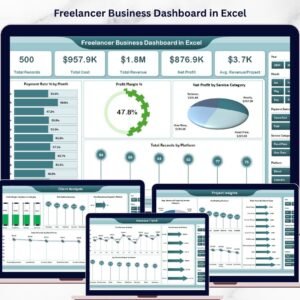
- Freelancer Business Dashboard in Excel: a full freelancer business dashboard in Excel
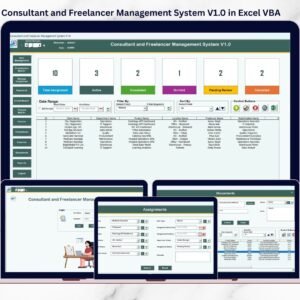
- Consultant and Freelancer Management System V1.0 in Excel VBA: manage consultants and freelancers in Excel
Browse all Excel KPI dashboards or the Excel dashboards.
































Reviews
There are no reviews yet.