



The Freelance Business KPI Dashboard in Excel is a must-have tool for freelancers looking to track and analyze the key performance indicators (KPIs) of their business. Whether you’re a freelancer working in design, writing, consulting, or any other field, this dashboard helps you monitor your revenue, project performance, client satisfaction, and more.
With a user-friendly and interactive design, this Excel template allows you to consolidate all essential data in one place. Track your finances, client projects, and performance metrics in real-time to make informed decisions and grow your freelance business efficiently.
Key Features of the Freelance Business KPI Dashboard in Excel
📊 Comprehensive KPI Tracking
Track all essential KPIs for your freelance business, including income, project completion rates, client satisfaction, billable hours, and more. Stay on top of your performance and identify opportunities for growth.
⚡ Real-Time Performance Monitoring
Monitor your business performance in real-time. Update your data regularly to track changes in revenue, project status, and key business metrics.
📈 Client & Project Management
Track the progress of all ongoing and completed projects, including deadlines, payment status, and client feedback. Stay organized and on top of client relationships.
📅 Financial Tracking
Monitor your income, expenses, and overall financial health. Track billable hours, payment status, and other financial metrics to ensure your freelance business remains profitable.
🖥️ Interactive Dashboard
Visualize your business performance with interactive charts and graphs. Get a quick overview of your KPIs and see your business trends at a glance.
Why You’ll Love the Freelance Business KPI Dashboard

✅ Track Essential KPIs in One Place
Consolidate all your key performance data into a single, easy-to-use dashboard. Monitor your income, project progress, and financial health in real-time.
✅ Monitor Your Freelance Income
Track revenue, expenses, and billable hours to ensure you’re getting paid for the work you do. Stay on top of client payments and outstanding invoices.
✅ Manage Projects and Clients Effectively
Keep track of your projects, deadlines, and client relationships. Use the dashboard to monitor project completion rates and client satisfaction.
✅ Visualize Your Business Success
Use interactive graphs and charts to see how your business is performing. Visualize income, project timelines, and client satisfaction to make data-driven decisions.
✅ Simplify Freelance Business Management
With everything organized in one dashboard, managing your freelance business becomes more efficient and stress-free.
What’s Inside the Freelance Business KPI Dashboard Template?
- KPI Tracking: Track important KPIs such as income, project status, client satisfaction, billable hours, and more.
- Project Management: Track ongoing and completed projects, including deadlines, payment status, and client feedback.
- Financial Dashboard: Monitor your income, expenses, and financial health, and track client payments and billable hours.
- Client Satisfaction Tracking: Log client feedback and track your overall client satisfaction rates to ensure repeat business.
- Real-Time Updates: The dashboard automatically updates with your latest data, ensuring you’re always looking at the most current information.
- Customizable Metrics: Adjust the dashboard to fit your unique freelance business needs, whether you’re tracking new clients, specific project types, or financial goals.
How to Use the Freelance Business KPI Dashboard
1️⃣ Download the Template: Access your Freelance Business KPI Dashboard instantly.
2️⃣ Input Your Data: Add your income, project details, client feedback, and financial information.
3️⃣ Track Your Business Performance: Monitor your KPIs in real-time, from project completion to income tracking.
4️⃣ Optimize & Grow: Use the dashboard to identify opportunities for growth, improve client satisfaction, and increase profitability.
Who Can Benefit from the Freelance Business KPI Dashboard?
🔹 Freelancers Managing Multiple Clients
🔹 Consultants Tracking Project Performance
🔹 Designers, Writers, and Creatives
🔹 Independent Contractors Looking to Track Their Progress
🔹 Business Coaches, Online Educators, and Content Creators
🔹 Anyone Running a Freelance Business and Looking to Monitor Their Success
Take control of your freelance business and optimize your performance with this easy-to-use, customizable Freelance Business KPI Dashboard in Excel. Track essential KPIs, manage client relationships, and monitor your financial health to ensure long-term success.
Click here to read the Detailed blog post
Visit our YouTube channel to learn step-by-step video tutorials
Youtube.com/@PKAnExcelExpert
Compatibility and Requirements
- Works in Microsoft Excel desktop (Excel 2016 or later, or Microsoft 365).
- The dashboard is built with Excel charts. Microsoft explains them in Create a chart from start to finish.
Frequently Asked Questions
Which KPIs does the dashboard track?
It tracks income, expenses, billable hours, project completion, payment status and client satisfaction.
How do I add my own data?
Enter your figures in the template. The charts and KPI views update from that data.
Can I track projects and client feedback?
Yes. Ongoing and completed projects are listed with deadlines, payment status and client feedback.
Is there a Google Sheets or Power BI version?
Yes. The Freelance Business KPI Dashboard in Google Sheets and the Freelance Business KPI Dashboard in Power BI cover the same KPIs.
Related Freelance Business Templates
- Freelance Business KPI Dashboard in Google Sheets: the same KPIs in Google Sheets
- Freelance Business KPI Dashboard in Power BI: the Power BI edition
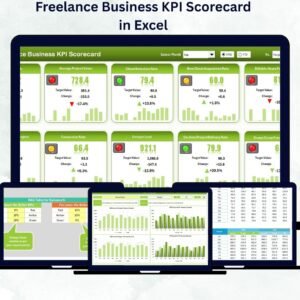
- Freelance Business KPI Scorecard in Excel: a freelance business KPI scorecard
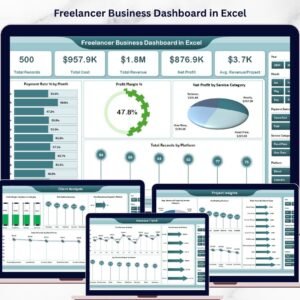
- Freelancer Business Dashboard in Excel: a full freelancer business dashboard
- KPI Dashboard Library (Excel): 15 Excel KPI dashboards in one download
Browse all Excel KPI dashboards or the Google Sheets KPI dashboards.







Reviews
There are no reviews yet.