



The Weekly Reflection Checklist Template in Excel is the perfect tool for anyone looking to track and reflect on their personal or professional growth each week. Whether you’re looking to improve productivity, assess your goals, or simply keep a mindful record of your achievements, this customizable checklist will help you stay on track and focused on continuous improvement.
With this easy-to-use Excel template, you can organize your weekly reflections, set new goals, track progress, and evaluate personal achievements. The built-in tracking features and simple design ensure you stay motivated, organized, and accountable as you work toward your personal or career goals.
Key Features of the Weekly Reflection Checklist Template in Excel
📝 Comprehensive Weekly Reflection
Reflect on all aspects of your week, from personal goals to work-related achievements. This template encourages you to track and evaluate your performance, mindset, and overall well-being.
⚡ Weekly Goal Setting & Progress Tracking
Set weekly goals, track progress, and assess the completion of tasks to ensure you are moving toward your long-term objectives.
📅 Weekly Scheduling & Task Prioritization
Plan your week by prioritizing tasks and setting deadlines. This helps you stay focused and productive, ensuring that important tasks are completed first.
📊 Personal Growth Dashboard
Visualize your personal growth and progress with an interactive dashboard that tracks completed tasks, goals achieved, and areas for improvement.
🔄 Customizable for Your Needs
Tailor the template to suit your specific needs. Modify weekly reflections, add goals, and create personal growth milestones that align with your objectives.
🖥️ User-Friendly Interface
The template’s simple design ensures quick updates and easy navigation, making it perfect for those who want to track their progress without any hassle.
Why You’ll Love the Weekly Reflection Checklist Template in Excel

✅ Improve Self-Awareness
Reflect on your weekly experiences and actions to increase your self-awareness and gain insights into your personal development.
✅ Stay Accountable
By tracking your progress and goals weekly, this checklist helps keep you accountable and motivated to continue achieving.
✅ Visualize Your Growth
Use the personal growth dashboard to visualize your progress and see how far you’ve come in just one week.
✅ Set & Achieve Weekly Goals
Set clear, actionable weekly goals, and track your progress toward achieving them, keeping you focused and organized.
✅ Customizable to Fit Your Routine
Whether for personal growth, work goals, or mindset development, customize the checklist to fit your unique needs.
What’s Inside the Weekly Reflection Checklist Template in Excel?
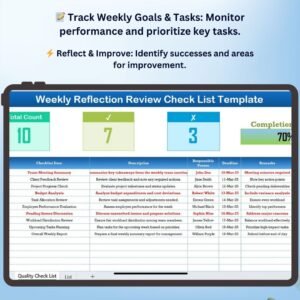
- Weekly Task Overview: A breakdown of your weekly tasks, goals, and priorities.
- Weekly Progress Tracker: A visual progress tracker that shows how much you’ve completed and how much is left.
- Reflection Section: A dedicated area for reflecting on the week’s experiences, challenges, and lessons learned.
- Personal Growth Dashboard: A dashboard to track your progress and visualize your achievements and growth.
- Goal Setting & Prioritization: Sections for setting goals and priorities for the upcoming week.
How to Use the Weekly Reflection Checklist Template in Excel
1️⃣ Download the Template: Get instant access to your weekly reflection checklist.
2️⃣ Plan Your Week: Enter your weekly goals, tasks, and priorities, and set specific time frames for each.
3️⃣ Track Your Progress: Use the progress tracker and dashboard to monitor your achievements and remaining tasks.
4️⃣ Reflect & Learn: Reflect on your successes and areas for improvement, and use that insight to enhance your next week’s plan.
Who Can Benefit from the Weekly Reflection Checklist Template in Excel?
🔹 Professionals & Entrepreneurs
🔹 Students & Learners
🔹 Personal Development Enthusiasts
🔹 Coaches & Mentors
🔹 Anyone Looking to Improve Productivity & Focus
🔹 Individuals Focused on Self-Improvement
Stay organized, motivated, and focused on your personal and professional development with this easy-to-use, customizable weekly reflection checklist.
Click here to read the Detailed blog post
Visit our YouTube channel to learn step-by-step video tutorials
Youtube.com/@PKAnExcelExpert
Compatibility and Requirements
- Works in Microsoft Excel desktop (Excel 2016 or later, or Microsoft 365).
- New to Excel? Microsoft’s Excel for Windows training course covers the basics.
Frequently Asked Questions
What can I record in this checklist?
Your weekly tasks, goals and priorities, plus a reflection section for the week’s experiences, challenges and lessons learned.
How do I see my progress?
A progress tracker shows how much you have completed and how much is left. The personal growth dashboard sums up completed tasks and goals achieved.
Can I change the reflections and goals?
Yes. You can edit the weekly reflections, add goals and set your own personal growth milestones.
Is there a Google Sheets version?
Yes. See the Weekly Reflection Checklist in Google Sheets.
Related Weekly Reflection and Habit Templates
- Weekly Reflection Review Checklist in Excel: review the week in more detail
- Weekly Reflection Planner Checklist in Excel: plan the coming week
- Gratitude Practice Checklist in Excel: a daily gratitude routine
- Daily Habits Tracker checklist in Excel: track daily habits
- Checklist & SOP Pack: 12 Excel and Google Sheets checklists in one pack
Browse all Excel checklists.

































Reviews
There are no reviews yet.