



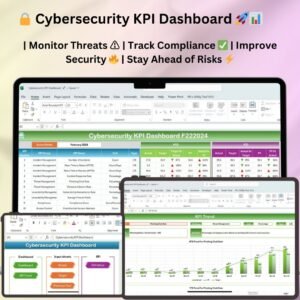
The System Security KPI Dashboard in Excel is an essential tool designed for IT professionals, security officers, and system administrators to monitor and manage the key performance indicators (KPIs) related to system security. This Excel-based dashboard allows you to track the performance of security measures, identify vulnerabilities, monitor threats, and assess compliance with security policies, ensuring that your organization’s IT infrastructure remains secure and resilient against cyber threats.
With real-time tracking, customizable charts, and an intuitive interface, this dashboard provides detailed insights into your system’s security performance, helping you proactively address security risks and protect critical assets.
Key Features of the System Security KPI Dashboard in Excel:
🔒 Threat Detection and Monitoring
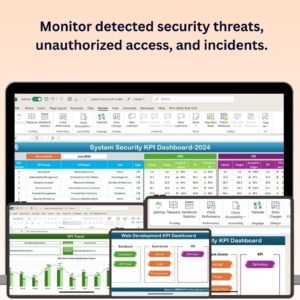
Track detected security threats, including potential intrusions, malware, and system vulnerabilities, helping you stay ahead of cyberattacks.
🔑 System Access and Authentication Monitoring
Monitor access control systems, authentication attempts, and user logins to identify unauthorized access and prevent security breaches.
🛡️ Incident Response and Resolution Tracking
Track the number of security incidents, response times, and resolution status, ensuring that all security events are handled promptly and effectively.
⚙️ Compliance and Policy Adherence
Monitor compliance with security policies and regulations, ensuring that your organization adheres to necessary standards and best practices.
📊 Security Performance Metrics
Track key security metrics such as system uptime, patch management, and response times, providing insights into overall system security health.
🚀 Why You’ll Love the System Security KPI Dashboard in Excel:

✅ Proactively Manage Security Threats – Monitor system security events and incidents to quickly detect and address potential threats before they escalate.
✅ Ensure Regulatory Compliance – Track adherence to security policies and regulations to ensure your organization meets industry standards and remains compliant.
✅ Enhance Incident Response – Track the number of incidents and their resolution time, helping you improve response strategies and minimize system downtime.
✅ Track Security Performance – Monitor system uptime, patch management, and other performance indicators to ensure your infrastructure remains secure and efficient.
✅ Data-Driven Decision Making – Use the dashboard to make informed decisions about system upgrades, security measures, and incident handling based on real-time security data.
✅ Customizable and User-Friendly – Fully customizable to match your organization’s security KPIs, with easy-to-use features that provide valuable insights.
What’s Inside the System Security KPI Dashboard in Excel:
Threat Detection: Track security threats detected by your monitoring systems, including malware, intrusions, and vulnerabilities, to ensure that issues are addressed promptly.
Access Control Monitoring: Monitor access control systems to detect unauthorized access attempts and ensure that only authorized users can access critical systems.
Incident Management: Track the number of security incidents, response times, and resolution status to improve incident response strategies and enhance security protocols.
Compliance Monitoring: Track compliance with industry regulations, security standards, and internal policies to ensure your organization is adhering to best practices.
Security Performance Metrics: Monitor key performance indicators such as system uptime, patch management, and response time, ensuring your systems remain secure and efficient.
Custom Reports: Generate detailed reports summarizing security events, incident response, and system performance to present to management or auditors.
How to Use the System Security KPI Dashboard in Excel:
1️⃣ Download the Template – Instantly access your Excel file upon purchase.
2️⃣ Input Security Data – Enter data related to security incidents, access control, compliance, and system performance to start tracking your KPIs.
3️⃣ Monitor Key Security Metrics – Use the dashboard to track incidents, response times, system uptime, patch management, and compliance with security policies.
4️⃣ Analyze Security Trends – Identify trends in security incidents, unauthorized access attempts, and system performance to improve your security strategy.
5️⃣ Generate Reports – Create detailed reports summarizing security KPIs, performance metrics, and incident management for stakeholders or compliance purposes.
Who Can Benefit from the System Security KPI Dashboard in Excel:
IT Security Managers
System Administrators
Cybersecurity Professionals
Risk Management Teams
Compliance Officers
Small to Large Enterprises with IT Infrastructure
Organizations with Security Standards and Compliance Needs
Government and Non-Governmental Organizations with Cybersecurity Needs
The System Security KPI Dashboard in Excel is a must-have tool for managing your organization’s security infrastructure. By tracking incidents, vulnerabilities, system uptime, and compliance, this dashboard helps you ensure that your IT systems remain secure, reliable, and protected against emerging threats.
Click here to read the Detailed blog post
https://www.pk-anexcelexpert.com/system-security-kpi-dashboard-in-excel/
Visit our YouTube channel to learn step-by-step video tutorials
Youtube.com/@PKAnExcelExpert
Compatibility and Requirements
- Works in Microsoft Excel desktop (Excel 2016 or later, or Microsoft 365).
- Microsoft’s guide Create a chart from start to finish explains the Excel feature this file is built on.
Frequently Asked Questions
What does the System Security KPI Dashboard track?
It covers threat detection, access control monitoring, incident management, compliance monitoring and security performance metrics such as system uptime, patch management and response time.
Can I track security incidents and how fast they are resolved?
Yes. You can track the number of incidents, response times and resolution status for each security event.
Can I create reports for management or auditors?
Yes. You can create reports that summarize security events, incident response and system performance.
Can I change the KPIs?
Yes. The dashboard is fully customizable, so you can match it to your own security KPIs.
Related IT Security Templates
- Cybersecurity KPI Dashboard in Excel: a cybersecurity KPI dashboard in Excel
- IT and Tech Cybersecurity KPI Dashboard in Excel: cybersecurity KPIs for IT and tech teams
- Security KPI Dashboard in Excel: a general security KPI dashboard in Excel
- Cybersecurity KPI Dashboard in Power BI: cybersecurity KPIs in Power BI
- IT and Cybersecurity Operations Bundle: IT and security templates in one bundle
Browse all IT templates or the Excel KPI dashboards.













Reviews
There are no reviews yet.