



The Space Exploration KPI Dashboard in Excel is a dynamic and detailed tool designed to help space agencies, aerospace companies, and researchers track and analyze key performance indicators (KPIs) related to space missions, research projects, and space exploration activities. This Excel-based dashboard enables users to monitor mission timelines, budget allocations, satellite performance, and much more, all while providing insightful visualizations to help improve decision-making and mission efficiency.
Whether you are managing satellite launches, space research, or interplanetary missions, this dashboard consolidates all critical metrics in one place, offering real-time insights into your space exploration projects. It is the perfect tool for space-related businesses, government agencies, or researchers looking to stay on top of their projects, streamline operations, and maximize performance.
Key Features of the Space Exploration KPI Dashboard in Excel
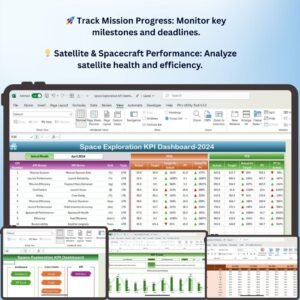
🚀 Mission Progress Tracking
Monitor the progress of various space missions, from launch dates to mission completion. Keep track of key milestones, deadlines, and mission phases to ensure successful execution.
💡 Satellite & Spacecraft Performance
Track the performance of satellites and spacecraft. Monitor key metrics such as orbital status, energy consumption, communication systems, and payload functionality.
💰 Budget & Funding Allocation
Monitor the budget allocated for each space mission and track spending against initial projections. Stay on top of funding usage, ensuring that projects stay within budget.
📊 Launch & Timeline Management
Track the launch dates, timeline progress, and completion rates for space missions. Ensure that your projects are on schedule by comparing actual and planned timelines.
📈 Research & Development Metrics
Monitor the progress of space research and development projects. Track innovation milestones, technology advancements, and research findings related to your space exploration efforts.
🖥️ Interactive & Customizable Dashboard
The dashboard features interactive charts, filters, and visualizations that allow you to drill down into specific mission data, adjust key parameters, and view the data that matters most to you.
Why You’ll Love the Space Exploration KPI Dashboard in Excel

✅ Track Mission Progress & Performance
Monitor your space exploration missions, satellites, and spacecraft to ensure they are on track and performing optimally.
✅ Optimize Budget & Funding Usage
Track project budgets, monitor funding allocation, and ensure financial resources are used efficiently across various space projects.
✅ Ensure Timely Project Completion
Stay on schedule by comparing mission timelines, tracking key milestones, and making adjustments as necessary.
✅ Gain Real-Time Insights into Research & Development
Track and analyze the latest findings and advancements in space research and development to guide the next steps in your space exploration efforts.
✅ Fully Customizable for Your Space Projects
Tailor the dashboard to your specific space exploration projects, whether you’re tracking satellite launches, interplanetary missions, or ground-based research.
What’s Inside the Space Exploration KPI Dashboard Template in Excel?
- Mission Tracking: Track the progress of your space missions, including timelines, milestones, and completion rates.
- Satellite & Spacecraft Performance Metrics: Monitor key performance indicators for satellites and spacecraft, such as orbit status and power usage.
- Budget & Funding Analysis: Track allocated budgets, expenditures, and remaining funds for each project.
- Launch & Timeline Monitoring: Keep a close eye on mission timelines and launch dates to ensure smooth execution.
- Research & Development Progress: Monitor innovation milestones and R&D activities in space exploration.
- Customizable Visualizations: Use dynamic charts and filters to gain detailed insights into your space missions and performance metrics.
How to Use the Space Exploration KPI Dashboard in Excel
1️⃣ Download the Template: Get instant access to the Space Exploration KPI Dashboard in Excel.
2️⃣ Input Your Mission Data: Enter mission milestones, satellite data, budgets, and research information into the dashboard.
3️⃣ Track Key Metrics: Use the dashboard to monitor performance, progress, and financial usage across multiple space missions.
4️⃣ Analyze & Optimize: Use real-time data insights to adjust project timelines, budget usage, and performance goals.
Who Can Benefit from the Space Exploration KPI Dashboard in Excel?
🔹 Space Agencies & Governments
🔹 Aerospace Companies
🔹 Satellite Manufacturers
🔹 Space Mission Managers & Coordinators
🔹 Research & Development Teams in Space Science
🔹 Aerospace Consultants & Analysts
Stay on top of your space exploration projects with the Space Exploration KPI Dashboard in Excel. Track mission progress, budget allocations, satellite performance, and research insights in real-time for optimal results.
Click here to read the Detailed blog post
Visit our YouTube channel to learn step-by-step video tutorials
Youtube.com/@PKAnExcelExpert
Compatibility and Requirements
- Works in Microsoft Excel desktop (Excel 2016 or later, or Microsoft 365).
- The dashboard uses interactive charts and filters. Microsoft’s chart basics are in Create a chart from start to finish.
Frequently Asked Questions
Which KPIs does the Space Exploration dashboard track?
Mission progress and milestones, satellite and spacecraft performance, budget and funding use, launch timelines, and research and development progress.
Can I compare planned and actual timelines?
Yes. You can track launch dates and timeline progress against planned schedules.
What data do I enter?
Mission milestones, satellite data, budgets and research information.
Can I filter the dashboard?
Yes. Interactive charts and filters let you drill down into specific mission data.
Is there a Power BI or Google Sheets version?
Yes. See the Space Exploration KPI Dashboard in Power BI and the Space Exploration KPI Dashboard in Google Sheets.
Related Space and Aerospace Templates
- Space Exploration KPI Dashboard in Power BI: the same KPIs in Power BI
- Space Exploration KPI Dashboard in Google Sheets: the same KPIs in Google Sheets
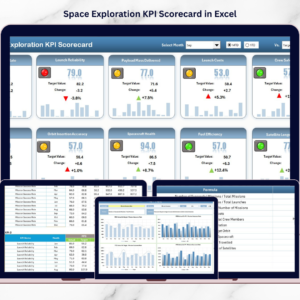
- Space Exploration KPI Scorecard in Excel: score these KPIs against targets
- Aerospace KPI Dashboard in Excel: KPIs for aerospace companies
- KPI Dashboard Library (Excel): 15 Excel KPI dashboards in one download
Browse all Excel KPI dashboards or the Excel dashboards.






























Reviews
There are no reviews yet.