

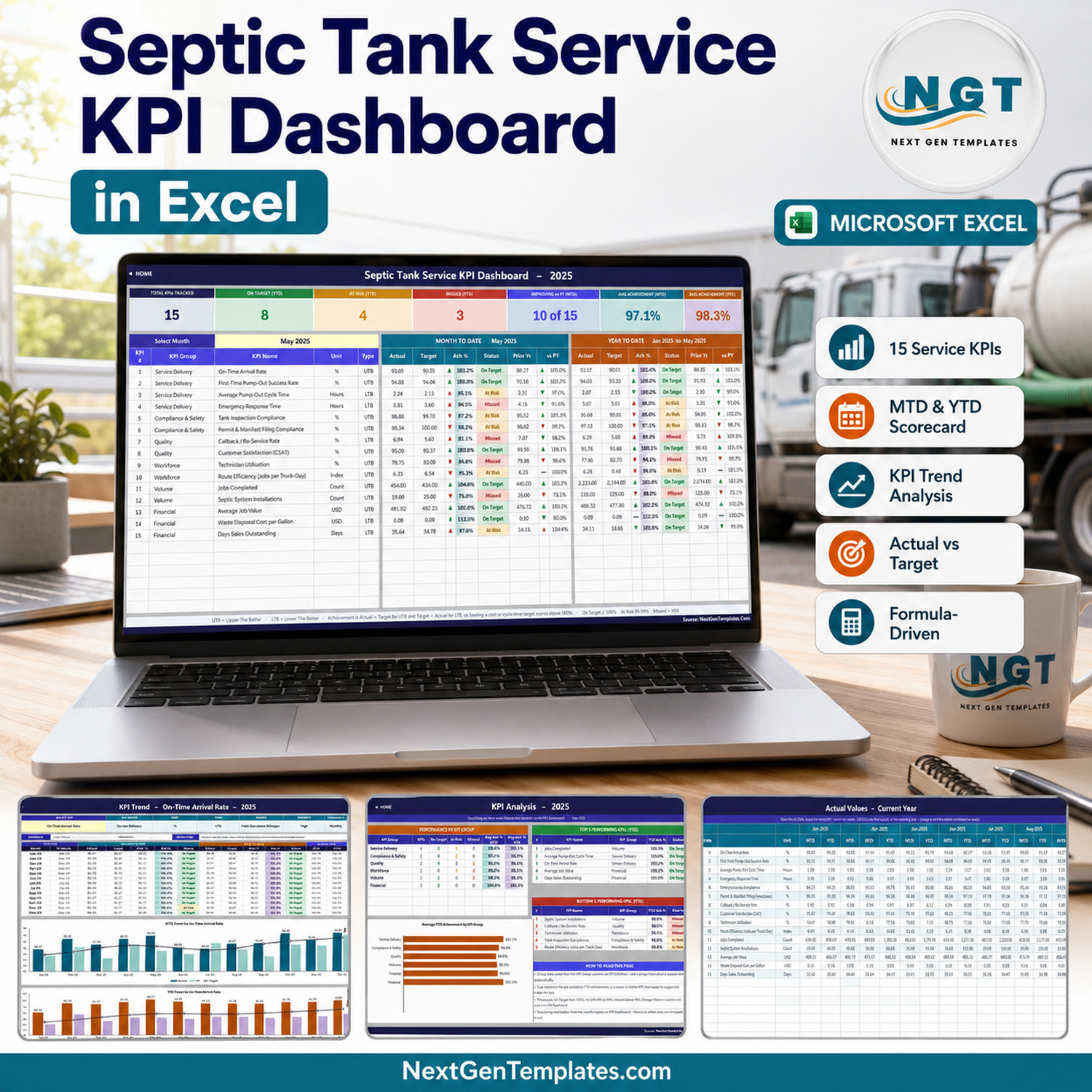

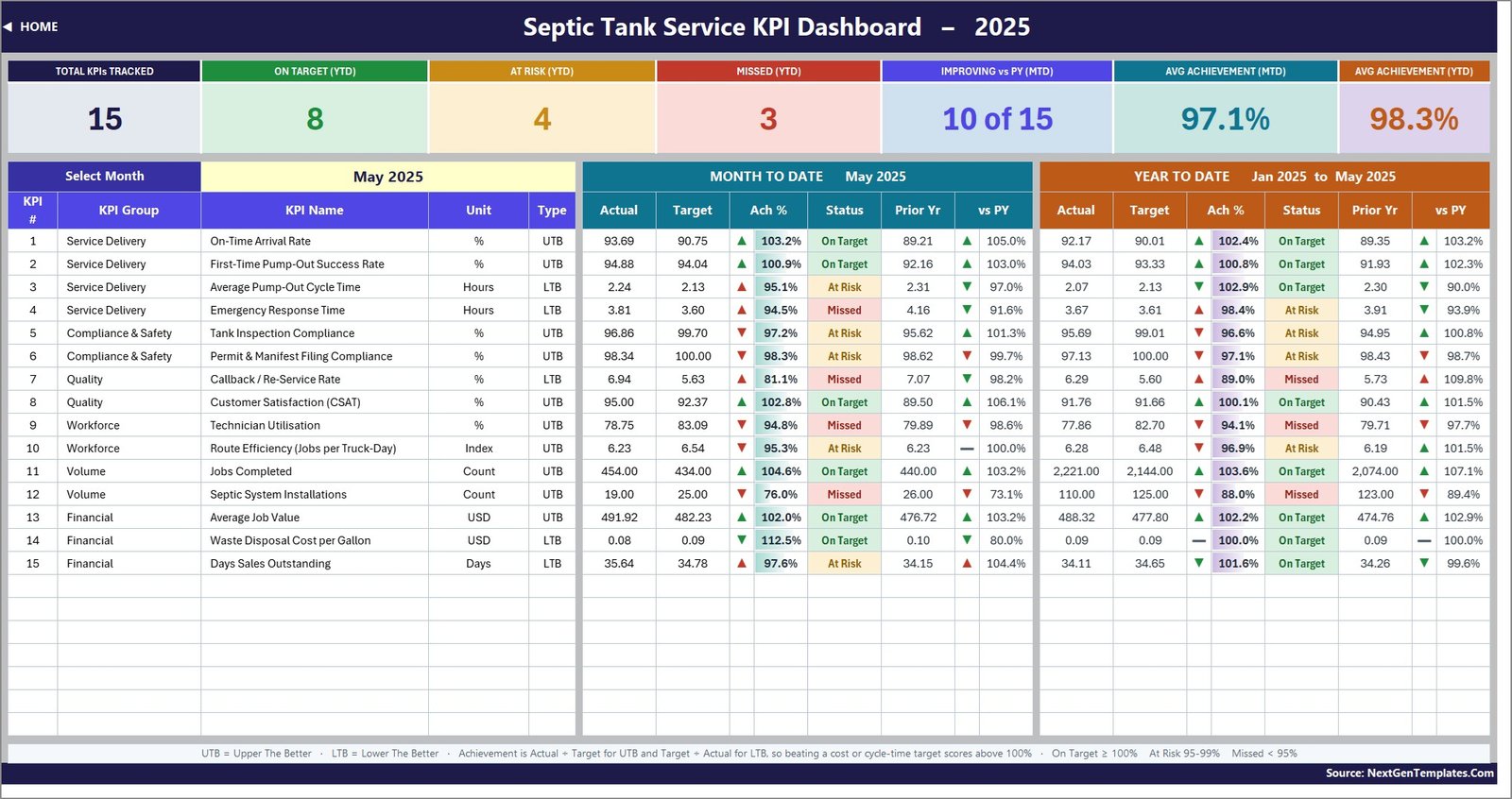
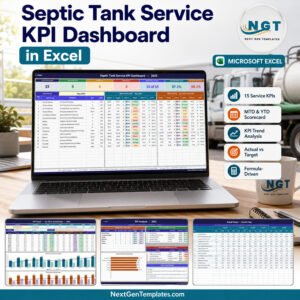
The Septic Tank Service KPI Dashboard in Excel is a month-picker performance scorecard for septic pumping, inspection and installation businesses. Choose a month from one dropdown and the whole workbook re-reads itself: fifteen septic-service KPIs, month-to-date and year-to-date side by side, actual against target, an achievement percentage, a traffic light, last year’s number and the year-on-year movement, plus a dedicated trend page and a group analysis page.
It is a plain .xlsx workbook built entirely from worksheet formulas – VLOOKUP, MATCH, INDEX and COUNTIF. There is no macro, no Power Query, no data model and no add-in, so it opens in Excel 2013 and later, in Excel for Mac and in Excel for the web, and there is nothing to enable, refresh or trust.
Key Features of the Septic Tank Service KPI Dashboard in Excel
- Fifteen septic-service KPIs organised into six groups – Service Delivery, Compliance & Safety, Quality, Workforce, Volume and Financial.
- One month dropdown drives everything. Cell D6 on the KPI Dashboard sheet picks the reporting month; the seven summary cards, every KPI row and the entire KPI Analysis page follow it.
- MTD and YTD in one view. Each KPI shows actual, target, achievement %, status, prior year and vs PY for the month, and again for the year to date, in two colour-coded blocks.
- Direction-aware scoring. Ten KPIs are UTB (upper the better) and five are LTB (lower the better), so beating a cycle-time, callback, disposal-cost or DSO target scores above 100% instead of reading as a miss.
- Traffic lights you can re-cut. On Target from 100%, At Risk 95-99%, Missed below 95% – and the thresholds sit in the visible formulas, not in a locked rule, so you can move them to your own governance.
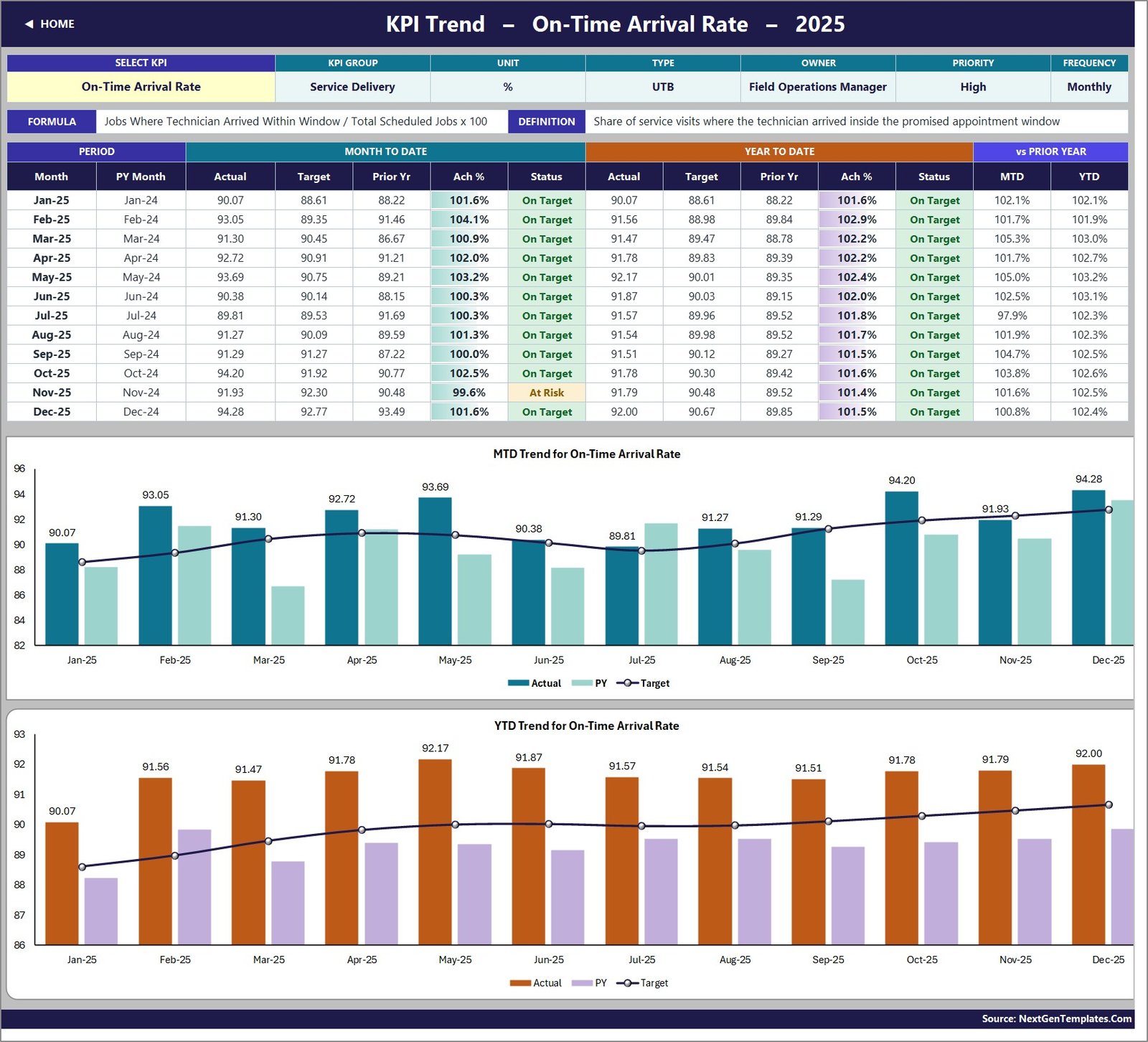
- A KPI Trend page for one KPI at a time: its attribute strip, formula and definition, a twelve-month table and two combo charts – actual and prior-year columns with a target line, on both an MTD and a YTD basis.
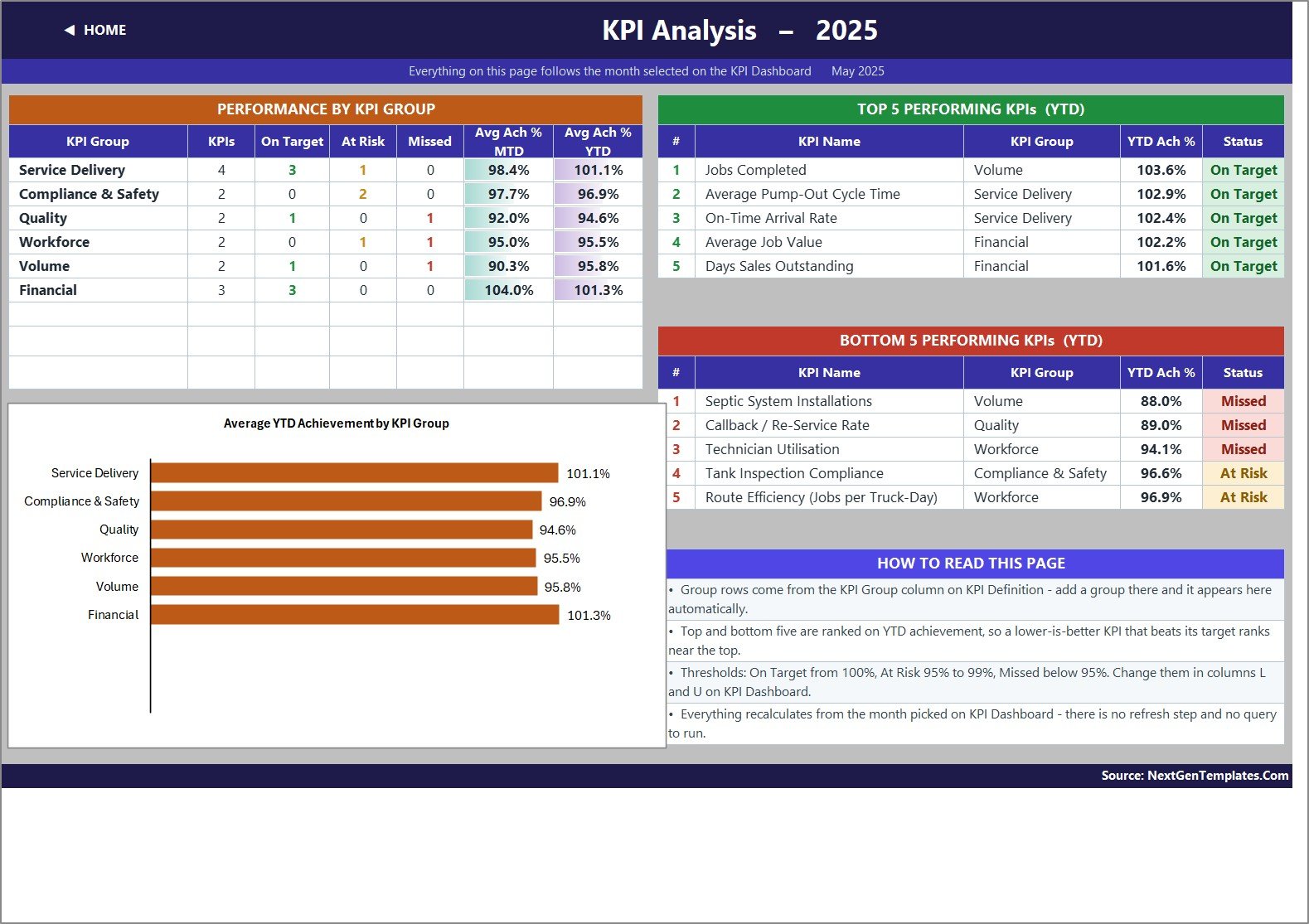
- A KPI Analysis page that rolls achievement up by KPI group with a bar chart, and ranks the top five and bottom five KPIs for the year to date.
- Wired for 22 KPIs. Fifteen are filled in; the remaining rows are live and empty. Type a new KPI on KPI Definition and the input sheets, the scorecard, the trend dropdown and the analysis page pick it up with no formula work.
- Owner, priority and frequency recorded per KPI, so a monthly review has a name against every red light.
- Twelve months of realistic 2025 sample data plus a full 2024 comparative year, so the workbook is working the moment you open it.
- The Excel KPI Dashboard User Manual PDF ships inside the same ZIP.
The 15 KPIs This Template Ships With
Every KPI carries its own formula, plain-English definition, unit, direction flag, owner, priority and review frequency on the KPI Definition sheet. Rename any of them there and the whole workbook follows.
| # | KPI | Group | Unit | Direction | Owner |
|---|---|---|---|---|---|
| 1 | On-Time Arrival Rate | Service Delivery | % | UTB | Field Operations Manager |
| 2 | First-Time Pump-Out Success Rate | Service Delivery | % | UTB | Field Operations Manager |
| 3 | Average Pump-Out Cycle Time | Service Delivery | Hours | LTB | Field Operations Manager |
| 4 | Emergency Response Time | Service Delivery | Hours | LTB | Dispatch Supervisor |
| 5 | Tank Inspection Compliance | Compliance & Safety | % | UTB | Compliance Officer |
| 6 | Permit & Manifest Filing Compliance | Compliance & Safety | % | UTB | Compliance Officer |
| 7 | Callback / Re-Service Rate | Quality | % | LTB | Quality Manager |
| 8 | Customer Satisfaction (CSAT) | Quality | % | UTB | Customer Experience Lead |
| 9 | Technician Utilisation | Workforce | % | UTB | Field Operations Manager |
| 10 | Route Efficiency (Jobs per Truck-Day) | Workforce | Index | UTB | Dispatch Supervisor |
| 11 | Jobs Completed | Volume | Count | UTB | Operations Director |
| 12 | Septic System Installations | Volume | Count | UTB | Installations Manager |
| 13 | Average Job Value | Financial | USD | UTB | Finance Manager |
| 14 | Waste Disposal Cost per Gallon | Financial | USD | LTB | Finance Manager |
| 15 | Days Sales Outstanding | Financial | Days | LTB | Finance Manager |
The direction flag is the part that makes the scorecard honest. Average Pump-Out Cycle Time, Emergency Response Time, Callback / Re-Service Rate, Waste Disposal Cost per Gallon and Days Sales Outstanding are all LTB, so achievement is target divided by actual for those five and actual divided by target for the other ten. A 2.07-hour cycle time against a 2.13-hour target scores above 100% and shows a green down-arrow, exactly as it should.
What Is Inside the Septic Tank Service KPI Dashboard in Excel
Eleven sheets, each doing one job.
Home
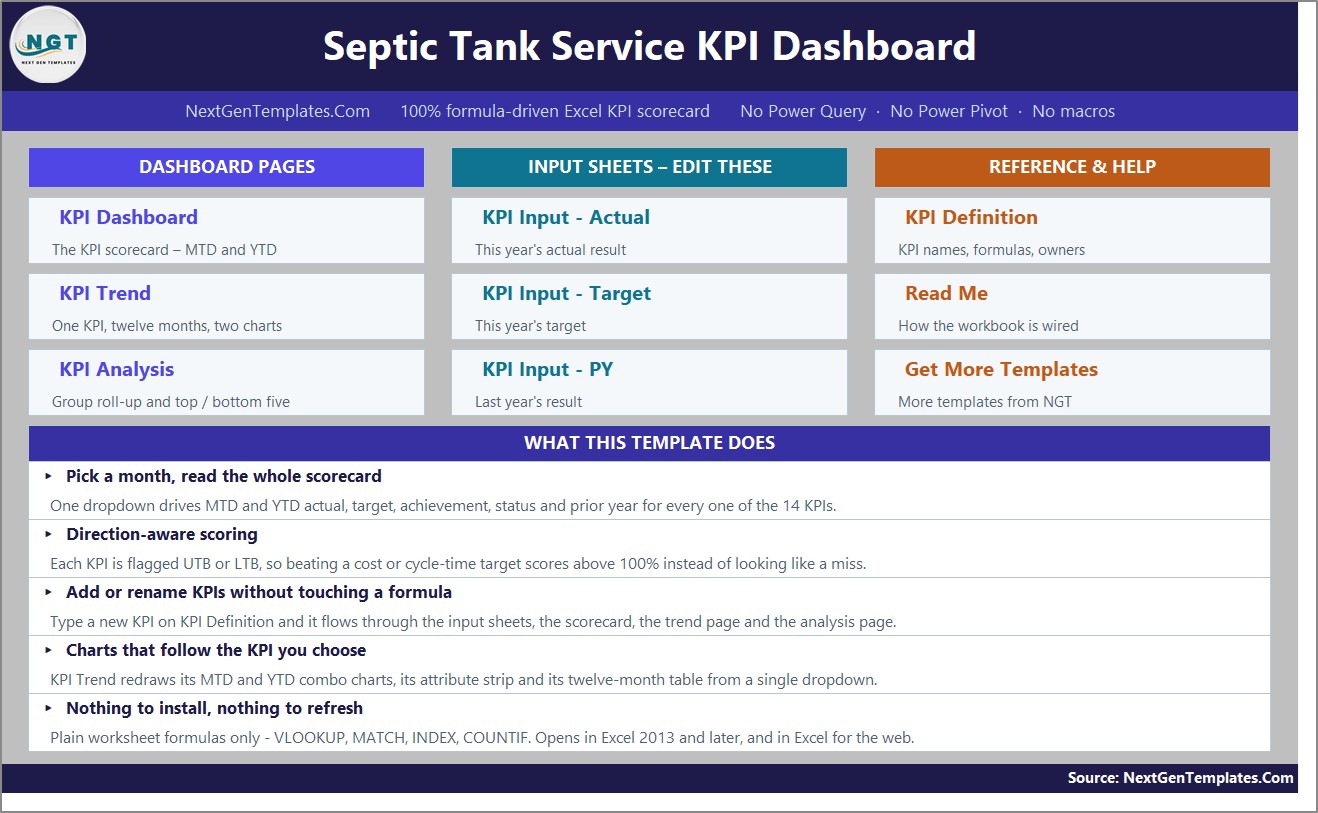
A navigation page: three tile columns for the dashboard pages, the input sheets and the reference sheets, plus a short summary of what the workbook does and how it is built.
KPI Dashboard – the scorecard
The month dropdown, seven summary cards and one row per KPI. In the bundled May 2025 sample the cards read: 15 KPIs tracked, 8 On Target (YTD), 4 At Risk (YTD), 3 Missed (YTD), 10 of 15 improving vs prior year (MTD), 97.1% average achievement (MTD) and 98.3% average achievement (YTD). Switch the dropdown to another month and all seven recount.
KPI Trend – one KPI, twelve months
Pick a KPI from the dropdown in cell B4 and the page rebuilds: group, unit, direction, owner, priority and frequency in the attribute strip, the formula and definition spelled out, a twelve-month table of MTD and YTD actual, target, prior year, achievement and status, and two combo charts underneath.
KPI Analysis – groups, top five and bottom five
Achievement rolled up by KPI group with a count of On Target, At Risk and Missed in each, an average YTD achievement bar chart, and the five best and five worst KPIs for the year to date. In the sample month, Financial and Service Delivery are the strongest groups and Septic System Installations is bottom of the table at 88.0% YTD.
KPI Input – Actual, Target and PY
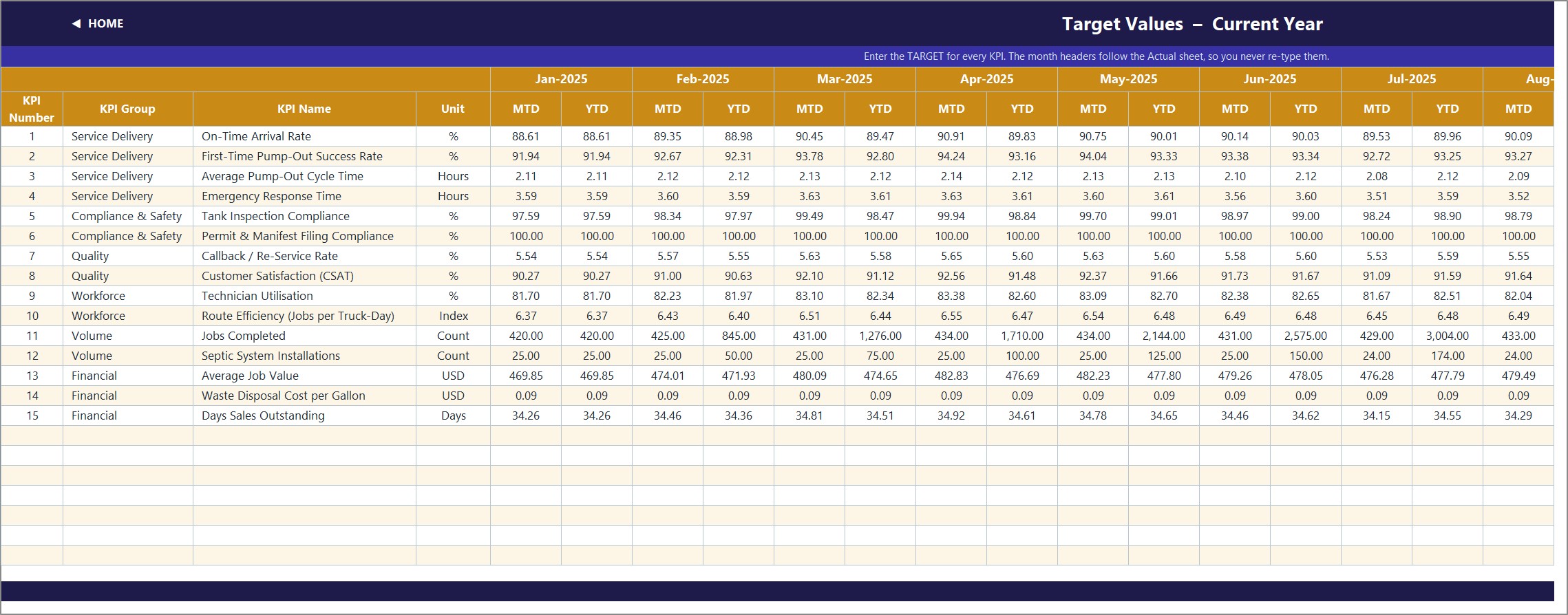
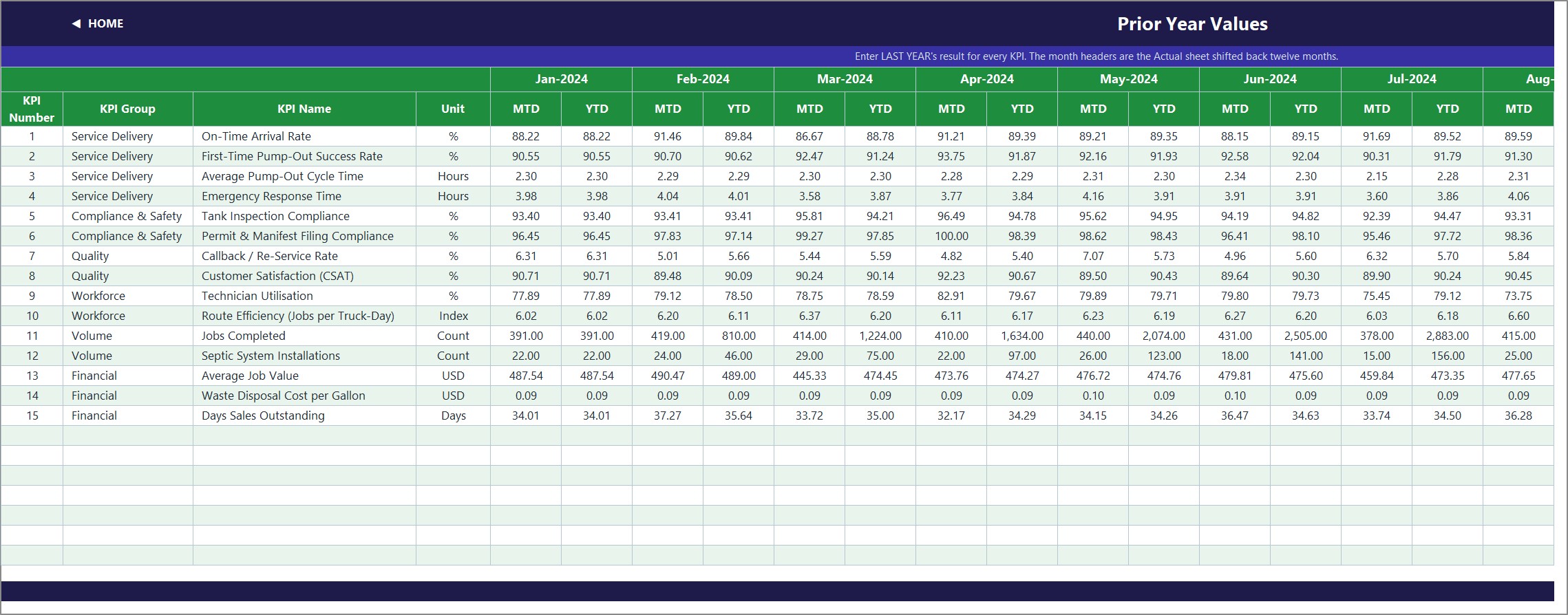
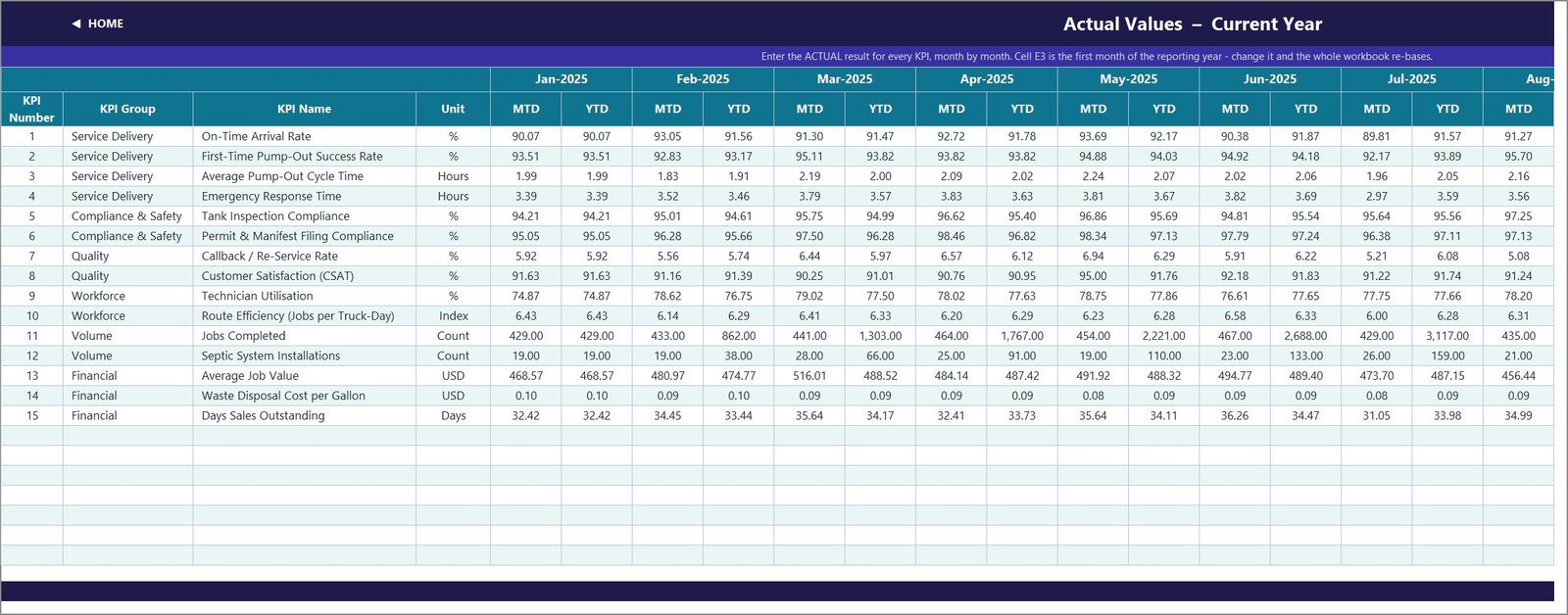
The only three sheets you normally type in. Each holds an MTD and a YTD column for every month of the year, with the KPI rows driven from KPI Definition so all three sheets always line up. Cell E3 on the Actual sheet is the first month of the reporting year – change it and the target sheet, the prior-year sheet, the month dropdown and every sheet title re-base automatically.
KPI Definition – the master list
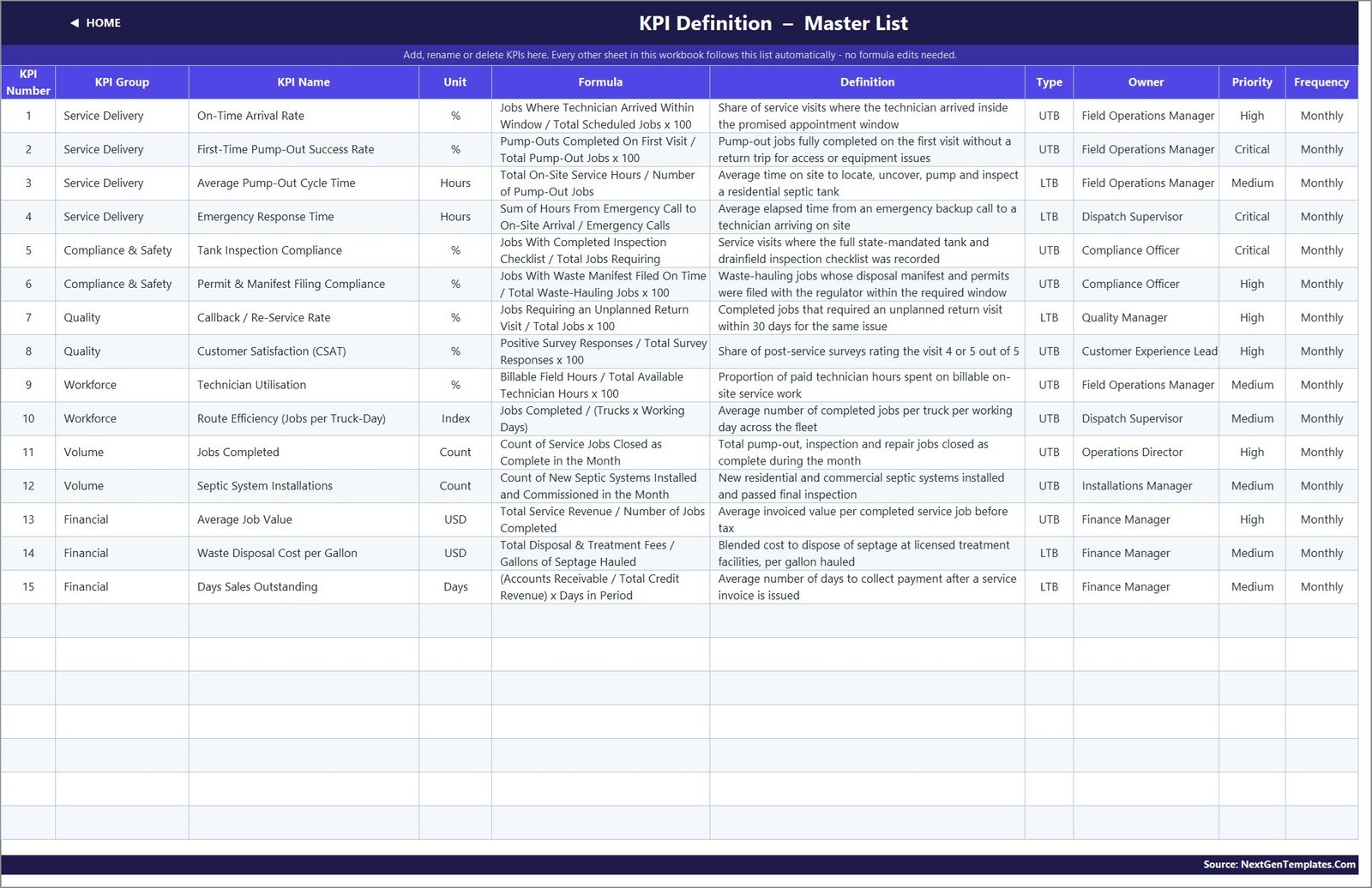
Number, group, name, unit, formula, definition, UTB/LTB type, owner, priority and frequency for all fifteen KPIs. This sheet is the single source of truth: add a row and it appears everywhere, clear a row and the dashboard row goes blank and the summary cards recount themselves.
Read Me and Get More Templates
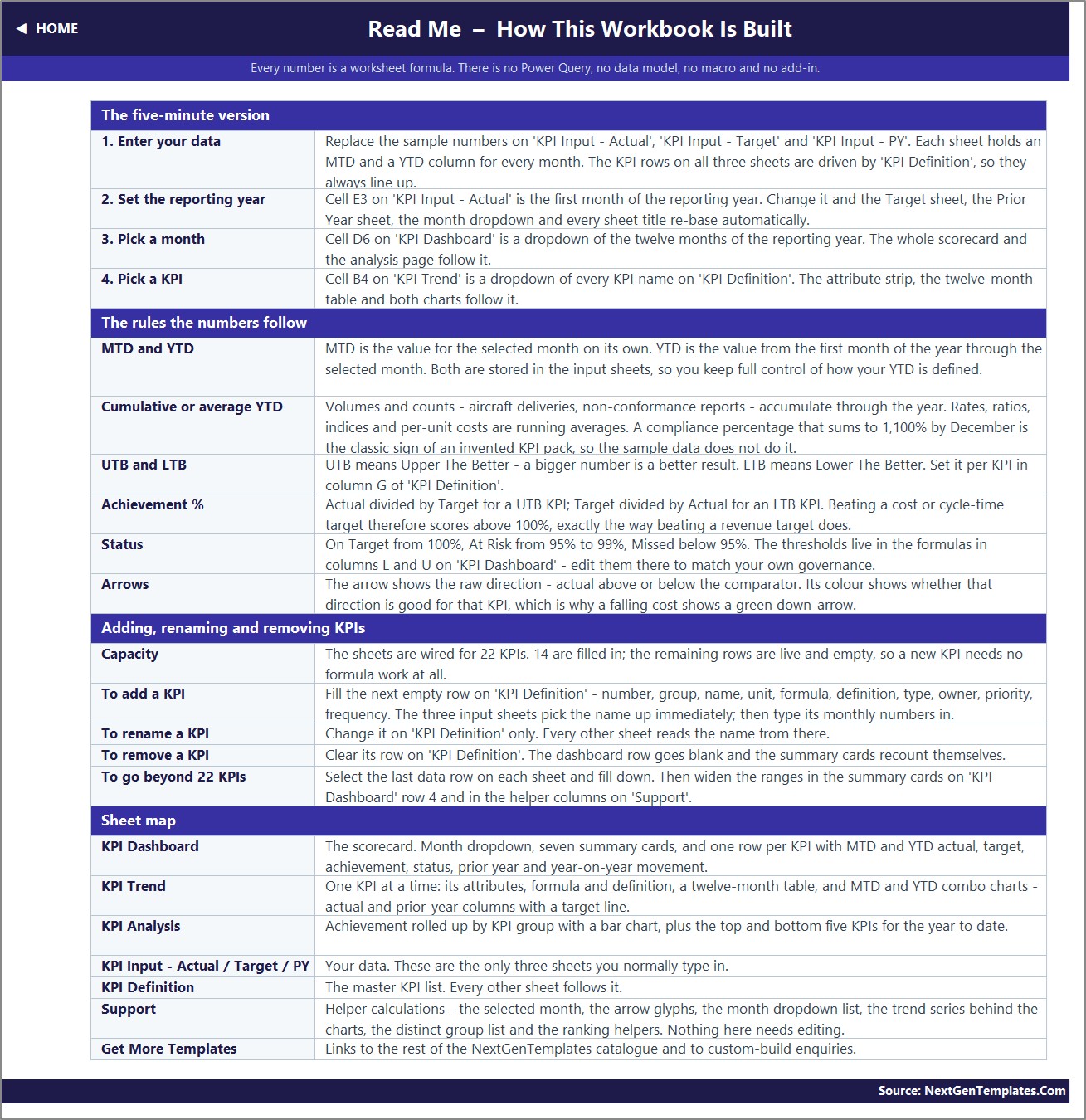
A five-minute setup guide, the rules the numbers follow, the sheet map, and a catalogue page linking to the rest of the NextGenTemplates library.
Septic Tank Service KPI Dashboard in Excel vs. Google Sheets vs. Field-Service SaaS – Where This Fits
| This Excel workbook | Google Sheets edition | Field-service SaaS | |
|---|---|---|---|
| Cost | One-off, under $20 | One-off, under $15 | $50-$200 per user per month |
| Setup time | Minutes – type over the sample data | Minutes – make a copy | Weeks of implementation |
| Works offline | Yes | No | Usually partial |
| Formulas visible and editable | Yes, every one | Yes, every one | No |
| Add or rename a KPI | Type it on one sheet | Type it on one sheet | Vendor configuration |
| Prior-year comparison built in | Yes | Yes | Usually an add-on |
| Dispatch, invoicing, GPS | No | No | Yes |
| Best for | An owner or ops manager who wants a board-ready monthly scorecard | The same, shared by link with a crew | Running the daily job flow itself |
These are complements, not rivals. Your dispatch or job-management system runs the day; this workbook is where the month gets summarised, argued about and signed off. If you would rather work in a browser and share by link, the same scorecard exists as the Septic Tank Service KPI Dashboard in Google Sheets, and a Power BI edition is on the way at Septic Tank Service KPI Dashboard in Power BI.
Who This Template Is For – and Who It Is Not For
It is a good fit if you are:
- An owner-operator or general manager of a septic pumping, inspection or installation business running one to twenty trucks.
- An operations or field-service manager who currently rebuilds a monthly performance summary by hand.
- A compliance officer who needs inspection-checklist and manifest-filing rates tracked next to the operational numbers rather than in a separate spreadsheet.
- A finance manager watching average job value, disposal cost per gallon and days sales outstanding on the same page as the field metrics.
- A consultant or bookkeeper who reports monthly to several septic or wastewater-hauling clients.
It is not the right tool if you need:
- Job scheduling, dispatch, routing or a technician mobile app – this workbook reports on the outcome, it does not run the day.
- Automatic manifest generation or electronic filing with a state or county regulator. It tracks the rate at which filings were made on time; it does not produce or submit them.
- A live feed from your field-service software. Numbers are typed or pasted in monthly, which is deliberate – it is what keeps the file dependency-free.
- Customer records, invoicing or accounts receivable ledgers. Days Sales Outstanding is entered as a monthly figure, not calculated from an invoice register.
- Daily or weekly reporting. The grid is monthly, twelve columns per year.
How to Use the Septic Tank Service KPI Dashboard in Excel
- Unzip and open the .xlsx. No macro prompt, no security banner, nothing to enable.
- Set your reporting year. Change cell E3 on KPI Input – Actual to the first month of your year. The target sheet, the prior-year sheet, the month dropdown and every sheet title re-base themselves.
- Edit the KPI list if you want to. On KPI Definition, rename anything that does not match your language, or fill the next empty row to add a KPI of your own – up to 22 without touching a formula.
- Type your numbers. Replace the sample values on KPI Input – Actual, – Target and – PY. Each month has an MTD and a YTD column, so you keep control of exactly how your year-to-date is defined.
- Pick a month. Use the dropdown in cell D6 on KPI Dashboard. Everything – cards, rows, statuses, arrows and the whole analysis page – recalculates instantly.
- Work the red first. Open KPI Analysis, read the bottom five, then go to KPI Trend, choose one of them from the dropdown and look at whether the twelve-month line is drifting or spiking.
- Tune the thresholds if your governance differs. On Target, At Risk and Missed are set in the formulas in columns L and U on KPI Dashboard. Edit them there once and both blocks follow.
Real-World Use Cases
- The monthly ops review. Set the dropdown to last month, print the KPI Dashboard sheet, and walk the room through eight green, four amber and three red without anybody rebuilding a slide.
- Defending a route change. Route Efficiency and On-Time Arrival Rate sit next to each other with a target and a prior-year column, so a dispatch change can be argued from twelve months of evidence instead of memory.
- Compliance sign-off. Tank Inspection Compliance and Permit & Manifest Filing Compliance are their own group with a named owner, so the regulator-facing metrics never get buried under the revenue ones.
- Pricing conversations. Average Job Value against Waste Disposal Cost per Gallon, both trended for a year, is usually the cleanest way to show why a price list needs revisiting.
- Cash collection. Days Sales Outstanding is scored as a lower-is-better KPI, so a month that pulls DSO below target actually reads as a win on the scorecard.
- Bank or buyer diligence. A twelve-month, target-versus-actual, prior-year-comparative record of a septic business in one file, with every formula visible.
Frequently Asked Questions
How many KPIs does this template include?
Fifteen, across six groups, all fully defined with formulas, owners and direction flags. The sheets are wired for up to 22, so you can add seven more without any formula work.
Do I need macros, Power Query or a Power BI licence?
No. It is a plain .xlsx built from worksheet formulas only – VLOOKUP, MATCH, INDEX and COUNTIF. It opens in Excel 2013 and later, in Excel for Mac and in Excel for the web.
Can I change the KPIs to match my own business?
Yes, and that is the point of the KPI Definition sheet. Rename, re-group, re-unit or re-flag any KPI there and the three input sheets, the scorecard, the trend page and the analysis page all follow automatically.
How is achievement calculated for a lower-is-better KPI?
Target divided by actual, rather than actual divided by target. That is why beating a cycle-time, callback-rate, disposal-cost or DSO target scores above 100% and shows a green arrow, the same way beating a revenue target does.
Does the workbook calculate year-to-date for me?
No – and deliberately so. Both MTD and YTD are entered on the input sheets, because septic businesses define year-to-date differently: a count like Jobs Completed accumulates, while a rate like CSAT or a per-unit cost is a running average. Typing both keeps you in control of that definition rather than forcing one on you.
Is the sample data real?
No. It is twelve months of realistic but invented 2025 figures with a matching 2024 comparative year, included so that every chart, card and traffic light is populated the moment you open the file. Replace it with your own.
How is this different from the Septic Tank Service KPI Scorecard in Excel?
They are two different products. The Septic Tank Service KPI Scorecard in Excel comes from our KPI Scorecard line. This one is from the KPI Dashboard line: fifteen KPIs, a month picker driving MTD and YTD blocks side by side, a dedicated KPI Trend page with twelve-month combo charts, and a KPI Analysis page with group roll-ups and top/bottom five rankings. If you want the deeper monthly review, this is the one.
Can my whole team use it at once?
An .xlsx on a shared drive or in OneDrive/SharePoint supports co-authoring in the usual Excel way. If simultaneous browser editing matters more than offline access, the Google Sheets edition is the better fit.
What exactly do I download?
A single ZIP containing the .xlsx workbook and the Excel KPI Dashboard User Manual PDF. Instant download after checkout, and lifetime access to the file you buy.
About the Author
Built by the NextGenTemplates team, who have shipped thousands of Excel, Power BI and Google Sheets templates for small and mid-sized operators. Every workbook we publish is formula-driven and fully unlocked on purpose: you can trace any number back to the cell it came from, and change anything you like. Need this scorecard reshaped around your own KPI list? Write to [email protected].
Explore Related Templates
- Septic Tank Service KPI Dashboard in Google Sheets – the same fifteen-KPI scorecard, share-ready by link
- Septic Tank Service KPI Scorecard in Excel – the lighter scorecard-line edition for the same trade
- Septic Tank Service KPI Scorecard in Google Sheets
- Plumbing Business KPI Dashboard in Excel – the nearest trade neighbour, same dashboard line
- Paving Contractor KPI Dashboard in Excel
- Insulation Contractor KPI Dashboard in Excel
- Swimming Pool Service KPI Dashboard in Google Sheets
- Pest Control Dashboard in Google Sheets
Watch the demo video:
Compatibility and Requirements
- Works in Microsoft Excel desktop (Excel 2016 or later, or Microsoft 365). No macros, Power Query or add-ins are used, so there is nothing to enable.
- You pick the reporting month from a dropdown on the KPI Dashboard sheet. Microsoft explains dropdowns in Create a drop-down list.
Related Septic and Field Service KPI Templates
- Septic Tank Service KPI Scorecard in Excel: a scorecard view of the same trade
- Septic Tank Service KPI Dashboard in Google Sheets: the same dashboard in Google Sheets
- Septic Tank Service KPI Dashboard in Power BI: the Power BI edition
- Plumbing Business KPI Dashboard in Excel: a nearby trade, same dashboard line
- KPI Dashboard Library (Excel): 15 KPI dashboard templates in one download
Browse all Excel KPI dashboards or the full MS Excel range.
































Reviews
There are no reviews yet.