



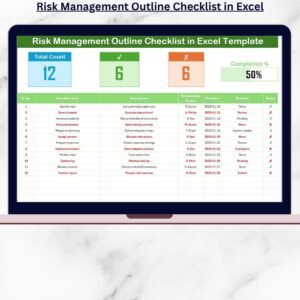
The Risk Management Monitoring Checklist in Excel is an essential tool designed to help businesses, project managers, and risk managers systematically identify, assess, and mitigate risks across their projects and operations. This Excel-based checklist allows you to monitor risk factors, track mitigation strategies, and ensure that potential risks are handled proactively to minimize their impact.
With customizable templates, real-time tracking, and an easy-to-navigate interface, this checklist helps you stay on top of risk management and ensures that your organization is prepared to handle unexpected challenges effectively.
Key Features of the Risk Management Monitoring Checklist in Excel:
🔍 Risk Identification and Assessment
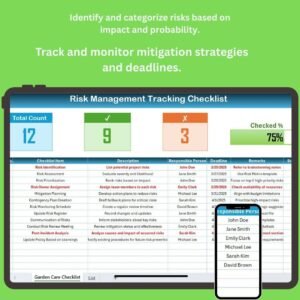
Track and assess potential risks, categorizing them by severity and likelihood to prioritize risk mitigation efforts.
⚠️ Risk Mitigation Tracking
Monitor the status of risk mitigation strategies and actions, ensuring that all identified risks are being addressed in a timely and effective manner.
📊 Risk Impact and Likelihood Analysis
Evaluate the potential impact and likelihood of each risk, providing a clear picture of which risks need immediate attention and action.
🗓️ Action and Deadline Tracking
Track assigned responsibilities, deadlines, and progress for each risk mitigation action to ensure timely resolution of identified risks.
📈 Risk Monitoring and Reporting
Generate reports that summarize risk data, mitigation progress, and overall risk management performance, providing insights for better decision-making.
🚀 Why You’ll Love the Risk Management Monitoring Checklist in Excel:

✅ Proactively Manage Risks – Track and assess risks to ensure that potential issues are identified and managed before they escalate.
✅ Monitor Mitigation Efforts – Track the progress of risk mitigation strategies and ensure that action plans are executed on time.
✅ Make Data-Driven Decisions – Use the checklist’s data and reports to make informed decisions and prioritize resources effectively.
✅ Ensure Timely Risk Resolution – Track deadlines and actions to ensure that all risks are managed proactively and on schedule.
✅ Customizable and Easy-to-Use – Fully customizable to suit your organization’s specific risk management needs, with an intuitive interface for easy tracking.
✅ Clear Reporting – Generate easy-to-understand reports that summarize risk management efforts and performance.
What’s Inside the Risk Management Monitoring Checklist in Excel:
Risk Identification: List all potential risks and assess their severity, likelihood, and potential impact on your business.
Risk Mitigation Tracking: Monitor the status of mitigation actions, tracking whether they are in progress, completed, or need further attention.
Action and Responsibility Tracking: Assign responsibilities to team members and track deadlines to ensure that risk mitigation is handled promptly.
Impact and Likelihood Analysis: Evaluate the potential severity and likelihood of risks to prioritize which risks need immediate attention.
Risk Monitoring: Continuously monitor the status of risks and mitigation efforts, ensuring nothing falls through the cracks.
Custom Reports: Generate detailed reports that provide an overview of risk management efforts, mitigation progress, and risk reduction outcomes.
How to Use the Risk Management Monitoring Checklist in Excel:
1️⃣ Download the Template – Instantly access your Excel file upon purchase.
2️⃣ Input Risk Data – Enter identified risks, severity, likelihood, and mitigation actions to begin tracking and managing risks.
3️⃣ Monitor Risk Mitigation – Track the progress of mitigation actions, assign responsibilities, and monitor deadlines to ensure timely risk resolution.
4️⃣ Analyze Risk Impact – Evaluate and categorize the risks based on their impact and likelihood to prioritize your mitigation strategies effectively.
5️⃣ Generate Reports – Create detailed reports to present to stakeholders and decision-makers, summarizing risk data and mitigation progress.
Who Can Benefit from the Risk Management Monitoring Checklist in Excel:
Risk Managers
Project Managers
Business Owners
Compliance and Safety Officers
HR and Legal Departments
Small to Medium-Sized Enterprises (SMEs)
Large Enterprises with Multiple Risk Factors
The Risk Management Monitoring Checklist in Excel is the ideal tool for organizations seeking to streamline their risk management processes. By identifying, tracking, and mitigating risks, you can ensure your organization is better prepared to face challenges while minimizing potential disruptions.
Click here to read the Detailed blog post
https://www.pk-anexcelexpert.com/risk-management-monitoring-checklist-in-excel/
Visit our YouTube channel to learn step-by-step video tutorials
Youtube.com/@PKAnExcelExpert
Compatibility and Requirements
- Works in Microsoft Excel desktop (Excel 2016 or later, or Microsoft 365).
- New to Excel? Microsoft has a free guide: Excel for Windows training.
Frequently Asked Questions
What does the Risk Management Monitoring Checklist cover?
It covers risk identification, impact and likelihood analysis, mitigation tracking, responsibilities and deadlines, and ongoing risk monitoring.
How do I prioritize risks?
You rate each risk by severity and likelihood so you can see which ones need attention first.
Can I assign responsibilities?
Yes. You assign each mitigation action to a team member and track its deadline and status.
Can I report on progress?
Yes. You can create reports that summarize risk data and mitigation progress for stakeholders.
Related Risk Management Templates
- Risk Management To-Do List Checklist in Excel: a risk management to-do list in Excel
- Risk Management Tracking Checklist in Excel: a risk management tracking checklist in Excel
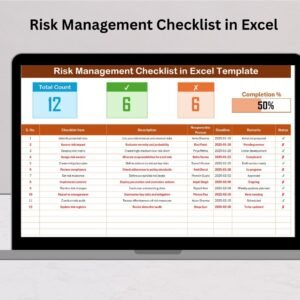
- Risk Management Checklist in Excel: a general risk management checklist in Excel
- Risk Management Dashboard in Excel: a full risk management dashboard in Excel
- Checklist & SOP Pack: 12 checklist templates in one download
Browse all Excel checklists or the Excel project management templates.


























Reviews
There are no reviews yet.