



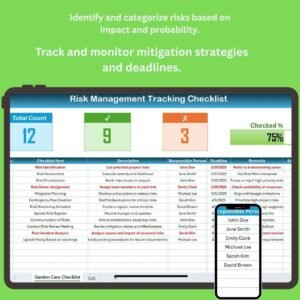
The Risk Management Tracking Checklist in Excel is an essential tool for businesses, project managers, and risk management professionals looking to identify, track, and mitigate risks effectively. This Excel-based checklist helps you document and manage potential risks, assess their impact, and create strategies for risk mitigation, ensuring that your organization is prepared for unforeseen challenges.
With its easy-to-use interface, customizable fields, and detailed tracking features, this checklist allows you to stay organized and monitor risk levels, ensuring that you can take proactive actions to minimize threats to your business.
Key Features of the Risk Management Tracking Checklist in Excel:
⚠️ Risk Identification and Categorization
Document and categorize risks based on their likelihood and impact, making it easier to prioritize and manage potential threats.
📊 Risk Impact and Probability Assessment
Evaluate each risk’s probability and potential impact, helping you to assess the severity of each risk and plan mitigation strategies accordingly.
📝 Risk Mitigation Strategies
Track and document the actions and strategies to reduce or eliminate each risk, ensuring that risks are effectively managed throughout the project lifecycle.
🔍 Ongoing Risk Monitoring
Monitor and update the status of identified risks in real-time, ensuring that any changes in risk levels are recorded and addressed immediately.
📅 Risk Mitigation Deadlines and Action Items
Set deadlines for mitigating actions, assign tasks to responsible parties, and track the progress of risk mitigation efforts.
🚀 Why You’ll Love the Risk Management Tracking Checklist in Excel:

✅ Comprehensive Risk Tracking – Identify, assess, and track risks across various projects, departments, or business functions to ensure that all potential threats are managed.
✅ Prioritize Risks – Categorize risks by likelihood and impact, allowing you to focus on the most critical threats first.
✅ Create Actionable Mitigation Plans – Develop and track risk mitigation strategies to reduce potential harm and keep projects or business operations on track.
✅ Real-Time Risk Monitoring – Continuously monitor and update risk statuses, ensuring that any changes in risks are addressed in real-time.
✅ Customizable and User-Friendly – The checklist is fully customizable and easy to use, allowing you to adapt it to your organization’s unique needs.
✅ Make Informed Decisions – Use data-driven insights to make proactive, informed decisions about risk management and mitigation strategies.
What’s Inside the Risk Management Tracking Checklist in Excel:
Risk Identification: Record and categorize all potential risks across different areas of your business, from operational risks to financial and strategic threats.
Risk Impact Assessment: Rate the potential impact and likelihood of each identified risk to determine how serious and urgent the risk is.
Mitigation Strategies: Track actions and strategies designed to mitigate or eliminate identified risks, and assign responsible parties for each task.
Ongoing Monitoring: Continuously monitor risk status, update risk levels, and ensure that all mitigation strategies are being executed effectively.
Task Management: Set deadlines, assign tasks, and track progress to ensure that risks are mitigated in a timely manner.
Custom Reports: Generate custom reports summarizing risk statuses, mitigation actions, and overall risk management performance for stakeholders or management.
How to Use the Risk Management Tracking Checklist in Excel:
1️⃣ Download the Template – Instantly access your Excel file upon purchase.
2️⃣ Input Risk Data – Add identified risks, impact assessments, mitigation strategies, and deadlines into the checklist.
3️⃣ Track Risk Levels – Monitor and update the likelihood and impact of each risk, adjusting strategies as necessary.
4️⃣ Assign and Monitor Tasks – Set deadlines for risk mitigation tasks and track progress to ensure that risks are addressed on time.
5️⃣ Generate Reports – Create custom reports to share risk management progress, action items, and mitigation results with key stakeholders.
Who Can Benefit from the Risk Management Tracking Checklist in Excel:
Risk Managers
Project Managers
Business Owners
Financial Analysts
Operations Managers
Compliance Officers
Non-Profit and Government Agencies
Consultants in Risk Management
The Risk Management Tracking Checklist in Excel is the ideal tool for businesses looking to streamline their risk management process, improve proactive decision-making, and ensure that they are prepared to handle any risks that come their way.
Click here to read the Detailed blog post
https://www.pk-anexcelexpert.com/risk-management-tracking-checklist-in-excel/
Visit our YouTube channel to learn step-by-step video tutorials
Youtube.com/@PKAnExcelExpert
Watch the step-by-step video Demo:
Compatibility and Requirements
- Works in Microsoft Excel desktop (Excel 2016 or later, or Microsoft 365).
- To add your own risk categories or status lists, Microsoft’s guide to applying data validation to cells shows how drop-down rules work.
Frequently Asked Questions
What does the Risk Management Tracking Checklist record?
Each risk gets a description, a category, a likelihood and impact rating, the mitigation strategy, the responsible person, a deadline and its current status.
How do I decide which risks to handle first?
Rate each risk by likelihood and impact. The higher-rated risks are the ones to work on first, and you can sort or filter the list in Excel to bring them to the top.
Can I use it for more than one project?
Yes. The checklist covers risks across projects, departments and business functions. Add a project or department name to each row, or keep one copy of the file per project.
Can I change the fields?
Yes. The checklist is fully customizable, so you can rename columns, add categories and adjust the rating scale to match your own risk process.
Is there a dashboard version?
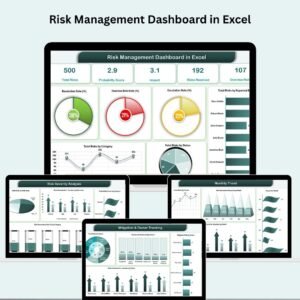
Yes. The Risk Management Dashboard in Excel turns risk data into charts, and a Google Sheets edition is also available.
Related Risk Management Templates
- Risk Management Checklist in Excel: a simpler checklist for routine risk reviews.
- Risk Management Action Plan Checklist in Excel: plan the actions behind each mitigation.
- Risk Management Dashboard in Excel: charts and KPIs for your risk register.
- Risk Assessment Management System v1.0: a full risk assessment system in Excel.
- Checklist & SOP Pack: 12 checklist templates in Excel and Google Sheets.
Browse all Excel checklist templates or the project management templates.
































Reviews
There are no reviews yet.