



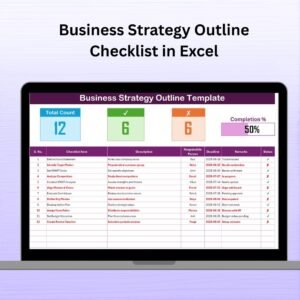
The Project Management Monitoring Checklist in Excel is an essential tool for project managers, team leaders, and organizations to efficiently track and monitor the progress of their projects. This comprehensive checklist allows users to stay organized and ensure that tasks are completed on time, resources are properly allocated, and project goals are met.
By using this Excel-based tool, project managers can track project timelines, identify potential risks, ensure proper communication among team members, and monitor the overall health of the project. The template is highly customizable, allowing it to be tailored to any project’s specific needs, whether it’s a small internal project or a large-scale enterprise initiative.
Key Features of the Project Management Monitoring Checklist in Excel
📅 Task & Milestone Tracking
Track key project tasks and milestones, ensuring that all deliverables are completed on time. Set deadlines for each task and milestone, and mark them as completed or pending.
📝 Resource Allocation & Management
Monitor the allocation of resources to ensure that the right team members are assigned to the appropriate tasks. This helps prevent resource overloads and ensures efficient project execution.
📈 Progress Monitoring & Reporting
Track the progress of the project over time and ensure that each phase is completed within the set timelines. Use color-coded status indicators to visually represent the health of the project.
⚠️ Risk Management & Issue Tracking
Identify potential risks and issues early on and create action plans to mitigate them. This feature ensures that your project stays on track and on budget, with any potential problems addressed immediately.
📊 Time & Budget Monitoring
Monitor both time and budget constraints to ensure that the project stays within the defined parameters. Use the checklist to track hours worked, costs incurred, and remaining budget.
⚙️ Customizable for Any Project
Whether you’re working on an IT project, construction project, or marketing campaign, the checklist can be easily customized to suit the specific needs of your project.
Why You’ll Love the Project Management Monitoring Checklist in Excel

✅ Stay Organized & Efficient
Track tasks, resources, and milestones in one central place. This helps you avoid confusion, ensure deadlines are met, and keep your project on track.
✅ Proactively Address Issues & Risks
Identify potential risks and issues early, and take action before they affect the project’s success. This proactive approach keeps your projects running smoothly.
✅ Optimize Resource Allocation
Ensure that resources are allocated efficiently and that your team members are working on tasks that align with their strengths and expertise.
✅ Increase Project Visibility
With clear tracking and reporting, stakeholders can easily stay updated on project progress, making it easier to communicate with the team, clients, and upper management.
✅ Customizable & Scalable
The checklist can be easily adjusted to meet the unique needs of any project, whether big or small, and can scale as your project grows.
What’s Inside the Project Management Monitoring Checklist in Excel?
Task & Milestone Tracking: Monitor key tasks and milestones to ensure they are completed on time.
Resource Allocation & Management: Track resource allocation and make adjustments as needed.
Progress Monitoring: Keep track of project progress and identify delays early on.
Risk Management & Issue Tracking: Identify risks and create mitigation plans.
Time & Budget Monitoring: Track hours worked and budget usage to avoid overruns.
Customizable Features: Adapt the checklist to suit your specific project needs.
How to Use the Project Management Monitoring Checklist in Excel
1️⃣ Download the Template: Get instant access to the Project Management Monitoring Checklist in Excel.
2️⃣ Input Project Tasks & Milestones: Add tasks, set deadlines, and assign responsibilities to team members.
3️⃣ Monitor Progress & Status: Track the progress of each task and milestone, updating statuses regularly.
4️⃣ Manage Resources & Risks: Track resource allocation and monitor potential risks and issues.
5️⃣ Generate Reports & Communicate: Use the checklist’s reporting features to keep stakeholders updated and informed about the project’s health.
Who Can Benefit from the Project Management Monitoring Checklist in Excel?
🔹 Project Managers & Team Leaders
🔹 Business Owners & Executives
🔹 Marketing & IT Teams
🔹 Construction Managers & Contractors
🔹 Event Planners
🔹 Consultants & Freelancers
🔹 Non-profit & Government Organizations
Ensure that your projects stay on track and meet their objectives with the Project Management Monitoring Checklist in Excel. Stay organized, track progress, and mitigate risks—all in one easy-to-use tool.
Click here to read the Detailed blog post
Visit our YouTube channel to learn step-by-step video tutorials
Youtube.com/@PKAnExcelExpert
Compatibility and Requirements
- Works in Microsoft Excel desktop (Excel 2016 or later, or Microsoft 365).
- Project health shows with color-coded status indicators. Microsoft explains color rules in Use conditional formatting to highlight information.
Frequently Asked Questions
What does the checklist monitor?
It monitors tasks and milestones, resource allocation, progress, risks and issues, and time and budget.
How do I mark progress?
Set a deadline for each task and milestone, then mark it as completed or pending. Color-coded indicators show project health.
Can I track hours and costs?
Yes. You can track hours worked, costs incurred and the remaining budget.
Does it work for any type of project?
Yes. You can customize it for IT projects, construction projects, marketing campaigns and other work.
Related Project Management Templates
- Project Management Tracking in Excel: track project tasks in Excel
- Project Management Planner Checklist in Excel: plan a project step by step
- Project Management Checklist in Google Sheets: a project checklist in Google Sheets
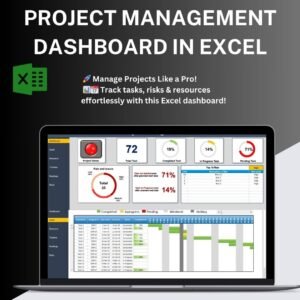
- Project Management Dashboard in Excel: see every project on a dashboard
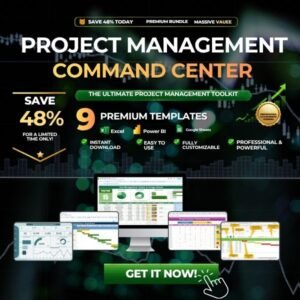
- Project Management Pro Bundle: 9 project templates in one download
Browse all Excel checklists or the Excel project management templates.
























Reviews
There are no reviews yet.