



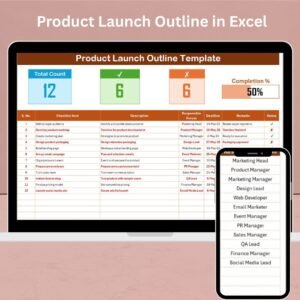
The Product Launch Outline in Excel is a comprehensive tool designed to help businesses, product managers, and marketing teams plan and execute successful product launches. This Excel-based template provides a structured outline to ensure every detail of the product launch process is covered, from initial concept to market introduction.
Launching a new product can be a complex process involving various teams and activities. This outline helps streamline the planning phase by clearly defining milestones, responsibilities, and deadlines. By using this tool, you can track the progress of each phase, minimize the risk of missed deadlines, and ensure a smooth and efficient product launch.
Key Features of the Product Launch Outline in Excel
📅 Clear Milestones & Timeline
The template allows you to create a detailed timeline for each phase of the product launch process. Define key milestones, set deadlines, and ensure all tasks are completed on time.
📝 Task Management & Assignment
Each task in the product launch process can be assigned to specific team members. Monitor progress and ensure accountability for every step, from market research to post-launch evaluation.
📊 Action Plan & Resource Tracking
Track the resources required for each task, including budget, tools, and personnel. This feature ensures you have everything you need to execute the launch successfully.
📈 Progress Tracking & Monitoring
Track the progress of each task in real time. The template allows you to mark tasks as complete, in progress, or pending, helping you stay organized and on track.
🔑 Customizable for Your Product Launch
Customize the outline to suit your product launch needs. Add specific phases, tasks, and milestones relevant to your business, ensuring the tool works perfectly for your project.
⚙️ Collaboration & Team Coordination
Facilitate communication and coordination across departments by using the outline to align marketing, design, sales, and other teams with the product launch timeline.
Why You’ll Love the Product Launch Outline in Excel

✅ Stay Organized & On Track
Keep all product launch activities organized in one place. Track progress, assign tasks, and stay on schedule with a well-structured outline.
✅ Improve Team Collaboration
Ensure that all team members are on the same page. The task assignment and progress tracking features make it easy to coordinate efforts and meet deadlines.
✅ Optimize Resource Allocation
Track resources such as budget, tools, and personnel to ensure that each phase of the launch is adequately supported. This helps optimize resource usage and reduce costs.
✅ Simplify Complex Launch Plans
A successful product launch requires careful planning and execution. This template simplifies the process, making it easier to manage tasks, track milestones, and stay organized.
✅ Customizable for Any Product Launch
Adapt the outline to fit any product launch, whether it’s for software, physical goods, or services. Modify tasks and timelines to suit your specific needs.
What’s Inside the Product Launch Outline in Excel?
Clear Milestones & Timeline: Define each phase of the product launch with key deadlines and tasks.
Task Management & Assignment: Assign tasks to team members and track progress.
Resource Tracking: Monitor the resources required for each task.
Progress Tracking: Stay on top of task completion with real-time updates.
Customizable Structure: Tailor the outline to suit your unique product launch process.
How to Use the Product Launch Outline in Excel
1️⃣ Download the Template: Access the Product Launch Outline in Excel instantly.
2️⃣ Set Up the Timeline: Define the key phases and deadlines for your product launch.
3️⃣ Assign Tasks & Responsibilities: Assign each task to the relevant team member and set deadlines.
4️⃣ Track Progress & Resources: Monitor task completion and track the resources needed to execute each phase.
5️⃣ Coordinate Teams & Ensure Timely Execution: Use the outline to keep teams aligned and ensure that the launch runs smoothly.
Who Can Benefit from the Product Launch Outline in Excel?
🔹 Product Managers & Marketing Teams
🔹 Startups & Entrepreneurs
🔹 E-commerce Businesses
🔹 Project Managers & Coordinators
🔹 Small & Medium Enterprises (SMBs)
🔹 Large Corporations with Complex Launch Plans
🔹 Agencies & Consultants Managing Product Launches
Ensure a smooth and organized product launch with the Product Launch Outline in Excel. Plan, track, and execute every step of your product launch efficiently.
Click here to read the Detailed blog post
Visit our YouTube channel to learn step-by-step video tutorials
Youtube.com/@PKAnExcelExpert
Watch the step-by-step video Demo:
Compatibility and Requirements
- Works in Microsoft Excel desktop (Excel 2016 or later, or Microsoft 365).
- New to Excel? Microsoft’s Excel for Windows training covers the basics.
Frequently Asked Questions
What does the product launch outline cover?
It covers milestones and a timeline for each launch phase, task assignments, the resources each task needs and progress tracking.
How do I mark task status?
You can mark each task as complete, in progress or pending.
Can I track budget and staff for each task?
Yes. Resource tracking covers budget, tools and personnel for each task.
Does it work for any type of product?
Yes. You can adapt the phases, tasks and timelines for software, physical goods or services.
Is there a Google Sheets version?
Yes. The Product Launch Checklist in Google Sheets covers launch tasks in Google Sheets.
Related Product Launch Templates
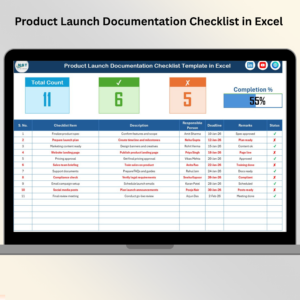
- Product Launch Checklist Template in Excel: tick off launch tasks step by step
- Product Launch Action Plan in Excel: turn the outline into an action plan
- Product Launch Calendar in Excel: put launch dates on a calendar
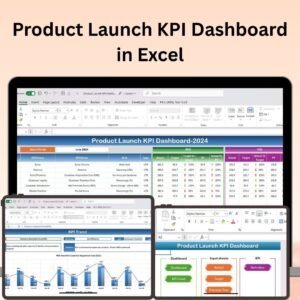
- Product Launch KPI Dashboard in Excel: measure the launch with KPIs
- Checklist & SOP Pack: 12 checklist templates in one download
Browse all Excel checklists or the Excel project management templates.































Reviews
There are no reviews yet.