



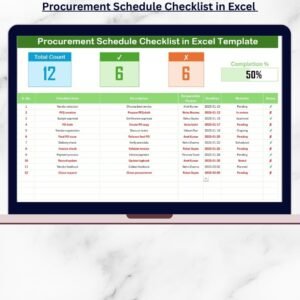
The Procurement Planner Checklist in Excel is an essential tool for businesses looking to streamline their procurement process. Designed for procurement managers, business owners, and teams, this Excel-based checklist helps you track every stage of the procurement cycle, from identifying suppliers to managing contracts and orders. Whether you’re purchasing raw materials, office supplies, or services, this checklist ensures that you never miss a step in the procurement process, making it easier to manage budgets, timelines, and supplier relationships.
With clearly defined tasks and deadlines, this customizable checklist is perfect for improving organizational efficiency, reducing costs, and ensuring timely procurement. The tool is scalable, making it ideal for both small businesses and large enterprises with complex procurement needs.
Key Features of the Procurement Planner Checklist in Excel
📋 Comprehensive Procurement Tracking
Track key procurement tasks including supplier identification, purchase requisitions, order processing, and contract management. Ensure that nothing is missed in the procurement cycle.
📝 Supplier Evaluation & Selection
Document the evaluation criteria for potential suppliers, including price, quality, delivery time, and reliability. Compare multiple suppliers to make informed purchasing decisions.
📅 Procurement Timeline & Deadlines
Manage procurement timelines by setting deadlines for each task. This helps ensure that all procurement activities are completed on time, avoiding delays in production or operations.
🔑 Purchase Order & Budget Monitoring
Track purchase orders, order status, and spending against the budget. The checklist helps you stay within budget and ensures that purchases align with financial forecasts.
📈 Reporting & Data Analysis
Generate procurement reports to track key metrics such as order volume, cost savings, supplier performance, and procurement cycle time. Use these reports to optimize procurement strategies and make data-driven decisions.
⚙️ Customizable & Scalable
Tailor the checklist to fit your specific procurement needs. Whether you’re managing a small team or a large-scale enterprise, this tool can be adjusted to suit your organization’s procurement processes.
Why You’ll Love the Procurement Planner Checklist in Excel

✅ Streamline Procurement Processes
Track every stage of the procurement cycle in one centralized location, from supplier selection to order fulfillment, ensuring a smooth and efficient process.
✅ Improve Supplier Management
Evaluate suppliers based on key criteria, track performance, and ensure that you’re getting the best value for your purchases.
✅ Stay on Budget & On Schedule
Monitor spending against the budget and track procurement timelines to ensure that purchases are made on time and within financial constraints.
✅ Optimize Decision-Making with Data
Use procurement reports and data insights to refine your procurement strategy, identify areas for improvement, and reduce costs.
✅ Customizable & Scalable
Adapt the checklist to suit the specific requirements of your organization, whether you’re handling small purchases or large-scale procurement projects.
What’s Inside the Procurement Planner Checklist in Excel?
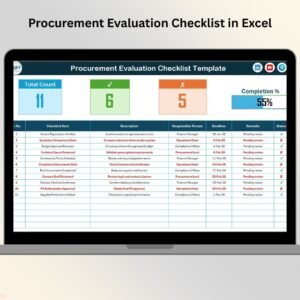
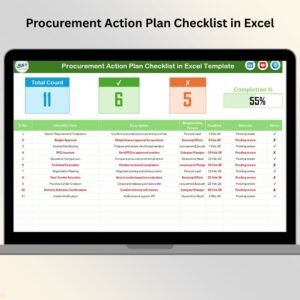
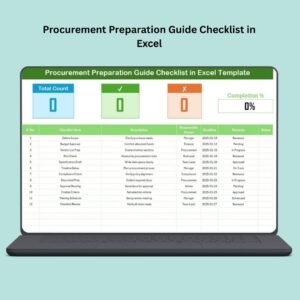
Procurement Task Tracking: Track each step of the procurement process, from requisition to purchase.
Supplier Evaluation: Document supplier criteria and compare options for better purchasing decisions.
Timeline & Deadlines: Organize procurement activities with deadlines for timely completion.
Purchase Order & Budget Monitoring: Track orders, spending, and supplier payments.
Reporting & Analysis: Generate procurement reports for insights and performance evaluation.
Customizable Fields: Tailor the checklist to your organization’s procurement needs.
How to Use the Procurement Planner Checklist in Excel
1️⃣ Download the Template: Get immediate access to the Procurement Planner Checklist in Excel.
2️⃣ Input Procurement Data: Add details such as supplier information, requisitions, and deadlines to the checklist.
3️⃣ Track Tasks & Progress: Monitor each step of the procurement process and ensure everything stays on track.
4️⃣ Generate Reports & Analyze Data: Use built-in reporting tools to generate procurement reports and track key metrics.
5️⃣ Optimize Procurement Strategy: Use the insights from the dashboard to refine your purchasing decisions, save costs, and improve efficiency.
Who Can Benefit from the Procurement Planner Checklist in Excel?
🔹 Procurement Managers & Teams
🔹 Supply Chain Managers
🔹 Business Owners & Operations Managers
🔹 Financial Controllers & Accountants
🔹 Small & Medium Enterprises (SMBs)
🔹 Large Enterprises with Complex Procurement Needs
🔹 Vendor Management Teams
Simplify and optimize your procurement process with the Procurement Planner Checklist in Excel. Track purchases, manage suppliers, and ensure on-time procurement with ease.
Click here to read the Detailed blog post
Visit our YouTube channel to learn step-by-step video tutorials
Youtube.com/@PKAnExcelExpert
Watch the step-by-step video Demo:
Compatibility and Requirements
- Works in Microsoft Excel desktop (Excel 2016 or later, or Microsoft 365).
- Excel has free training for new users: Excel for Windows training.
Frequently Asked Questions
What does the checklist track?
It tracks procurement tasks from requisition to purchase, supplier evaluation, deadlines, purchase orders, budget spending and supplier payments.
Can I compare suppliers with it?
Yes. You document evaluation criteria such as price, quality, delivery time and reliability, then compare suppliers side by side before you buy.
Can I change the checklist to fit my process?
Yes. The fields are customizable, so you can adjust the checklist for small purchases or larger procurement projects.
Does it include reports?
Yes. You can generate procurement reports on order volume, cost savings, supplier performance and procurement cycle time.
Is there a Google Sheets version?
Yes. See the Procurement Checklist in Google Sheets.
Related Procurement Templates
- Procurement Checklist Template in Excel: another Excel checklist for the buying process
- Procurement Checklist in Google Sheets: the same topic in Google Sheets
- Procurement Tracking Checklist in Excel: follow orders as they move
- Procurement Dashboard in Excel: a dashboard view of procurement data
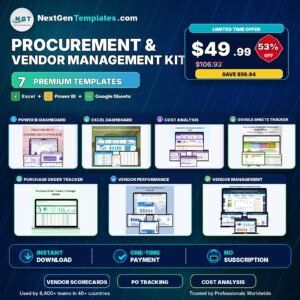
- Procurement and Vendor Management Kit: 7 procurement templates in one download
Browse all Excel checklists and Excel financial tools.
























Reviews
There are no reviews yet.