



The Pest Control Checklist Template in Excel is a practical tool for businesses, property managers, homeowners, and pest control professionals to effectively track and manage pest control efforts. This customizable Excel-based checklist simplifies the process of monitoring pest control activities, ensuring that every pest management task is completed on time and effectively.
Designed for use in various settings—whether you’re managing a commercial property, handling residential pest issues, or overseeing pest control teams—this checklist helps keep your property free from pests while complying with health and safety standards. With real-time tracking and a user-friendly interface, this tool helps you stay organized, proactive, and prepared for any pest-related challenges.
Key Features of the Pest Control Checklist Template in Excel
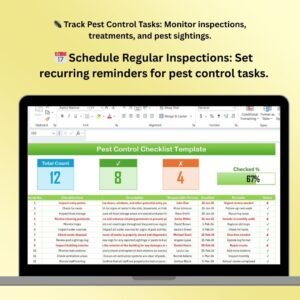
🐜 Track Pest Control Activities
Monitor a wide range of pest control tasks such as inspections, treatments, and follow-up visits. Keep a record of which pests were treated, the methods used, and the success of each treatment.
📅 Schedule Regular Inspections & Treatments
Set reminders for routine pest inspections and treatments to ensure your property remains pest-free. Never miss an important task with automated tracking and scheduling.
📝 Document Pest Sightings & Treatment Logs
Log any pest sightings and the details of each treatment performed, including dates, methods, and areas treated. This creates a comprehensive record for future reference and compliance reporting.
⚙️ Customizable Tasks & Categories
Customize the checklist to fit your specific pest control needs. Add categories for different types of pests, inspection areas, or pest control methods, ensuring the checklist is tailored to your property or business.
📊 Real-Time Tracking & Reporting
Track the progress of pest control efforts in real-time. Generate reports to share with management, clients, or regulatory agencies to show that your pest control program is effective and up to code.
🛠️ Maintenance & Preventive Measures
Monitor preventive measures and maintenance tasks, such as sealing entry points and eliminating food sources, to minimize the risk of future infestations.
Why You’ll Love the Pest Control Checklist Template in Excel

✅ Stay Proactive & Prevent Infestations
By scheduling regular inspections and documenting treatments, you can stay ahead of potential pest problems and prevent infestations before they become a larger issue.
✅ Ensure Compliance with Regulations
Track pest control activities and maintain detailed records to comply with local regulations and health standards. This ensures your business or property is always prepared for inspections.
✅ Improve Pest Control Efficiency
Keep pest control activities organized and ensure that every task is completed on time. This will increase the efficiency of your pest control efforts and reduce the likelihood of recurring problems.
✅ Easily Customize to Your Needs
Tailor the checklist to suit your pest control requirements. Whether you’re tracking treatments for residential homes, commercial properties, or specialized pest control methods, the template is fully customizable.
✅ User-Friendly & Accessible
This Excel-based template is easy to use and accessible for anyone in the pest control industry. Its simple interface allows you to keep track of all pest control efforts in one place, saving time and reducing the risk of errors.
What’s Inside the Pest Control Checklist Template in Excel?
- Pest Control Tasks & Treatment Tracking: Monitor inspection dates, treatments performed, and pest sightings.
- Scheduled Maintenance & Inspections: Set recurring tasks for regular inspections and pest treatments.
- Pest Control Treatment Logs: Document pest control methods used, areas treated, and follow-up actions.
- Customizable Categories: Add specific pest types, treatment methods, or property areas to tailor the checklist to your needs.
- Real-Time Tracking & Reports: Track progress and generate reports to demonstrate compliance or share with clients.
How to Use the Pest Control Checklist Template in Excel
1️⃣ Download the Template: Instantly access the Pest Control Checklist in Excel.
2️⃣ Add Your Property or Business Details: Input relevant information, including areas to be inspected, pest types, and treatment methods.
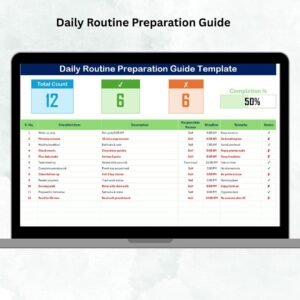
3️⃣ Track Pest Control Tasks: Use the checklist to monitor inspections, treatments, and preventive measures.
4️⃣ Schedule Recurring Tasks: Set reminders for regular inspections and treatments to stay on top of pest control.
5️⃣ Generate Reports & Ensure Compliance: Use the reporting features to share progress with stakeholders and ensure compliance with regulations.
Who Can Benefit from the Pest Control Checklist Template in Excel?
🔹 Property Managers & Owners
🔹 Pest Control Professionals & Technicians
🔹 Facilities Management Teams
🔹 Homeowners & Renters
🔹 Commercial Property Owners
🔹 Real Estate Managers
Ensure your property stays pest-free and compliant with the Pest Control Checklist Template in Excel. Track inspections, treatments, and preventive measures to maintain a healthy and safe environment.
Click here to read the Detailed blog post
Visit our YouTube channel to learn step-by-step video tutorials
Youtube.com/@PKAnExcelExpert
Compatibility and Requirements
- Works in Microsoft Excel desktop (Excel 2016 or later, or Microsoft 365).
- New to Excel? Microsoft’s free Excel for Windows training covers the basics.
Frequently Asked Questions
What can I record in the Pest Control Checklist?
Inspections, treatments and follow-up visits, the pests treated, the methods used, areas treated, pest sightings and preventive work such as sealing entry points or removing food sources.
Can I add my own pest types and areas?
Yes. You can add categories for pest types, inspection areas and treatment methods so the checklist fits your property or business.
Can I share the records with clients?
Yes. You can produce reports from the logged activities to share with management, clients or inspectors.
Who uses this checklist?
Property managers and owners, pest control technicians, facilities teams, homeowners and renters, and commercial property owners.
Related Pest Control Templates
- Pest Control Checklist in Google Sheets: the pest control checklist in Google Sheets
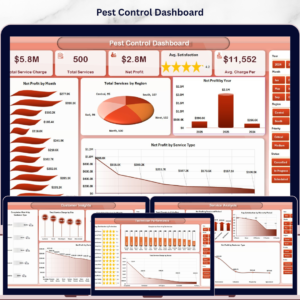
- Pest Control Dashboard in Excel: a full pest control dashboard in Excel
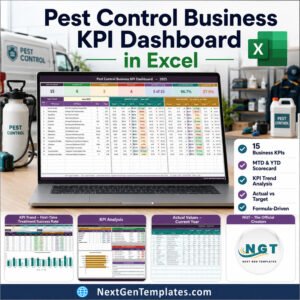
- Pest Control Business KPI Dashboard in Excel: KPIs for a pest control business in Excel
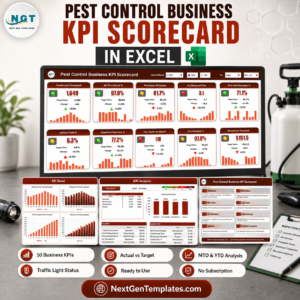
- Pest Control Business KPI Scorecard in Excel: a one-page KPI scorecard for pest control firms
- Checklist & SOP Pack: 12 checklist templates in one pack
Browse all Excel checklists or the Excel health and safety templates.




Reviews
There are no reviews yet.