

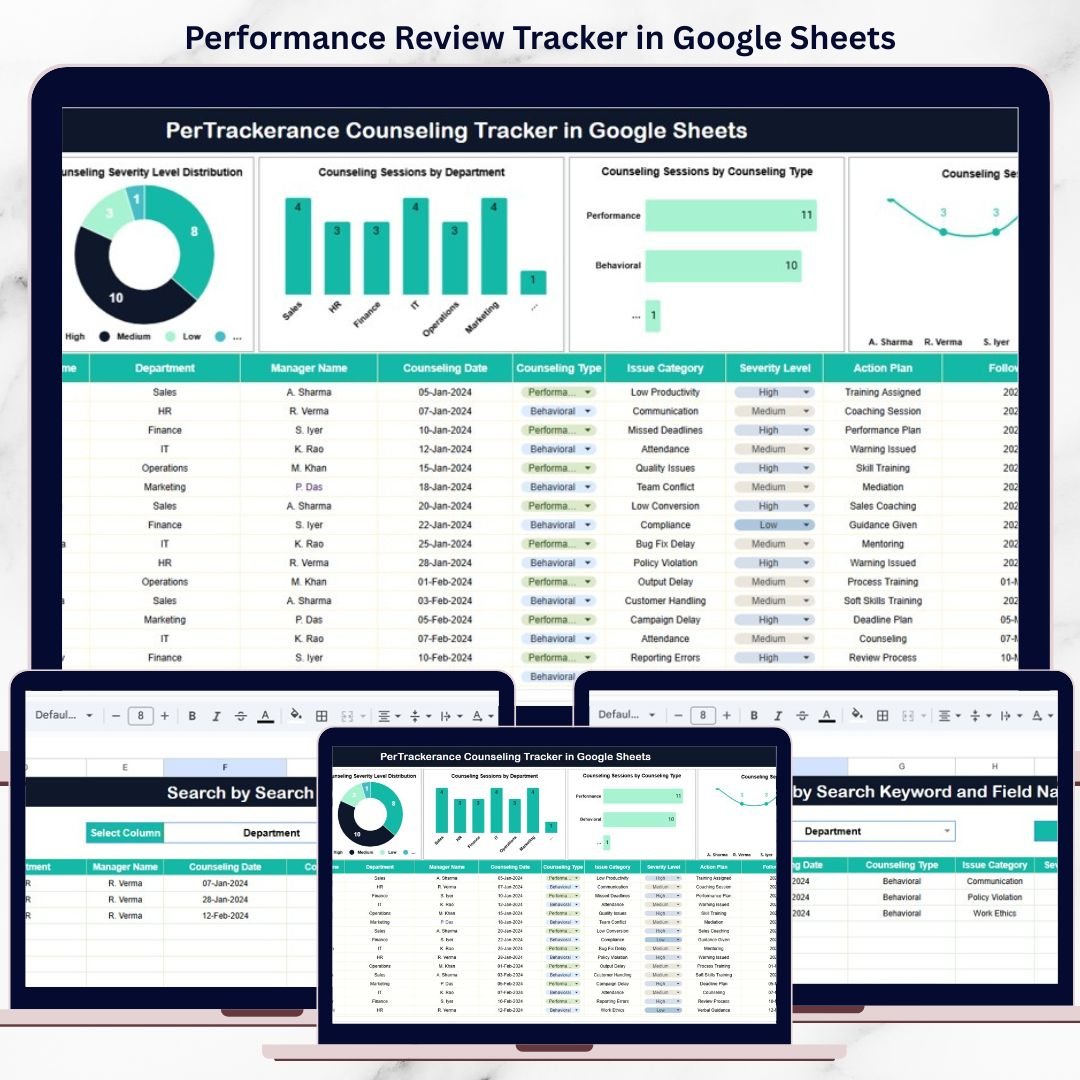

Employee counselling plays a critical role in improving performance, correcting behavior, supporting professional growth, and maintaining workplace harmony. When handled properly, counselling sessions help employees understand expectations, address challenges, and grow constructively. However, many organizations still document counselling discussions through emails, meeting notes, or unstructured spreadsheets. As a result, counselling records become difficult to track, follow-ups are missed, and HR teams lack visibility into trends and risk areas.Per Trackerance Counselling Tracker in Google Sheets
That is exactly why a Performance Counselling Tracker in Google Sheets becomes an essential HR and employee relations tool.
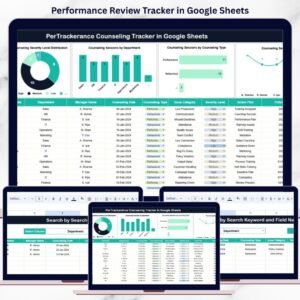
This ready-to-use tracker provides a structured and centralized way to record, monitor, and analyze employee counselling sessions. It allows HR teams and managers to track counselling status, severity levels, types of counselling, and follow-up requirements—all within a single Google Sheets file.Per Trackerance Counselling Tracker in Google Sheets
Because the tracker is built in Google Sheets, it supports real-time collaboration, automatic chart updates, and secure cloud-based access—without the need for expensive HR software or complex systems.Per Trackerance Counselling Tracker in Google Sheets
🔑 Key Features of Performance Counselling Tracker
🗂️ Centralized Counselling Records
All counselling sessions are recorded in one structured tracker. This ensures consistency, transparency, and easy access to historical counselling data.
⚠️ Severity Level Monitoring
Track counselling severity levels such as Low, Medium, and High to identify high-risk cases early and prioritize HR attention effectively.
⏱️ Counselling Status Tracking
Monitor whether counselling sessions are Open, In Progress, or Closed, ensuring timely follow-ups and proper closure.
📊 Visual Insights with Charts
Built-in charts convert counselling data into meaningful insights across departments, managers, and counselling types.
🔍 Smart Search Functionality
Quickly locate counselling records using keyword-based search, saving time during reviews, audits, and employee discussions.
📦 What’s Included in the Performance Counselling Tracker
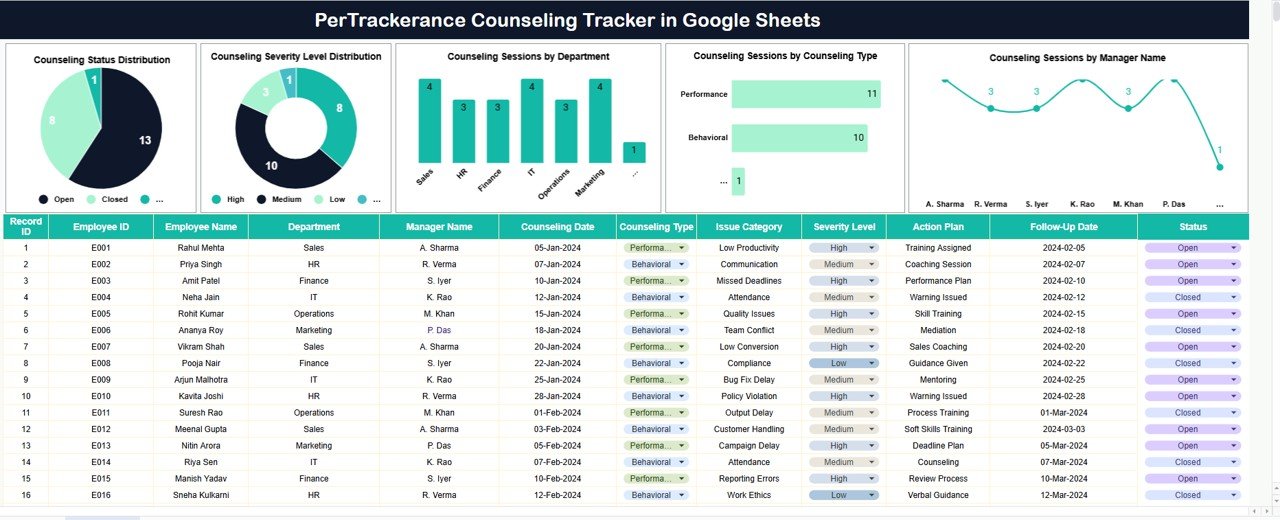
📋 Tracker Sheet Tab – Central Counselling Repository
This is the main data entry and management sheet where HR teams and managers record counselling details, including:
Employee ID / Name
Department
Manager Name
Counselling Type (Performance, Behavioral, Developmental, etc.)
Counselling Severity Level (Low, Medium, High)
Counselling Status (Open, In Progress, Closed)
Counselling Session Date
Follow-up Required (Yes / No)
Remarks / Action Notes
Whenever data is updated, all charts refresh automatically, ensuring real-time insights.
📊 Charts Included in the Performance Counselling Tracker
📌 Counselling Status Distribution
Shows the number of counselling sessions by status (Open, In Progress, Closed).
Helps HR teams ensure no counselling case remains unresolved.
⚠️ Counselling Severity Level Distribution
Displays counselling sessions by severity level.
Supports early identification of high-risk or sensitive cases.
🏢 Counselling Sessions by Department
Highlights departments with higher counselling frequency.
Helps management identify performance or cultural issues.
🧭 Counselling Sessions by Counselling Type
Categorizes sessions into performance, behavioral, developmental, or policy-related counselling.
Improves understanding of counselling patterns.
👤 Counselling Sessions by Manager Name
Shows counselling sessions handled by each manager.
Ensures consistency and fairness in counselling practices.
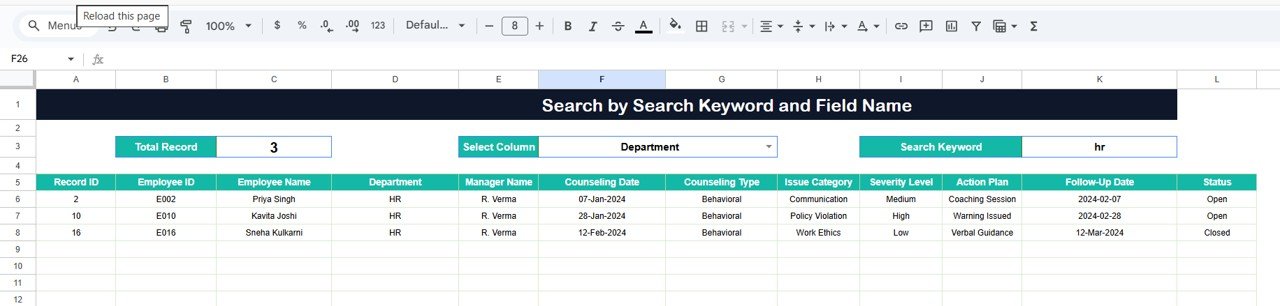
🔍 Search Feature – Search by Keyword and Field Name
The tracker includes a powerful Search by Keyword and Field Name option.
You can search counselling records by:
Employee Name
Department
Manager Name
Counselling Type
Severity Level
Counselling Status
This feature is especially useful during:
HR case reviews
Employee follow-up discussions
Compliance audits
Management reporting
👥 Who Should Use This Tracker
👩💼 HR & Employee Relations Teams
🧑💼 Line Managers & Team Leads
🏢 Compliance & Governance Teams
📊 Senior Leadership
🌟 Advantages of Using Performance Counselling Tracker
Centralized counselling documentation
Clear visibility into counselling trends
Better follow-up and closure management
Reduced compliance and legal risks
Improved employee development support
Easy collaboration using Google Sheets
No additional software or licensing cost
🚀 Opportunities for Improvement
Organizations can further enhance this tracker by adding:
Counselling outcome effectiveness ratings
Automated follow-up reminders
Role-based access controls
Integration with performance reviews
Year-over-year counselling trend analysis
🧠 Best Practices for Using the Tracker
Document counselling sessions promptly
Use consistent severity definitions
Review open cases regularly
Train managers on ethical counselling
Protect sensitive employee information
Analyze trends quarterly
Click here to Read detailed blog post
Watch the step-by-step video tutorial:
▶️ Visit our YouTube channel for step-by-step video tutorials
👉 https://www.youtube.com/@NeotechNavigators
Compatibility and Requirements
- Works in Google Sheets. You need a free Google account and a web browser.
- The tracker uses dropdown values for counselling type, severity level, status and follow-up. Google explains dropdowns in Create an in-cell dropdown list.
Frequently Asked Questions
What does the tracker record for each counselling session?
The Tracker sheet records employee ID or name, department, manager name, counselling type, severity level, status, session date, follow-up required (Yes or No) and remarks or action notes.
Which charts are included?
Five charts: counselling status distribution, severity level distribution, sessions by department, sessions by counselling type and sessions by manager name. They refresh when you update the Tracker sheet.
What severity levels and statuses can I track?
Severity levels are Low, Medium and High. Statuses are Open, In Progress and Closed.
How do I find a specific counselling record?
Use the Search by Keyword and Field Name option. You can search by employee name, department, manager name, counselling type, severity level or counselling status.
Is there a similar tracker for performance reviews?
Yes. The HR Performance Dashboard in Google Sheets covers HR performance data in Google Sheets.
Related HR and Performance Templates
- HR Performance Dashboard in Google Sheets: HR performance reporting in Google Sheets
- HR Performance Dashboard in Excel: the same topic in Excel
- Performance Improvement Plan Template in MS Word and Google Docs: a document to follow up counselling cases
- Employee Performance Tracking Dashboard in Excel: employee performance tracking in Excel
- HR Google Sheets Pack: 10 HR templates for Google Sheets in one download
Browse all Google Sheets trackers or Google Sheets HR and payroll templates.






Reviews
There are no reviews yet.