

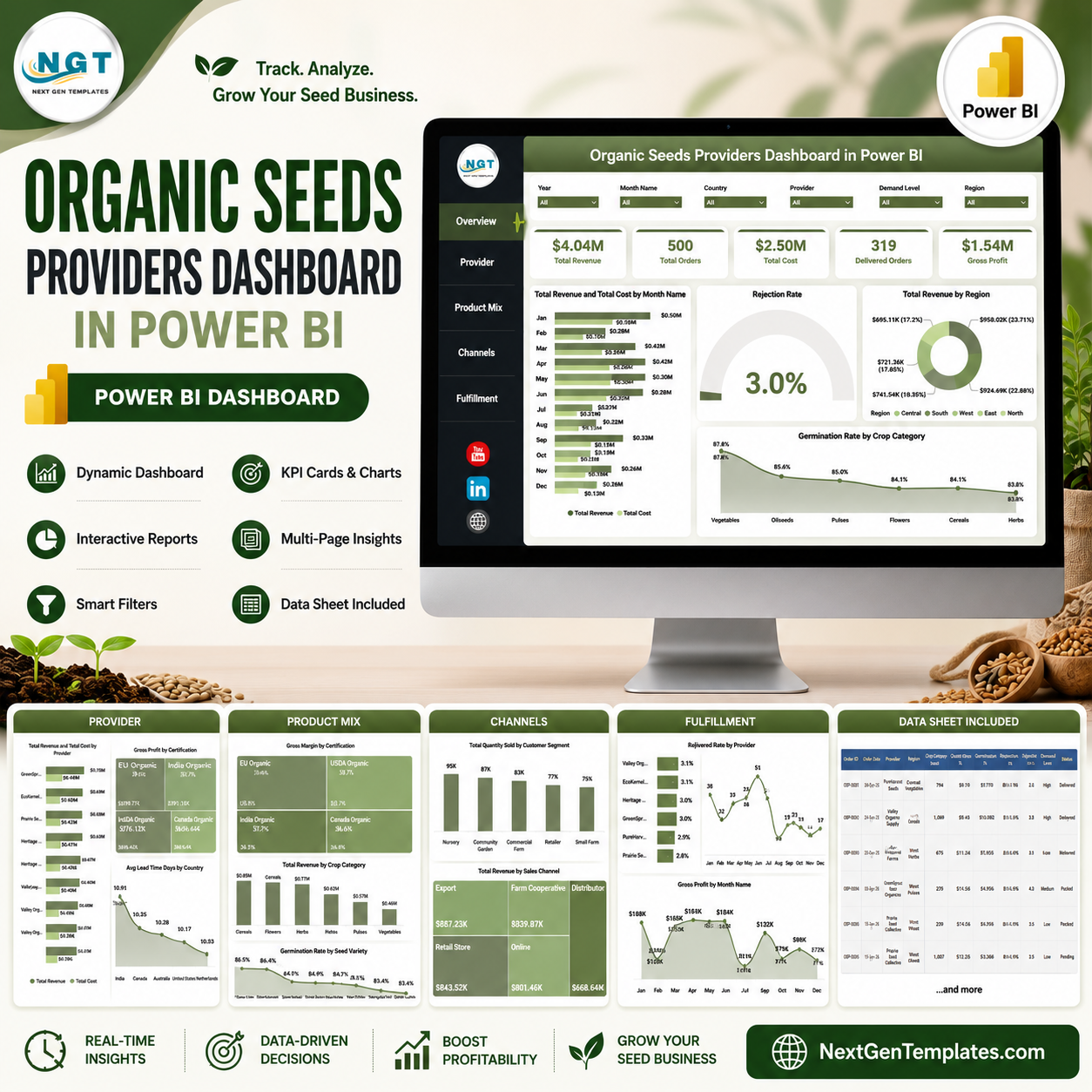

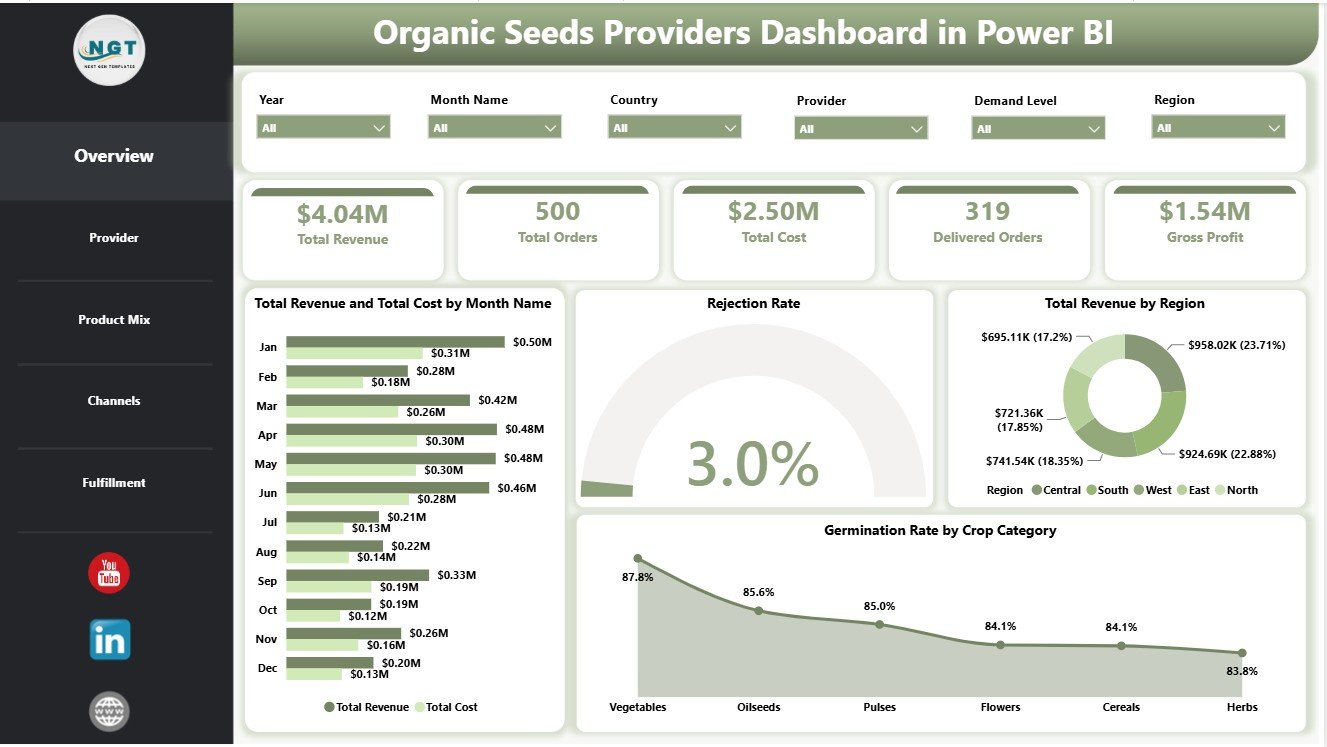
Organic Seeds Providers Dashboard in Power BI helps organic seed suppliers, agribusiness owners, provider managers, and operations analysts review revenue, cost, gross profit, delivered orders, rejection rate, germination rate, lead time, providers, certifications, crop categories, seed varieties, regions, sales channels, and customer segments in one editable PBIX report. Seed providers often manage 100+ sales and fulfillment records across markets, varieties, and suppliers, but reporting becomes slow when cost, quality, and delivery data sit in separate spreadsheets. For $17.99 one-time, this Power BI dashboard gives you 5 focused pages, KPI cards, slicers, and ready visuals. Open it in Power BI Desktop, replace the sample source, and adapt it for your own reporting workflow.
Key Features of Organic Seeds Providers Dashboard in Power BI
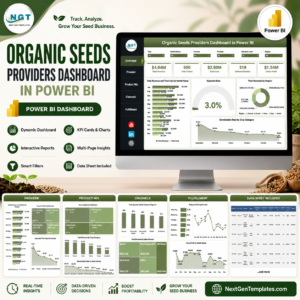
- 5 Power BI pages for Overview, Provider, Product Mix, Channels, and Fulfillment analysis.
- Executive KPI cards for Total Revenue, Total Orders, Total Cost, Delivered Orders, and Gross Profit.
- Overview reporting for monthly revenue vs. cost, rejection rate, regional revenue, and germination rate.
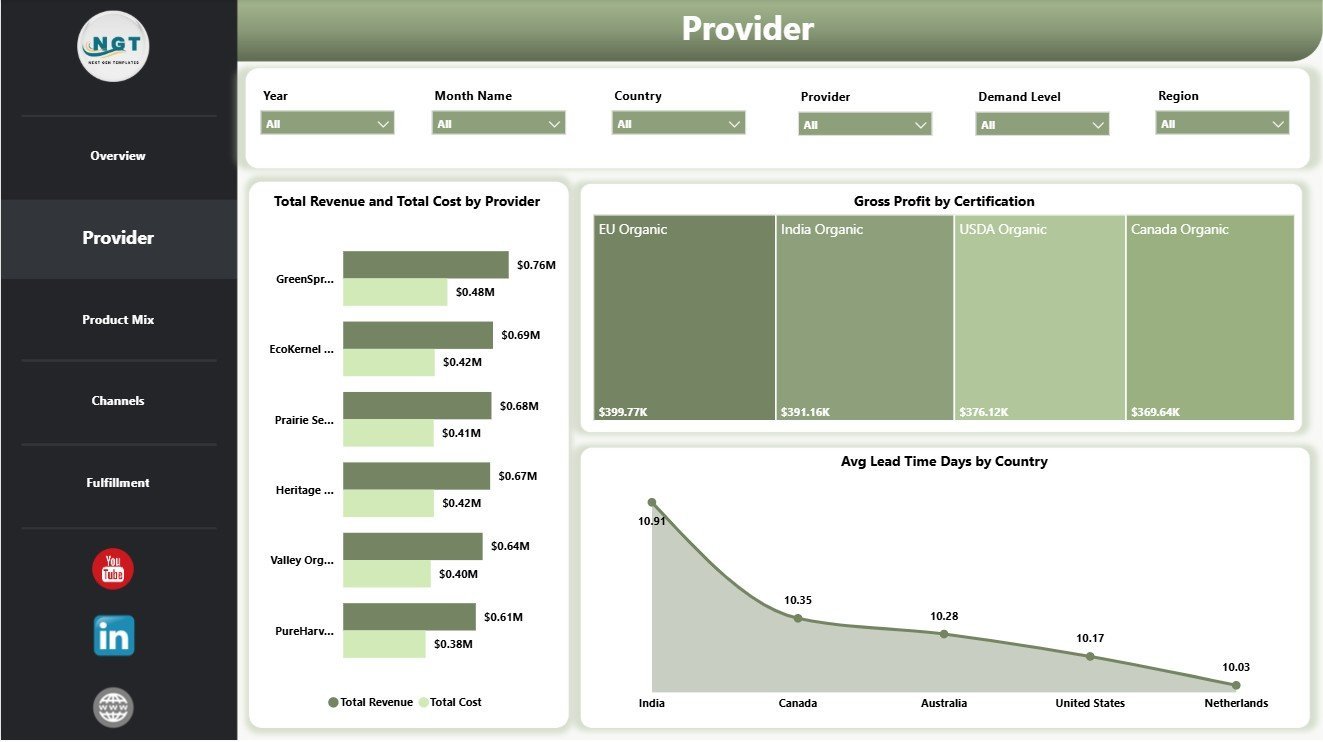
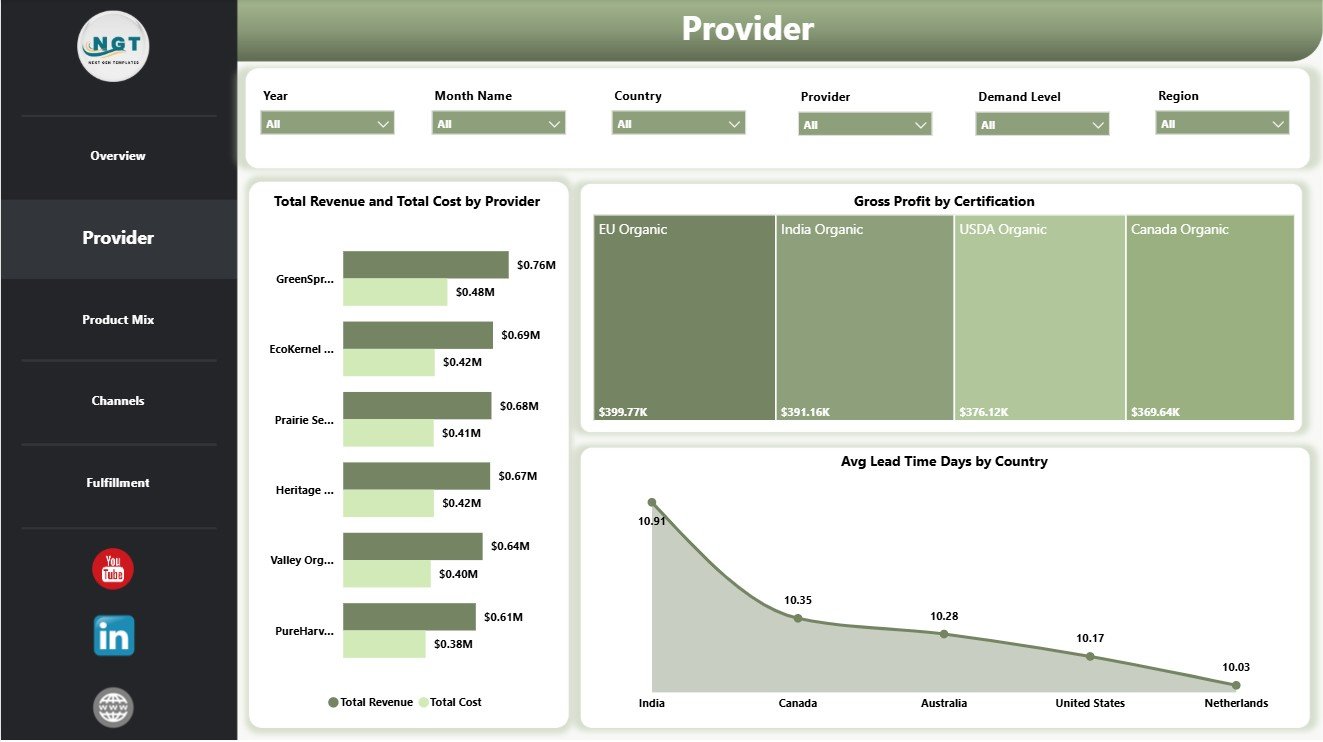
- Provider analysis by provider, certification, country, cost, revenue, gross profit, and lead time.
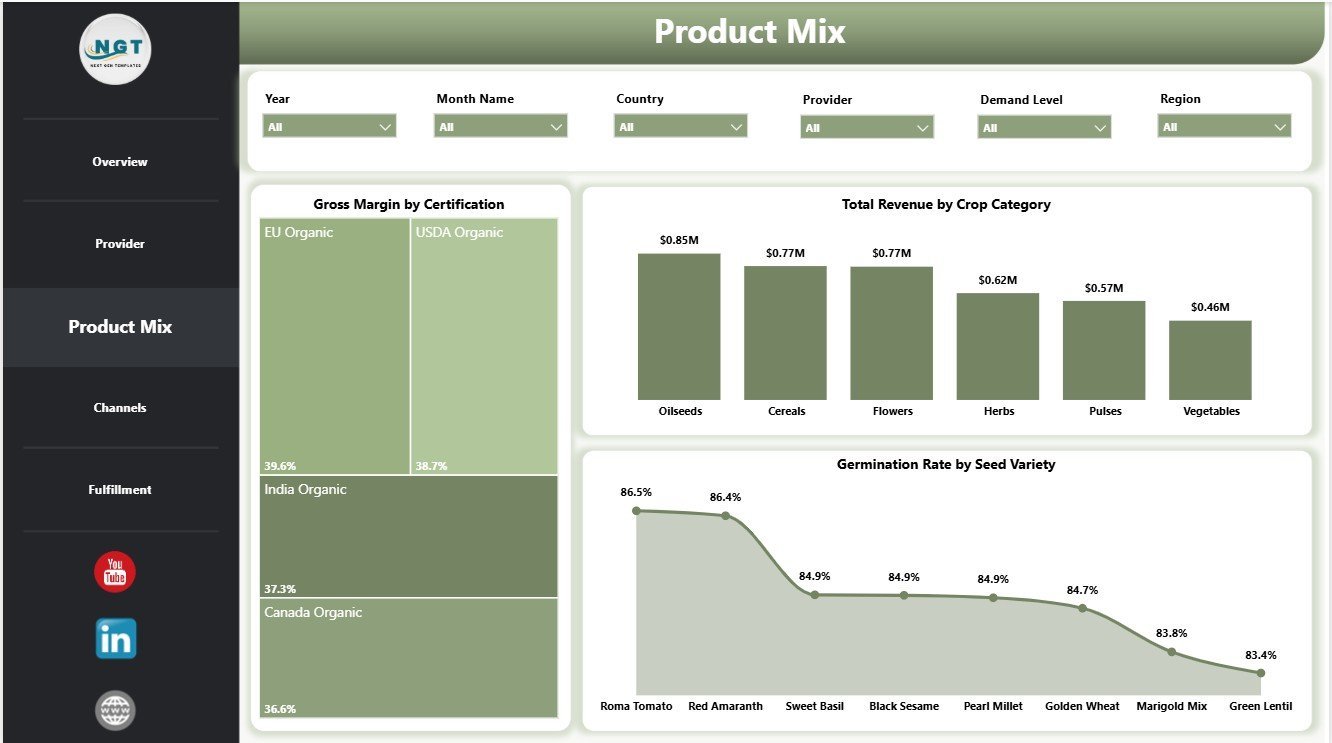
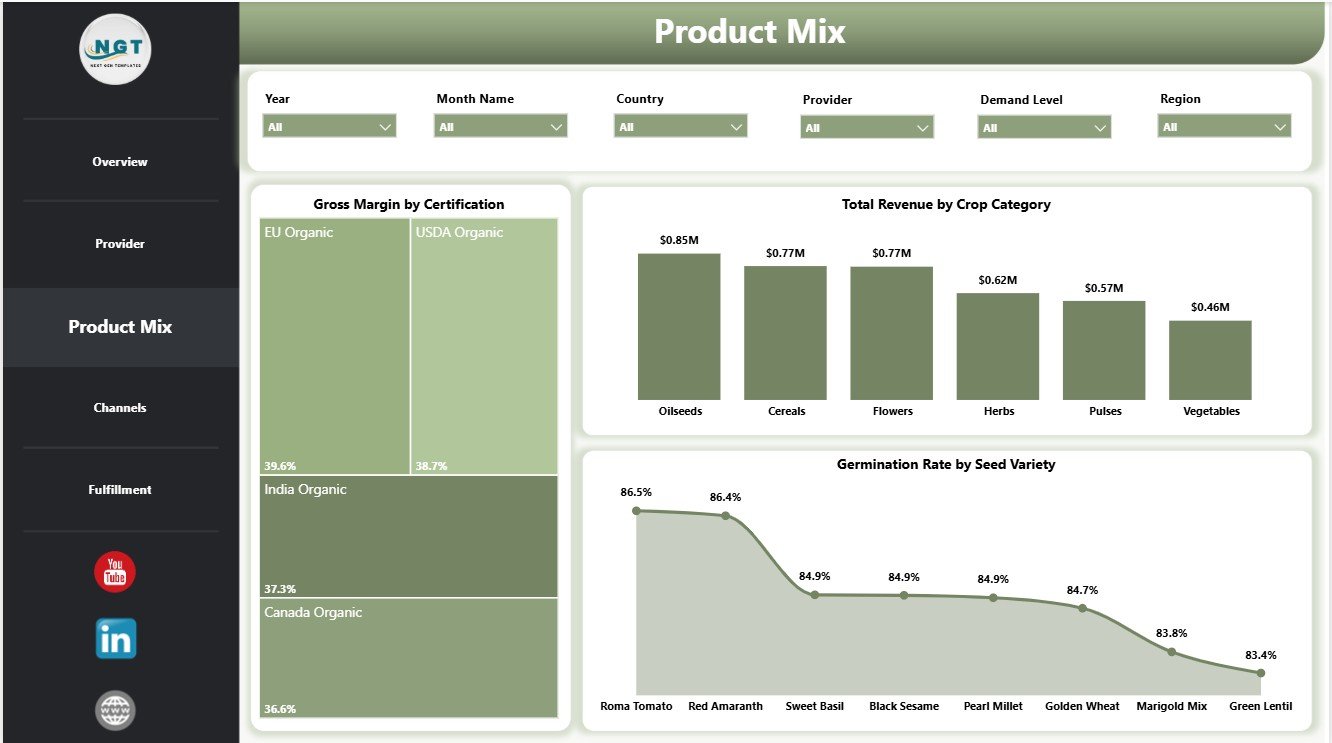
- Product mix insights across certification, crop category, seed variety, margin, revenue, and germination rate.
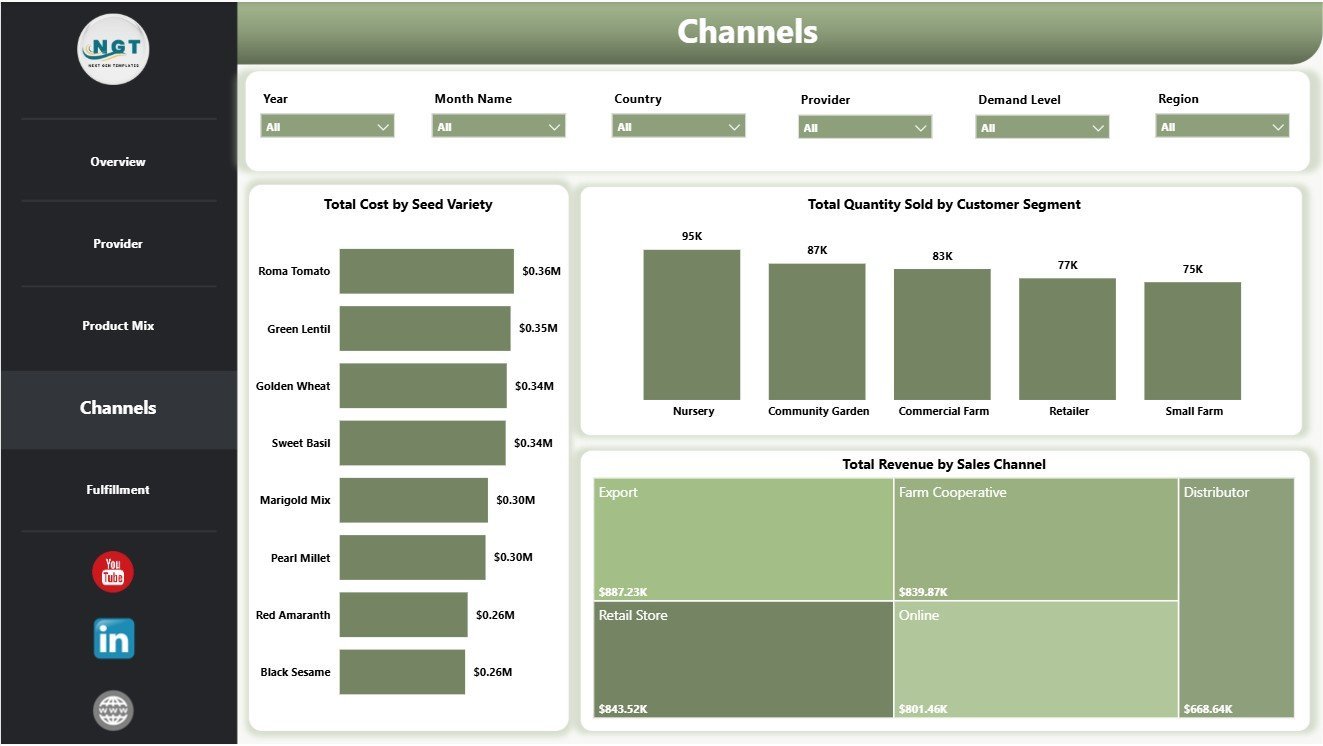
- Channel reporting for seed variety cost, customer segment quantity, and sales channel revenue.
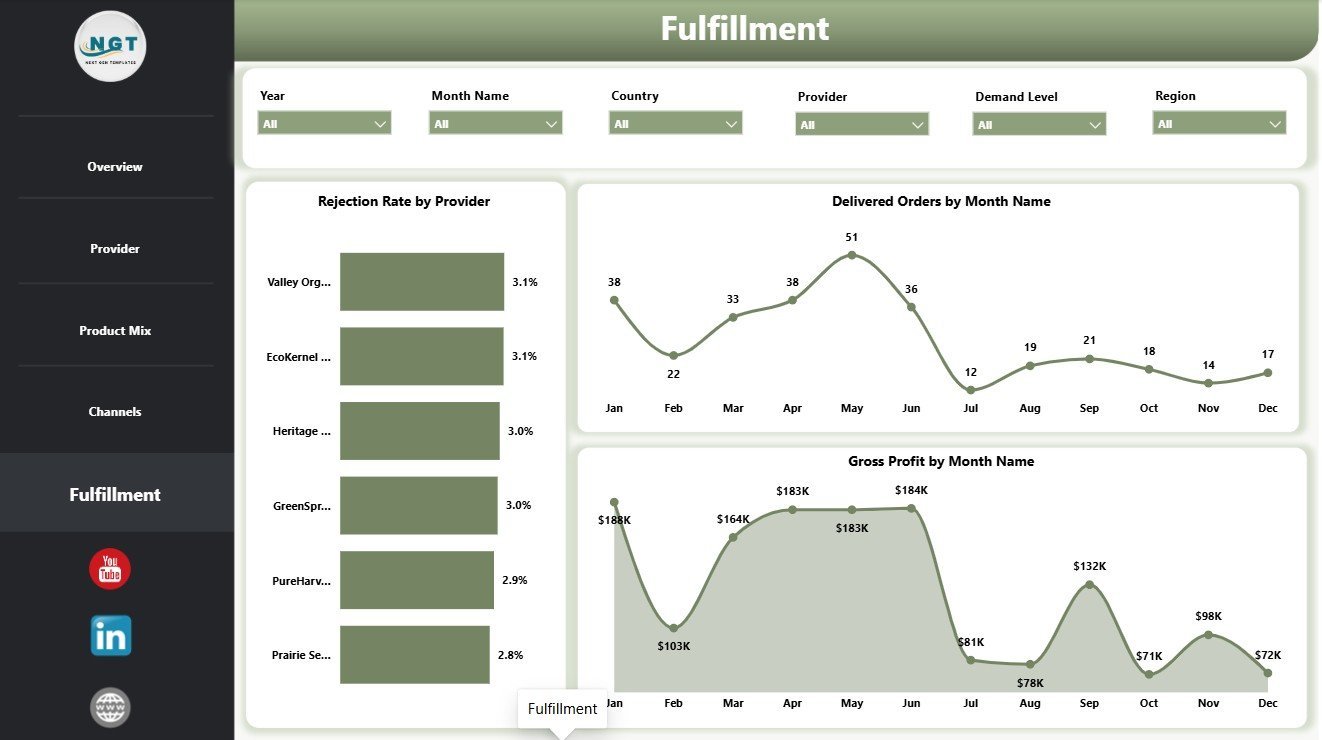
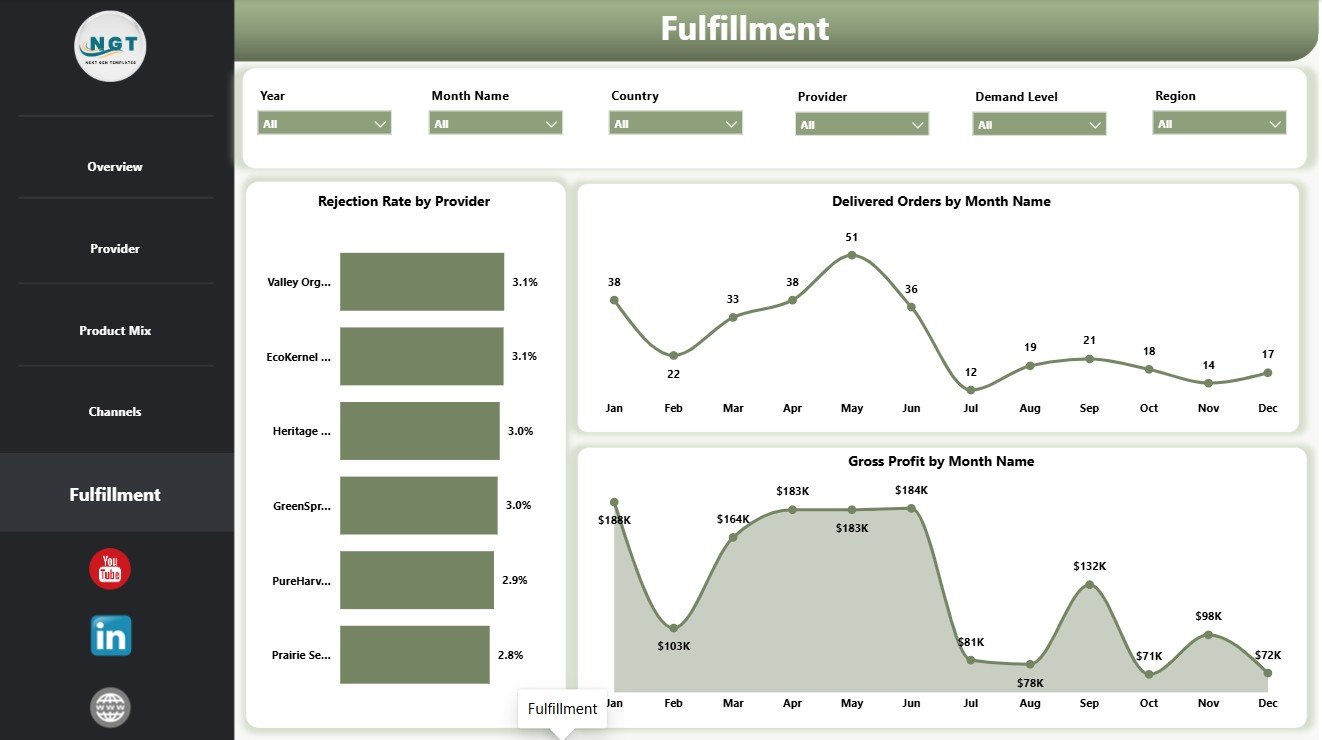
- Fulfillment tracking for rejection rate by provider, delivered orders by month, and gross profit by month.
- Interactive slicers for fast filtering during supplier reviews, sales meetings, and quality discussions.
- Editable PBIX file designed for Power BI Desktop customization and optional Power BI Service sharing.
What’s Inside the Organic Seeds Providers Dashboard in Power BI
1. Overview Page
The Overview page gives leadership a fast snapshot of overall seed provider performance. The top cards show Total Revenue, Total Orders, Total Cost, Delivered Orders, and Gross Profit so users can review commercial volume, fulfillment progress, spending, and margin health together.
Total Revenue and Total Cost by Month Name: This chart compares month-wise sales with operating cost. It helps users see whether revenue growth is keeping pace with cost movement.
Rejection Rate by Overall Orders: This visual highlights rejected order share against overall order flow. It helps teams monitor quality, handling, and provider reliability risk.
Total Revenue by Region: This chart shows how revenue is distributed across regions. It supports market comparison and regional sales planning.
Germination Rate by Crop Category: This chart compares germination performance by crop group. It helps quality teams identify categories that need testing, supplier review, or improvement.
2. Provider
The Provider page focuses on supplier performance and provider economics. Total Revenue and Total Cost by Provider compares provider-level sales and cost, Gross Profit by Certification shows profitability by certification type, and Avg Lead Time Days by Country helps users find countries where delivery cycles are longer or shorter.
3. Product Mix
The Product Mix page helps users understand which seed groups, varieties, and certification types are driving performance. Gross Margin by Certification compares profitability by certification, Total Revenue by Crop Category identifies stronger crop groups, and Germination Rate by Seed Variety highlights quality differences across varieties.
4. Channels
The Channels page connects product cost, buyer segment demand, and sales channel performance. Total Cost by Seed Variety reveals cost-heavy varieties, Total Quantity Sold by Customer Segment shows demand volume by buyer type, and Total Revenue by Sales Channel compares the channels generating the most sales.

5. Fulfillment
The Fulfillment page supports order delivery and quality follow-up. Rejection Rate by Provider identifies providers with higher rejection risk, Delivered Orders by Month Name tracks fulfillment activity over time, and Gross Profit by Month Name shows whether fulfilled order activity is converting into profit.
Organic Seeds Providers Dashboard in Power BI vs. Tableau vs. Paid CRM/SaaS – Where This Fits
| Feature | This Power BI Dashboard | Tableau or Qlik Alternative | Paid Farm SaaS |
|---|---|---|---|
| Cost | $17.99 one-time template | License cost plus build time | Monthly or annual subscription |
| Platform | Power BI Desktop and Power BI Service | Tableau or Qlik environment | Vendor cloud platform |
| Setup time | Open PBIX, connect or replace data, refresh | Build data model and visuals manually | Onboarding and configuration |
| Real-time team collaboration | Available after publishing to Power BI Service | Available by plan | Usually included by plan |
| Mobile access | Power BI mobile app after publishing | Vendor mobile app | Usually included |
| Customizable fields | Edit model, visuals, measures, pages, and slicers | Editable with analyst skills | Depends on vendor permissions |
| Share with link | Available through Power BI permissions | Available through platform permissions | Usually login controlled |
| Year-1 cost at 5 users | Template cost plus any Microsoft licensing | License cost plus analyst time | Often hundreds or thousands |
| Seed provider metrics | Revenue, orders, cost, gross profit, delivery, rejection, germination, provider, certification, crop, channel, and segment | Must be designed manually | Depends on product module |
Who This Template Is For – and Who It’s Not For
This template is for organic seed providers, seed distributors, farm supply businesses, agribusiness analysts, procurement managers, quality teams, fulfillment managers, channel managers, and consultants who need a Power BI report for seed provider performance. It is not a live inventory system, seed certification filing tool, ERP, CRM automation platform, warehouse scanner, or compliance database.
How to Use the Organic Seeds Providers Dashboard in Power BI
- Download and unzip the product file.
- Open the PBIX file in Power BI Desktop.
- Review the sample pages, cards, slicers, and visuals.
- Replace or connect the sample source with your own organic seed provider data.
- Refresh the report and check each dashboard page.
- Use slicers to filter by provider, region, country, crop category, seed variety, certification, sales channel, customer segment, month, status, or available fields.
- Publish to Power BI Service if your team needs browser access, sharing, or scheduled refresh.
Real-World Use Cases
Anika, seed provider owner: reviews Total Revenue, Total Orders, Delivered Orders, Total Cost, and Gross Profit before monthly sales and operations meetings.
Rohan, procurement manager: compares provider cost, provider revenue, rejection rate, and lead time to identify suppliers that need follow-up.
Meera, agribusiness consultant: uses product mix, channel, and fulfillment pages to prepare client reports on certification, crop category, seed variety, regional performance, and monthly profit.
Frequently Asked Questions
What does this Power BI dashboard track?
It tracks revenue, orders, cost, delivered orders, gross profit, rejection rate, germination rate, provider, certification, country, region, crop category, seed variety, sales channel, customer segment, quantity sold, lead time, and month.
Do I need Power BI Desktop?
Yes. Open the PBIX file in Power BI Desktop, which is free from Microsoft. Power BI Service is optional for sharing and scheduled refresh.
Can I customize the dashboard?
Yes. You can edit visuals, pages, measures, slicers, labels, colors, and data source connections in Power BI Desktop.
Can I use my own seed provider data?
Yes. Replace the sample source or connect your structured data source, then refresh the report.
Is this a seed inventory or compliance system?
No. It is an analytics dashboard for prepared data, not a live inventory, ERP, certification, or compliance platform.
Is this a subscription?
No. It is a one-time downloadable Power BI template purchase.
About the Author
Built by PK – Microsoft Certified Professional with 15+ years of Excel, Google Sheets, and Power BI experience. Founder of NextGenTemplates, reaching 300K+ subscribers across YouTube channels. Every template is hand-built and tested before release.
Explore Related Templates
Pair this dashboard with Organic Seeds Providers Dashboard in Excel, Indoor Farming Systems Dashboard in Power BI, and Agriculture and Farm Dashboard in Power BI. Browse more Power BI Dashboard templates and Power BI templates.
Read the detailed blog post: Organic Seeds Providers Dashboard in Power BI Template.
Download the Organic Seeds Providers Dashboard in Power BI and start reviewing provider performance, seed quality, revenue, cost, delivery, channels, and fulfillment in one editable report.
Last updated: July 18, 2026.
Watch the step-by-step video tutorial:
Compatibility and Requirements
- Works in Power BI Desktop, which is free from Microsoft. Open the PBIX file there to edit pages, measures and slicers. Microsoft explains the download in Get Power BI Desktop.
- Power BI Service is optional and only needed if you want to publish the report for browser access, sharing or scheduled refresh.















Reviews
There are no reviews yet.