



In today’s fast-paced manufacturing environment, real-time visibility into production, quality, and cost is not just helpful—it’s essential. That’s why we’ve created the Manufacturing Dashboard in Google Sheets, a ready-to-use, interactive dashboard that gives manufacturers instant access to key performance indicators across the production lifecycle.
Whether you’re a plant manager, production analyst, or business owner, this tool simplifies complex manufacturing data into actionable insights—all within Google Sheets.

📊 Key Features of the Manufacturing Dashboard
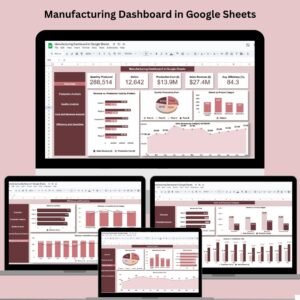
✅ 1. Overview Sheet Tab
The main control center of your dashboard—this sheet gives you high-level visibility through smart visualizations:
Quantity Produced: Units manufactured over time
Defects: Number of issues identified during production
Production Cost ($): Total manufacturing expenses
Sales Revenue ($): Revenue from product sales
Avg. Efficiency (%): Snapshot of operational performance
Charts Included:
Revenue vs. Production Cost by Product
Quantity Produced by Plant
Defects by Product Category
Sales Revenue by Category & Month
🏗️ 2. Production Analysis Sheet
Zoom into specific production performance using these key visualizations:
Quantity Produced by Product
Quantity Produced by Category
Monthly Production Trend
This sheet helps teams identify underperforming product lines and seasonal trends.
📦 3. Quality Analysis Sheet
Manage product and process quality with detailed insights:
Defects by Plant
Defects by Product Category
Defects by Product
Defects Trend Over Time
Perfect for pinpointing quality issues before they escalate.
💰 4. Cost & Revenue Analysis Sheet
Track profitability at every level:
Revenue by Plant
Revenue vs. Cost by Category
Revenue vs. Cost Monthly Trend
Use this sheet to identify cost-saving opportunities and profitable product lines.
⚙️ 5. Efficiency and Downtime Sheet
Focus on performance and time optimization:
Defects by Plant
Efficiency % vs. Downtime (hrs) by Category
Efficiency % vs. Downtime (hrs) by Month
This helps eliminate inefficiencies and improve plant-wide productivity.
📂 6. Data Sheet Tab
The source of all the insights—this raw data sheet powers the entire dashboard with editable fields for:
Date, Product, Plant, Quantity, Defects, Cost, Revenue, Efficiency, Downtime
Keep it updated regularly to maintain accurate visualizations.
🎯 Advantages of Using This Dashboard
📈 Real-Time Production Tracking
Keep your team updated with live performance indicators from anywhere.
💸 Cost Optimization
Track production cost vs. revenue to increase profitability.
📊 Better Decision-Making
Make informed, data-driven decisions with clearly visualized metrics.
🛠️ Customizable for Any Plant
Easily adjust charts, metrics, and layout based on your unique production setup.
🌐 Access Anywhere
Hosted in Google Sheets—no special software required.
🔧 Best Practices to Maximize Value
✅ Update regularly: Daily/weekly updates ensure data is always relevant.
🎯 Customize to your workflow: Tailor KPIs to reflect your plant’s goals.
🔍 Use conditional formatting: Quickly spot anomalies or quality issues.
📅 Track trends: Monthly production and defect charts highlight recurring patterns.
🚀 Opportunities for Improvement
Want to take your dashboard further?
🔗 Integrate with ERP systems: Pull live data automatically.
🧠 Add smart alerts: Notify supervisors when KPIs fall below targets.
📊 Use advanced charts: Upgrade with heat maps or 3D visuals in Data Studio or Looker.
👨🏭 Real-Life Applications
🏭 Plant Managers: Monitor output, quality, and costs in real-time
💼 Business Owners: Evaluate profitability and ROI by product line
👷 Quality Teams: Spot defects early and improve compliance
🔧 Operations Teams: Reduce downtime and boost performance
📥 What’s Included in Your Download
✔️ Pre-built Google Sheet with 6 dashboard tabs
📈 Pre-linked charts & formulas
💼 Ready-to-fill data sheet
🧭 Easy-to-navigate interface
🔗 Click here to read the Detailed blog post
Watch the step-by-step video Demo:
🎥 Visit our YouTube channel to learn step-by-step video tutorials
Compatibility and Requirements
- Works in Google Sheets. You need a free Google account and a web browser.
- The charts are standard Google Sheets charts. Google explains how to edit them in Add & edit a chart or graph.
Frequently Asked Questions
Which sheets are included?
There are six tabs: Overview, Production Analysis, Quality Analysis, Cost and Revenue Analysis, Efficiency and Downtime, and a Data sheet.
What data do I enter?
You fill the Data sheet with Date, Product, Plant, Quantity, Defects, Cost, Revenue, Efficiency and Downtime. The charts on the other tabs are linked to it.
Which KPIs appear on the Overview tab?
Quantity Produced, Defects, Production Cost, Sales Revenue and Average Efficiency, with charts for revenue against cost by product, quantity by plant, defects by category and revenue by category and month.
Can I compare plants?
Yes. Quantity produced, defects and revenue are each charted by plant.
Do I need any extra software?
No. The dashboard runs in Google Sheets in your browser.
Related Manufacturing Templates
- Manufacturing Dashboard in Excel: a manufacturing dashboard built in Excel
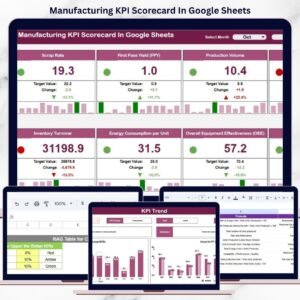
- Manufacturing KPI Scorecard In Google Sheets: KPI targets and actuals in Google Sheets
- Manufacturing KPI Dashboard in Excel: KPI tracking for production teams
- Industrial Manufacturing KPI Dashboard in Excel: KPIs for industrial plants
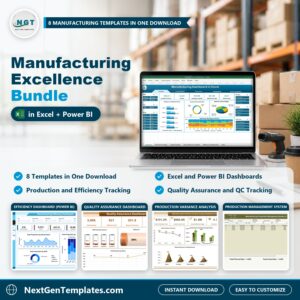
- Manufacturing Excellence Bundle: 8 manufacturing templates for Excel and Power BI
Browse all Google Sheets dashboards or the Excel manufacturing templates.











Reviews
There are no reviews yet.