Compliance mistakes are expensive. Penalties increase. Regulations evolve. Audits arrive without warning. ⚠️
If your organization still tracks compliance performance through scattered spreadsheets and manual reports, you are exposing yourself to unnecessary risk.
So how do high-performing organizations stay compliant, audit-ready, and in control?
The answer is simple.
You need the Legal Compliance KPI Scorecard in Excel.
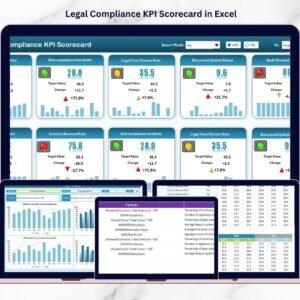
This ready-to-use Excel scorecard centralizes legal and regulatory KPIs, compares Actual vs Target performance, and tracks Month-to-Date (MTD) and Year-to-Date (YTD) trends — all in one structured and professional template. Instead of reacting to compliance problems, you proactively monitor them.
No confusion. No hidden risks. Just measurable compliance visibility.
Let us explore what makes this scorecard powerful.
🚀 Key Feature of Legal Compliance KPI Scorecard in Excel
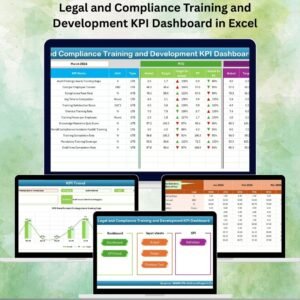
📊 Interactive Scorecard Dashboard
Select Month, MTD, or YTD from dropdown menus and watch the scorecard update instantly.
🎯 Actual vs Target Comparison
Measure compliance performance against predefined targets automatically.
📈 MTD & YTD Tracking
Monitor short-term and long-term compliance performance clearly.
🔴🟢 Conditional Formatting Indicators
Instantly identify target achievement with visual color signals.
📉 Dynamic KPI Trend Charts
Analyze compliance patterns over time with structured trend graphs.
📘 Centralized KPI Documentation
Store KPI Name, Group, Formula, Definition, Unit, and Type (LTB/UTB) in one place.
⚡ Automated Calculations
Excel formulas calculate performance differences instantly.
🛠️ Fully Customizable Template
Modify KPIs, targets, and data structure according to your regulatory environment.
Because everything updates automatically, leadership gains real-time compliance visibility.
📦 What’s Inside the Legal Compliance KPI Scorecard in Excel
This ready-to-use template includes 4 structured worksheets:
1️⃣ Scorecard Sheet
This is the main performance view.

You can:
• Select Month
• Choose MTD or YTD analysis
• Compare Actual vs Target
• View Previous Year comparisons
• Identify performance gaps using visual indicators
The structured layout ensures fast decision-making.
2️⃣ KPI Trend Sheet
This sheet allows deeper analysis.
From cell C3, select a KPI and instantly view:
• KPI Group
• Unit of KPI
• KPI Type (Lower the Better / Upper the Better)
• Formula and Definition
Additionally, you get:
• MTD Trend Chart (Actual, Target, Previous Year)
• YTD Trend Chart (Actual, Target, Previous Year)
Because trends reveal patterns, teams can correct compliance issues early.
3️⃣ Input Data Sheet
This is where you enter monthly compliance numbers.
Simply input:
• KPI Name
• Month
• Actual Value
• Target Value
The scorecard updates automatically.
No complex formulas required.
4️⃣ KPI Definition Sheet
Centralized documentation improves audit readiness.
This sheet stores:
• KPI Name
• KPI Group
• Unit
• Formula
• Definition
• KPI Type (LTB/UTB)
During audits, having clear KPI definitions strengthens transparency.
📊 How to Use the Legal Compliance KPI Scorecard in Excel
Using this scorecard is simple:
1️⃣ Define your compliance KPIs.
2️⃣ Enter KPI definitions in the Definition sheet.
3️⃣ Input monthly Actual and Target values.
4️⃣ Select Month and MTD/YTD from dropdown menus.
5️⃣ Review compliance performance instantly.
The template automatically calculates performance gaps and highlights risk areas.
Because everything is structured, implementation takes only minutes.
👥 Who Can Benefit from This Legal Compliance KPI Scorecard in Excel
This scorecard is ideal for:
⚖️ Compliance Officers
📑 Legal Teams
🛡️ Risk Managers
📊 Internal Audit Teams
🏢 Corporate Governance Leaders
💼 HR & Regulatory Departments
Industries that benefit include:
• Financial Services
• Healthcare
• Manufacturing
• IT & Technology
• Corporate Enterprises
If your organization faces regulatory scrutiny, this scorecard provides structure and control.
This template strengthens compliance by:
✔ Highlighting risk exposure
✔ Tracking corrective actions
✔ Monitoring regulatory adherence
✔ Supporting audit preparation
✔ Improving accountability
✔ Encouraging continuous improvement
Instead of reacting to compliance failures, you build a proactive compliance culture.
Stop relying on fragmented reports. Start managing compliance with clarity.
📘 Click here to read the Detailed blog post
Visit our YouTube channel to learn step-by-step video tutorials
👉 https://www.youtube.com/@PKAnExcelExpert
Watch the step-by-step video tutorial:
Compatibility and Requirements
- Works in Microsoft Excel desktop (Excel 2016 or later, or Microsoft 365).
- You choose the month and MTD or YTD from dropdown menus, and the KPI Trend sheet has a KPI dropdown in cell C3. Microsoft explains dropdowns in Create a drop-down list.
Frequently Asked Questions
How many worksheets does the template have?
Four: Scorecard, KPI Trend, Input Data and KPI Definition.
Where do I enter my compliance numbers?
On the Input Data sheet. Enter the KPI name, month, actual value and target value, and the Scorecard sheet updates automatically.
Can I view MTD and YTD results?
Yes. Pick the month and MTD or YTD from the dropdown menus on the Scorecard sheet to compare Actual, Target and Previous Year.
What does the KPI Trend sheet show?
Select a KPI in cell C3 to see its group, unit, type (Lower the Better or Upper the Better), formula and definition, plus MTD and YTD trend charts for Actual, Target and Previous Year.
Is there a Power BI or Google Sheets version of a legal compliance KPI view?
Yes. See the Legal Compliance KPI Dashboard in Power BI and the Legal Compliance KPI Dashboard in Google Sheets.
Related Legal Compliance Templates
- Legal Compliance KPI Dashboard in Excel: a dashboard view of the same type of KPIs
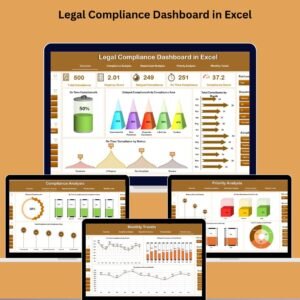
- Legal Compliance Dashboard in Excel: a broader compliance overview in Excel
- Legal Compliance Report in Excel: a report layout for compliance results
- Legal KPI Scorecard in Excel: a scorecard for legal department KPIs
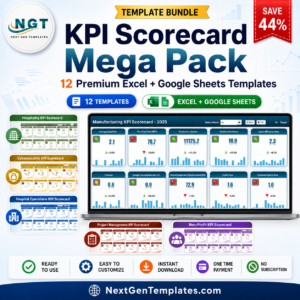
- KPI Scorecard Mega Pack: 12 scorecard templates in one download
Browse all Excel KPI dashboards.