



The Human Resources Cybersecurity KPI Dashboard in Excel is an essential tool designed to help HR and IT teams track and monitor key cybersecurity performance indicators within the human resources function. This Excel-based dashboard allows organizations to assess their cybersecurity preparedness, track data breaches, monitor employee training, and improve overall security practices within the HR department.
In today’s digital world, human resources departments are handling sensitive employee data, and it’s crucial to ensure that this data is protected. This dashboard helps HR teams keep track of cybersecurity policies, track employee compliance with security protocols, and measure the effectiveness of cybersecurity training programs. With real-time data tracking and visualized KPIs, this tool provides actionable insights to enhance your organization’s security posture.
Key Features of the Human Resources Cybersecurity KPI Dashboard in Excel
🔒 Cybersecurity Training & Awareness Tracking
Monitor the completion rates of cybersecurity training programs among employees. Track the progress of security awareness campaigns and ensure that employees are well-informed about potential cyber threats and how to mitigate them.
📉 Incident Reporting & Breach Monitoring
Track cybersecurity incidents and breaches within the organization, including the number of incidents, severity, and resolution times. This KPI helps ensure that breaches are addressed promptly and helps mitigate future risks.
🛡 Compliance Monitoring
Monitor compliance with cybersecurity regulations and internal security protocols. Keep track of HR policies related to data protection, access control, and confidentiality to ensure compliance with industry standards.
📅 Time-Based Performance Monitoring
Analyze cybersecurity-related metrics over different time periods (daily, monthly, quarterly). Monitor trends and performance to identify areas that need attention and to improve security protocols over time.
📈 Real-Time Data & Insights
Integrate real-time data from various systems into the dashboard for up-to-date performance tracking. Monitor employee training progress, incidents, and compliance in real time to make timely decisions.
⚙️ Customizable Dashboard
Customize the dashboard to reflect the specific cybersecurity KPIs relevant to your organization. Track employee compliance, incident response times, security training effectiveness, and other key metrics.
Why You’ll Love the Human Resources Cybersecurity KPI Dashboard in Excel

✅ Streamline Cybersecurity Management
Track all cybersecurity metrics in one centralized location. This dashboard simplifies managing cybersecurity tasks within HR and ensures no critical step is overlooked.
✅ Improve Employee Security Awareness
Monitor the effectiveness of cybersecurity training programs and ensure that all employees are properly educated about potential cyber threats and how to avoid them.
✅ Enhance Incident Response
Track and monitor incidents to ensure timely resolution. Identify trends in security breaches, improve response times, and implement preventative measures.
✅ Ensure Regulatory Compliance
Monitor compliance with internal and external cybersecurity regulations, ensuring that HR practices meet security standards and legal requirements.
✅ Data-Driven Decision Making
Leverage data and insights to make informed decisions about security policies, employee training, and risk management.
What’s Inside the Human Resources Cybersecurity KPI Dashboard in Excel?
Cybersecurity Training Tracking: Track employee completion rates for cybersecurity training programs.
Incident & Breach Reporting: Monitor and report security incidents and breaches.
Compliance Monitoring: Ensure adherence to security policies and regulations.
Time-Based Monitoring: Analyze trends in cybersecurity performance over time.
Real-Time Data Tracking: Track real-time cybersecurity metrics and employee performance.
Customizable Dashboard: Tailor the dashboard to your organization’s specific needs.
How to Use the Human Resources Cybersecurity KPI Dashboard in Excel
1️⃣ Download the Template: Access the Human Resources Cybersecurity KPI Dashboard in Excel instantly.
2️⃣ Input Data & Metrics: Input employee cybersecurity training data, compliance status, and incident details.
3️⃣ Track KPIs & Performance: Monitor key metrics such as training completion rates, incident response times, and compliance.
4️⃣ Analyze Trends & Identify Risks: Use time-based performance tracking to identify trends and potential risks.
5️⃣ Optimize Cybersecurity Practices: Use insights to improve training programs, strengthen security policies, and enhance HR cybersecurity practices.
Who Can Benefit from the Human Resources Cybersecurity KPI Dashboard in Excel?
🔹 HR & People Operations Teams
🔹 IT & Cybersecurity Teams
🔹 Risk & Compliance Managers
🔹 Security Analysts & Incident Responders
🔹 Small & Medium Enterprises (SMBs)
🔹 Large Enterprises with Complex Cybersecurity Needs
🔹 Organizations Concerned with Employee Data Protection
Enhance your HR cybersecurity management with the Human Resources Cybersecurity KPI Dashboard in Excel. Track incidents, monitor training effectiveness, ensure compliance, and improve your organization’s overall security posture.
Click here to read the Detailed blog post
Visit our YouTube channel to learn step-by-step video tutorials
Youtube.com/@PKAnExcelExpert
Compatibility and Requirements
- Works in Microsoft Excel desktop (Excel 2016 or later, or Microsoft 365).
- Excel’s own guide covers the basics of building and reading charts: Create a chart from start to finish.
Frequently Asked Questions
What does this dashboard track?
It tracks cybersecurity training completion, incidents and breaches, and compliance with security policies in the HR function. You can view these over daily, monthly and quarterly periods.
Can I track security incidents with it?
Yes. It covers the number of incidents, their severity and how long they take to resolve, so you can see whether breaches are handled promptly.
Can I change the KPIs to fit my organization?
Yes. The dashboard is customizable, so you can adjust it to the cybersecurity KPIs you care about, such as employee compliance, incident response times and training effectiveness.
Does it help with compliance monitoring?
Yes. You can monitor adherence to internal security protocols and regulations, including HR policies on data protection, access control and confidentiality.
Is there a similar dashboard for IT teams?
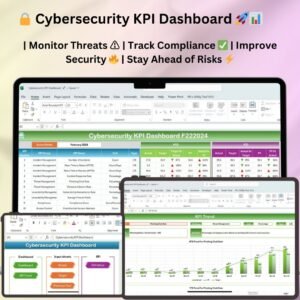
Yes. See the Cybersecurity KPI Dashboard in Excel and the Cybersecurity KPI Dashboard in Power BI.
Related HR and Cybersecurity Templates
- Cybersecurity KPI Dashboard in Excel: the general cybersecurity KPI view
- Cybersecurity Incident KPI Dashboard in Excel: a closer look at incidents
- Cybersecurity Awareness KPI Dashboard in Excel: tracks security awareness
- Human Resources Compliance KPI Dashboard in Excel: HR compliance metrics
- IT and Cybersecurity Operations Bundle: 8 templates for IT and security teams
Browse all Excel KPI dashboards.

































Reviews
There are no reviews yet.