

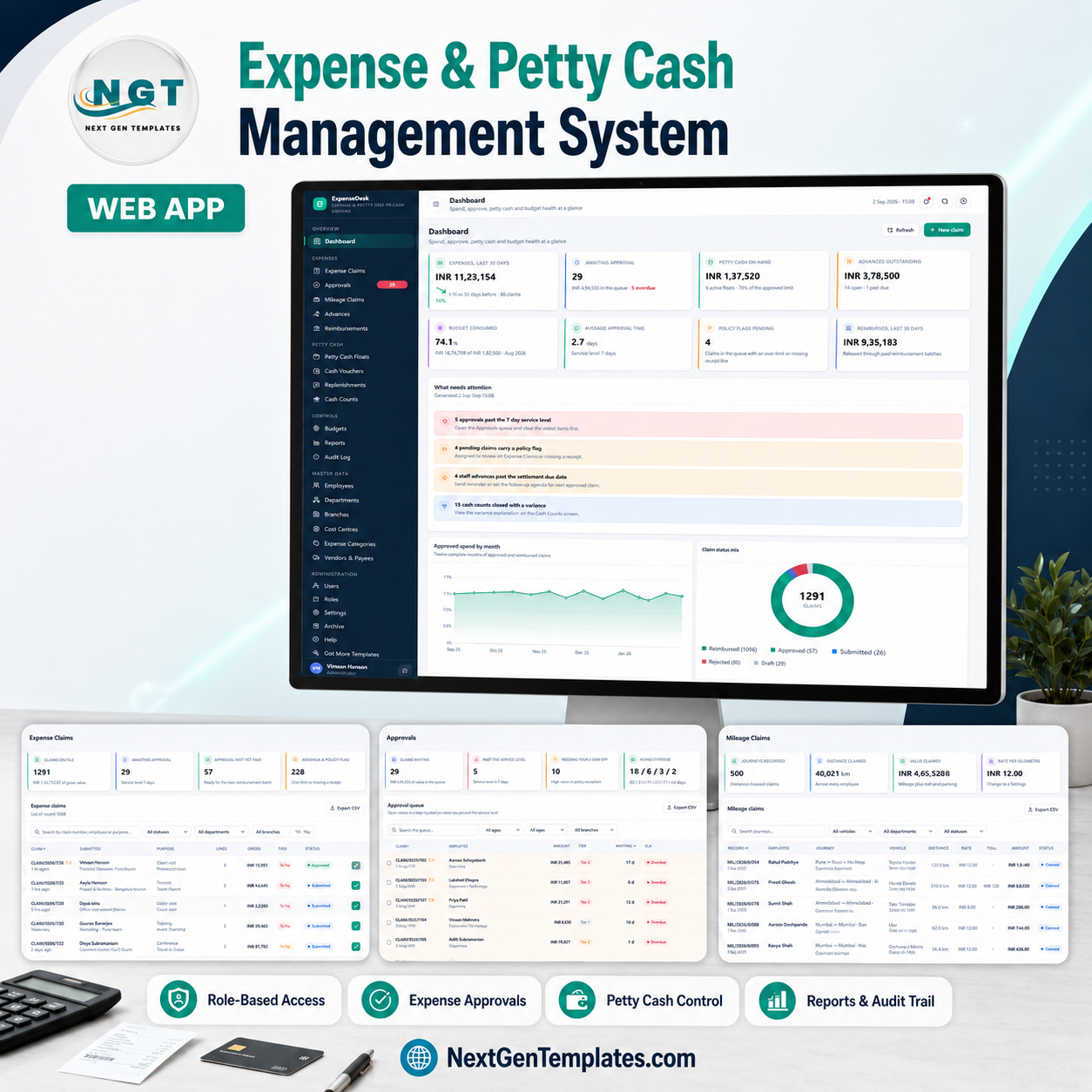

The Expense & Petty Cash Management System Web App is a complete Google Apps Script web application with 25 screens, 6 permission roles, 16 finance reports and a self-building Google Sheets database of 24 sheets. Setup takes about 15 minutes: paste two files into a new Apps Script project, deploy, press one button, and 10,932 rows of realistic demo data appear so every screen, chart and report is populated on day one.
🌍 Join 8,400+ teams in 40+ countries using NextGenTemplates to replace paid SaaS tools with one-time-purchase Excel, Google Sheets, Power BI and Apps Script templates.
✅ Instant download · One-time payment · No subscription · No per-user fees · Lifetime access · Full source code
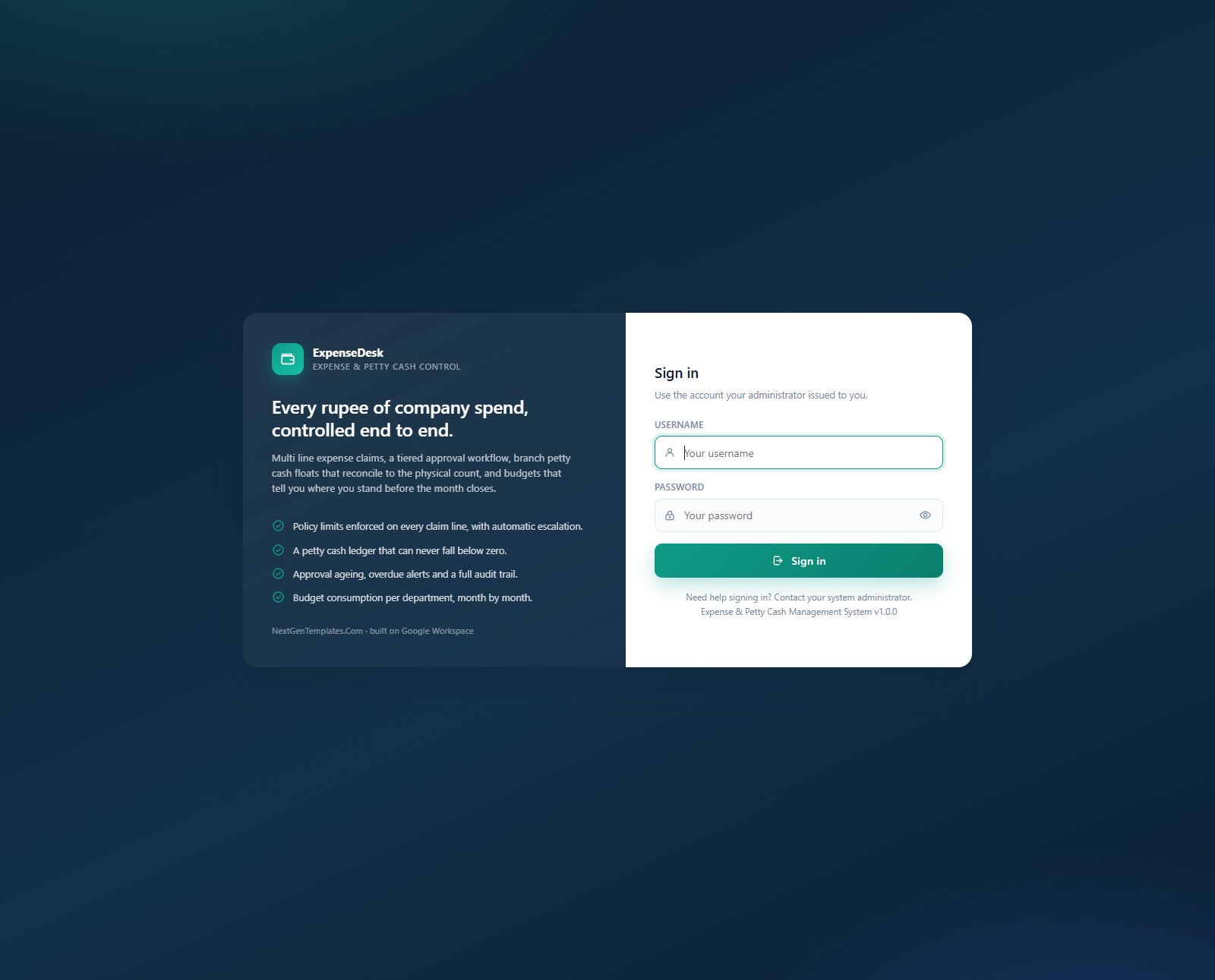
🚀 Try the Live Demo Before You Buy
We have deployed this web app in our own Google account so you can test every page and every one of the six roles — with the full 10,932-row sample database — before you spend anything. No signup, no email required.
🔑 Test Login Credentials
Sign in as admin to see everything, then sign out and come back as employee or custodian — the menu itself shrinks to the handful of screens that role is allowed to touch. That role separation is the point of the product, and you can see it in ten seconds.
💡 These credentials are public on purpose. They belong to a shared demo instance that we reset — they are not anybody’s live system, and they are not what you get after buying. After purchase you deploy your own private copy in your own Google account, with your own accounts and passwords, and nobody else can reach it. What you get in the download is the full source (Code.cs.txt + Index.txt) plus a step-by-step deployment guide.
🔑 Key Features of the Expense & Petty Cash Management System Web App
🧾 Multi-line expense claims with policy enforcement built into the save. A claim carries as many lines as it needs, each with its own date, expense category, amount and attached receipt. A line above its category policy limit, or missing a receipt where the category demands one, is flagged automatically — and any flag pushes the whole claim up one approval tier. The demo database holds 1,291 claims across 3,445 lines, 228 of them carrying a flag.
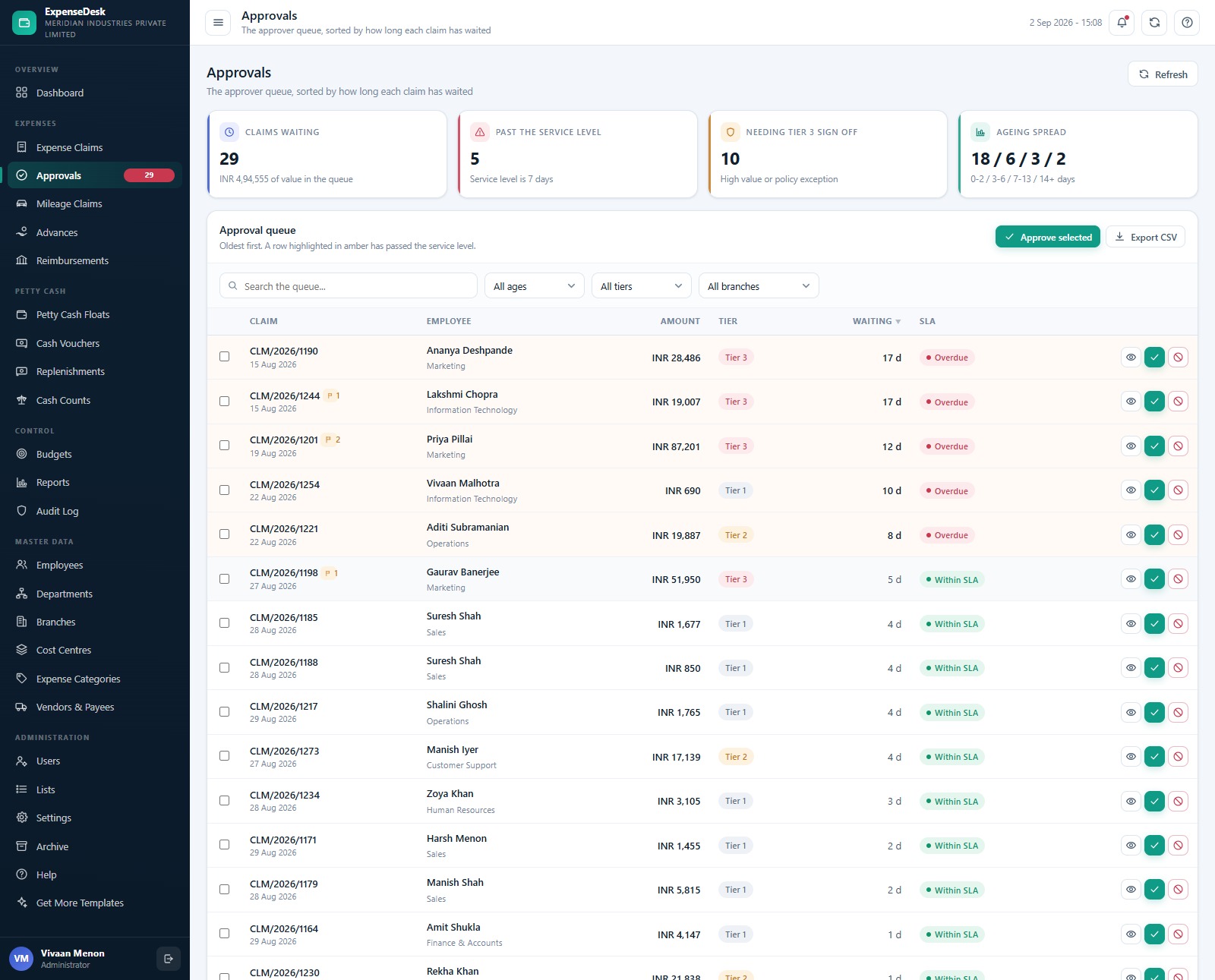
⏱️ A three-tier approval queue that ages itself. Value thresholds route claims on their own: INR 15,000 and above needs tier 2, INR 50,000 and above needs tier 3, and either can be overridden upward by a policy flag. The Approvals screen sorts oldest first, highlights anything past the 7-day service level in amber, and shows the ageing spread as four buckets — 0-2, 3-6, 7-13 and 14+ days.
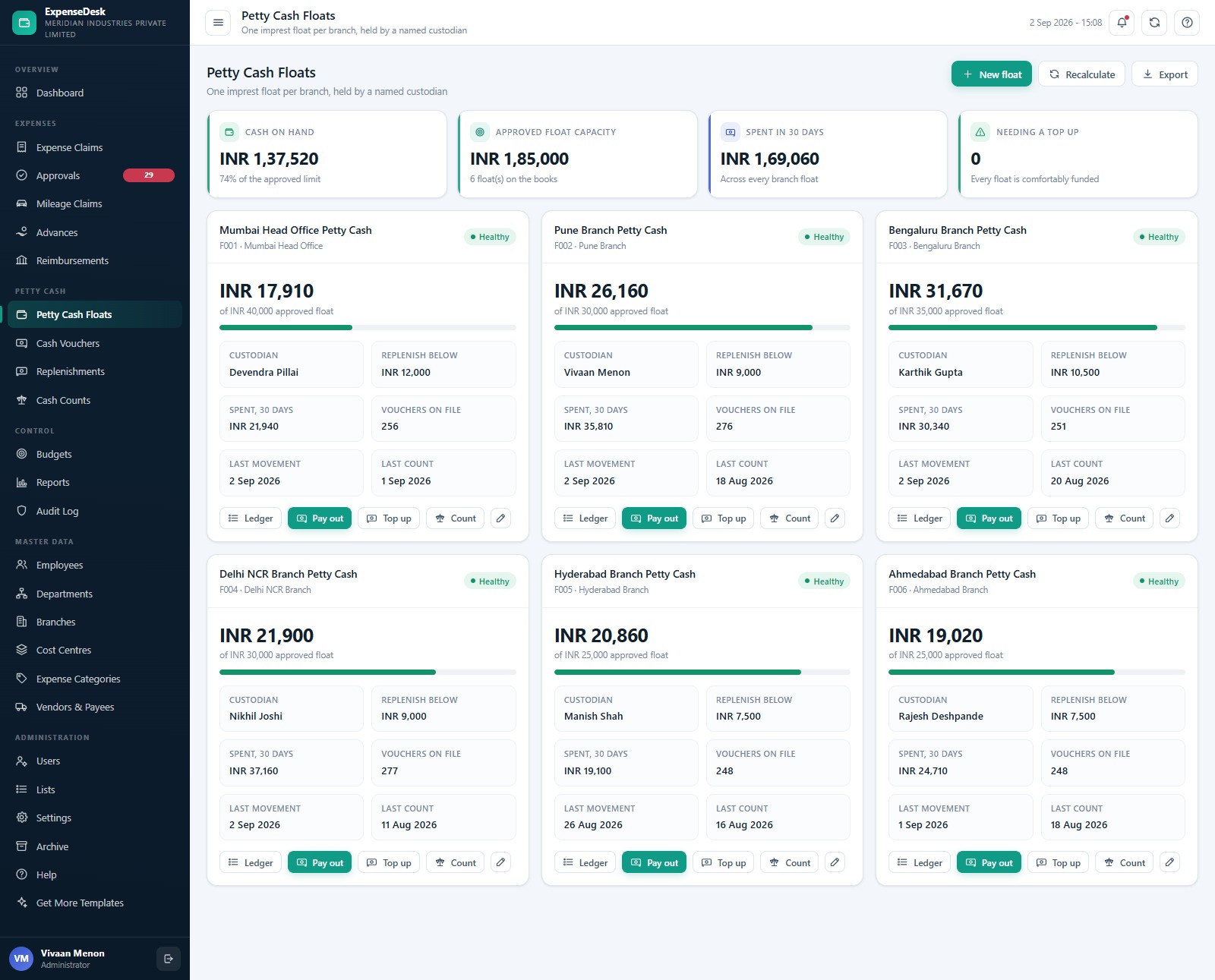
💰 Branch petty cash floats that can never go negative. Each branch runs one imprest float held by a named custodian. A voucher that would overdraw the float is refused outright, with the current balance printed in the refusal message, and a single voucher can never exceed the ceiling in Settings (INR 5,000 out of the box) — anything larger has to go through an expense claim instead.
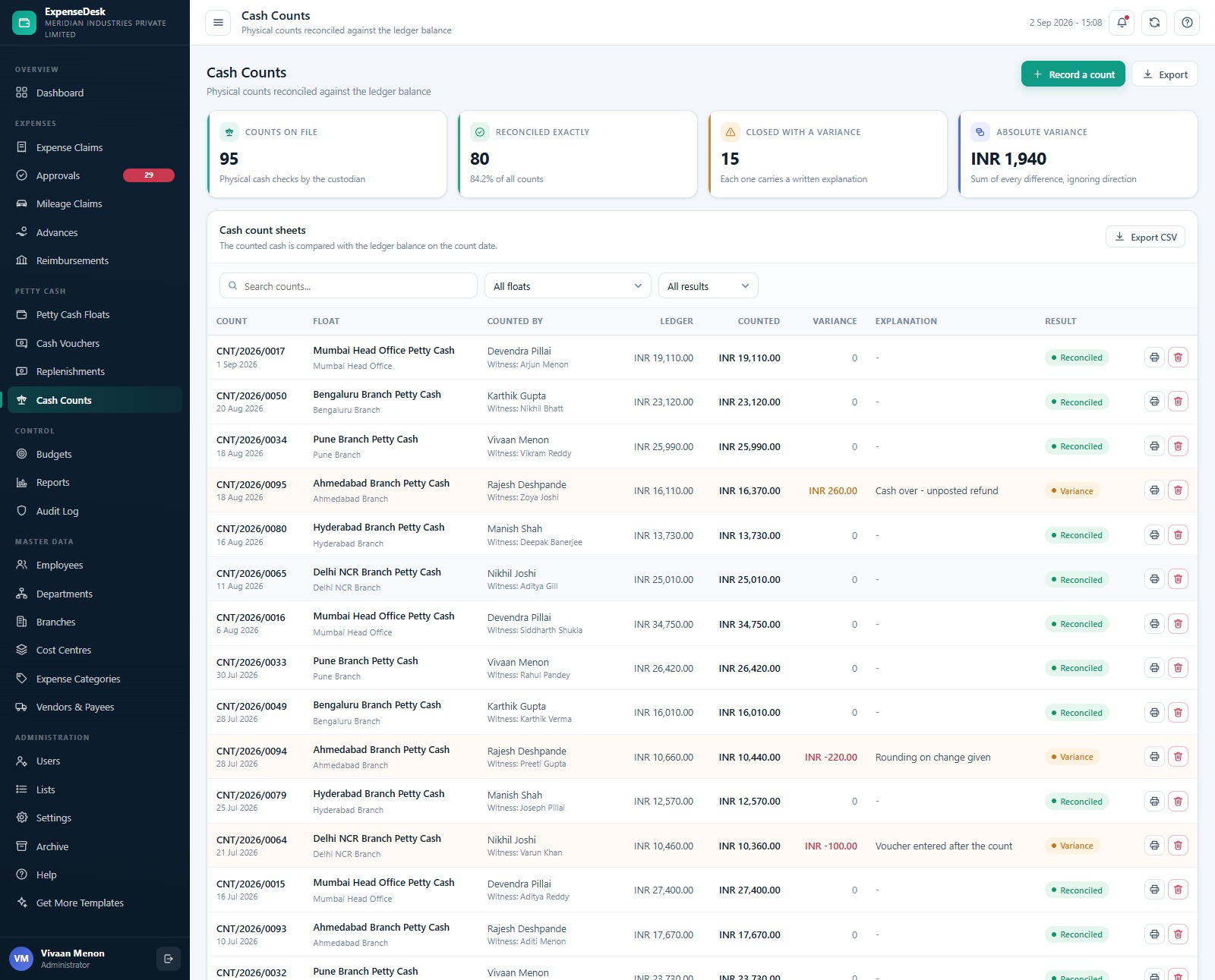
⚖️ Physical cash counts reconciled against the ledger. Every count records the ledger balance, the counted cash and the difference, and a count that closes with a variance cannot be saved without a written explanation. The demo carries 95 counts, 80 of them reconciled exactly and 15 closed with an explained variance.
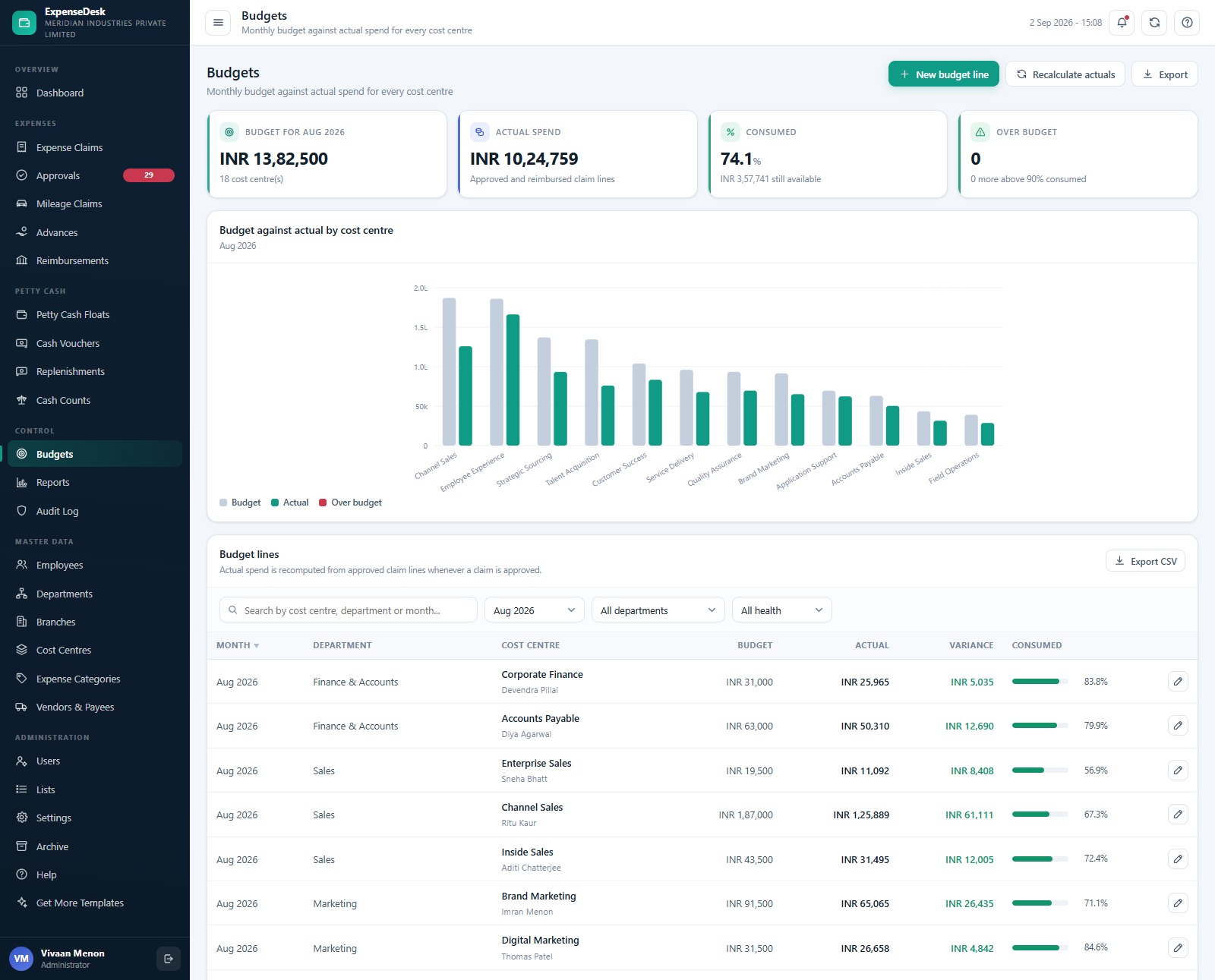
📊 Budgets whose actuals are computed, never typed. Budget consumption is recalculated from approved and reimbursed claim lines whenever a claim is approved, per cost centre, per month, with a colour band for consumption. The seeded month shows INR 10,24,759 spent against INR 13,82,500 budgeted across 18 cost centres — 74.1% consumed, nothing over budget.
🚗 Mileage, advances and reimbursement batches, joined up. Mileage is claimed by distance at the rate in Settings (INR 12 per kilometre by default) with toll and parking added on top. Staff advances net themselves against the employee’s next approved claim and can never fall below zero. Reimbursement batches group approved claims into one payment run per branch, and a claim only leaves the “approved, not yet paid” pool when its batch is marked paid.
🔒 Six roles, enforced on the server as well as the screen. The same permission map that hides a menu item also guards every server call, so a Custodian who guesses a URL still gets nothing back. Passwords are stored as a salted SHA-256 hash and can never be read out of the sheet — a lost password is reset, not recovered.
📝 A real audit trail and a real archive. Every create, update, approval, payment and sign-in is written to the Audit Log (3,000 rows seeded). When the database grows past comfortable, the Archive screen takes a full dated copy into Google Drive first, verifies it, and only then removes closed transactions older than your cutoff — master data and anything still open always stay live.
📦 What’s Inside the Expense & Petty Cash Management System Web App
The download is a ZIP holding three files: Code.cs.txt (the Apps Script server code), Index.txt (the single-page front end) and a user manual PDF with the deployment guide, the role map and the seeded logins. There is no spreadsheet to create and no ID to paste anywhere — the app builds its own 24-sheet Google Sheets database the first time you run setup, along with a Drive folder tree for Receipts, Vouchers, Exports and Archives.
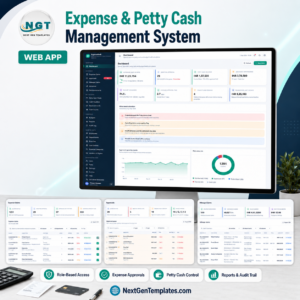
Dashboard
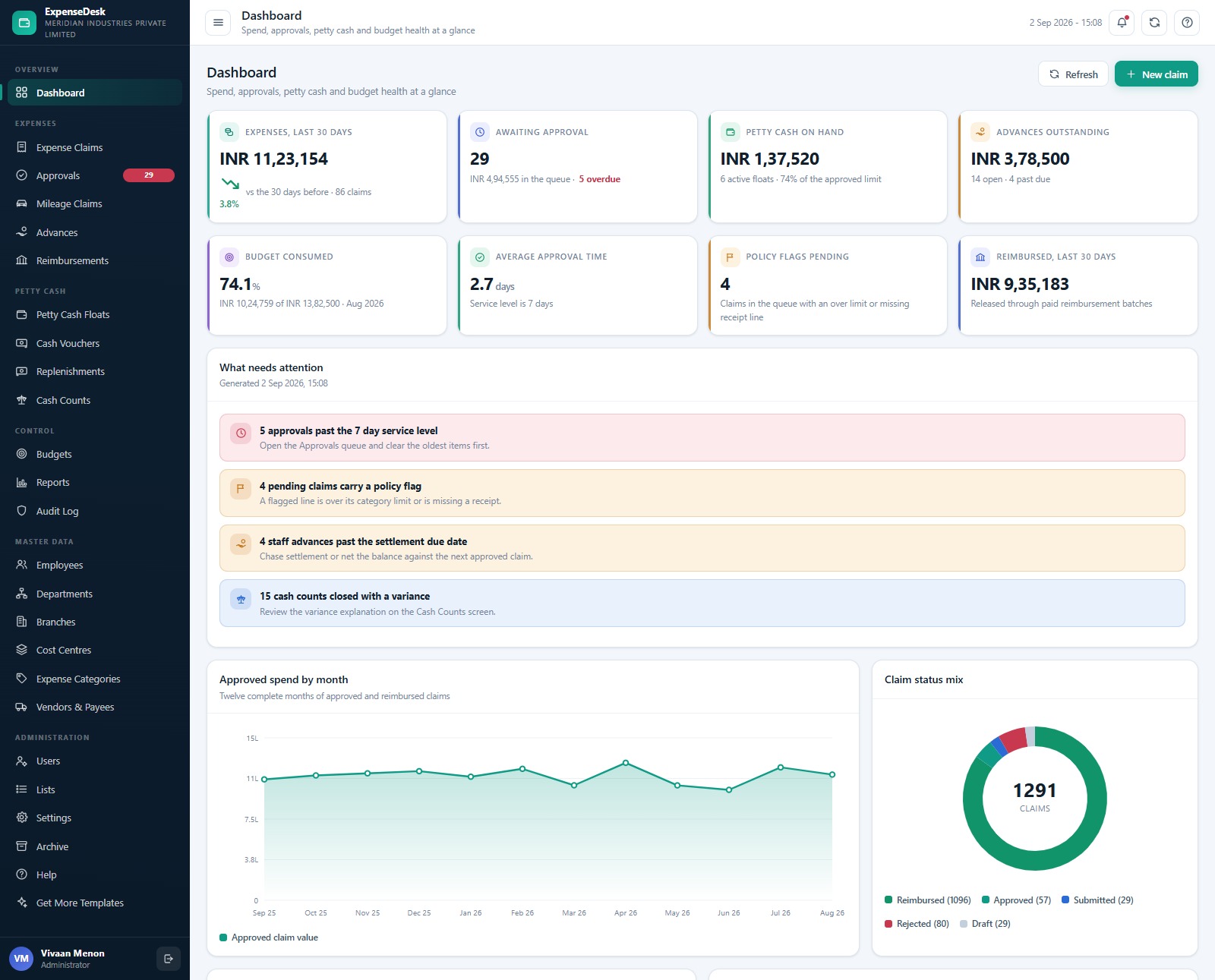
Eight KPI cards — Expenses Last 30 Days, Awaiting Approval, Petty Cash On Hand, Advances Outstanding, Budget Consumed, Average Approval Time, Policy Flags Pending and Reimbursed Last 30 Days — sit above a “What needs attention” panel that names the exact problems waiting for you. Below that are Approved Spend by Month across twelve complete months and Claim Status Mix as a donut of all 1,291 claims.
Expense Claims
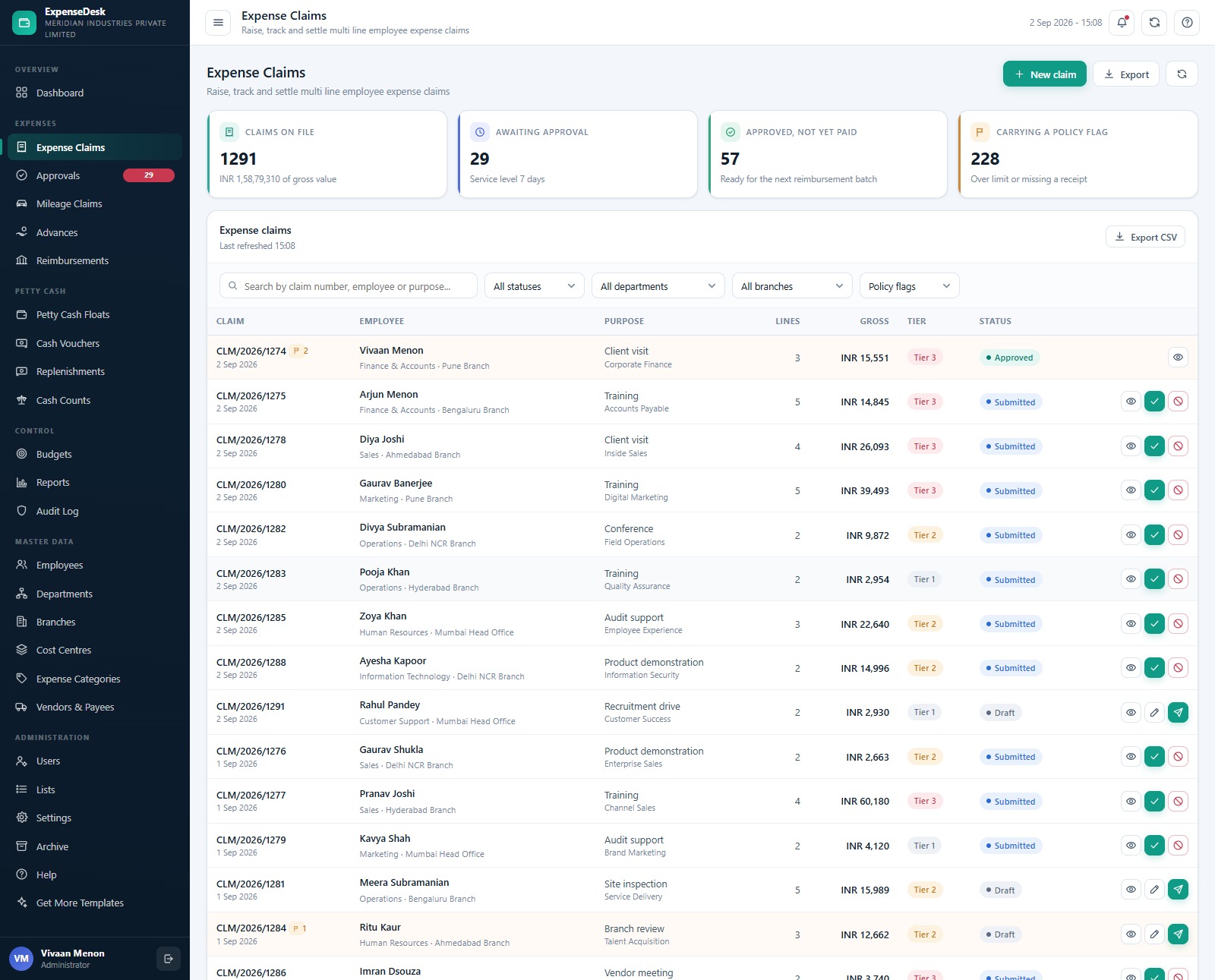
The claims register with Claims On File, Awaiting Approval, Approved Not Yet Paid and Carrying A Policy Flag as cards, then a searchable table filtered by status, department, branch and policy flag. Each row shows the claim number, employee, department and branch, purpose, line count, gross value, approval tier and status, with view, approve, reject and submit actions on the row itself.
Approvals
The approver’s working queue: Claims Waiting, Past The Service Level, Needing Tier 3 Sign Off and the Ageing Spread across four day-buckets. Rows are oldest first, amber where they have breached the 7-day service level, and there is a checkbox column with Approve Selected for clearing a backlog in one action.
Advances
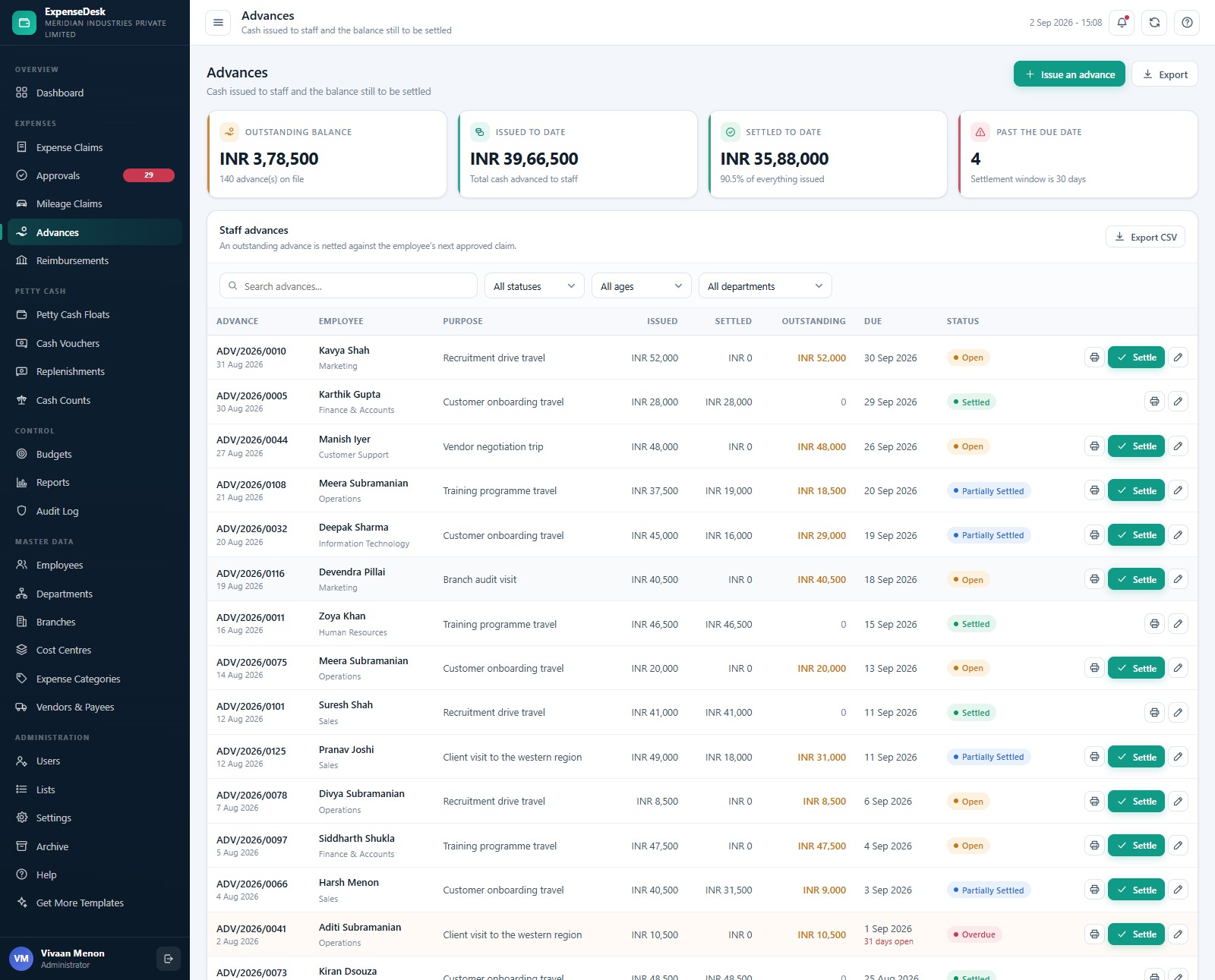
Cash issued to staff and the balance still to be settled, with Outstanding Balance, Issued To Date, Settled To Date and Past The Due Date as cards. Each advance shows issued, settled and outstanding amounts against a due date, and a status of Open, Partially Settled, Settled or Overdue, with a Settle action and a printable advance slip on every row.
Petty Cash Floats
One card per branch float showing the live balance against the approved limit, the named custodian, the replenish-below threshold, spend over 30 days, vouchers on file, last movement and last count date, plus a health badge. Ledger, Pay Out, Top Up and Count buttons sit on the card, so the custodian never has to hunt through a menu.
Cash Vouchers
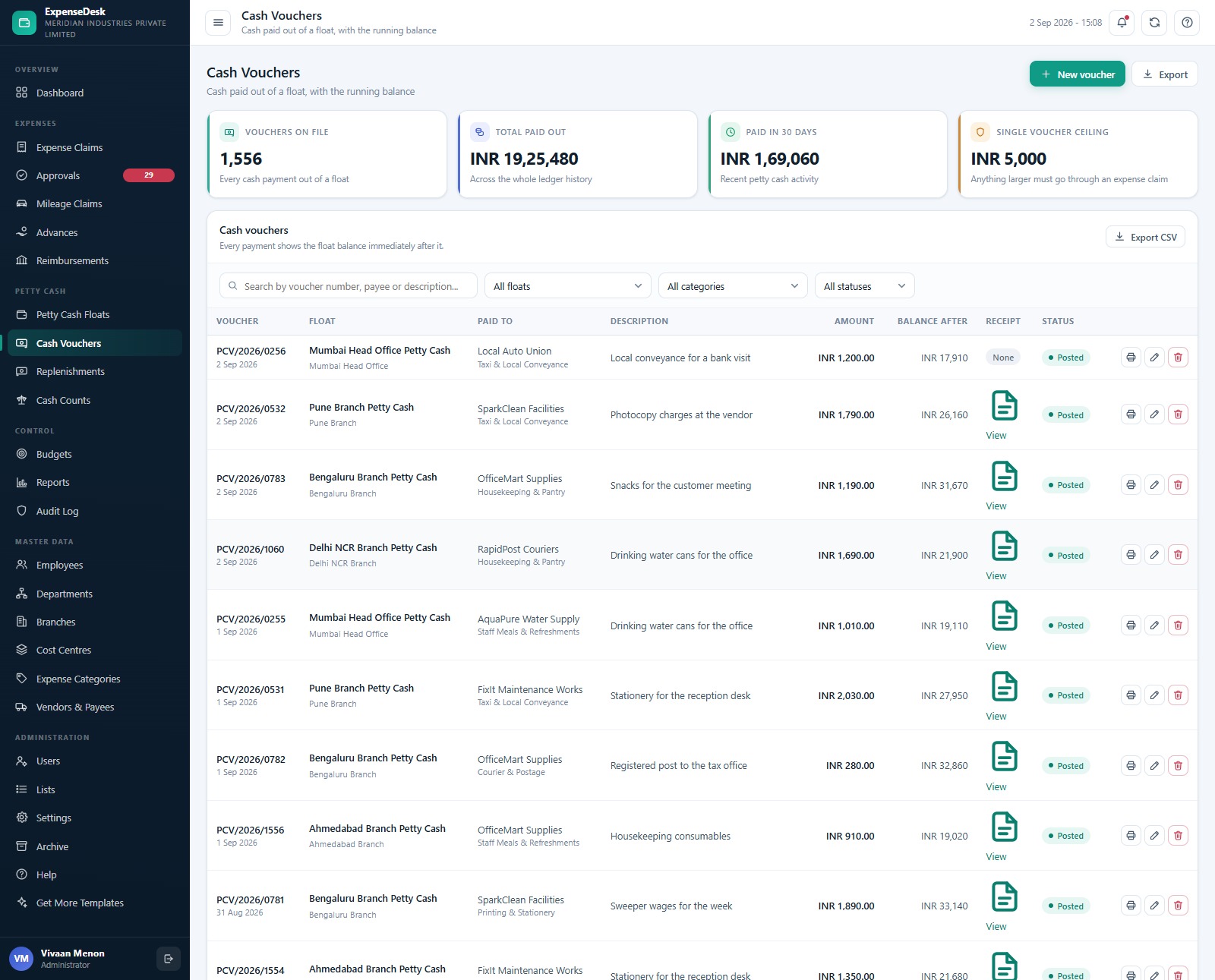
Every cash payment out of a float, with the float balance printed immediately after it so the ledger reads like a cash book. Cards show Vouchers On File, Total Paid Out, Paid In 30 Days and the Single Voucher Ceiling. Each row carries the payee, description, amount, balance after, an attached receipt where one was uploaded, and a printable voucher.
Cash Counts
Physical counts set against the ledger balance on the count date, with Counts On File, Reconciled Exactly, Closed With A Variance and Absolute Variance as cards. Every row names the custodian and the witness, shows ledger versus counted, the signed variance and the written explanation, and prints as a count sheet.
Budgets
Budget For The Month, Actual Spend, Consumed percentage and Over Budget count, then Budget Against Actual By Cost Centre as a grouped column chart, then the budget lines themselves with budget, actual, variance and a consumption bar per cost centre. A month picker and department and health filters sit above the table, and Recalculate Actuals reruns the whole month from the claim lines.
Reports
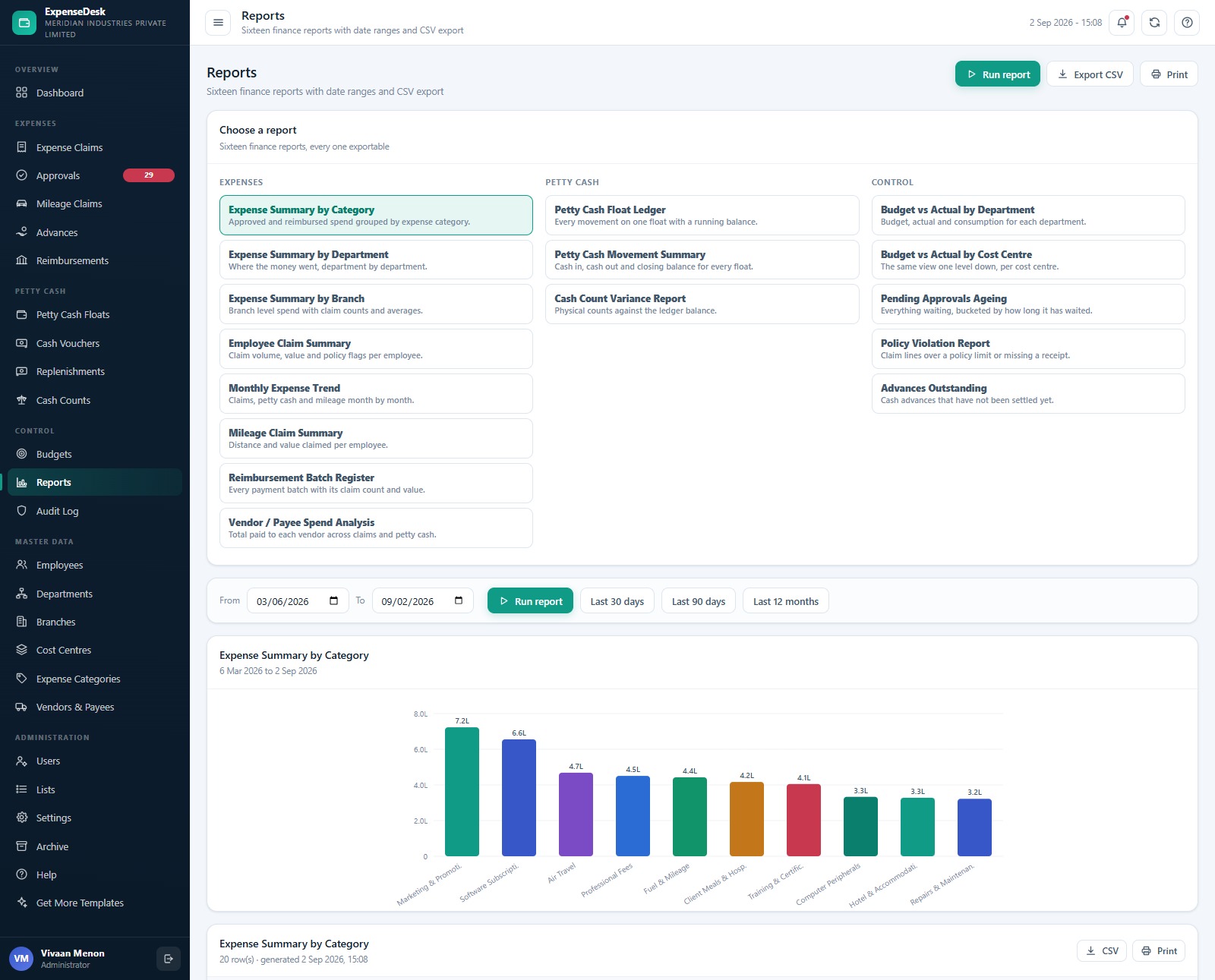
Sixteen reports in three groups. Expenses: Expense Summary by Category, by Department and by Branch, Employee Claim Summary, Monthly Expense Trend, Mileage Claim Summary, Reimbursement Batch Register and Vendor / Payee Spend Analysis. Petty cash: Petty Cash Float Ledger, Petty Cash Movement Summary and Cash Count Variance Report. Control: Budget vs Actual by Department and by Cost Centre, Pending Approvals Ageing, Policy Violation Report and Advances Outstanding. Every one takes a From and To date (with Last 30 Days, Last 90 Days and Last 12 Months shortcuts), charts its result and exports to CSV or print.
Users and roles
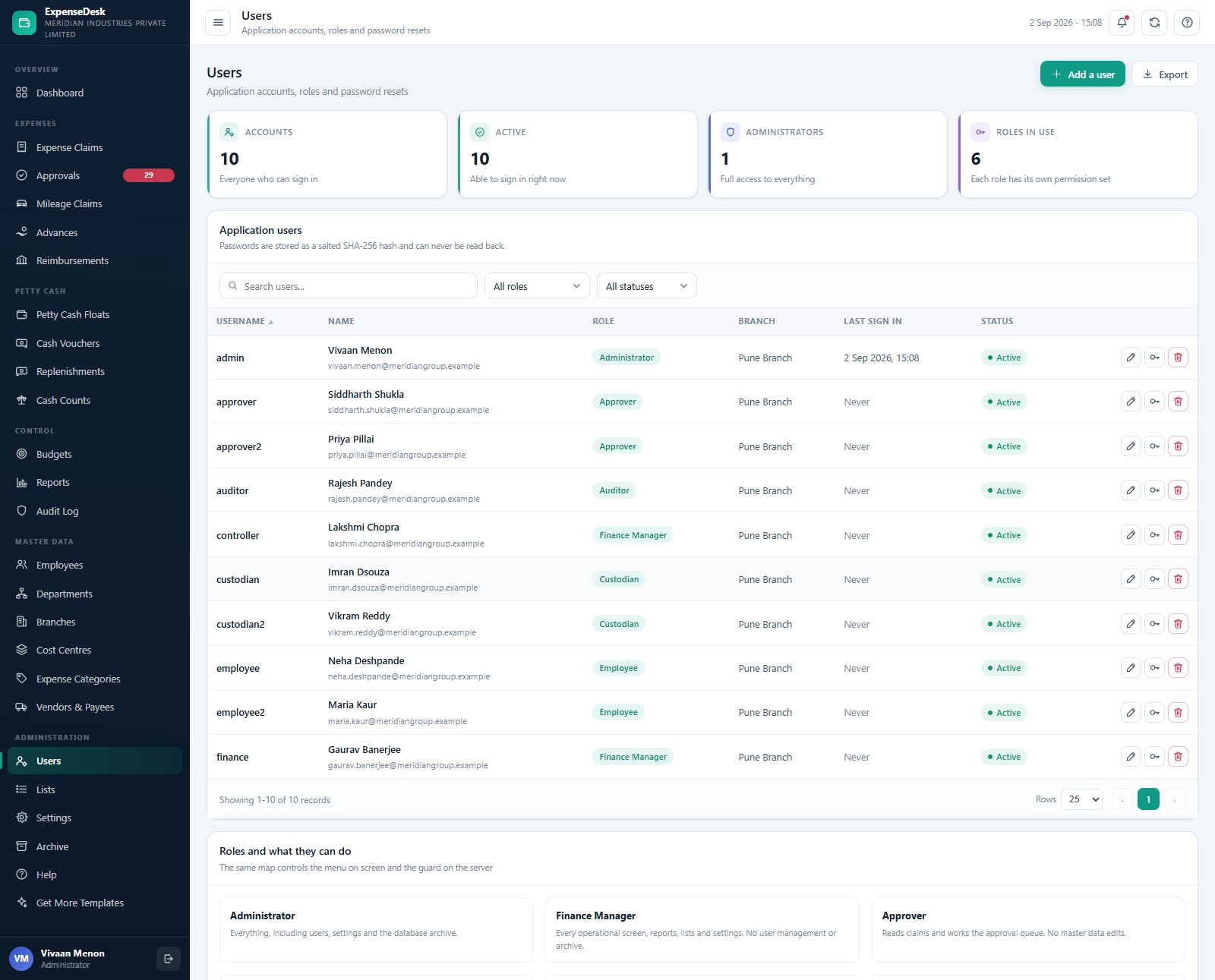
Accounts, roles and password resets, with a “Roles and what they can do” panel underneath spelling out exactly what Administrator, Finance Manager, Approver, Custodian, Employee and Auditor can each reach. The key icon on a row resets somebody else’s password; Settings > Change my password handles your own.
Also in the menu but not pictured above: Mileage Claims, Reimbursements, Replenishments, Audit Log, Employees, Departments, Branches, Cost Centres, Expense Categories, Vendors & Payees, Lists, Settings, Archive and an in-app Help guide. The seeded database holds 60 employees, 8 departments, 6 branches, 18 cost centres, 20 expense categories with GL codes and policy limits, 45 vendors, 500 mileage journeys, 140 advances, 75 payment batches, 216 budget lines and 3,000 audit entries.
📊 Expense & Petty Cash Web App vs. a Spreadsheet vs. Paid Expense SaaS — Where This Fits
| Feature | Expense & Petty Cash Management System Web App | Shared expense spreadsheet | SAP Concur / Expensify / Zoho Expense |
|---|---|---|---|
| Cost | $39.99 one-time, unlimited users | Free, but no controls | $5-15 / user / month, often plus a platform fee |
| Platform | Your own Google account (Apps Script + Sheets) | Google Sheets or Excel | Vendor’s cloud |
| Setup time | About 15 minutes, one-button database build | Hours of formula work | Days to weeks, plus onboarding calls |
| Tiered approval routing | ✅ 3 tiers, value and policy driven, out of the box | ❌ Manual | ✅ Yes |
| Branch petty cash floats with counts | ✅ Imprest floats, vouchers, replenishments, reconciled counts | ❌ Rare and unenforced | ⚠️ Often an add-on or absent |
| Server-enforced role permissions | ✅ 6 roles, guarded on every server call | ❌ Sheet protection only | ✅ Yes |
| Full audit trail | ✅ Every action logged, exportable | ❌ Version history only | ✅ Yes |
| You own and can edit the source | ✅ Complete, commented Code.gs and Index.html | ✅ Yes | ❌ No |
| Year-1 cost at 25 users | $39.99 total | $0 plus the cost of the mistakes | $1,500-$4,500 |
For a finance team that has outgrown a shared spreadsheet but cannot justify a per-user subscription, the Expense & Petty Cash Management System Web App sits in the sweet spot: real approval control and a real audit trail, hosted in your own Google account, for one payment.
👥 Who This Template Is For — and Who It’s Not For
✅ This template is built for:
- Finance and accounts teams at 20-500 person companies running expense claims and branch petty cash on spreadsheets today
- Multi-branch businesses that hand a cash float to a custodian at each location and need the count to reconcile
- Business owners and controllers who want approval limits, policy limits and receipt rules actually enforced rather than remembered
- Auditors and internal-control staff who need a read-only view of every claim, voucher and change on the system
- Consultants and developers who want a working, commented Apps Script codebase to brand and extend for a client
❌ This template is NOT for:
- Anyone who needs receipts read automatically — you upload the image or PDF and it is stored against the line, but nothing performs OCR on it
- Teams that need a live bank or corporate-card feed. “Corporate Card” here is a payment-mode label on a record, not a connection to a card issuer
- Companies that want their accounting package updated automatically — there is no Tally, QuickBooks, Xero, NetSuite or SAP integration, and nothing files a statutory return, GST return or e-invoice
- Enterprises with SOC 2, SSO or SAML requirements — sign-in is the app’s own salted-hash account table inside your Google account
- Anyone looking for payroll, purchase orders or vendor invoice processing — this system handles employee expenses and cash, not the accounts-payable ledger
⚙️ How to Use the Expense & Petty Cash Management System Web App
- Try the demo first. Open the live demo above, sign in as admin, then sign in again as employee and custodian to see how much the menu changes per role. It costs you nothing and answers most questions.
- Create a new Apps Script project at script.google.com, paste Code.cs.txt into Code.gs, add an HTML file named exactly Index and paste Index.txt into it, then save.
- Deploy as a web app — Deploy > New deployment > Web app, Execute as Me, Who has access Anyone — and accept the Google permission prompt.
- Build the database once. Open the web app URL and press “Build the database” on the first-run panel, or run setup() from the editor. Setup is staged and resumable, so it can never hit the six-minute execution limit mid-write.
- Sign in as admin and change every seeded password under Users, then delete the accounts you do not need.
- Set your company up in Settings: company name, address, tax registration, financial year, currency code and prefix, approval service level, tier 2 and tier 3 thresholds, petty cash voucher ceiling, maximum advance, mileage rate and print size.
- Replace the master data — Departments, Branches, Cost Centres, Expense Categories with their GL codes and policy limits, Vendors and Employees. Employees and most master screens have an Import button for a CSV paste.
- Open a float per branch under Petty Cash Floats, name its custodian, set the approved limit and the replenish-below threshold, and start recording vouchers.
- Run the month. Employees raise claims, approvers clear the queue, finance batches the approved claims into a payment run, custodians count the cash, and Budgets recalculates itself from the approved lines.
- Archive once a year or two — the Archive screen previews exactly what would move, takes the dated Drive copy first, and only then removes closed rows older than your cutoff.
💼 Real-World Use Cases
Priya is the financial controller at a 180-person manufacturer with six branches. Before this, each branch emailed a monthly petty cash summary and she trusted it. Now every voucher posts against a named float with the balance printed after it, cash counts are reconciled with a witness and a written explanation for any variance, and she can see all six float balances on one screen — for one payment instead of a per-user subscription she could not get signed off.
Rakesh runs accounts at a 40-person consultancy where travel claims used to sit in an inbox. He set the tier 2 threshold at INR 15,000 and made receipts mandatory on Air Travel, Hotel & Accommodation and Client Entertainment. Claims now route themselves, the Approvals screen turns amber after seven days, and the Pending Approvals Ageing report is the only thing he takes to the Monday finance meeting.
Meera is an internal auditor at a group with a 60-person head office. She was given the auditor login and nothing else. She can read every claim, voucher, count, budget line and audit entry, run the Policy Violation Report and the Cash Count Variance Report over any date range, export both to CSV — and she cannot change a single record, which is exactly what her scope requires.
❓ Frequently Asked Questions
Can I try it before buying?
Yes. A full live demo of the Expense & Petty Cash Management System Web App is linked above with all ten seeded accounts across six roles. Those credentials are public on purpose — it is a shared demo instance we reset, not anybody’s live data. After purchase you deploy your own private copy in your own Google account.
Where is my data stored, and can NextGenTemplates see it?
The Expense & Petty Cash Management System Web App builds a Google Sheets database and a Drive folder tree inside your own Google account when you run setup. Nothing is sent anywhere else, and we never hold, see or process your expense data. Securing and operating your deployment lawfully remains your responsibility.
Does it read my receipts or connect to my bank or corporate card?
No. Receipts are uploaded as images or PDFs and stored against the claim line or voucher in Google Drive, but nothing performs OCR on them. There is no bank feed and no corporate-card feed — “Corporate Card” is only a payment-mode value on a record.
How long does setup take?
About 15 minutes end to end. Pasting the two files and deploying takes roughly five minutes; the one-button database build does the rest. Setup is staged and resumable, so on a free Google account it simply continues by itself rather than failing.
How does this compare to SAP Concur, Expensify or Zoho Expense?
Those charge $5-15 per user per month and add OCR, card feeds and accounting connectors. The Expense & Petty Cash Management System Web App gives you tiered approvals, branch petty cash floats, reconciled cash counts, budgets, sixteen reports and a full audit trail for $39.99 once, with the source code included — but no OCR, no card feed and no accounting integration.
Can I change the currency, the approval limits and the branding?
Yes. The demo is seeded in INR, and the currency code, currency prefix, both approval thresholds, the petty cash voucher ceiling, the maximum staff advance, the settlement window, the mileage rate and the print size are all Settings fields. Company name, address, tax registration and financial year print on every voucher, claim and report.
How many people can use it?
As many as you like. There are no per-user fees and no seat limit in the Expense & Petty Cash Management System Web App — you add accounts under Users and assign each one of the six roles. Google Workspace’s own Apps Script quotas are the only practical ceiling.
👤 About the Author
Built by PK — Microsoft Certified Professional with 15+ years of Excel, Google Sheets, Apps Script and Power BI experience. Founder of NextGenTemplates, reaching 300K+ subscribers across YouTube channels (@PKAnExcelExpert, @NextGenTemplates, @NeoTechNavigators). Every template is hand-built and tested before release.
🔗 Explore Related Templates
If you are fitting out a whole finance back office, the Debt Collection Agency Management System Web App and the Credit Union Member Management System Web App are built on the same Apps Script foundation, with the same role model and audit trail. For a lighter, single-file alternative there is the Petty Reimbursement Data Entry System in Excel, and for reporting rather than transaction capture see the Payroll Management Dashboard in Google Sheets. Browse the full Web Apps collection or the wider Google Sheets Dashboards catalogue.
📖 Click here to read the Detailed Blog Post
🎥 Visit our YouTube channel for step-by-step video tutorials
👉 YouTube.com/@NextGenTemplates
📅 Last updated: September 2026
Compatibility and Requirements
- Runs as a Google Apps Script web app that stores its data in Google Sheets and Google Drive inside your own Google account. You need a Google account and a web browser.
- The download holds Code.cs.txt, Index.txt and a user manual PDF. You paste the two code files into a new Apps Script project, deploy it as a web app and press one button to build the 24-sheet database.
- Google explains how to open the app and its related files in Google’s guide to working with Office files in Drive.
More Questions About This Template
Which roles can sign in?
There are six roles: Administrator, Finance Manager, Approver, Custodian, Employee and Auditor. The menu and every server call follow the same permission map, so each role sees only the screens it is allowed to use.
When does a claim need a second or third approval?
A claim of INR 15,000 or more needs tier 2 and a claim of INR 50,000 or more needs tier 3. A policy flag on any line, such as a missing receipt or a line over its category limit, pushes the claim up one tier.
Can a petty cash voucher overdraw a branch float?
No. A voucher that would take the float below zero is refused and the message shows the current balance. A single voucher also cannot go above the ceiling in Settings, which is INR 5,000 by default.
Is there a spreadsheet version for smaller teams?
Yes. The Expense Reimbursement Tracker in Excel and the Expense Reimbursement Tracker in Google Sheets cover expense claims in a single file.
Related Expense Templates
- Expense Reimbursement Tracker in Google Sheets: track claims and payments in a sheet
- Expense Reimbursement Tracker in Excel: the same tracking in Excel
- Expense Tracking Dashboard in Power BI: expense reporting in Power BI
- Expense Management KPI Dashboard in Excel: expense KPIs in one Excel dashboard
- Weekly Expense Tracker Template in Google Sheets: a free weekly tracker
Browse all Web Apps.































Reviews
There are no reviews yet.