

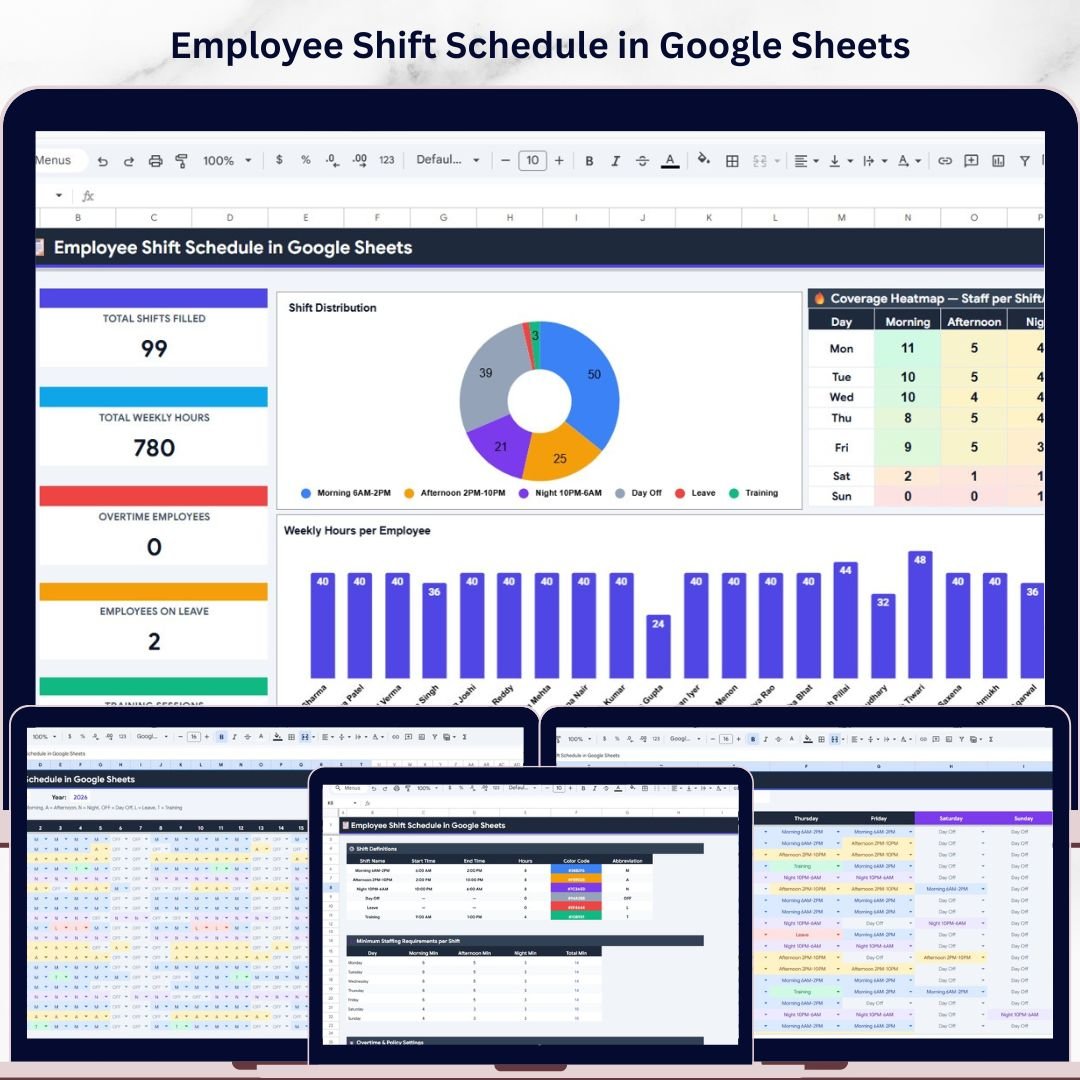

Employee Shift Schedule in Google Sheets is a powerful, ready-to-use scheduling template designed to help HR teams, managers, and operations leaders plan, assign, and monitor employee shifts with complete clarity. Whether you manage a team of 10 or 100, this template provides a centralized and automated way to organize weekly schedules, track monthly calendars, manage employee directories, and visualize shift data through a built-in analytics dashboard — all within Google Sheets.
Shift scheduling is one of the most time-consuming tasks in workforce management. Manual spreadsheets, scattered emails, and last-minute changes often create confusion and staffing gaps. This Employee Shift Schedule in Google Sheets eliminates those pain points by offering a structured, cloud-based solution that updates in real time and can be accessed from anywhere.
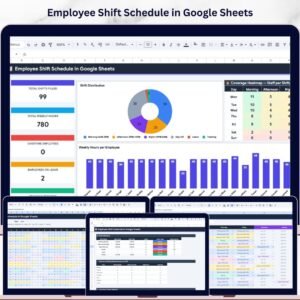
This template includes 5 interactive pages covering weekly scheduling, monthly calendar views, an employee directory, a comprehensive dashboard with KPI cards and charts, and a customizable settings page for shift definitions and staffing policies.
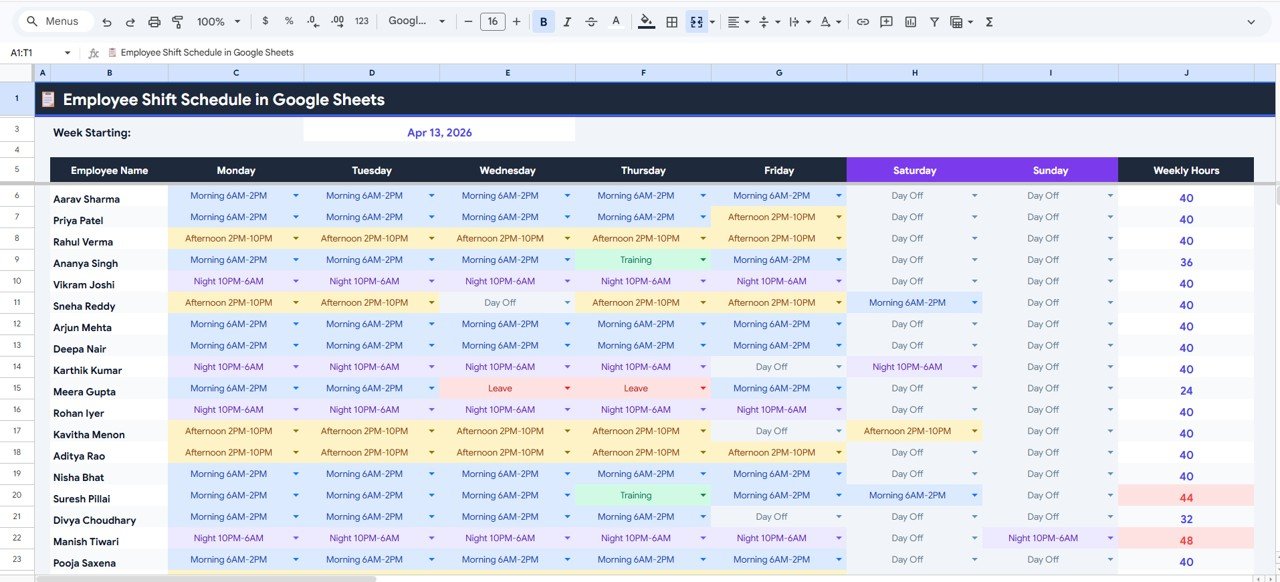
 Weekly Schedule View
🔑 Key Features of Employee Shift Schedule in Google Sheets
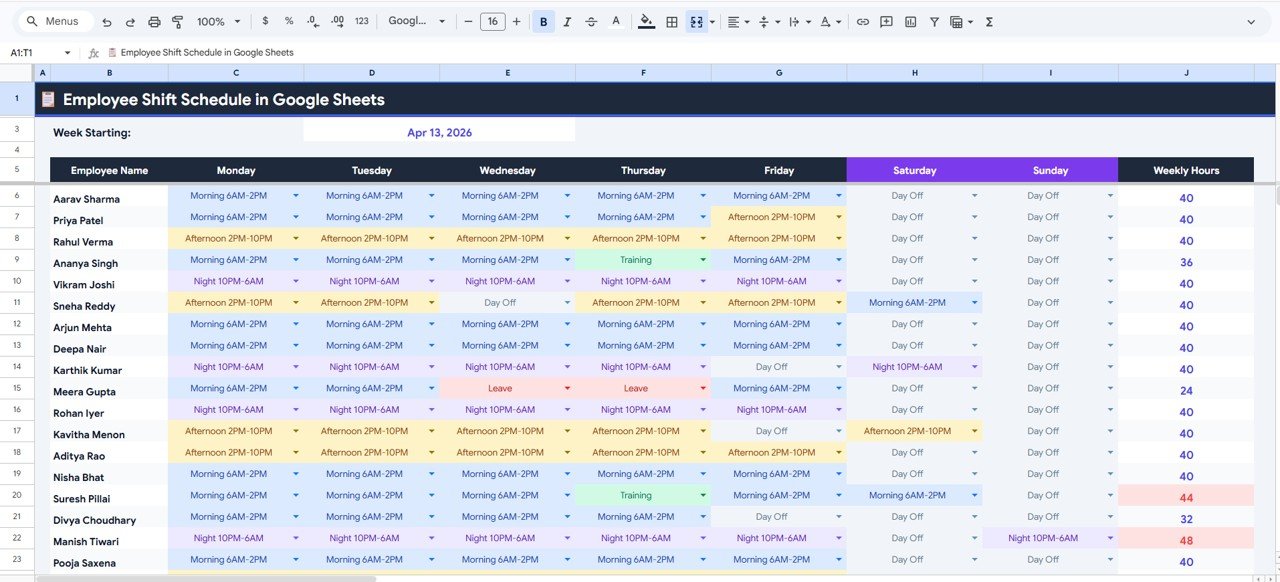
📅 Weekly Schedule View — Assign shifts for each employee from Monday through Sunday with automatic weekly hours calculation. KPI cards display the week starting date, employee name, shift assignments by day, and total weekly hours at a glance. Built-in charts show Shift Assignment by Employee by Day of Week and Weekly Hours by Employee for instant workforce visibility.
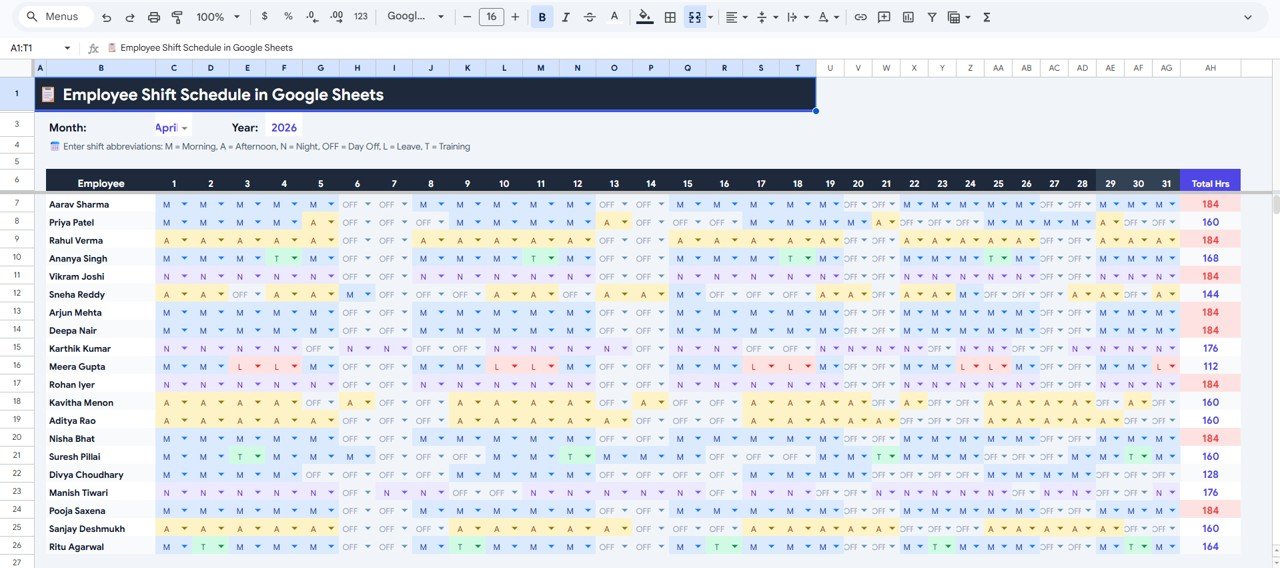
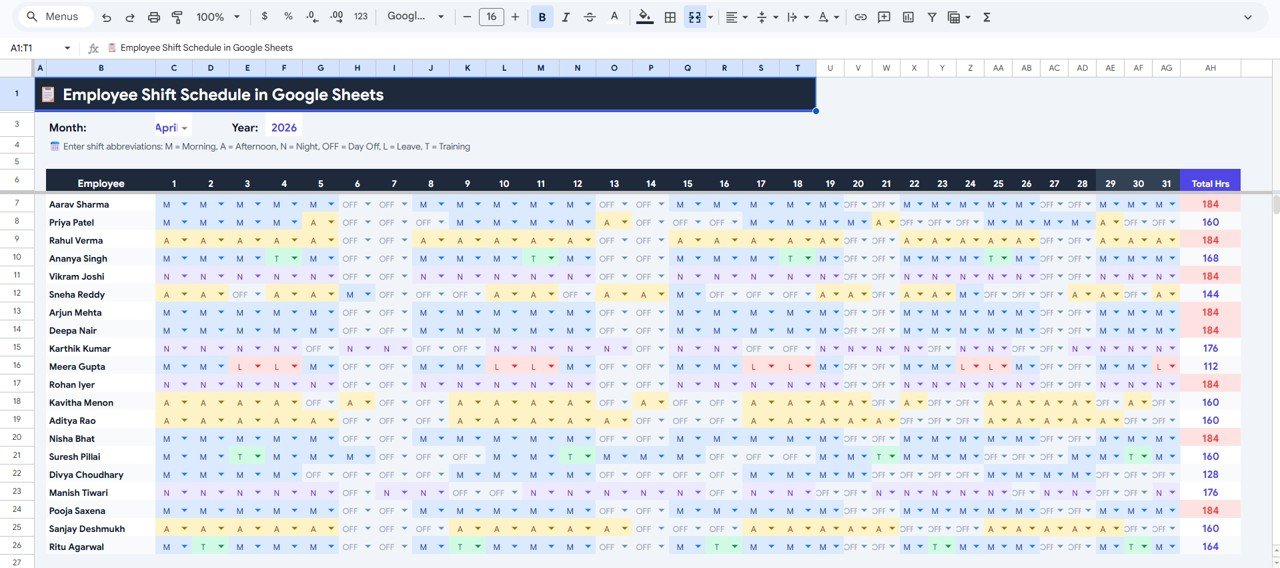
📆 Monthly Calendar View — Visualize an entire month of shift assignments across all employees. Charts display Monthly Shift Assignments by Employee by Day, Total Hours by Employee for the Selected Month, and Shift Abbreviation by Day by Employee — making it easy to spot coverage gaps and overtime patterns.
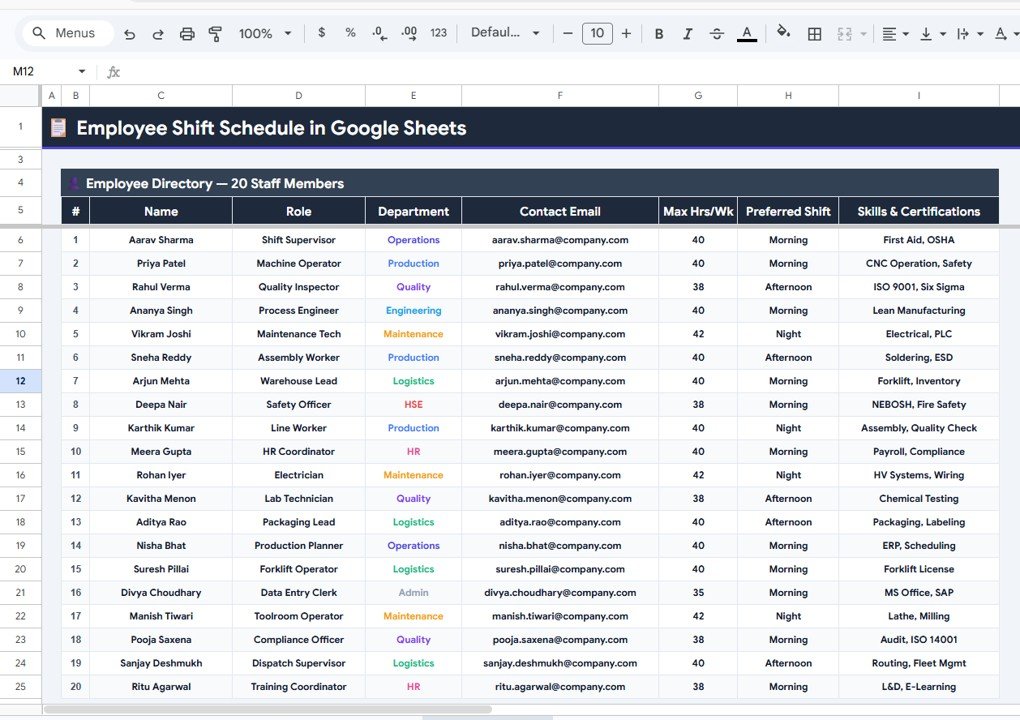
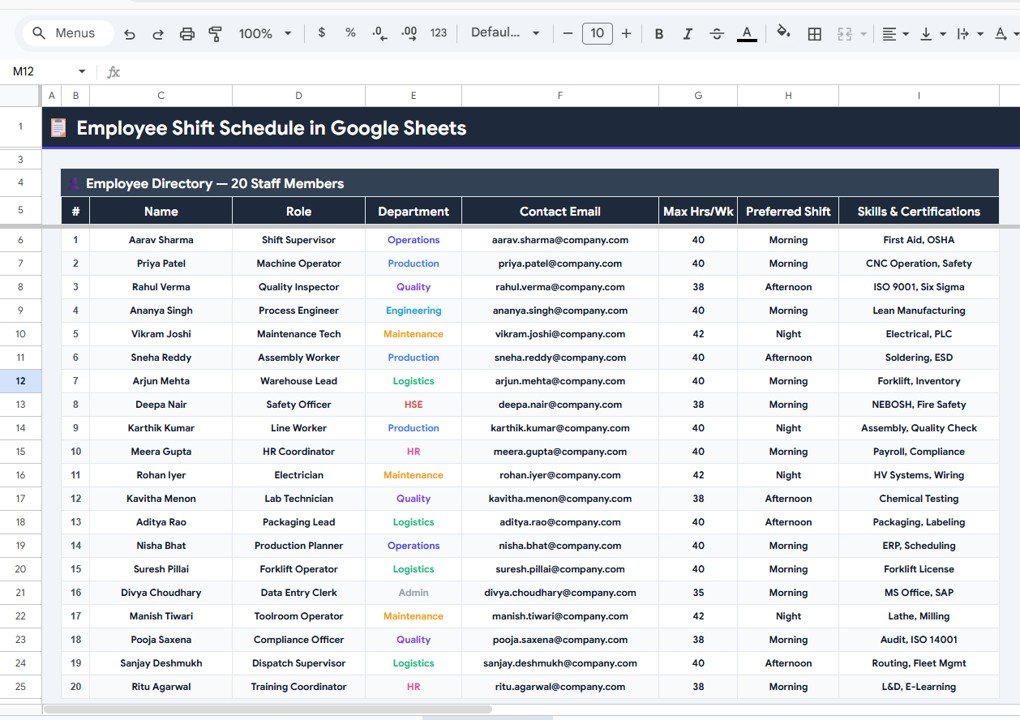
👥 Employee Directory — Maintain a complete roster with Employee Name by Role, Department by Employee, Contact Email by Employee, Max Hours per Week by Employee, Preferred Shift by Employee, and Skills and Certifications by Employee. This centralized directory ensures every scheduling decision is informed by employee capabilities and preferences.
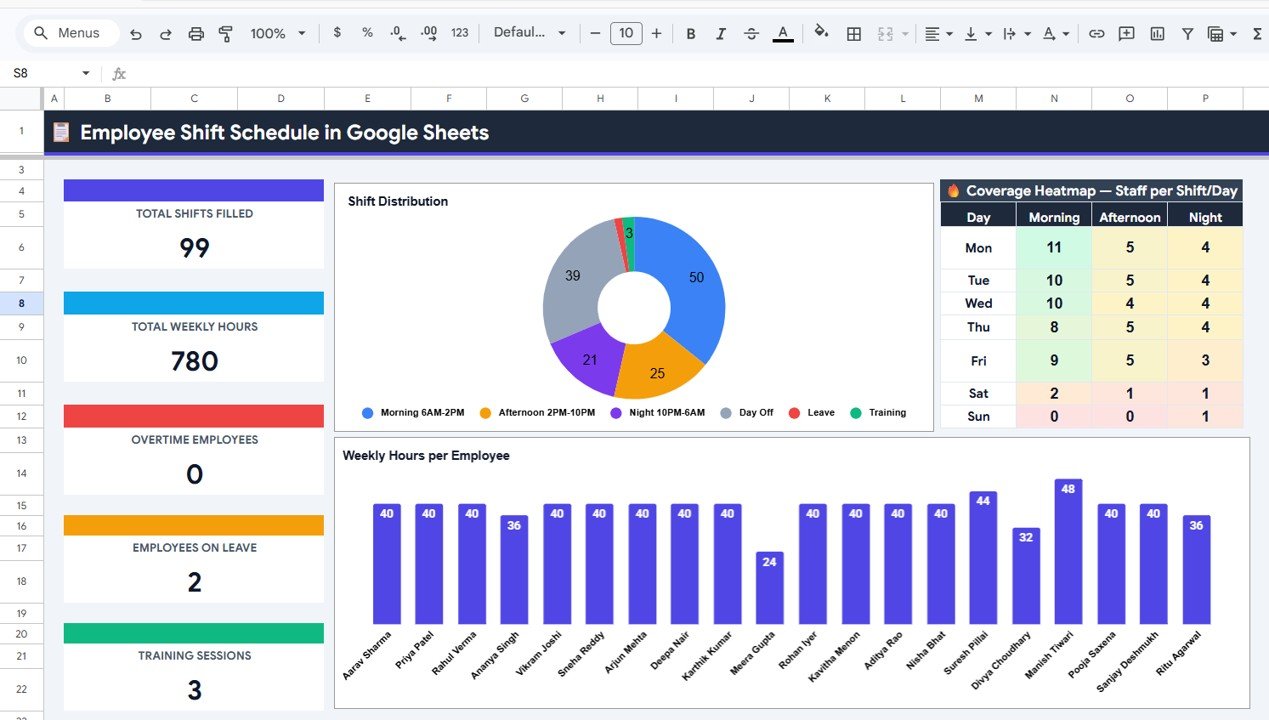
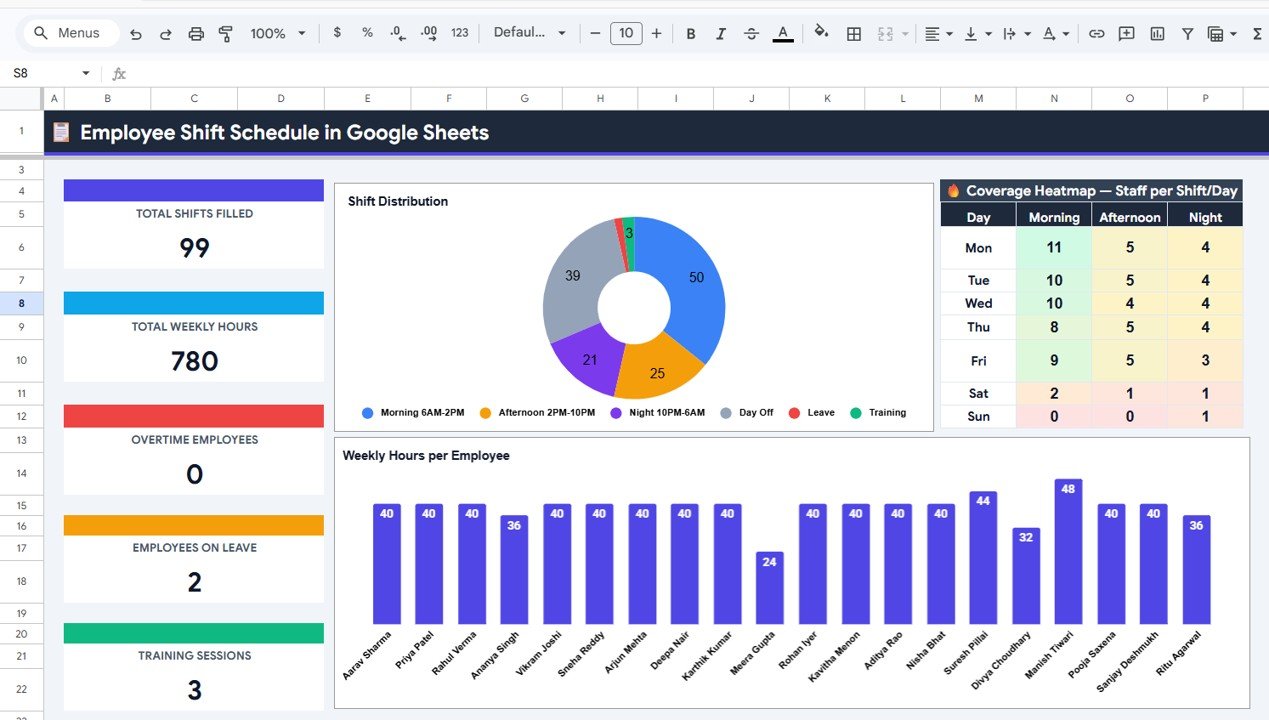
📊 Dashboard with KPI Analytics — Track Total Shifts Filled, Total Weekly Hours, Overtime Employees, Employees on Leave, and Training Sessions through KPI cards. Interactive charts cover Shift Distribution by Shift Type, Weekly Hours by Employee, and a Coverage Heatmap showing Staff per Shift by Day — providing complete operational intelligence.
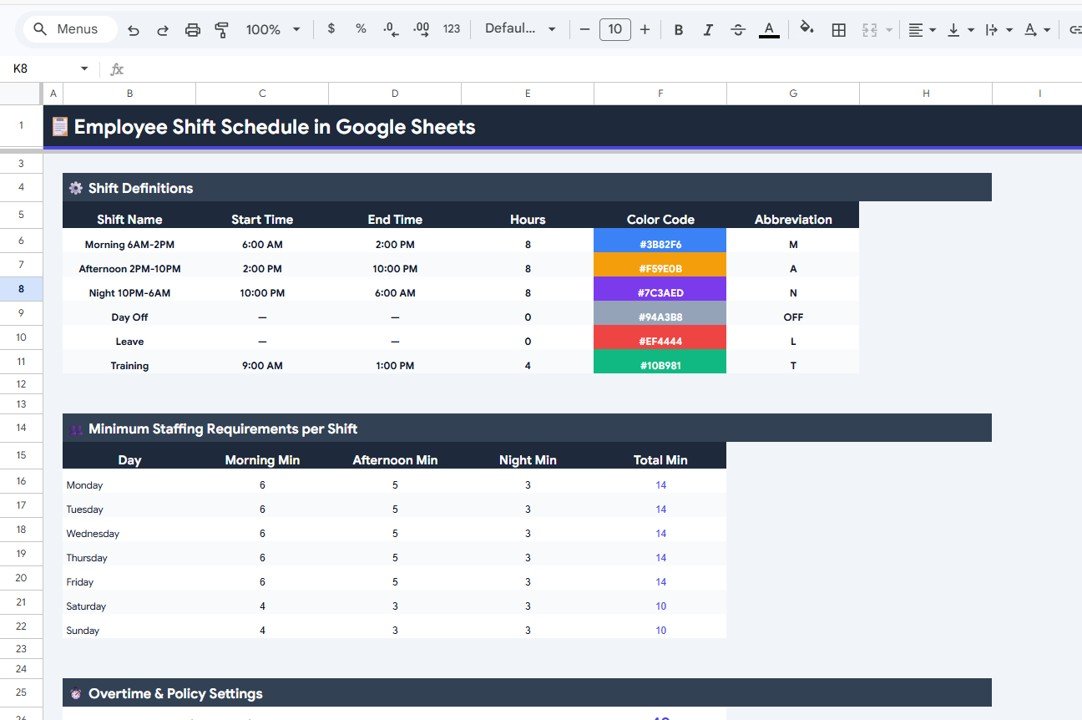
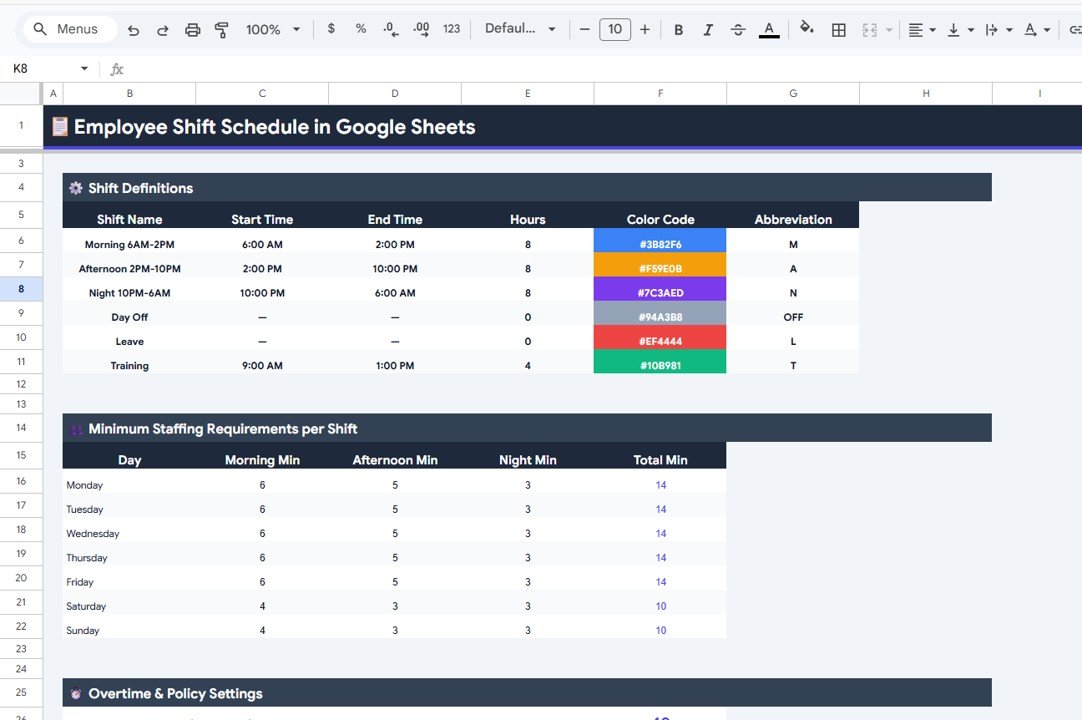
⚙️ Settings Page — Configure Shift Definitions by Shift Name, Start Time and End Time by Shift, Hours and Color Code by Shift, Abbreviation by Shift Type, Minimum Staffing Requirements by Day by Shift, and Overtime and Policy Settings to match your organization’s unique scheduling rules.
If you manage employee work hours and need a structured way to handle shift adjustments, this template works perfectly alongside dedicated HR trackers for comprehensive workforce management.
📦 What’s Inside the Employee Shift Schedule in Google Sheets
📋 Weekly Schedule View — Day-by-day shift assignments with employee-level details, weekly hours tracking, and visual charts for shift distribution analysis.
📋 Monthly Calendar View — Full-month shift overview with employee-wise hours tracking, shift abbreviation mapping, and monthly assignment visualization.
📋 Employee Directory — Complete employee database with roles, departments, contact details, max hours, preferred shifts, and certifications for informed scheduling.
📋 Dashboard — KPI cards for shifts filled, weekly hours, overtime, leave, and training metrics plus charts for shift distribution, employee hours, and coverage heatmaps.
📋 Settings — Fully customizable shift definitions, time configurations, color codes, abbreviations, minimum staffing rules, and overtime policies.
 Monthly Calendar View
 Employee Directory
 Dashboard
 Settings
⚙️ How to Use the Employee Shift Schedule in Google Sheets
1️⃣ Open the Google Sheets file and go to the Settings page first. Define your shift types, start and end times, color codes, and staffing requirements.
2️⃣ Navigate to the Employee Directory and add all employees with their roles, departments, contact emails, max weekly hours, preferred shifts, and certifications.
3️⃣ Use the Weekly Schedule View to assign shifts for each employee from Monday through Sunday. The template automatically calculates weekly hours.
4️⃣ Switch to the Monthly Calendar View for a bird’s-eye view of the entire month’s shift coverage and employee hours.
5️⃣ Monitor the Dashboard for real-time KPI tracking — shifts filled, overtime alerts, leave tracking, and coverage heatmaps update automatically.
👥 Who Can Benefit from This Employee Shift Schedule in Google Sheets
✔️ HR Managers managing employee rosters and shift assignments across departments
✔️ Operations Managers ensuring adequate shift coverage and minimizing overtime costs
✔️ Restaurant and Hospitality Managers coordinating front-of-house and kitchen staff schedules
✔️ Healthcare Administrators scheduling nurses, technicians, and support staff across shifts
✔️ Retail Store Managers planning weekly staff rotations and holiday coverage
✔️ Small Business Owners who need a simple yet effective employee scheduling tool
✔️ Team Leads tracking part-time, full-time, and contract employee availability
Explore more Google Sheets Tracker Templates and HR & Payroll Templates to build a complete workforce management system.
❓ Frequently Asked Questions
What is an Employee Shift Schedule in Google Sheets?
An Employee Shift Schedule in Google Sheets is a cloud-based spreadsheet template that helps managers assign, track, and visualize employee shifts across weekly and monthly views. It includes KPI cards, charts, an employee directory, and customizable settings for shift definitions and staffing policies.
How many employees can this shift schedule template handle?
This template is designed to handle teams of any size. You can add as many employees as needed in the Employee Directory, and the Weekly Schedule View and Monthly Calendar View will automatically accommodate them with dynamic calculations.
Can I customize the shift types and working hours?
Yes. The Settings page allows you to define unlimited shift types with custom names, start and end times, color codes, abbreviations, and minimum staffing requirements per day per shift.
Does this template track overtime automatically?
Yes. The Dashboard displays Overtime Employees as a KPI card, and the Weekly Hours by Employee chart helps you instantly identify employees exceeding their maximum weekly hours defined in the Employee Directory.
Can multiple managers access this template simultaneously?
Absolutely. Since this template runs on Google Sheets, multiple managers and HR team members can view and edit the schedule in real time from any device with an internet connection.
🔗 Explore Related Templates
📊 Employee Work Hours Adjustment Request Tracker in Google Sheets — Track and manage employee requests for work hour changes with visual dashboards and smart search.
📊 Performance Review Tracker in Google Sheets — Monitor employee performance reviews with structured tracking and visual analytics.
📊 Job Description Update Tracker in Google Sheets — Manage job description updates, approvals, and compliance across departments.
📖 Click here to read the Detailed Blog Post
Watch the step-by-step video tutorial:
🎥 Visit our YouTube channel to learn step-by-step video tutorials
👉 YouTube.com/@NextGenTemplates
Compatibility and Requirements
- Works in Google Sheets with a free Google account and a web browser.
- Managers and HR team members can view and edit the schedule together from any device with an internet connection.
- New to Google Sheets? Google covers the basics in How to use Google Sheets.






Reviews
There are no reviews yet.