



Reimbursements don’t need to be a paperwork headache. With our Employee Reimbursement Form Template, available in MS Word and Google Docs, you can formalize, track, and approve employee expense claims efficiently and professionally. 💼💰employee reimbursement form template
Whether it’s travel expenses, office supplies, or client entertainment, this easy-to-use template is designed to simplify the reimbursement process for employees, managers, and finance teams. It captures all essential expense details, payment preferences, and required documentation in a structured format — helping your business stay organized and compliant. 📋✅
Streamline your expense tracking and approvals with one professional form that’s ready to use in minutes!
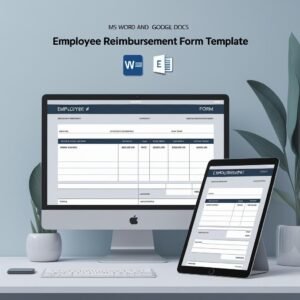
🛠️ Key Features of Employee Reimbursement Form Template
🧑💼 Complete Employee Details Section
Includes fields for employee name, ID, department, and submission date — ensuring easy identification and tracking.
📅 Detailed Reimbursement Table
Capture all expense items with columns for Date, Description, Amount (INR), and Category — essential for clear reporting and approvals.
💰 Auto Total Field
At the bottom of the table, the Total Amount to be Reimbursed ensures quick calculation and reference.
🏦 Payment Method Selection
Let employees choose between Direct Deposit, Cheque, or Add to Next Payroll — giving flexibility and preference.
📎 Supporting Documents Checklist
Checkboxes for Receipts, Invoices, or Other Documents — promoting accountability and proper documentation.
💬 Comments / Notes Section
Employees or reviewers can add any extra clarification or internal notes for transparency.
✅ Multi-Level Approval Signatures
Three signature lines — for Employee, Manager, and Finance Approval — ensure compliance and proper tracking.
📝 Fully Editable Format in MS Word & Google Docs
Customizable layout allows you to brand the form, add new expense categories, or localize text — perfect for any organization.
📦 What’s Inside the Employee Reimbursement Form Template
With your download, you’ll receive:
✅ 1 MS Word file (.docx)
✅ 1 Google Docs editable version
✅ Pre-built table for entering multiple expenses
✅ Signature blocks for proper authorization
✅ Supporting document and payment options
✅ Clean, printable, and digital-friendly format
Use it for travel, training, office supplies, or any employee-submitted claim — this template keeps everything clear, compliant, and professional. 🧾🖊️
📝 How to Use the Employee Reimbursement Form Template
Download the form in MS Word or Google Docs
Customize it with your company logo and details
Employee fills in all expenses and attaches receipts/invoices
Choose payment method and submit for review
Manager reviews and signs with comments if needed
Finance approves and processes the reimbursement
File it digitally or in printed records for future audits
Save time, reduce back-and-forth communication, and keep your financial processes clean and simple. 📈📁
👥 Who Can Benefit from This Employee Reimbursement Form Template
🧾 HR and Finance Teams – To process and track expense claims easily
🏢 Managers & Team Leads – Approve team expenses quickly and consistently
🚀 Startups & SMEs – Bring structure to growing teams
🧰 Freelancers & Consultants – Use it with clients for submitted expenses
🏫 Educational & Nonprofit Organizations – Manage operational costs and travel reimbursements
Whether you’re a solo founder or a large enterprise, this template simplifies the workflow for expense reporting and ensures nothing falls through the cracks. 💼💸
Stop wasting time chasing receipts and scattered spreadsheets. The Employee Reimbursement Form Template gives your organization the structure it needs to approve expenses faster and stay financially compliant — all with one clean, editable document. ✅🧾
Compatibility and Requirements
- Edit the Employee Reimbursement Form in Microsoft Word (desktop or Microsoft 365).
- It also works in Google Docs with a free Google account. Upload the .docx to Google Drive and open it with Google Docs, or use the Google Docs link. Google explains the steps in Work with Office files.
- Print it for paper records, or save it as a PDF to share by email.
Frequently Asked Questions
What expense details does the form capture?
Each row has Date, Description, Amount and Category, with a Total Amount to be Reimbursed line at the bottom of the table.
Can I change the currency or the expense categories?
Yes. The form is fully editable, so you can rename the amount column, add categories or change any text to suit your company.
Which payment methods can employees choose?
Direct Deposit, Cheque or Add to Next Payroll.
Who approves a claim?
There are three signature lines: the employee, the manager and finance approval. A checklist confirms whether receipts, invoices or other documents are attached.
Related Expense Templates
- Expense Reimbursement Tracker in Excel: log every claim from this form and track its status.
- Expense Reimbursement Tracker in Google Sheets: the same tracker in the browser.
- Travel Expense Report Tracker in Excel: for teams with regular travel claims.
- Weekly Expense Tracker in Excel: a free tracker for week-by-week spending.
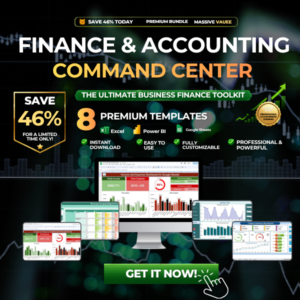
- Finance & Accounting Command Center: 8 finance templates across Excel, Power BI and Google Sheets.
Browse all form templates or the Excel financial templates.











Reviews
There are no reviews yet.