




Need an organized and professional way to track and manage employee overtime? Streamline your process with our Overtime Request Form Template in MS Word and Google Docs — available in MS Word and Google Docs. 🕒📝
This ready-to-use template helps employees formally request overtime hours and ensures that supervisors and HR can review, approve, and document those requests with full transparency. Whether you’re running a large operation or a small team, having a consistent overtime request form ensures fairness, compliance, and accurate payroll processing. ✅💼
Say goodbye to verbal requests or email chains — this form is your new go-to solution for clean, clear overtime tracking.
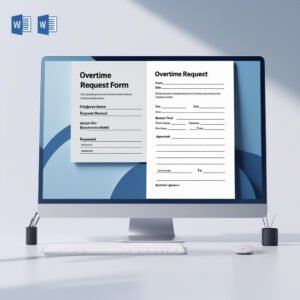
🛠️ Key Features of Overtime Request Form Template
🧑💼 Employee Information Section
Capture the essentials: employee name, ID, department, and job title — crucial for HR tracking and documentation.
📅 Detailed Overtime Log
Includes fields for date, start time, end time, and total hours worked — keeping everything accurate and organized.
✍️ Justification Section
Allows employees to clearly state the reason for the requested overtime — ensuring transparency and justification.
🗣️ Supervisor Comments Area
Give managers space to add context, concerns, or approval notes — supports effective decision-making.
✅ Signature Lines for Validation
Formal sign-off from employee, supervisor, and HR (if required) — ensures authorization and legal clarity.
📝 Fully Editable Format
Easily update in Microsoft Word or Google Docs. Add your company logo, customize fields, or modify the layout as needed.
📦 What’s Inside the Overtime Request Form Template
When you download this product, you’ll receive:
✅ 1 Editable MS Word file (.docx)
✅ 1 Editable Google Docs link
✅ Formatted table to log date, time in, time out, and total hours
✅ Justification section for overtime request
✅ Supervisor comments and signature areas
✅ HR approval section (optional)
It’s professional, practical, and ready to use — just plug in your company details and start tracking. 🖨️📂
📝 How to Use the Overtime Request Form Template
Download the file in MS Word or open the Google Docs version
Add your branding – company name, logo, contact details
Share the form digitally or as printed copies
Employee fills out date, time, hours, and reason for overtime
Supervisor adds comments and signs the form
Forward to HR (if required) for final review and filing
Save or archive the form for payroll or auditing purposes
Simple, efficient, and completely customizable — your overtime management just got smarter! ⏱️✅
👥 Who Can Benefit from This Overtime Request Form Template
🧑💼 HR Professionals – For proper documentation and payroll accuracy
🧰 Team Leaders & Supervisors – Track approvals and stay informed
🏢 Small & Medium Businesses – Keep overtime consistent and well-documented
🏫 Nonprofits & Institutions – Manage labor hours and maintain compliance
📊 Project Managers – Track team workload and justify extra hours
This form is ideal for any industry that deals with extended hours, shift work, or project deadlines. 📈📅
Take the guesswork out of overtime requests and approvals. With our Overtime Request Form Template, you can ensure every extra hour is properly requested, reviewed, and recorded. 🧾✅
Compatibility and Requirements
- Edit the Overtime Request Form in Microsoft Word (desktop or Microsoft 365).
- It also works in Google Docs with a free Google account. Upload the .docx to Google Drive and open it with Google Docs, or use the Google Docs link. Google explains the steps in Work with Office files.
- Print it for paper records, or save it as a PDF to share by email.
Frequently Asked Questions
What does the overtime log record?
The date, start time, end time and total hours worked for each request, plus a justification section for the reason.
Who approves an overtime request?
The form has signature lines for the employee and the supervisor, a supervisor comments area and an optional HR approval section.
Can I add my company logo?
Yes. The form is fully editable in Word or Google Docs, so you can add your logo, change fields or adjust the layout.
Is the Overtime Request Form free?
Yes. It is a free download with a Word file and an editable Google Docs link.
Related Overtime and Timesheet Templates
- Attendance and Overtime Dashboard in Excel: analyze approved overtime and attendance in one dashboard.
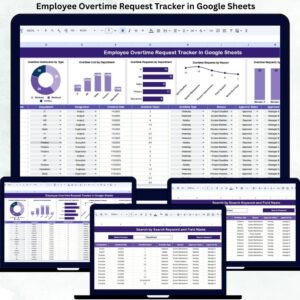
- Employee Overtime Request Tracker in Google Sheets: log every request and its approval status.
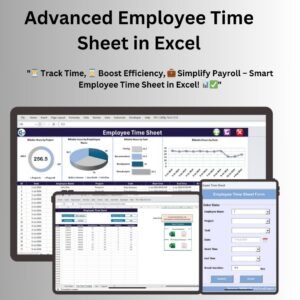
- Advanced Employee Time Sheet in Excel: record daily hours in Excel.
- Timesheet Form Template in MS Word and Google Docs: a free printable timesheet.
- HR & Workforce Analytics Bundle: 10 HR templates across Excel, Google Sheets and Power BI.
Browse all form templates or the HR and Payroll templates.












Reviews
There are no reviews yet.