



The Data Breach Response KPI Dashboard in Excel is an essential tool designed to help organizations track and manage their response to data breaches. With increasing concerns about cybersecurity and data protection, this Excel-based dashboard allows businesses to monitor key performance indicators (KPIs) related to data breach incidents, helping ensure an effective, timely, and compliant response.
This tool is perfect for IT teams, cybersecurity professionals, and compliance officers who need a structured way to track breach incidents, document actions taken, monitor the progress of investigations, and ensure that corrective measures are implemented. With easy-to-read charts, real-time data tracking, and detailed reporting capabilities, this dashboard provides full visibility over your data breach response efforts.
Key Features of the Data Breach Response KPI Dashboard in Excel
📊 Incident Tracking & Management
Track each data breach incident from detection to resolution. Document critical details such as breach type, affected systems, and severity, and ensure all necessary actions are taken.
📝 Action Plan & Response Monitoring
Create and manage action plans for each breach, assign tasks, set deadlines, and monitor the progress of incident response efforts. Ensure that every step is taken to mitigate the damage caused by the breach.
⚠️ Compliance & Legal Monitoring
Ensure compliance with regulatory requirements such as GDPR and CCPA. Track legal notifications, compliance checks, and deadlines for reporting to authorities to stay on top of your legal obligations.
📈 Real-Time KPI Tracking
Monitor key performance indicators (KPIs) such as breach response time, incident resolution time, and compliance adherence. Stay up to date with real-time tracking to make informed decisions.
🔄 Post-Incident Analysis & Reporting
Generate detailed reports and analyze incident response performance over time. Identify trends, evaluate the effectiveness of your response, and implement strategies to prevent future breaches.
⚙️ Customizable & Scalable
Customize the dashboard to fit the unique needs of your organization, adding additional KPIs, data fields, and action plans to meet specific compliance and incident response requirements.
Why You’ll Love the Data Breach Response KPI Dashboard in Excel

✅ Efficient Incident Management
Easily track and manage data breach incidents, from initial detection to final resolution. Stay on top of your incident response process and ensure no step is missed.
✅ Monitor Compliance & Legal Obligations
Ensure compliance with industry regulations and track legal actions taken to meet reporting deadlines. Stay ahead of legal requirements and avoid penalties.
✅ Improve Response Efficiency
Track breach response times and resolution progress to identify areas of improvement. Optimize your incident response efforts for faster, more efficient resolutions.
✅ Comprehensive Reporting & Analysis
Generate detailed incident reports and analyze trends to identify recurring issues. Use insights to strengthen your data breach response strategy.
✅ Customizable for Any Organization
Tailor the dashboard to meet your organization’s unique data breach response needs. Add custom KPIs, actions, and incident categories to fit your incident management protocols.
What’s Inside the Data Breach Response KPI Dashboard in Excel?
Incident Tracking & Management: Document breach details and actions taken.
Action Plan & Response Monitoring: Create and monitor action plans for breach incidents.
Compliance & Legal Monitoring: Track legal actions and ensure compliance with regulatory requirements.
Real-Time KPI Tracking: Track performance metrics like breach response and resolution times.
Post-Incident Analysis & Reporting: Generate detailed reports and analyze breach response performance.
Customizable Features: Modify the dashboard to suit your incident response needs.
How to Use the Data Breach Response KPI Dashboard in Excel
1️⃣ Download the Template: Instantly access the Data Breach Response KPI Dashboard in Excel.
2️⃣ Input Incident Details: Track information on each data breach, including severity, affected systems, and incident type.
3️⃣ Create & Monitor Action Plans: Assign tasks, set deadlines, and track progress on resolving breaches.
4️⃣ Monitor Compliance: Track legal notifications, compliance checks, and reporting deadlines.
5️⃣ Analyze & Improve: Use the post-incident analysis to improve your breach response strategy and reduce future risks.
Who Can Benefit from the Data Breach Response KPI Dashboard in Excel?
🔹 IT & Cybersecurity Teams
🔹 Compliance Officers & Legal Teams
🔹 Data Protection Officers (DPOs)
🔹 Risk Management Professionals
🔹 Large Enterprises with Complex IT Systems
🔹 Small & Medium Enterprises (SMBs)
🔹 Organizations Handling Sensitive Data
Ensure that your organization is prepared for data breaches and can respond efficiently with the Data Breach Response KPI Dashboard in Excel. Track incident details, manage action plans, monitor compliance, and improve your overall incident response strategy.
Click here to read the Detailed blog post
Visit our YouTube channel to learn step-by-step video tutorials
Youtube.com/@PKAnExcelExpert
Compatibility and Requirements
- Works in Microsoft Excel desktop (Excel 2016 or later, or Microsoft 365).
- Microsoft’s guide Create a chart from start to finish explains the Excel feature this file is built on.
Frequently Asked Questions
Which KPIs does the Data Breach Response KPI Dashboard track?
Breach response time, incident resolution time and compliance adherence, and you can add your own KPIs.
What details can I record for each breach?
Breach type, affected systems, severity and the actions taken, from detection through to resolution.
Can it help with GDPR and CCPA reporting deadlines?
Yes. The compliance and legal section tracks legal notifications, compliance checks and the deadlines for reporting to authorities.
Can I assign response tasks?
Yes. Create an action plan for each breach, assign tasks, set deadlines and follow their progress.
Can I change the KPIs and fields?
Yes. You can add KPIs, data fields, incident categories and action plans to fit your own response process.
Related Data Breach and Cybersecurity Templates
- Data Breach Response KPI Dashboard in Google Sheets: the same KPI dashboard in Google Sheets
- Cybersecurity Incident KPI Dashboard in Excel: KPIs for cybersecurity incidents in Excel
- Cybersecurity Risk Assessment KPI Dashboard in Excel: a cybersecurity risk assessment KPI dashboard
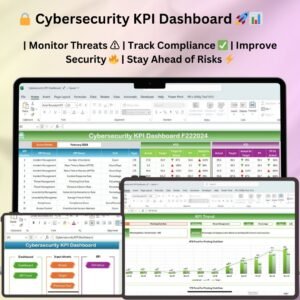
- Cybersecurity KPI Dashboard in Excel: a broader cybersecurity KPI dashboard in Excel
- IT and Cybersecurity Operations Bundle: IT and cybersecurity templates in one bundle
Browse all Excel KPI dashboards or the Excel IT templates.




















Reviews
There are no reviews yet.