



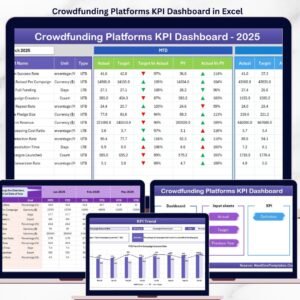
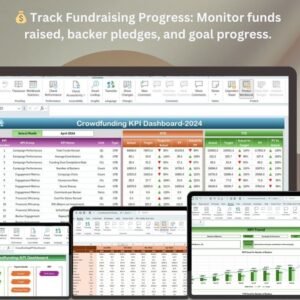
The Crowdfunding KPI Dashboard in Excel is a powerful tool designed to help campaign managers, business owners, and entrepreneurs track and monitor the performance of their crowdfunding campaigns. Whether you’re running a Kickstarter, Indiegogo, or other crowdfunding campaign, this customizable dashboard allows you to track key performance indicators (KPIs) such as funding progress, backer engagement, pledge amounts, and campaign milestones.
With real-time data tracking and comprehensive reporting, the Crowdfunding KPI Dashboard in Excel ensures you stay on top of your campaign’s performance, make data-driven decisions, and optimize your fundraising efforts to reach your goals. This Excel-based tool is perfect for managing multiple campaigns, evaluating funding strategies, and maintaining transparency with backers, making it easier to keep your crowdfunding efforts on track for success.
Key Features of the Crowdfunding KPI Dashboard in Excel
💰 Comprehensive Campaign Tracking
Monitor all critical crowdfunding KPIs including total funds raised, number of backers, funding goal progress, and average pledge per backer. Get a clear overview of your campaign’s health and progress toward your goal.
⚡ Real-Time Funding Progress Monitoring
Track real-time funding performance, including how close you are to your goal. See daily, weekly, or monthly progress and identify any areas that need more focus or promotion.
📈 Backer Engagement & Pledge Analysis
Analyze backer activity, including pledge amounts, backer trends, and retention rates. Gain insights into which reward tiers are most popular and which backer segments are most engaged.
📅 Campaign Milestone Tracking
Set and track key milestones, including marketing targets, stretch goals, and promotional activities, to keep your campaign moving toward success. Stay focused on key dates and deadlines.
🖥️ Interactive & User-Friendly Interface
The Excel dashboard is intuitive and interactive, offering charts, filters, and slicers to explore and analyze data easily. Visualize your crowdfunding campaign’s progress and make informed decisions to improve performance.
Why You’ll Love the Crowdfunding KPI Dashboard in Excel

✅ Track Campaign Performance in Real Time
Monitor fundraising progress and backer engagement with up-to-date data. Track how close you are to reaching your funding goal, ensuring that you stay focused and on target.
✅ Optimize Backer Engagement & Retention
Track which rewards tiers are popular and how backers are interacting with your campaign. Adjust your strategy to focus on the most engaged backers and increase retention.
✅ Improve Fundraising Strategies
Use insights from the dashboard to adjust your marketing and promotional strategies. Determine which campaigns or activities are driving the most engagement and maximize their impact.
✅ Make Data-Driven Decisions
Leverage real-time insights from your crowdfunding campaign to make informed decisions about pricing, backer engagement, and reward structure to optimize campaign performance.
✅ Ensure Transparency & Accountability
Keep backers informed about the campaign’s progress with real-time updates on the dashboard. This transparency helps build trust and maintain momentum throughout the campaign.
What’s Inside the Crowdfunding KPI Dashboard Template?
- Fundraising Progress Tracking: Monitor the amount raised, percentage of goal achieved, and funding milestones.
- Backer Engagement Analysis: Track number of backers, pledge amounts, reward tier popularity, and backer trends.
- Pledge & Payment Tracking: Visualize pledge distributions, average pledge per backer, and payment status.
- Milestone & Stretch Goal Tracking: Track campaign milestones, stretch goals, and promotional achievements.
- Customizable KPIs: Adjust the dashboard to track your specific crowdfunding goals, such as marketing objectives or reward tier performance.
- Interactive Charts & Filters: Use dynamic charts and filters to dive deeper into campaign data and improve your strategies.
How to Use the Crowdfunding KPI Dashboard in Excel
1️⃣ Download the Template: Instantly access your Crowdfunding KPI Dashboard in Excel.
2️⃣ Input Campaign Data: Enter data such as total funds raised, backer pledges, reward tiers, and campaign milestones.
3️⃣ Track & Monitor KPIs: Use the dashboard to track real-time funding progress, backer engagement, and reward performance.
4️⃣ Analyze & Optimize: Leverage insights from the dashboard to adjust your campaign strategy and improve fundraising performance.
Who Can Benefit from the Crowdfunding KPI Dashboard in Excel?
🔹 Campaign Managers & Entrepreneurs
🔹 Crowdfunding Campaign Owners (Kickstarter, Indiegogo, etc.)
🔹 Marketing & Sales Teams Running Crowdfunding Campaigns
🔹 Fundraising & Event Coordinators
🔹 Data Analysts in Crowdfunding or Fundraising
🔹 Anyone Involved in Managing or Promoting Crowdfunding Campaigns
Track, analyze, and optimize your crowdfunding campaign performance with the Crowdfunding KPI Dashboard in Excel. Monitor funding progress, backer engagement, and campaign milestones to ensure you meet your goals and succeed in your crowdfunding efforts.
Click here to read the Detailed blog post
Visit our YouTube channel to learn step-by-step video tutorials
Youtube.com/@PKAnExcelExpert
Compatibility and Requirements
- Works in Microsoft Excel desktop (Excel 2016 or later, or Microsoft 365).
- Slicers filter the dashboard. Microsoft explains how they work in Use slicers to filter data.
Frequently Asked Questions
What does the Crowdfunding KPI Dashboard track?
It tracks fundraising progress, backer engagement, pledges and payments, and campaign milestones and stretch goals.
Can I change the KPIs?
Yes. You can adjust the dashboard to track your own crowdfunding goals, such as marketing objectives or reward tier performance.
What data do I enter?
You enter total funds raised, backer pledges, reward tiers and campaign milestones. The dashboard then shows the results in its charts.
Can I filter the data?
Yes. Interactive charts and filters let you look deeper into your campaign data.
Is there a Google Sheets or Power BI version?
Yes. See the Crowdfunding KPI Dashboard in Google Sheets and the Crowdfunding KPI Dashboard in Power BI.
Related Crowdfunding Templates
- Crowdfunding KPI Dashboard in Google Sheets: the same KPIs in Google Sheets
- Crowdfunding KPI Dashboard in Power BI: the Power BI edition
- Crowdfunding KPI Scorecard in Excel: a scorecard view of campaign KPIs
- Crowdfunding Platforms Dashboard in Excel: compare crowdfunding platforms
- Charity Fundraising KPI Dashboard in Excel: KPIs for charity fundraising
Browse all Excel KPI dashboards.




















Reviews
There are no reviews yet.