

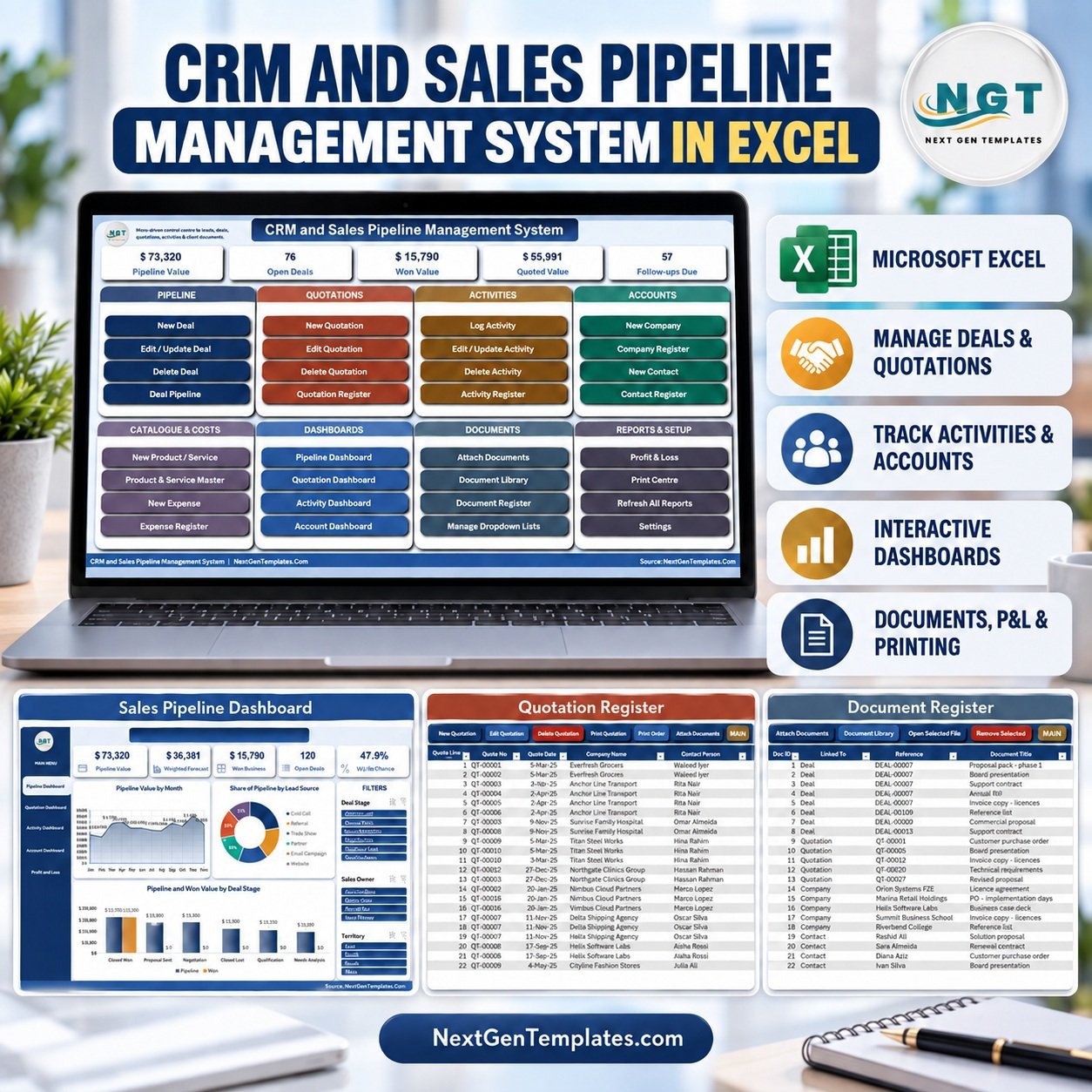
The CRM and Sales Pipeline Management System runs an entire sales desk from one macro-enabled Excel file: 16 worksheets, 12 VBA entry forms, 4 pivot dashboards, a live Profit & Loss statement, and 3 printable documents that come out at A4, 4 inch and 3 inch. Nothing is typed into a data sheet – every record goes in through a checked form.
Sample data ships with 120 deals, 80 quotations across 190 line items, 260 logged activities, 30 companies and 45 contacts, so every chart is populated the moment you open it. Replace it with your own and the whole system follows. If you have outgrown a plain sales pipeline Excel list of one row per deal, this is the step up: a working Excel CRM template with entry forms, printing and filed paperwork.
🌍 Join 8,400+ teams in 40+ countries using NextGenTemplates to replace paid SaaS tools with one-time-purchase Excel, Google Sheets, Power BI and HTML templates.
✅ Instant download · One-time payment · No subscription · No per-user fees · Lifetime access
🎥 Watch the Demo Video
Video Overview
In this 10-minute demo PK walks through the whole system with one real deal from start to finish: adding the deal (the stage sets the win probability and the weighted value by itself), raising a three-line quotation under one quote number, logging a demo activity, and attaching the signed contract, proposal and pricing sheet to the deal in one upload. You then see the Pipeline, Quotation, Activity and Account dashboards and the MAIN KPIs already include the new deal, followed by the twelve-month Profit & Loss, the Print Centre (A4, 4 inch and 3 inch), the dropdown masters and Settings.
🎁 Try it free for 7 days before you buy – every form, dashboard and report works in the free trial, so you can test it on your own PC first.
🔑 Key Features of the CRM and Sales Pipeline Management System
📌 A real pipeline, not a list. Every deal carries a stage, and the stage does the work: picking Negotiation or Closed Won sets the deal status and the win probability by formula, so the weighted forecast recalculates itself. Six stages ship as standard – Qualification, Needs Analysis, Proposal Sent, Negotiation, Closed Won and Closed Lost.
📌 Multi-line quotations. The quotation form is a basket: enter the company, contact and deal once, then add as many product or service lines as you need. Saving writes one row per line under a single quote number, and editing or deleting acts on the whole quotation rather than the row you clicked.
📌 Attach documents to any record. This is the part most Excel CRMs do not have. Pick a Deal, Quotation, Company, Contact or Activity, press Add Files…, select several files at once, and each one is copied into your document folder and listed against that record. The Document Library opens any of them again in two clicks.
📌 Printing that a sales desk actually uses. Quotation, Sales Order Confirmation and Visit / Call Report all print from the same data at A4, 4 inch (104 mm) and 3 inch (80 mm). Paper size and what the print button does – Preview, Print or Save as PDF – are dropdowns on the Settings sheet.
📌 Type-to-search everywhere it matters. Company, contact, deal and product boxes filter as you type and match the start, middle or end of a value. Date boxes are locked and open a themed calendar picker, so 03/04 can never mean March on one PC and April on another.
📌 A deal tracking system that stays yours. As an Excel VBA CRM it runs entirely on your own PC – no account to create, no sync, no per-seat licence, and nothing leaves the file unless you send it.
📌 Everything is yours to edit. Stages, lead sources, industries, territories, sales owners, activity types, document types and expense categories are all master lists you can extend from a form – no sheet editing, no broken dropdowns.
📦 What’s Inside the CRM and Sales Pipeline Management System
Sixteen worksheets, laid out in the order you actually work in them.
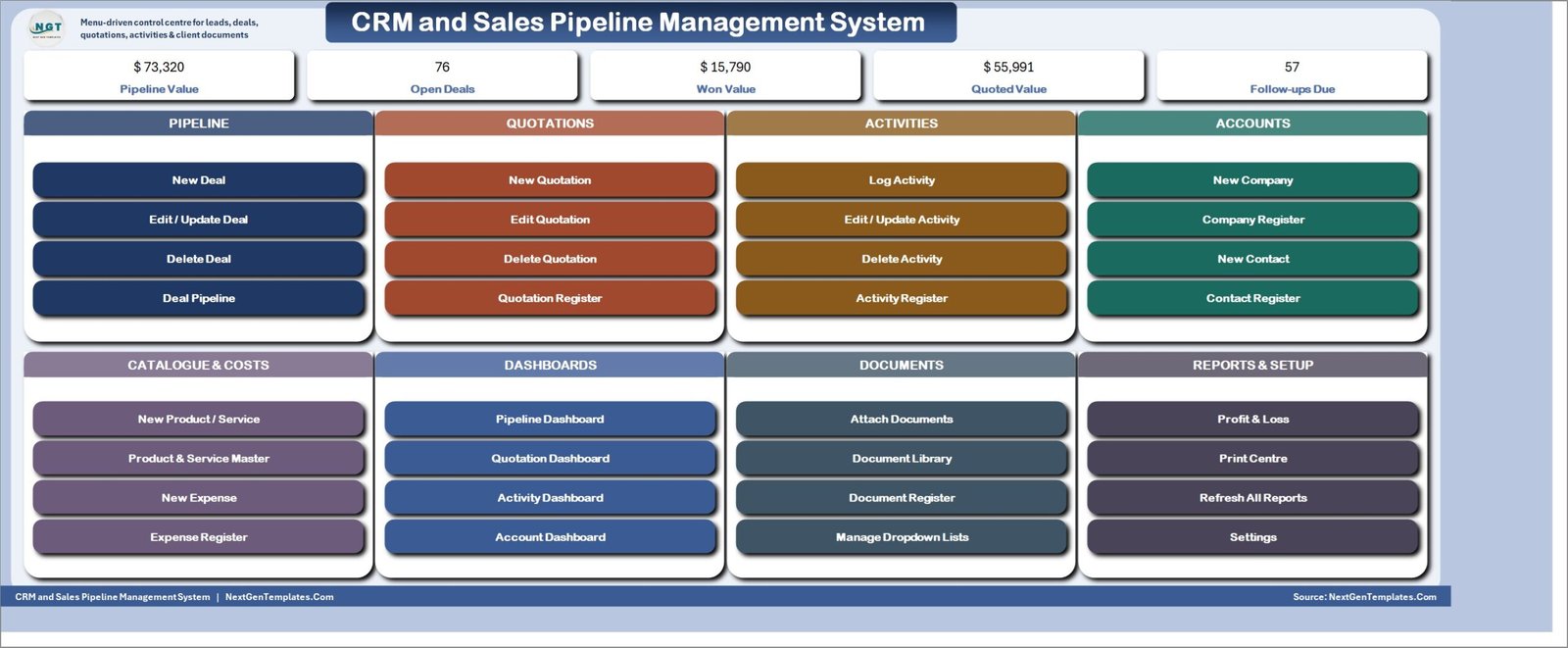
MAIN – the menu screen
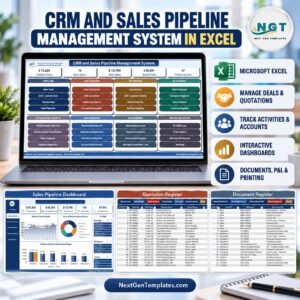
The file opens here every time. Five live KPI chips across the top – Pipeline Value, Open Deals, Won Value, Quoted Value and Follow-ups Due – then eight colour-coded section cards covering Pipeline, Quotations, Activities, Accounts, Catalogue & Costs, Dashboards, Documents and Reports & Setup. Thirty-two buttons, no menu hunting.
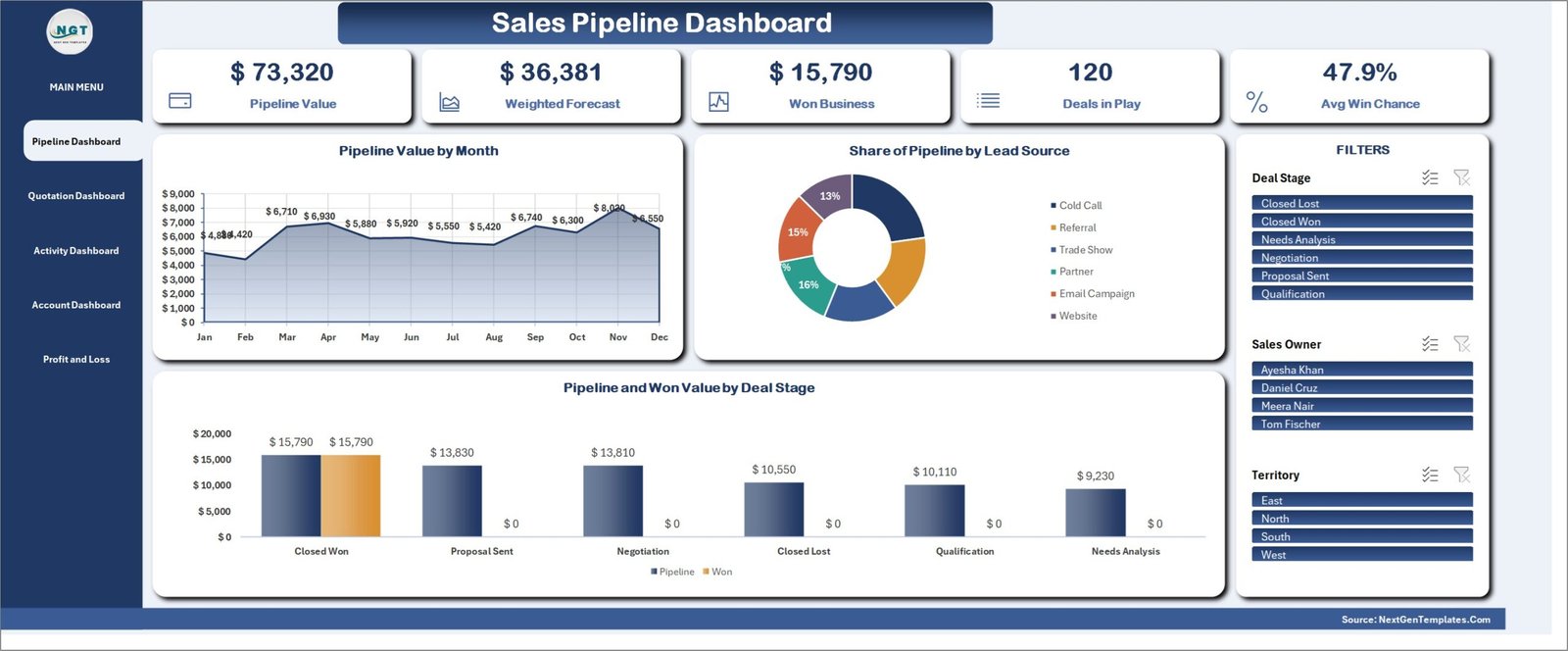
Sales Pipeline Dashboard
Pipeline Value, Weighted Forecast, Won Business, Deals in Play and Average Win Chance, with Pipeline Value by Month, Share of Pipeline by Lead Source, and Pipeline and Won Value by Deal Stage. Slicers for Deal Stage, Sales Owner and Territory drive every figure and chart on the page.
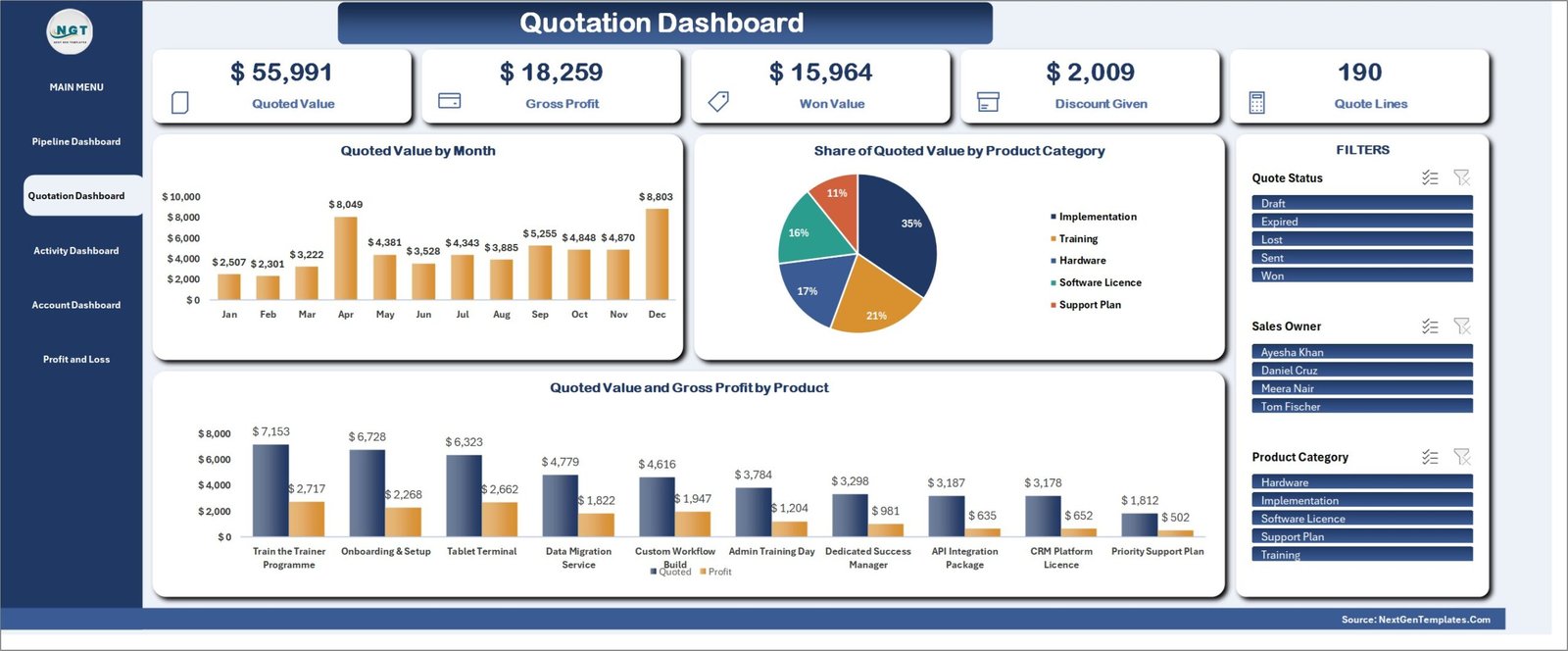
Quotation Dashboard
Quoted Value, Gross Profit, Won Value, Discount Given and Quote Lines, with Quoted Value by Month, Share of Quoted Value by Product Category, and Quoted Value and Gross Profit by Product. Filter by Quote Status, Sales Owner or Product Category.
Sales Activity Dashboard
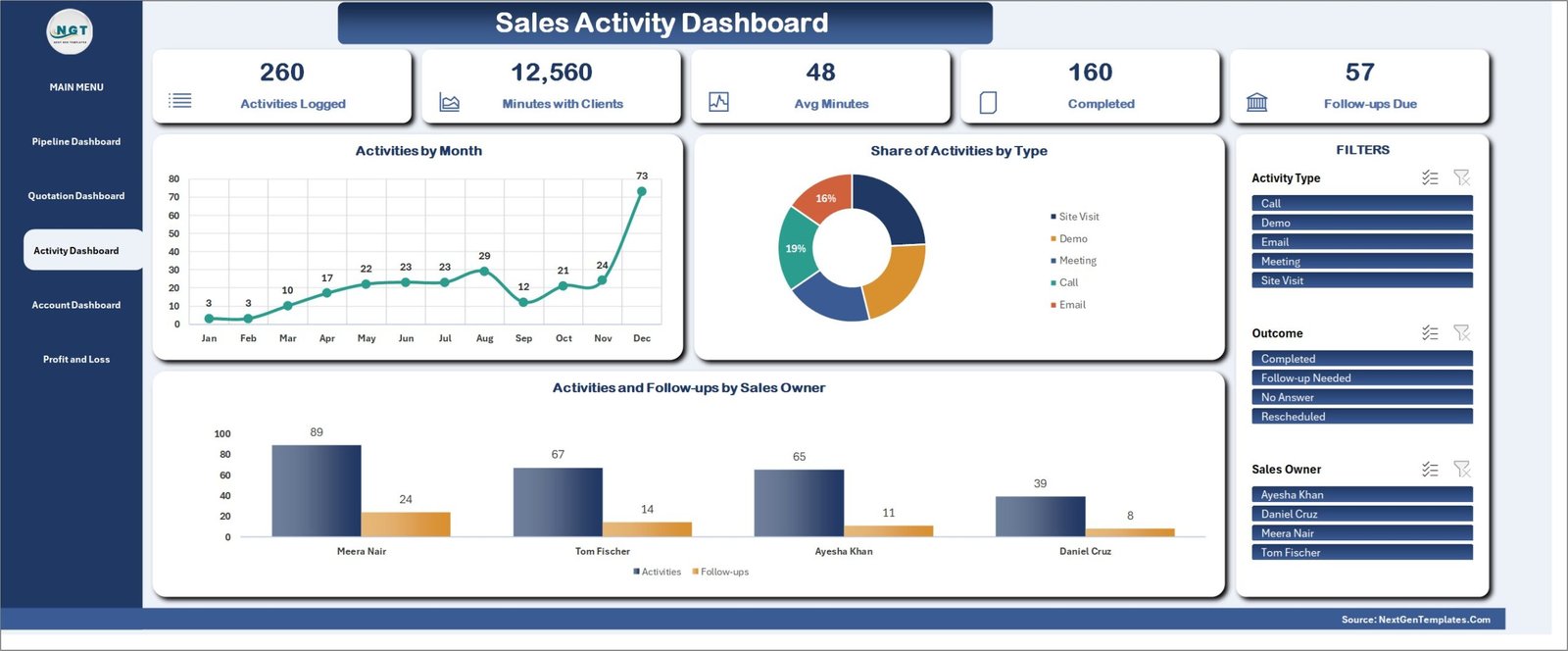
Activities Logged, Minutes with Clients, Average Minutes, Completed and Follow-ups Due, with Activities by Month, Share of Activities by Type, and Activities and Follow-ups by Sales Owner. This is the page that tells you whether the pipeline is being worked.
Account & Territory Dashboard
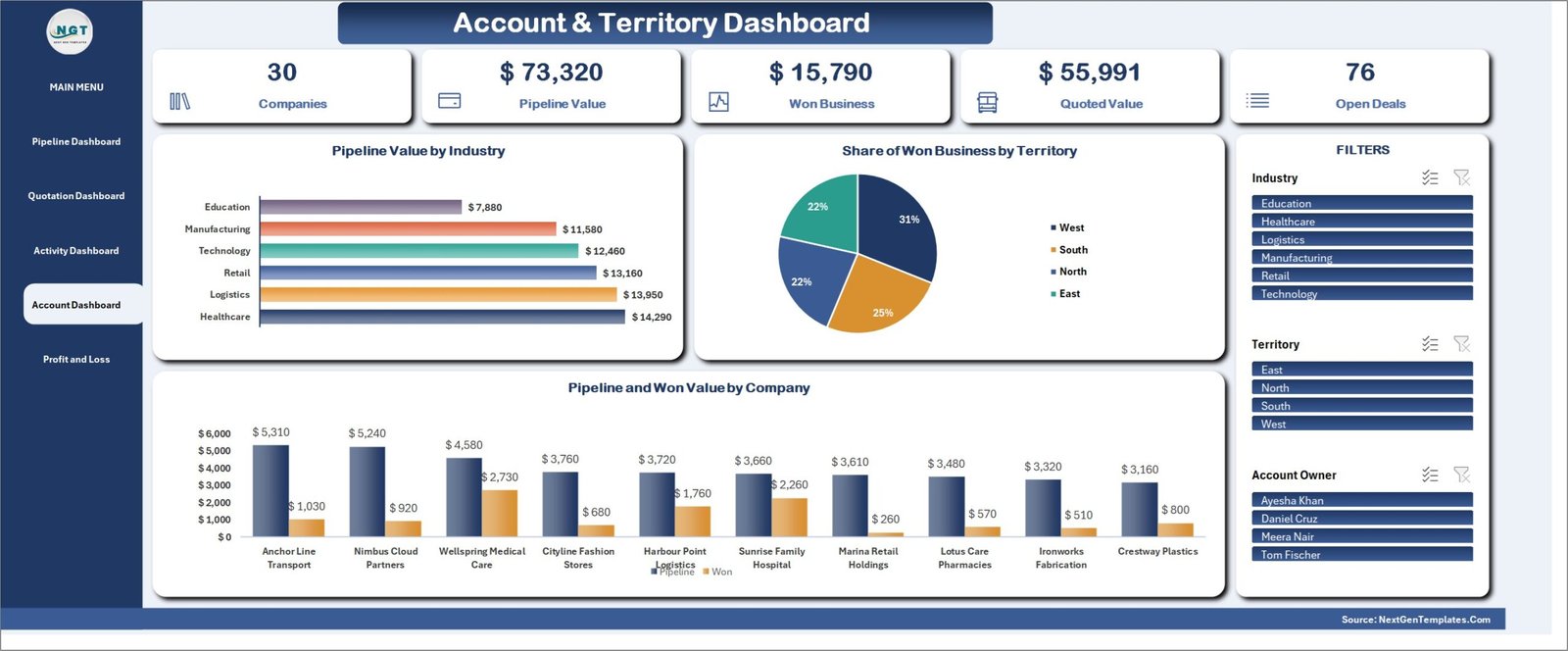
Companies, Pipeline Value, Won Business, Quoted Value and Open Deals, with Pipeline Value by Industry, Share of Won Business by Territory, and Pipeline and Won Value by Company. Slicers for Industry, Territory and Account Owner.
Profit & Loss statement
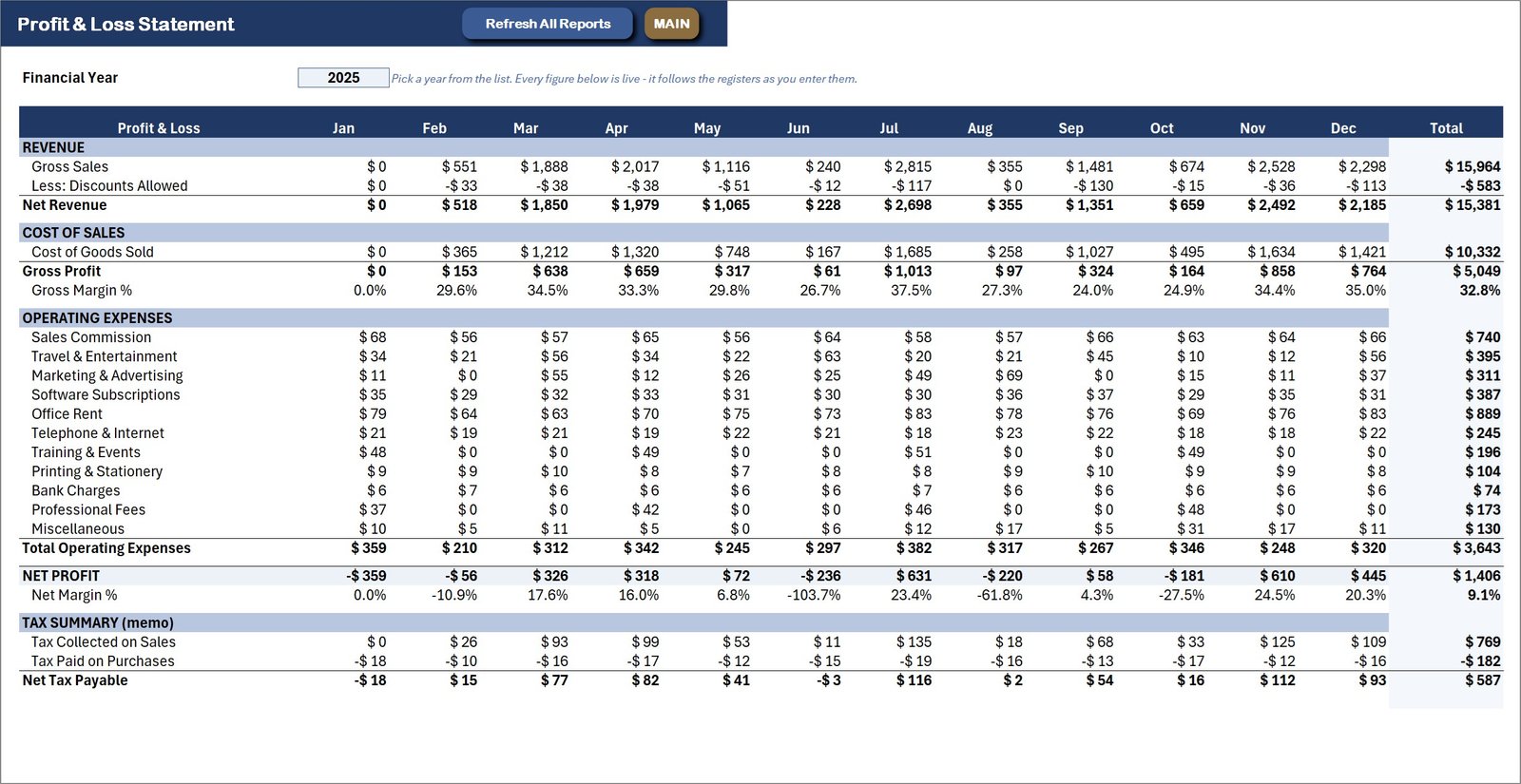
A live formula statement built on won quotations only – twelve months and a year total, from gross sales and discounts through cost of sales and gross margin, every expense category, down to net profit and net margin. The Financial Year dropdown runs 20 years ahead and rolls forward by itself.
Deal Pipeline – the main ledger
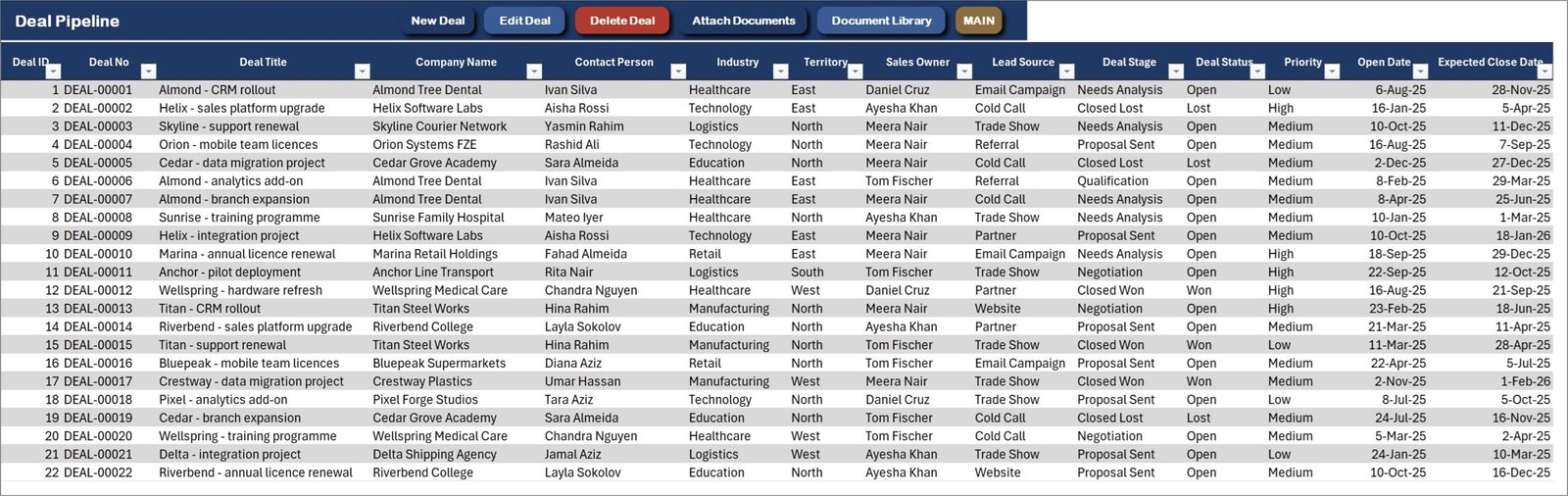
One row per deal across 28 columns: title, company, contact, industry, territory, owner, lead source, stage, status, priority, open and expected close dates, deal value, probability, weighted value, quoted value, activity count, files attached and next step. Attach Documents and Document Library sit right on the action bar.
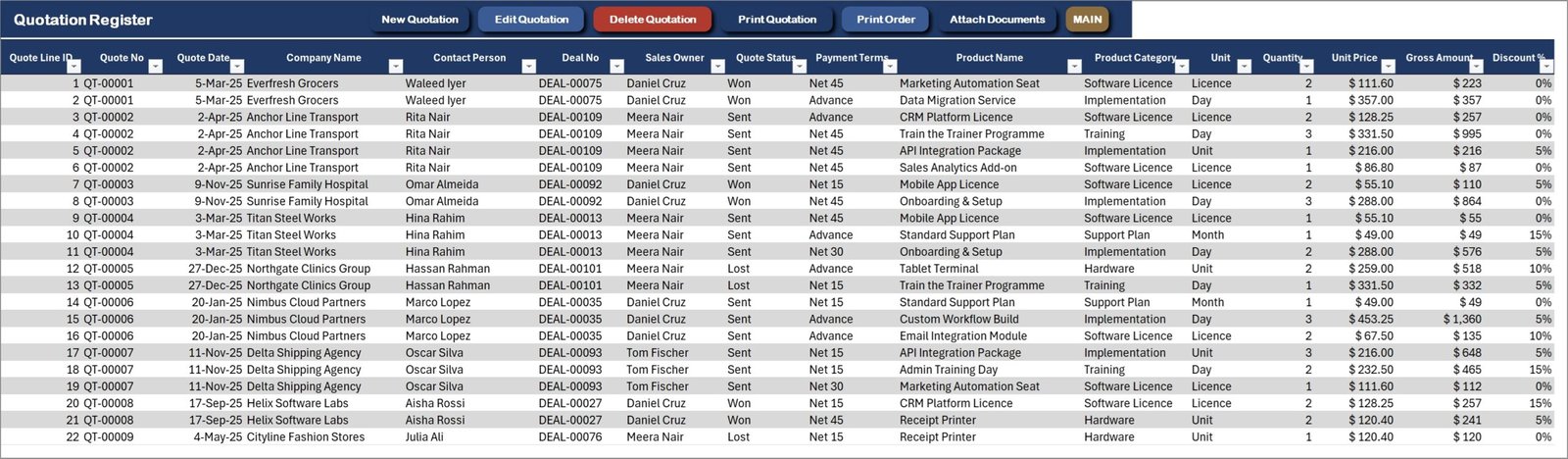
Quotation Register
Every quotation line, grouped by quote number – company, contact, deal, owner, status, payment terms, product, quantity, price, discount, tax, net amount, cost and margin. Print Quotation and Print Order print the selected quote without leaving the sheet.
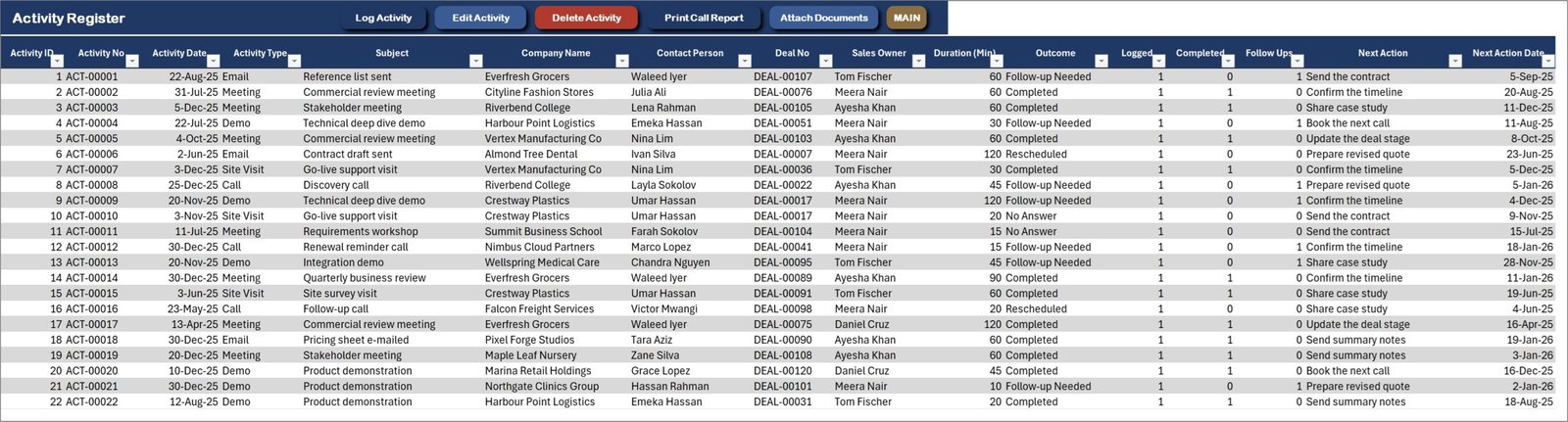
Activity Register
Calls, meetings, demos, emails and site visits against a real deal, with duration, outcome, next action and next action date. Completed and follow-up counters are formula columns, which is what feeds the Activity Dashboard.
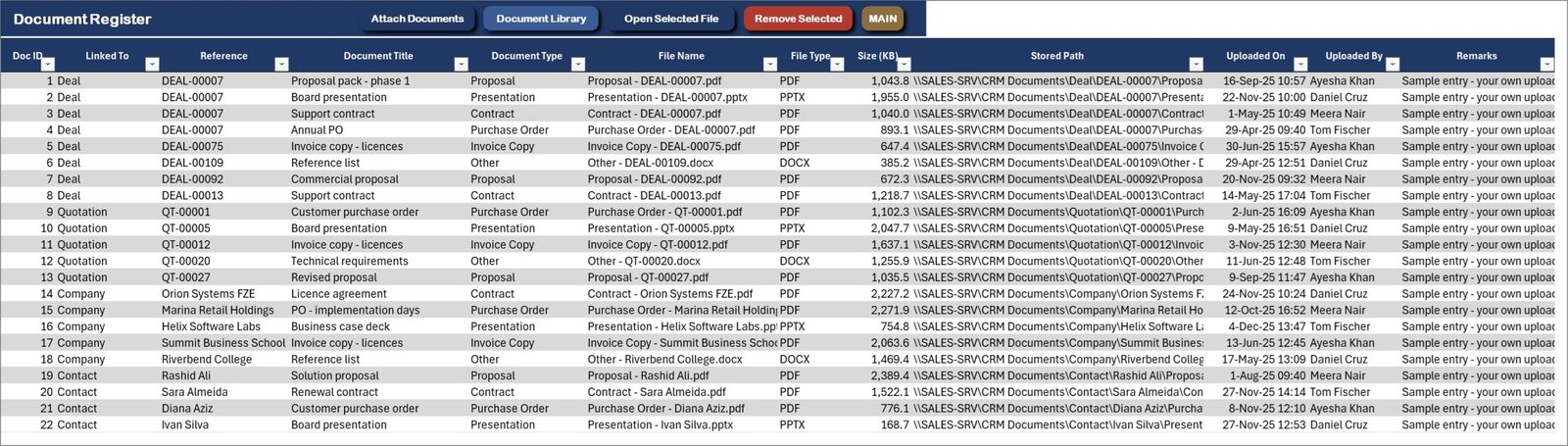
Document Register
The attachment log: what is filed, which record it belongs to, the document type, file name, file type, size, stored path, who uploaded it and when. Open Selected File and Remove Selected work straight from the sheet.
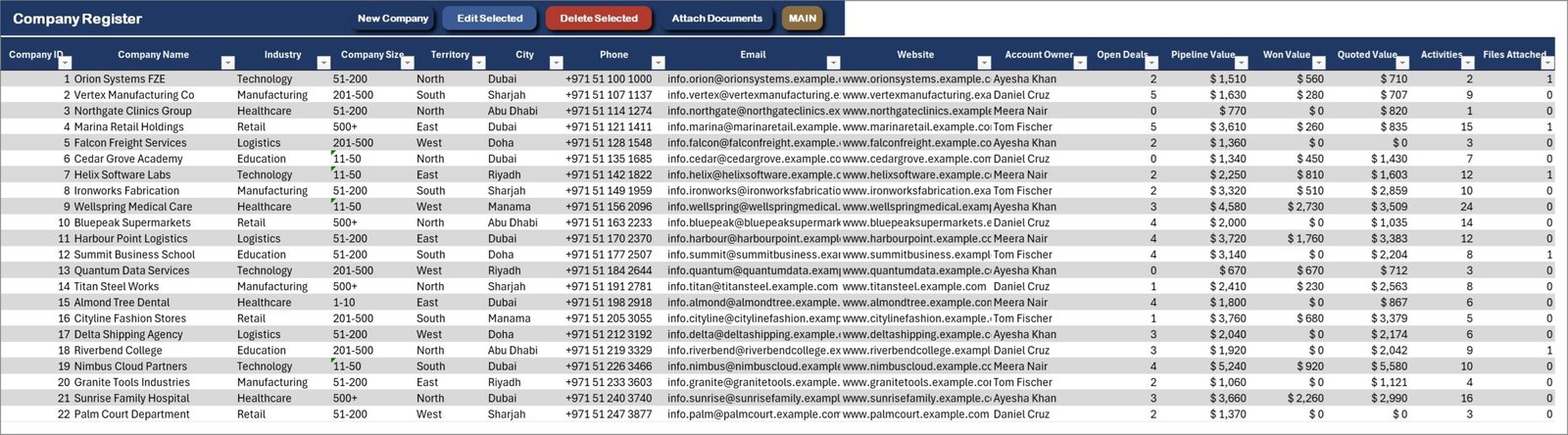
Company Register
Thirty accounts with industry, size, territory, city, contact details and account owner – plus formula columns counting open deals, pipeline value, won value, quoted value, activities and files attached.
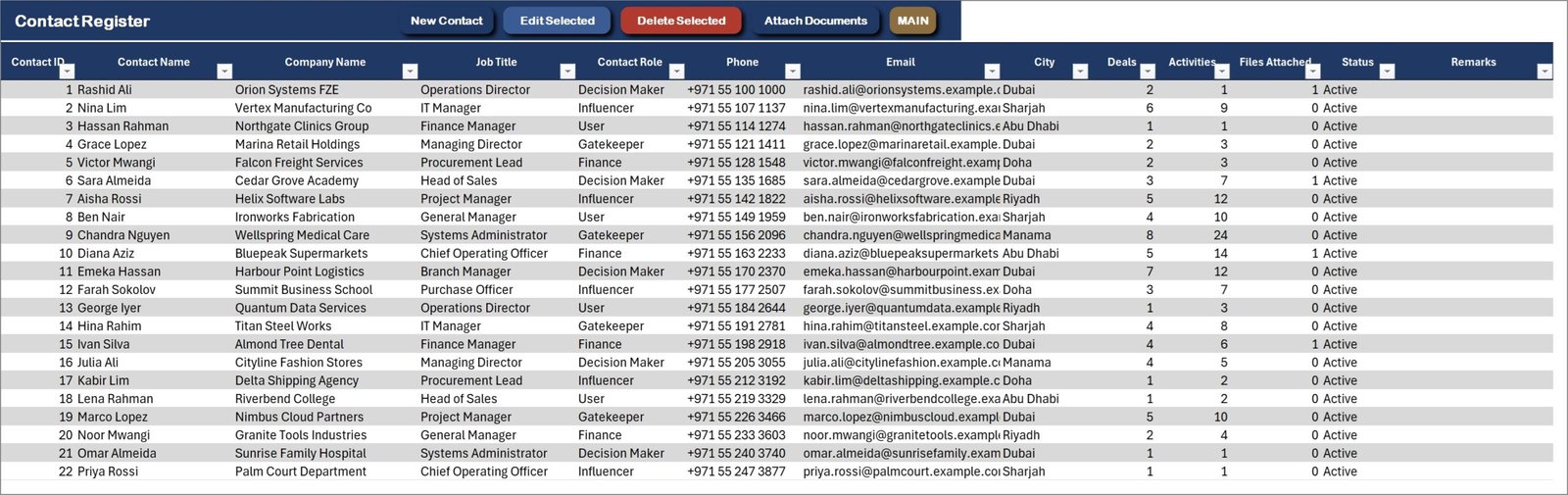
Contact Register
Forty-five named contacts tied to their company, with job title, contact role, phone, email and city, and live counts of deals, activities and attached documents.
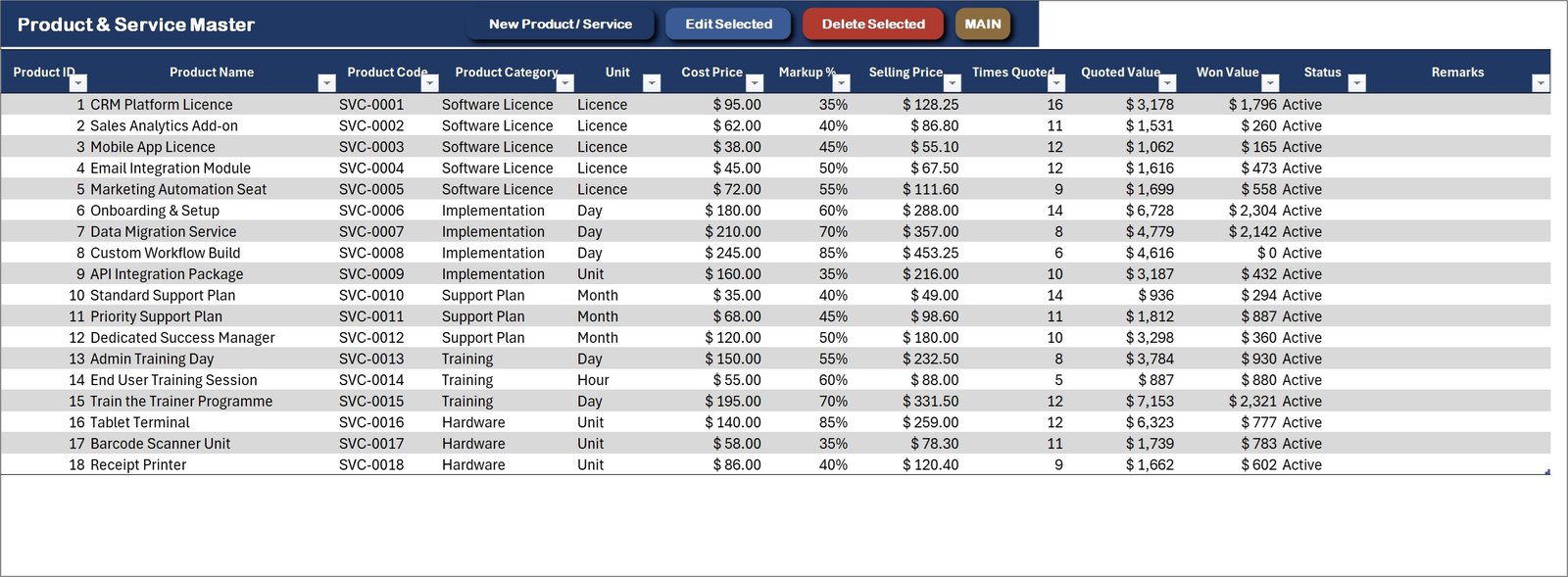
Product & Service Master
Eighteen sellable items across Software Licence, Implementation, Support Plan, Training and Hardware, with cost price, markup and a calculated selling price that the quotation form looks up automatically.
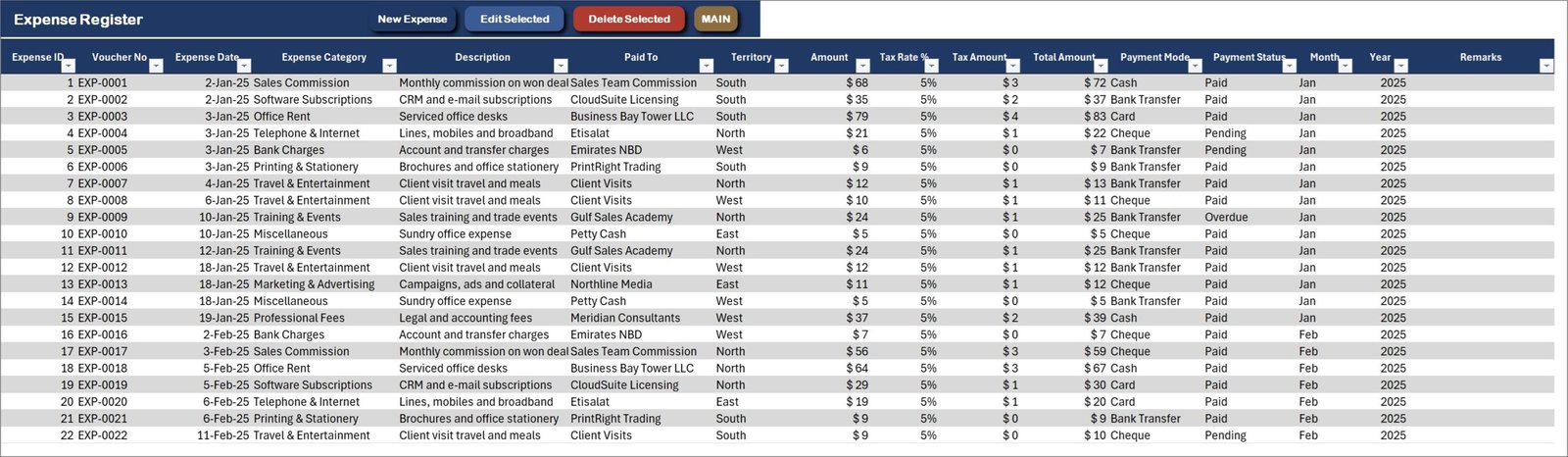
Expense Register
Sales-office running costs by category, with tax, payment mode and status – the input side of the Profit & Loss statement.
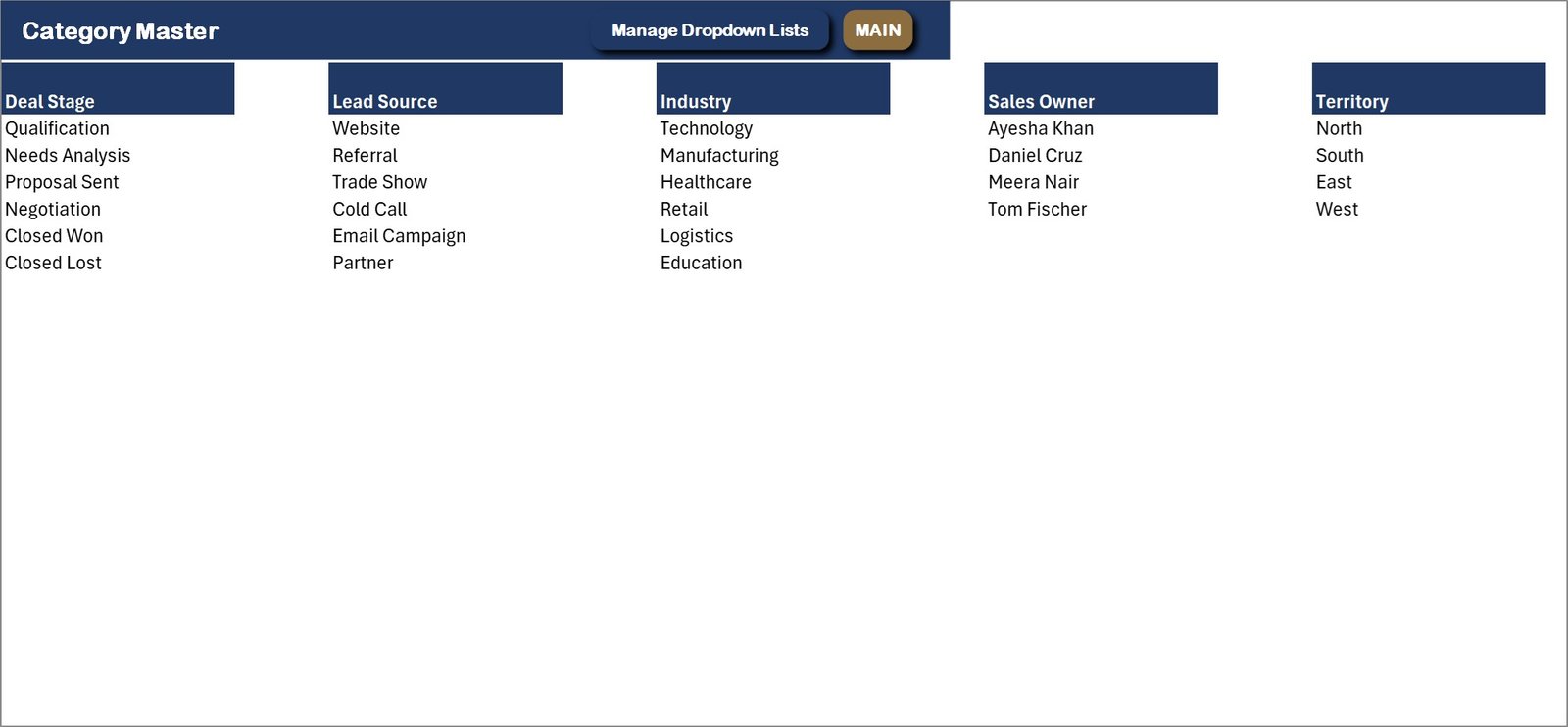
Category Master
Every dropdown in one place: deal stages, lead sources, industries, sales owners, territories, product categories, activity types, document types, cities and expense categories. Edit here or through the Manage Dropdown Lists form.
Settings
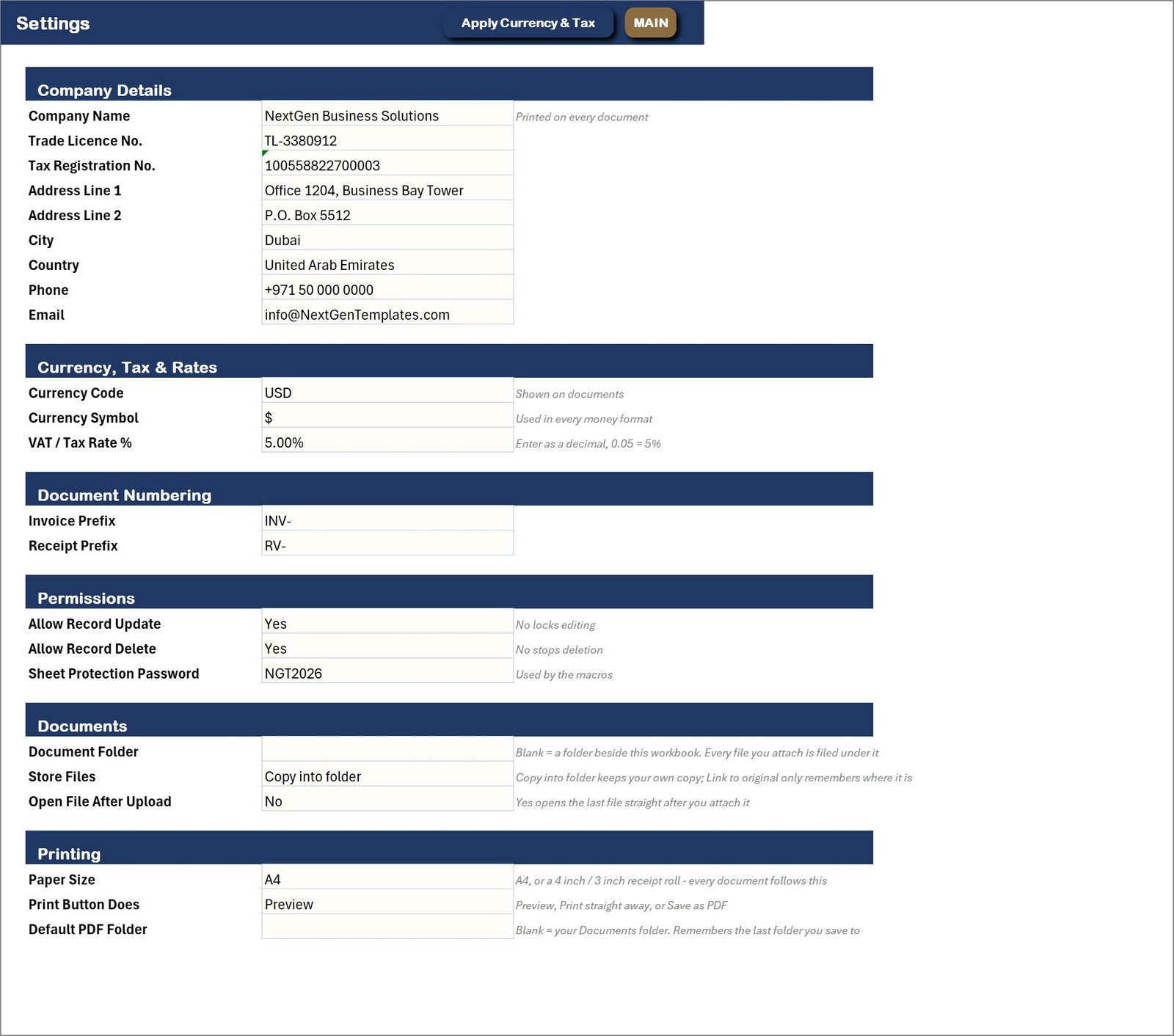
Company details for the printed documents, currency symbol and tax rate, document numbering, permissions, the Document Folder and file-handling rules, and the printing defaults. The document folder ships blank so the system uses a folder beside the workbook until you point it at a network drive.
📊 CRM and Sales Pipeline Management System vs. a Google Sheets CRM vs. HubSpot / Salesforce / Pipedrive – Where This Fits
| Feature | CRM and Sales Pipeline Management System | Google Sheets CRM template | HubSpot / Salesforce / Pipedrive |
|---|---|---|---|
| Cost | $29 one-time ✅ | $0-20 one-time | $20-165 / user / month |
| Platform | Microsoft Excel for Windows (macros) | Google Sheets, browser | Cloud SaaS |
| Setup time | Under 15 minutes ✅ | 15-30 minutes | Days to weeks |
| Deal pipeline with weighted forecast | Yes, stage-driven ✅ | Manual formulas | Yes ✅ |
| Multi-line quotations from a form | Yes, basket form ✅ | No | Add-on or higher tier |
| Print quotation at A4 + 4 inch + 3 inch | Yes, all three ✅ | No | A4 / PDF only |
| Attach several files to a record | Yes, multi-select upload ✅ | Link pasting only | Yes, in cloud storage ✅ |
| Works offline, data stays on your PC | Yes ✅ | No | No |
| Year-1 cost at 5 users | $29 total ✅ | $0-20 total | $1,200-9,900 |
For a sales team that wants a worked pipeline, printable quotations and filed paperwork without a per-seat subscription, the CRM and Sales Pipeline Management System sits in the sweet spot.
👥 Who This Template Is For – and Who It’s Not For
✅ This template is built for:
- Small and mid-size B2B sales teams of 2-20 people who live in Excel already
- Consultancies, agencies, software resellers and equipment suppliers that quote before they invoice
- Sales managers who need a weighted forecast and an activity count without paying per seat
- Owner-run businesses that want the signed contract filed against the deal, not lost in email
❌ This template is NOT for:
- Teams that need several people in the same file at the same time – this is a single-user desktop workbook
- Mac or Excel-for-web users; the forms are VBA and need Excel for Windows with macros enabled
- Anyone wanting email sync, automated sequences, web forms or a customer portal – it does none of those
- Enterprises needing SSO, audit trails or SOC 2 – an unprotected workbook is not the right control environment
⚙️ How to Use the CRM and Sales Pipeline Management System
- Download the ZIP, extract it, open the .xlsm file and click Enable Content so the VBA runs.
- Go to Reports & Setup > Settings and enter your company details, currency symbol and tax rate.
- Set the Document Folder on the same sheet if you want attachments on a shared drive. Leave it blank to use a folder beside the workbook.
- Open Category Master or Manage Dropdown Lists and replace the sample stages, owners, territories and industries with your own.
- Add your companies and contacts, then your products and services with their cost price and markup.
- Press New Deal and start your pipeline. Raise quotations against a deal with New Quotation.
- Log every call and meeting with Log Activity, and attach the paperwork with Attach Documents.
- Delete the sample rows when you are ready – the dashboards and the Profit & Loss refresh themselves.
💼 Real-World Use Cases
Meera runs sales at a 12-person software reseller. She works the pipeline by stage, raises multi-line quotations for licences plus implementation days, and prints them on A4 for procurement. Her Monday forecast is the Weighted Forecast card – no spreadsheet wrangling, no $60-a-seat CRM.
Daniel is an equipment supplier working from a van. He logs every site visit as an activity, prints a Visit / Call Report on the 3 inch roll printer in the van and leaves it with the customer, then attaches the signed order to the deal when he gets back.
Ayesha owns a training consultancy of four. She uses the Quotation Register and the Profit & Loss to see which course lines actually earn margin after delivery cost, and keeps every proposal, contract and purchase order filed against its own deal.
🎁 Try Before You Buy: 7-Day Free Trial
Download the free trial of the CRM and Sales Pipeline Management System in Excel VBA and use the complete system for 7 days. Every form, register, dashboard, printable document and setting works exactly as in the full version, so you can test it with your own records before you decide.
How the free trial works
- Download and unzip the trial file below.
- Open it in Microsoft Excel for Windows (the desktop app, not Excel Online or Mac) and click Enable Content on the yellow bar. If there is no yellow bar, right-click the file, choose Properties, tick Unblock and open it again.
- Your 7 days start the first time the file opens with macros on. A banner on the MAIN page shows how many days are left.
- After 7 days the trial locks and shows a Buy Full Version button. Buy the full version to keep working with no time limit.
| Free Trial | Full Version | |
|---|---|---|
| Every feature, form and dashboard | Yes | Yes |
| Time limit | 7 days | None, lifetime use |
| Trial banner | Yes | No |
| PDF user manual | Included | Included |
| Editable (unlocked) VBA code | No, locked | Yes |
The trial runs once per computer: downloading it again does not restart the 7 days. Records you enter during the trial can be copied into the full version.
❓ Frequently Asked Questions
What exactly does the CRM and Sales Pipeline Management System track?
It tracks deals through six pipeline stages, multi-line quotations, sales activities, companies, contacts, products and services, sales expenses and attached documents. Four dashboards and a live Profit & Loss statement are built on top of those registers.
Can I attach contracts and proposals to a deal?
Yes. This is the feature most Excel CRM templates lack. Choose the record, press Add Files…, select several files at once, and each is copied into your document folder and listed against that deal, quotation, company, contact or activity. The Document Library reopens any of them in two clicks.
Where are my attached files actually stored?
In the folder you set on the Settings sheet, under a subfolder for the record type and the record itself. Leave the setting blank and the system uses a folder beside the workbook. You can also choose Link to original, in which case the file never moves and removing an entry never deletes it.
How long does setup take?
Under 15 minutes. Enable macros, fill in Settings, replace the dropdown master lists with your own, and add your companies and products. The sample data can stay while you learn the system and be deleted later.
How does this compare to HubSpot or Pipedrive?
The CRM and Sales Pipeline Management System is a one-time $29 desktop workbook with no per-user fee, and your data never leaves your PC. HubSpot and Pipedrive add email sync, web forms, automation and multi-user access that an Excel file cannot provide. If you need those, buy those. If you need a worked pipeline and printable quotations, this is far cheaper.
Does it work on Mac or Excel for the web?
No. The entry forms, the printing engine and the document upload are VBA, so it needs Microsoft Excel for Windows on the desktop with macros enabled. It will open elsewhere but the buttons will not run.
Can I change the stages, owners and categories?
Yes – all of them. Deal stages, lead sources, industries, territories, sales owners, activity types, document types and expense categories are master lists you edit from the Manage Dropdown Lists form or the Category Master sheet, and every form picks up the change immediately.
👤 About the Author
Built by PK – Microsoft Certified Professional with 15+ years of Excel, Google Sheets and Power BI experience. Founder of NextGenTemplates, reaching 300K+ subscribers across YouTube channels (@PK-AnExcelExpert, @NextGenTemplates, @NeoTechNavigators). Every template is hand-built and tested before release.
🔗 Explore Related Templates
💎 Best value: the VBA Management Systems Mega Pack bundles five complete Excel VBA systems for less than buying them separately.
- Retail Store Management System V1.0 in Excel VBA – the same engine built for a shop counter: billing, purchases, stock and a till-roll receipt.
- Proposal & Quote Tracker in Google Sheets – a lighter, browser-based way to follow quotes if you do not need the full pipeline.
- Networking & Professional Contacts Tracker in Google Sheets – keep early-stage contacts before they become deals.
- Wholesale Order Book Data Entry System in Excel – a single-sheet order book for teams that only need order capture.
Browse more Excel VBA Tools or the full range of MS Excel templates.
📖 Click here to read the Detailed Blog Post
🎥 Visit our YouTube channel for step-by-step video tutorials
👉 YouTube.com/@NextGenTemplates
📅 Last updated: September 2026












Reviews
There are no reviews yet.