



The Budget Approval Evaluation in Excel template is a practical and powerful tool designed to help businesses streamline their budgeting process and ensure that budget approvals are efficiently tracked. This template allows finance teams, project managers, and budget approvers to easily evaluate, track, and manage all aspects of the budget approval process, from initial proposals to final approval.
With a user-friendly interface, this Excel template organizes budget details, approval statuses, responsible persons, and deadlines all in one place, making it easier for teams to stay on track and ensure that all approvals are done on time. Whether for department budgets or company-wide allocations, this template helps ensure transparency, accountability, and better financial management.
Key Features of the Budget Approval Evaluation in Excel
📊 Comprehensive Budget Tracking
Track all aspects of budget approval, from initial evaluation to final approval, and keep all details organized in one place. The template is designed to help you monitor budget status, amounts, responsible persons, and due dates.
✅ Approval Process Monitoring
Monitor and visualize the status of each budget proposal, whether it’s pending, approved, or rejected. Ensure timely decision-making with a clear view of all approval stages.
📅 Customizable Evaluation Metrics
Customize the budget evaluation criteria based on your organization’s specific requirements. Track the impact of each budget proposal, the alignment with financial goals, and its overall priority.
📝 Detailed Tracking Table
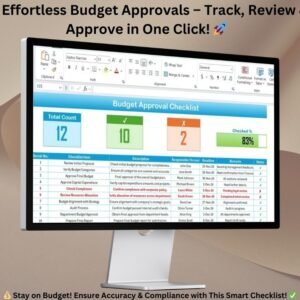
Easily track the budget evaluation process with a detailed table that includes columns for serial numbers, budget items, descriptions, responsible persons, deadlines, remarks, and approval statuses.
⚙️ Approval Status & Reporting
The template includes easy-to-use checkboxes to mark whether a budget proposal is approved or rejected. Real-time reporting provides an instant view of the current approval status across all departments.
📈 Progress Tracker & Visual Dashboard
Stay on top of your budget approval process with an at-a-glance progress tracker that provides clear visual indicators of the approval status of each proposal. This makes it easier to identify bottlenecks and ensure timely approvals.
Why You’ll Love the Budget Approval Evaluation in Excel

✅ Efficient Budget Tracking
Track the status of all budget proposals, monitor approval stages, and ensure that deadlines are met for a more efficient budgeting process.
✅ Streamline Approval Process
With real-time tracking and approval indicators, you can simplify and speed up the budget approval process across teams.
✅ Improve Accountability & Transparency
The clear structure and tracking features improve transparency and accountability in the budgeting process, ensuring that everyone is aligned with financial goals.
✅ Customizable for Any Organization
This template can be easily customized to fit your company’s unique budget evaluation process, whether it’s for a specific department or the entire organization.
✅ User-Friendly Interface
Designed for ease of use, this Excel template is simple to navigate and ensures that all team members can quickly adopt it for seamless integration into your workflow.
What’s Inside the Budget Approval Evaluation in Excel?
Budget Proposal Tracking: Organize and track proposals, responsible persons, and status.
Approval Status Management: Mark each proposal’s status as pending, approved, or rejected.
Detailed Evaluation Table: Track budget items, descriptions, deadlines, and more.
Customizable Criteria: Add or adjust evaluation criteria according to your needs.
Real-Time Progress Tracker: Get an overview of the approval process with a visual dashboard.
Actionable Reporting: Monitor approval progress and identify delays quickly.
How to Use the Budget Approval Evaluation in Excel
1️⃣ Download the Template: Instantly access your Excel file upon purchase.
2️⃣ Input Budget Details: Enter the budget proposals, responsible persons, and deadlines.
3️⃣ Customize Evaluation Criteria: Modify the evaluation criteria based on your organization’s needs.
4️⃣ Track Progress: Monitor the approval process and use the progress tracker to identify delays.
5️⃣ Complete Reporting: Use the reporting dashboard to track overall progress and completion.
Who Can Benefit from the Budget Approval Evaluation in Excel?
🔹 Finance Teams & Budget Managers
🔹 Project Managers & Department Heads
🔹 Business Owners & Executives
🔹 Government & Nonprofit Organizations
🔹 Accounting & Financial Analysts
🔹 Any Organization with a Formal Budgeting Process
Ensure that your budget approval process is efficient and transparent with the Budget Approval Evaluation in Excel. Stay organized, keep track of all proposals, and ensure timely decision-making with this powerful tool.
Click here to read the Detailed blog post
Visit our YouTube channel to learn step-by-step video tutorials
Youtube.com/@PKAnExcelExpert
Watch the step-by-step video Demo:
Compatibility and Requirements
- Works in Microsoft Excel desktop (Excel 2016 or later, or Microsoft 365).
- You mark each proposal as approved or rejected with checkboxes. Microsoft explains them in Using check boxes in Excel.
Frequently Asked Questions
What does the tracking table contain?
It has columns for serial number, budget item, description, responsible person, deadline, remarks and approval status.
How do I mark a proposal as approved or rejected?
Use the checkboxes in the approval status column. The progress tracker shows the result for each proposal.
Can I change the evaluation criteria?
Yes. You can add or adjust the criteria to match how your organization evaluates budget proposals.
Is there a Google Sheets version?
There is a similar template in Google Sheets: Budget Approval Checklist in Google Sheets.
Related Budget Approval Templates
- Budget Approval Checklist in Excel: a checklist for each step of approval
- Budget Approval Schedule in Excel: plan the approval dates
- Budget Approval Audit in Excel: review how approvals were handled
- Budget Approval Preparation Guide in Excel: prepare proposals before submission
- Budget Approval Checklist in Google Sheets: a similar checklist for Google Sheets
Browse all Excel checklist templates.



























Reviews
There are no reviews yet.