



The Budget Approval Preparation Guide in Excel is a comprehensive and user-friendly template designed to simplify the budget approval process. Whether you’re preparing a budget for a corporate project, department, or a personal financial plan, this guide ensures that every detail is accounted for and that the approval process runs smoothly.
This Excel template helps you track key budget components, manage timelines, and maintain accountability at every stage of the approval process. With an easy-to-follow layout and customizable features, it is an essential tool for finance teams, project managers, or anyone involved in preparing and obtaining budget approvals.
Key Features of the Budget Approval Preparation Guide in Excel
📊 Comprehensive Budget Tracking
This template allows you to input and track all components of your budget, including revenue, expenses, and variances. The clear categorization ensures that you don’t miss any important aspects of the budget.
📅 Step-by-Step Approval Process
Break down the approval process into manageable steps. Track the status of each step, whether it’s review, approval, or revision. The template keeps everyone aligned and ensures the process is completed on time.
📝 Customizable Budget Categories
Tailor the budget categories to suit your specific needs. Add or modify categories such as payroll, marketing, office supplies, etc., to match the requirements of your project or organization.
🔑 Responsible Party Tracking
Assign responsibility to team members or departments to ensure accountability. Track who is in charge of each task and stage of the approval process.
💡 Clear Timeline Management
Set deadlines for each stage of the budget approval process, from initial preparation to final approval. Track progress in real-time, ensuring that no step is missed and deadlines are met.
⚙️ Easy-to-Use Dashboard
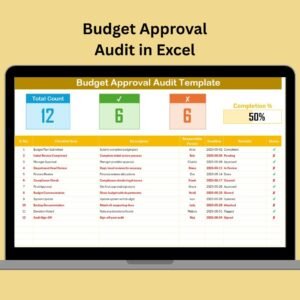
The template features an intuitive, visually appealing dashboard for an at-a-glance view of the budget’s status. Track pending approvals, completed stages, and total budget progress easily.
Why You’ll Love the Budget Approval Preparation Guide in Excel

✅ Streamlined Approval Process
Easily follow the approval steps and keep everyone on track with clear deadlines and responsibilities, ensuring timely budget approvals.
✅ Comprehensive Overview
Track all aspects of the budget preparation process in one place, helping you avoid overlooked details and costly mistakes.
✅ Customization & Flexibility
Tailor the template to your organization’s needs, whether you’re preparing a department’s budget or managing a large-scale project budget.
✅ Clear Accountability
Assign responsibility at each stage of the budget approval process to ensure that everyone knows what is expected of them.
✅ Real-Time Progress Monitoring
Track progress and quickly identify any roadblocks or delays in the budget approval process with clear, real-time status updates.
What’s Inside the Budget Approval Preparation Guide in Excel?
Comprehensive Budget Categories: Track revenue, expenses, and variances across multiple categories.
Step-by-Step Approval Process: A clear and organized method for tracking the approval stages.
Responsible Party Assignment: Keep accountability clear by assigning tasks to team members.
Timeline Management: Set deadlines for each stage and monitor real-time progress.
Customizable Elements: Modify categories and stages to meet your specific budget needs.
How to Use the Budget Approval Preparation Guide in Excel
1️⃣ Download the Template: Instantly access the Excel file with all necessary templates and tracking features.
2️⃣ Input Budget Details: Add your budget categories, expenses, and revenue estimates.
3️⃣ Assign Responsibility: Designate team members for specific budget components and approval stages.
4️⃣ Track Progress: Use the dashboard to monitor real-time progress, ensuring each step is completed on time.
5️⃣ Customize as Needed: Modify the categories and deadlines to fit the unique needs of your project or organization.
Who Can Benefit from the Budget Approval Preparation Guide in Excel?
🔹 Finance Managers & Teams
🔹 Project Managers
🔹 Small Business Owners
🔹 Corporate Budgeting Teams
🔹 Non-Profit Organizations
🔹 Consultants & Freelancers
🔹 Departments Handling Annual Budgets
The Budget Approval Preparation Guide in Excel helps you organize and streamline the entire budget approval process, making it easier to get timely approvals, stay within budget, and avoid costly mistakes.
Click here to read the Detailed blog post
Visit our YouTube channel to learn step-by-step video tutorials
Youtube.com/@PKAnExcelExpert
Watch the step-by-step video Demo:
Compatibility and Requirements
- Works in Microsoft Excel desktop (Excel 2016 or later, or Microsoft 365).
- New to Excel? Microsoft has free lessons in Excel for Windows training.
Frequently Asked Questions
What budget details can I track in this template?
You can track revenue, expenses and variances across budget categories. You can add or change categories such as payroll, marketing or office supplies.
Can I assign people to each approval step?
Yes. You assign a responsible team member or department to each budget component and approval stage, so it is clear who owns each task.
How do I keep track of deadlines?
Set a deadline for each stage, from preparation to final approval. The dashboard shows pending approvals, completed stages and overall budget progress.
Can I change the categories and stages?
Yes. The categories and stages are customizable, so you can match them to a department budget or a larger project budget.
Is there a Google Sheets version?
Yes. See the Budget Approval Checklist in Google Sheets.
Related Budget Approval Templates
- Budget Approval Checklist in Excel: a checklist for each approval step
- Budget Approval Schedule in Excel: plan the approval dates
- Budget Approval Action Plan in Excel: list the actions and owners
- Budget Approval Audit in Excel: review the approval process
- Budget Request & Approval Tracker in Google Sheets: track requests in Google Sheets
Browse all Excel checklist templates.































Reviews
There are no reviews yet.