
Struggling to manage book fair data across multiple sources? 😓
The Book Fairs Dashboard in Power BI is your all-in-one solution to track performance, boost engagement, and maximize profitability 🚀.
In today’s dynamic event industry, handling visitor attendance, vendor performance, and revenue manually can slow you down. However, this powerful and ready-to-use dashboard transforms complex data into interactive visuals, real-time KPIs, and actionable insights.
As a result, you can make faster, smarter, and data-driven decisions—all from one centralized dashboard.
🚀 Key Feature of Book Fairs Dashboard in Power BI
✅ 📊 Interactive Power BI Dashboard
Analyze book fair data using dynamic visuals and slicers.
✅ 📈 Real-Time KPI Tracking
Monitor revenue, profit margin, attendance, and vendor performance.
✅ 🎯 Multi-Page Analysis
Explore insights across 5 powerful analytical pages.
✅ 🔍 Advanced Filtering (Slicers)
Customize analysis by city, month, exhibitor type, and weather.
✅ 💰 Revenue & Profit Insights
Identify high-performing fairs and optimize strategies.
✅ 👥 Attendance & Engagement Analysis
Understand visitor trends and improve marketing.
✅ ⚡ Automated Data Processing
Save time by eliminating manual reporting.
📦 What’s Inside the Book Fairs Dashboard in Power BI
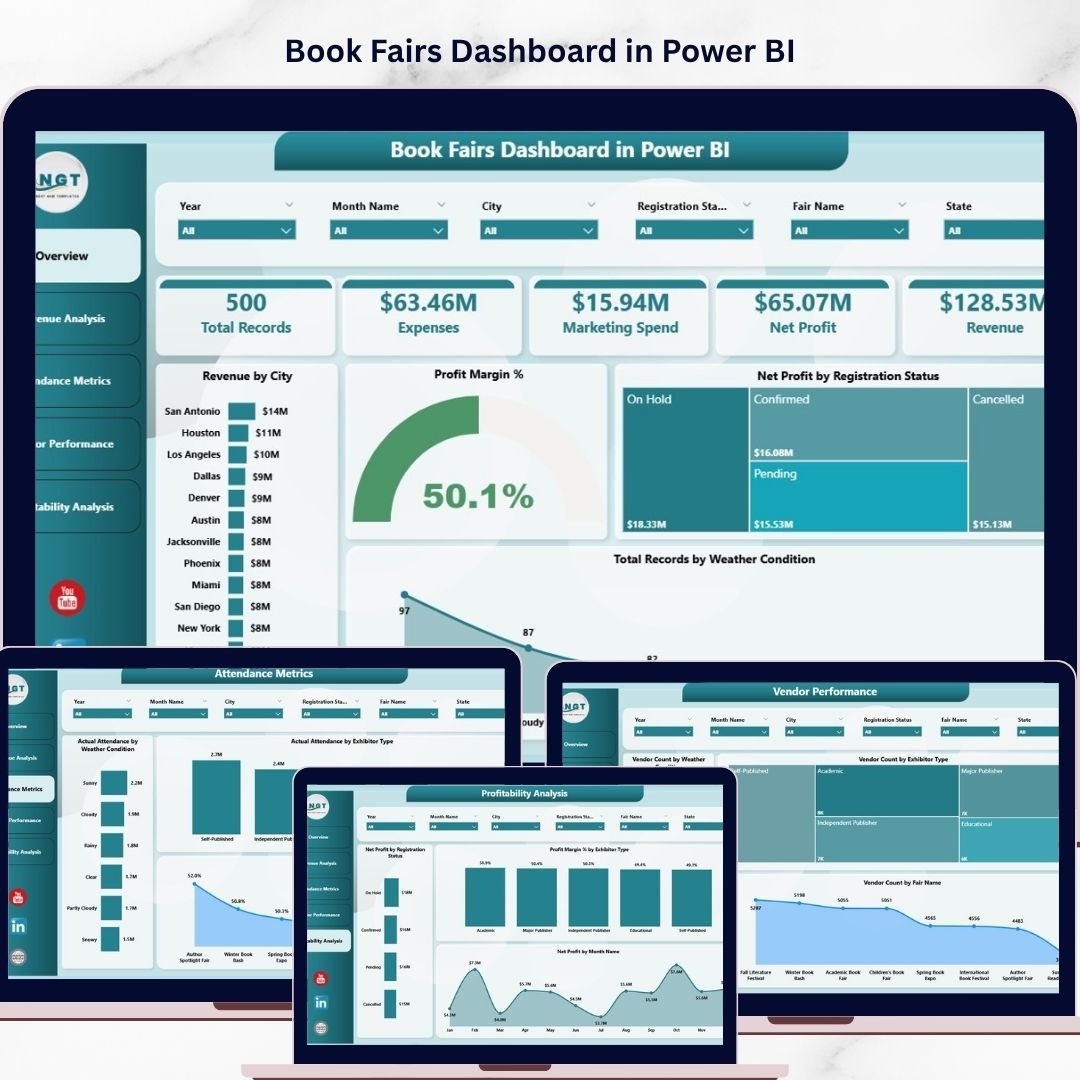
This dashboard includes 5 interactive pages:
🏠 Overview Page – Quick snapshot of key KPIs and performance
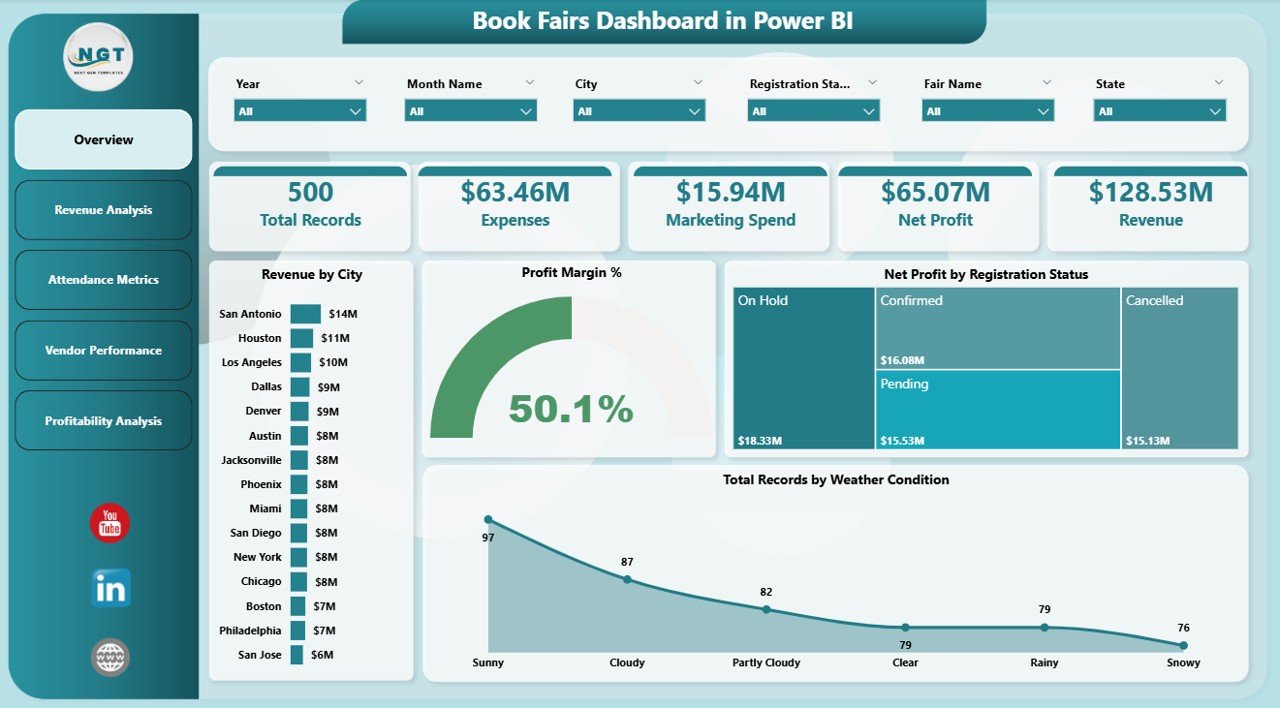
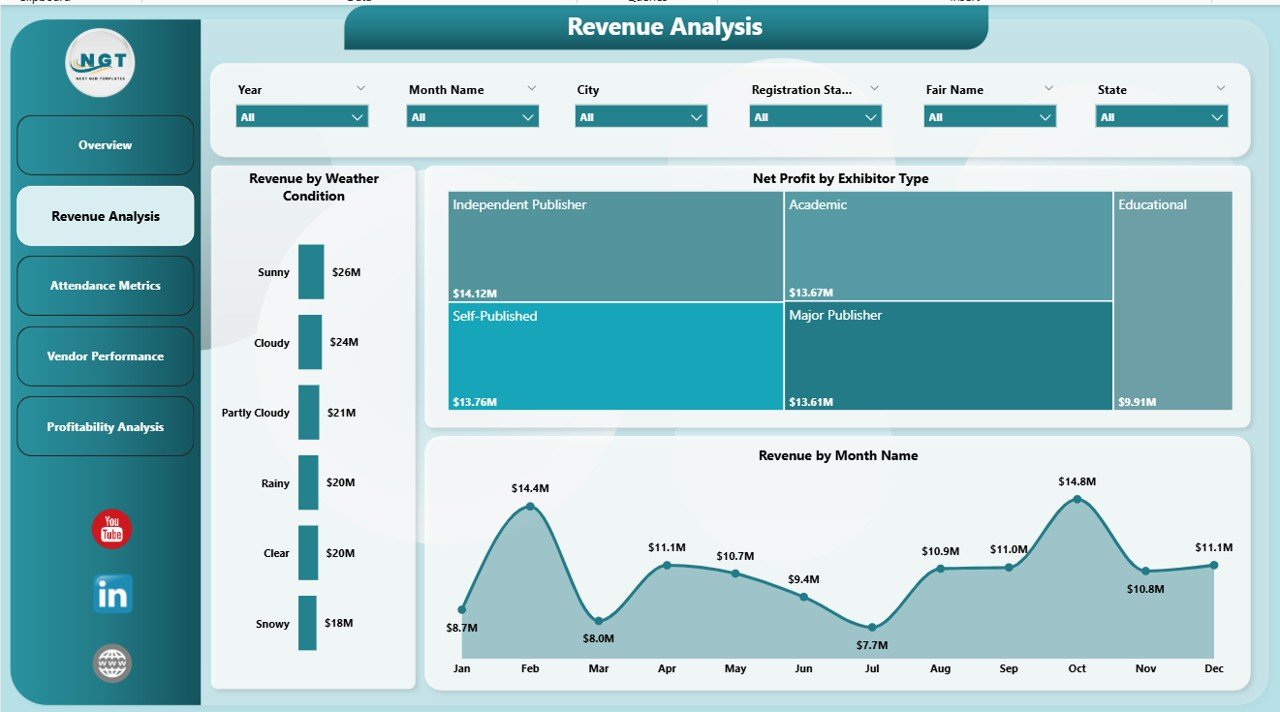
💰 Revenue Analysis – Track earnings across months and exhibitors
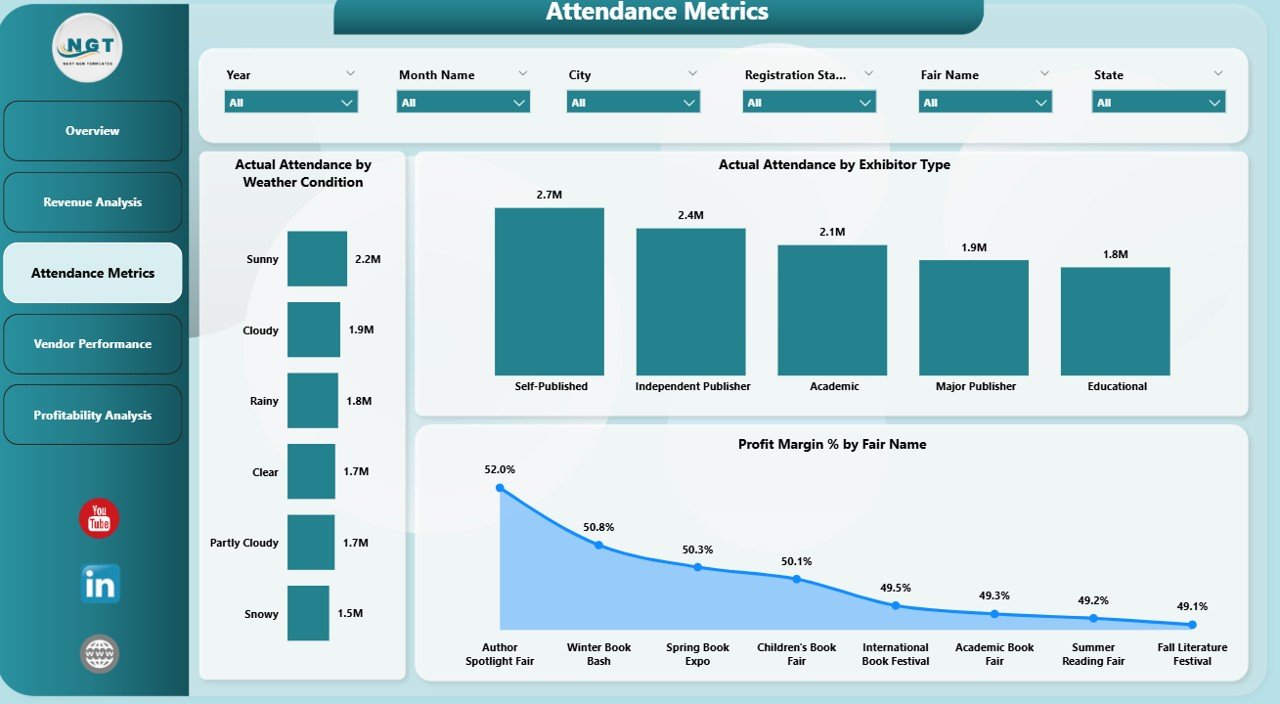
👥 Attendance Metrics – Analyze visitor behavior and engagement
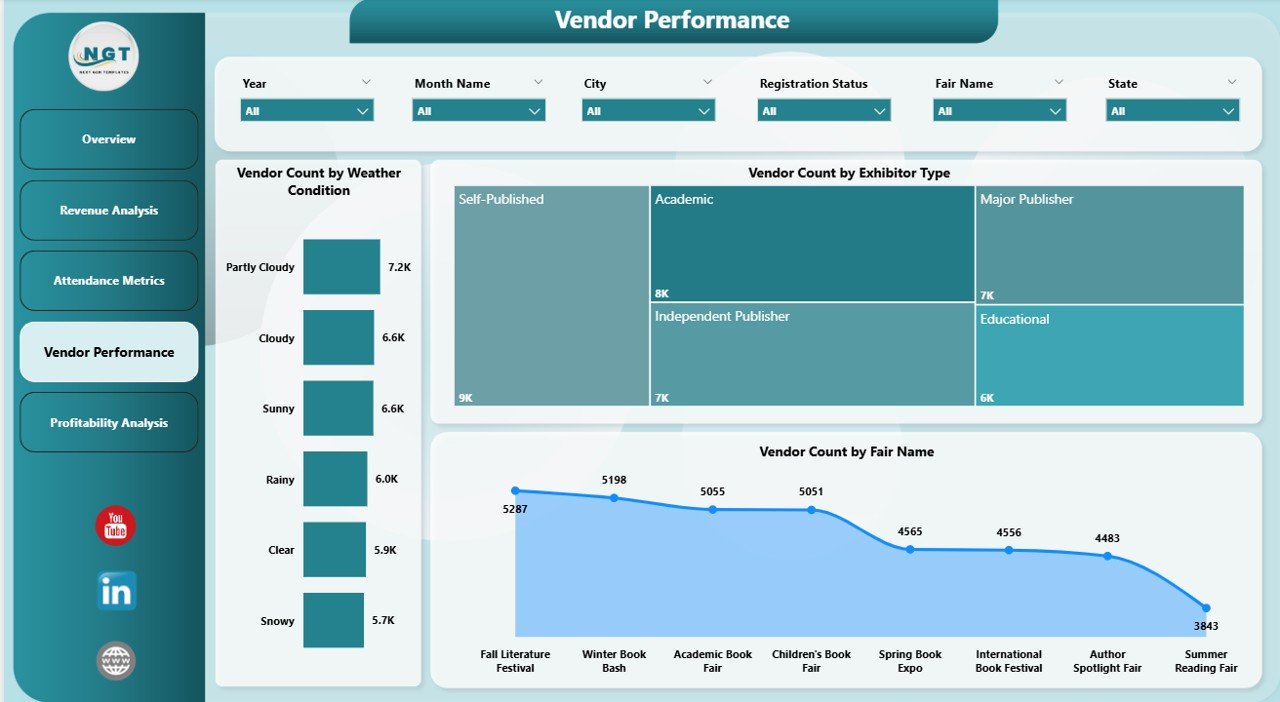
🏪 Vendor Performance – Evaluate exhibitor contribution
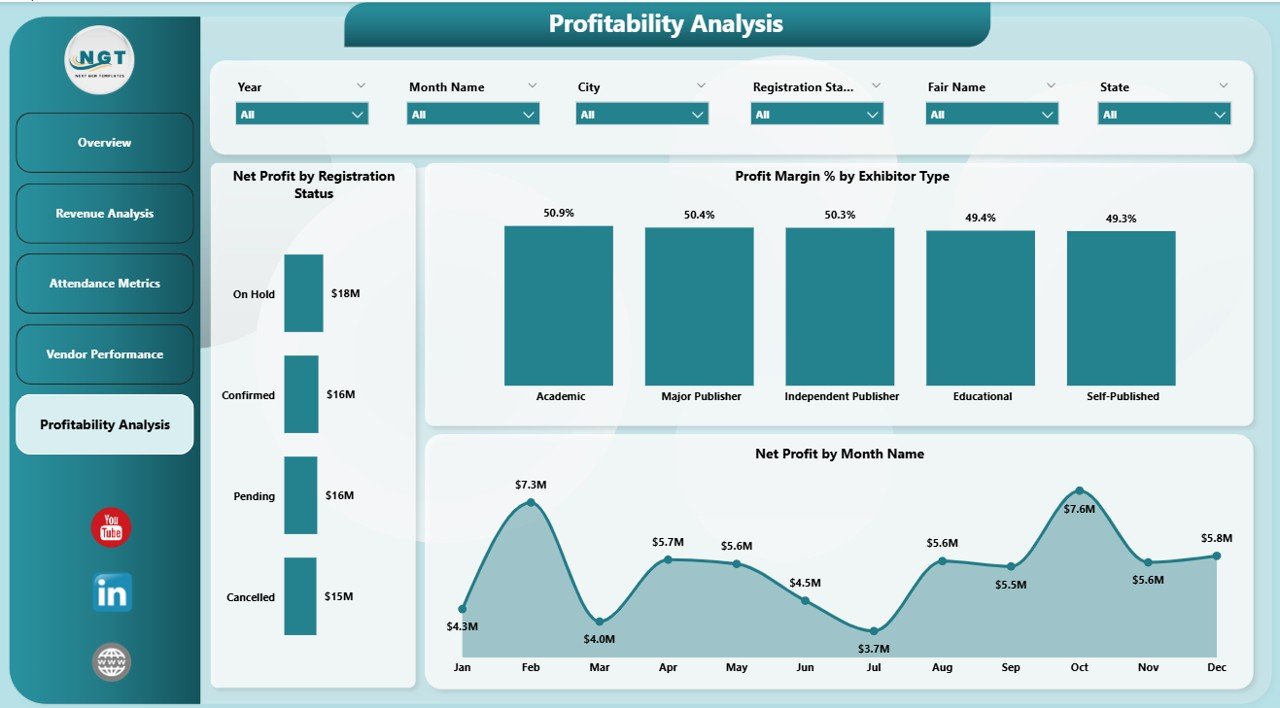
📈 Profitability Analysis – Monitor margins and financial performance
👉 Together, these pages provide a complete 360° view of your book fair operations.
⚙️ How to Use the Book Fairs Dashboard in Power BI
Getting started is simple:
👉 Import your event data into Power BI
👉 Connect your data sources
👉 Use slicers to filter by city, month, or exhibitor type
👉 Analyze KPI cards and charts
👉 Take data-driven actions
Within minutes, you can convert raw event data into powerful insights 📊.
👨💼 Who Can Benefit from This Book Fairs Dashboard in Power BI
This dashboard is perfect for:
📚 Event Organizers – Track fair performance and planning
📊 Data Analysts – Generate insights and reports
🏪 Vendors & Exhibitors – Evaluate participation and results
💼 Business Owners – Monitor profitability and growth
🎯 Marketing Teams – Improve campaigns and engagement
👉 Anyone involved in event management and analytics will benefit from this tool.
🔗 Click hare to read the Detailed blog post
Explore the complete guide with features, advantages, and best practices.
👉 Visit our YouTube channel to learn step-by-step video tutorials:
https://youtube.com/@PKAnExcelExpert
Watch the step-by-step video tutorial:
Compatibility and Requirements
- Open the report in Power BI Desktop, which is free. Microsoft explains how to install it in Get Power BI Desktop.
- Slicers filter the pages by city, month, exhibitor type and weather. Sharing a report online needs a Power BI account, but building and viewing it in Desktop does not.
Frequently Asked Questions
What pages are in the Book Fairs Dashboard?
Five pages: Overview, Revenue Analysis, Attendance Metrics, Vendor Performance and Profitability Analysis.
Which numbers does it track?
Revenue, profit margin, visitor attendance and vendor or exhibitor performance.
Can I compare fairs by city or month?
Yes. Use the slicers to filter by city, month, exhibitor type and weather.
Who is it for?
Book fair organizers, exhibitors, analysts and marketing teams who report on fair results.
Is there an Excel version?
Yes, see the Book Fairs Dashboard in Excel.
Related Event and Publishing Templates
- Book Fairs Dashboard in Excel: the same dashboard in Excel.
- Event Management Dashboard in Power BI: for other events you run.
- Event Management Analysis Dashboard in Power BI: deeper event analysis.
- Publishing Dashboard in Power BI: for the publishing side of the business.
- Trade Show & Conference Calendar in Excel: plan your fair schedule.
Browse all Power BI dashboards or the Power BI KPI dashboards.