


In today’s fast-paced agricultural environment, relying on scattered spreadsheets or guesswork can hurt your profits and productivity. That’s why we’ve created the Agribusiness KPI Dashboard in Google Sheets — a powerful, ready-to-use tool designed to help agribusinesses track, monitor, and improve key performance indicators (KPIs) in real-time. 📈✅
Whether you’re growing crops, managing a farm, or running a full-scale agribusiness, this dashboard gives you clear, visual insights into your operations — all in Google Sheets!
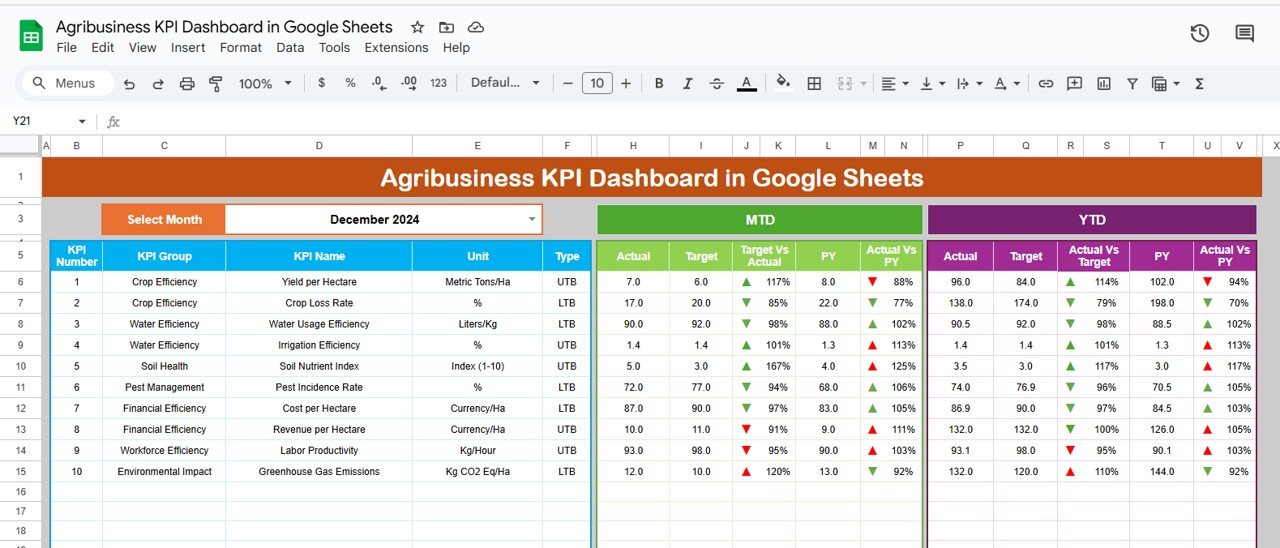
✨ Key Features of Agribusiness KPI Dashboard
📊 Dashboard Sheet Tab
Get a visual summary of your most important KPIs — from production to profitability. Track Month-to-Date (MTD) and Year-to-Date (YTD) metrics, with arrows showing if you’re above or below target.
🔹 MTD Actual vs Target
🔹 PY vs Current Comparison
🔹 Conditional formatting highlights performance trends at a glance
📈 KPI Trend Sheet Tab
Select any KPI and see how it’s performed over time. Perfect for tracking seasonal shifts or year-over-year improvements.
🔹 Dropdown to select KPI
🔹 Displays unit, formula, type (UTB/LTB), and definition
🔹 Trend charts make patterns easy to spot
📥 Actual Number Sheet Tab
Enter your monthly performance data for each KPI. This feeds the entire dashboard and keeps it updated in real time.
🎯 Target Sheet Tab
Input your performance goals for each KPI. Compare your actual results against clear benchmarks.
📆 Previous Year Number Sheet Tab
Add last year’s performance metrics and instantly compare progress. Great for understanding trends and growth.
📘 KPI Definition Sheet Tab
Define each KPI clearly to maintain alignment across your team. Includes KPI group, formula, unit, and full definition.
📂 What’s Inside the Product
You’ll get access to 6 pre-built, interlinked Google Sheets tabs:
Dashboard Sheet – Your KPI control center
KPI Trend Sheet – Historical KPI tracking
Actual Number Sheet – Real-time data entry
Target Sheet – Input targets for each KPI
Previous Year Number Sheet – YoY comparison
KPI Definition Sheet – Full KPI glossary
Each tab is automated and visually optimized for easy navigation and performance insights. No need for coding or formulas — everything works out of the box. 💡
🛠️ How to Use the Product
Start with the Actual Number Sheet – Enter your current month’s performance data
Input targets in the Target Sheet
Add previous year’s numbers for comparison
Let the Dashboard Sheet auto-populate with MTD, YTD, and PY performance
Use the KPI Trend Sheet to analyze changes over time
Refer to the KPI Definition Sheet for clarity and alignment across teams
No technical skills required. Just input your data and start making smarter decisions. 💼✅
👩🌾 Who Can Benefit from This Dashboard?
🌽 Farm Owners & Managers – Track productivity, revenue, and inputs
🧑💼 Agribusiness Executives – Analyze trends and optimize strategy
🌿 Sustainability Teams – Monitor environmental KPIs
📉 Finance & Ops Teams – Improve cost management and budgeting
🌾 Crop Consultants & Agronomists – Present data-driven insights
📊 Agri Startups & Tech Providers – Showcase real-time performance with visual reports

























Reviews
There are no reviews yet.