

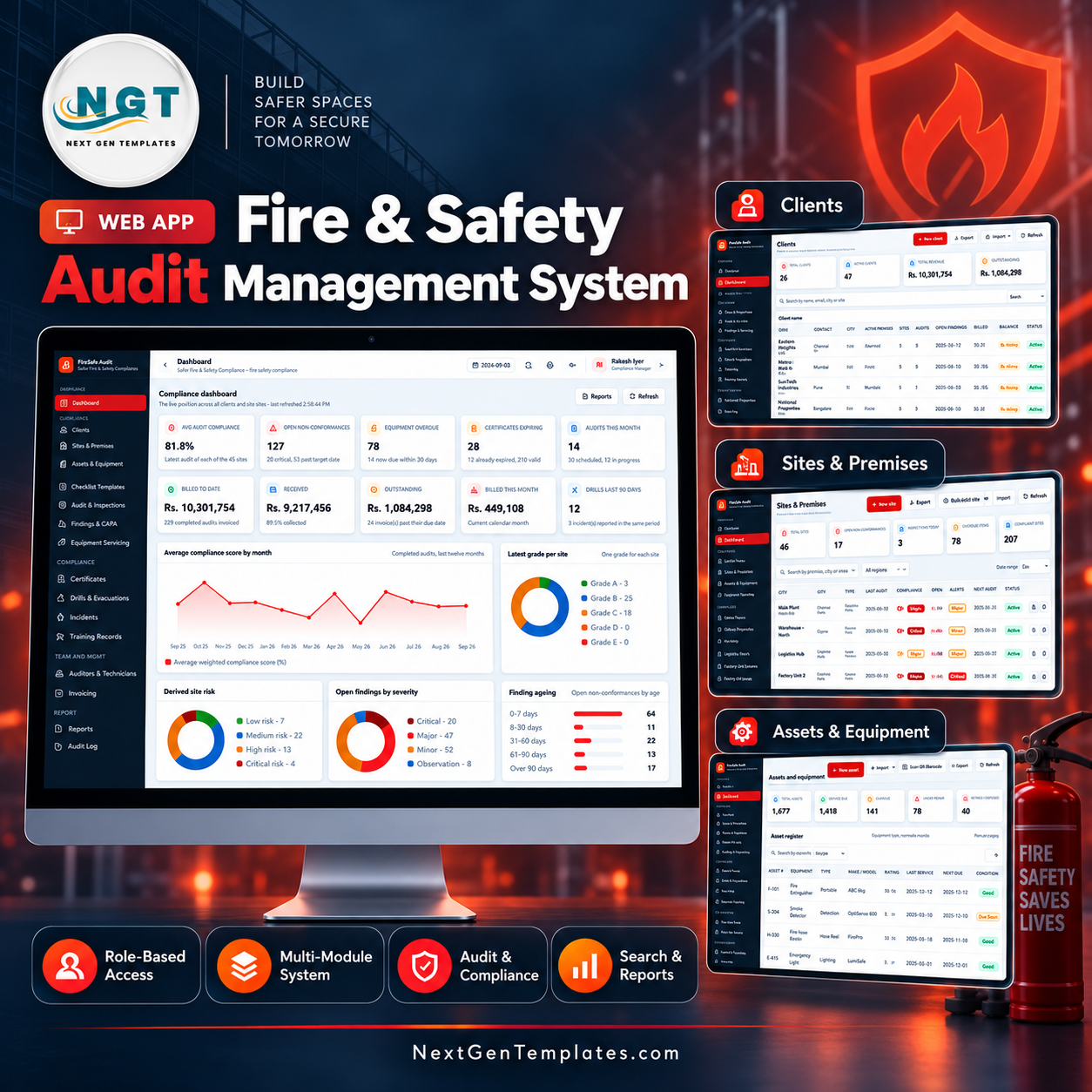

The Fire & Safety Audit Management System Web App is a multi-user Google Apps Script application that runs a fire safety consultancy end to end: 22 screens, 6 roles and 21 database tables, delivered with 12,606 seeded rows so every chart, register and report is populated the moment you sign in. The shipped demo carries 26 clients, 46 sites, 1,677 fire protection assets, 271 audits scored against weighted checklists, 1,193 non-conformances, 255 certificates and 274 invoices. It is a fire safety audit management system you own outright as source code — no subscription, no per-seat fee, and the entire database lives in one Google Sheet inside your own Drive. Try it free before you buy using the live demo below, then deploy your own copy in about fifteen minutes.
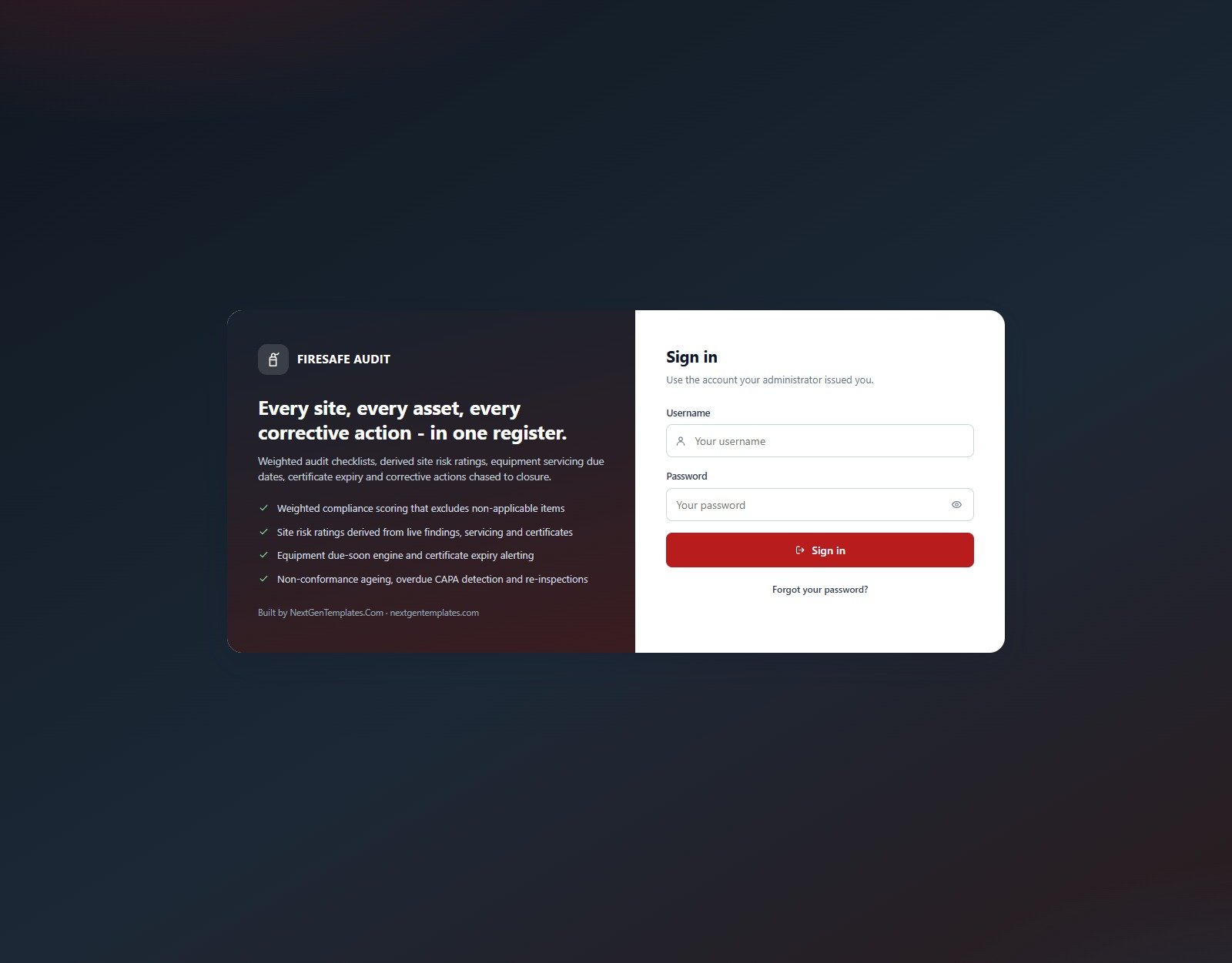
Try the Live Demo – No Download, No Sign-Up
Open the deployed system in your browser and click through all 22 screens with the seeded data in place. Sign in as the most restricted role first and watch the sidebar shrink – the permission map is the product.
Demo Sign-In Details – Every Role
| Role | Username | Password | What this role can reach |
|---|---|---|---|
| Administrator | admin | Admin@2025 | All 22 screens, users, lists, settings and the database archive |
| Compliance Manager | compliance | Comply@2025 | 21 screens – clients through reports and the audit log; can view settings but not change them |
| Lead Auditor | dprane | Audit@2025 | 16 screens – conducts audits, raises and closes findings, issues certificates |
| Lead Auditor | psathe | Audit@2025 | Second auditor account, same permission set |
| Safety Technician | isheikh | Tech@2025 | 13 screens – assets, equipment servicing and drills, read-only elsewhere |
| Accounts | nbansal | Money@2025 | 10 screens – invoicing, receipts, clients and reports |
| Client Liaison | aprakash | Liaise@2025 | Read-only across every client-facing screen |
These credentials are public by design. They are the seeded logins of a shared demo instance that resets – not a customer deployment. Your own copy gets its own database, its own accounts and its own passwords, which you change on day one.
Key Features of the Fire & Safety Audit Management System Web App
- Weighted compliance scoring that excludes non-applicable items. Score = passed weight / applicable weight. Weight 10 covers critical life safety clauses (escape routes, detection health, extinguisher currency, pump operation, flammable storage, fire NOC); weight 8 is major clauses, 5 standard, 3 housekeeping and record keeping. Anything marked Not Applicable is removed from both sides of the calculation, so a building without a sprinkler system is not punished for it.
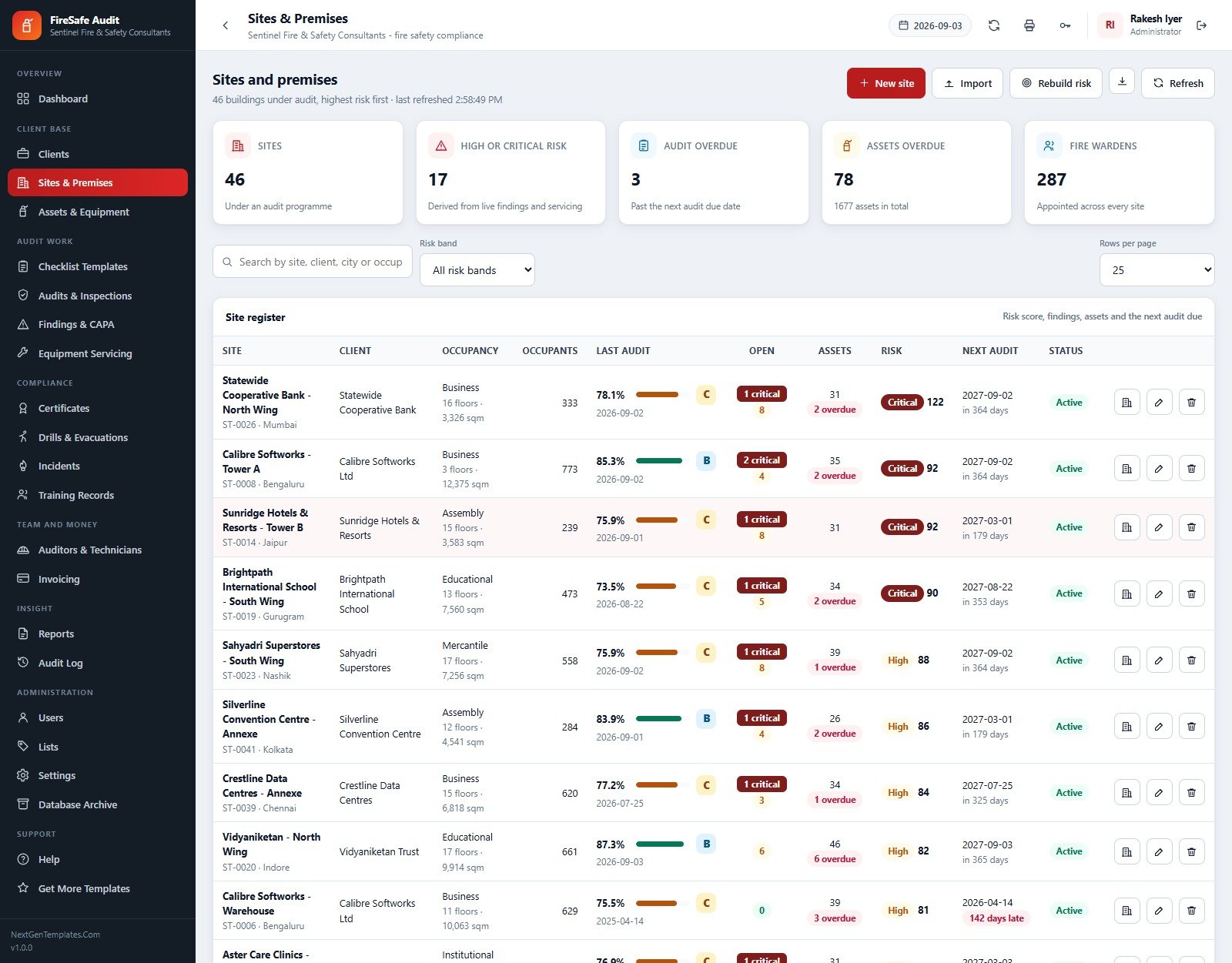
- Derived site risk ratings, never typed in. Each open critical finding adds 25 points, each major 10, each minor 3, each overdue asset 6, each expired certificate 20, each certificate expiring soon 8, an overdue audit 15, and a latest score under 70% adds 0.6 per point below. Bands: Low under 20, Medium 20-49, High 50-89, Critical 90+.
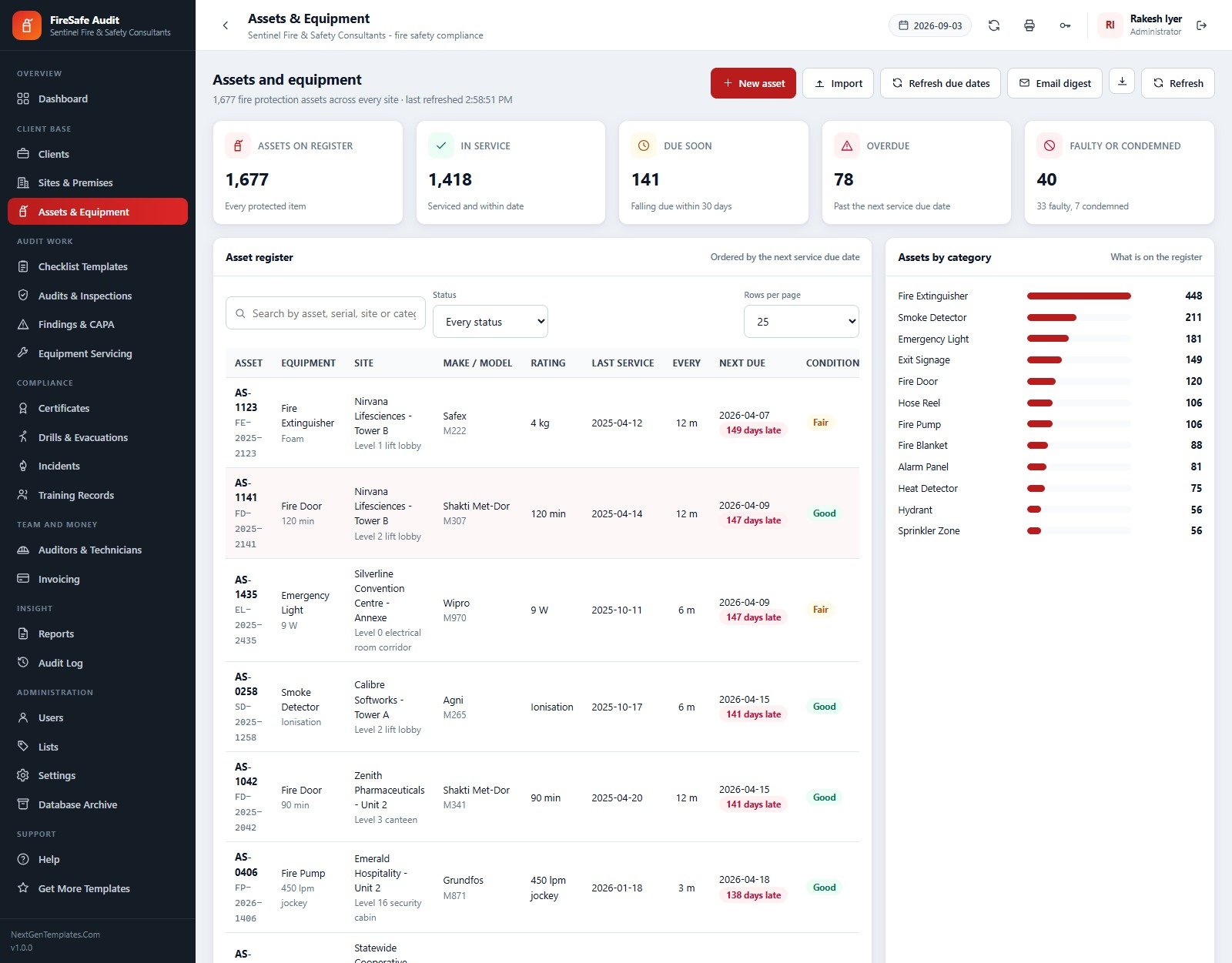
- 1,677-asset equipment register with a due-soon engine. Last service date plus the service interval gives the next due date; past that it is Overdue and inside the window it is Due Soon. The seed shows 1,418 in service, 141 due soon, 78 overdue and 40 faulty or condemned across 13 categories from 448 fire extinguishers down to 56 sprinkler zones.
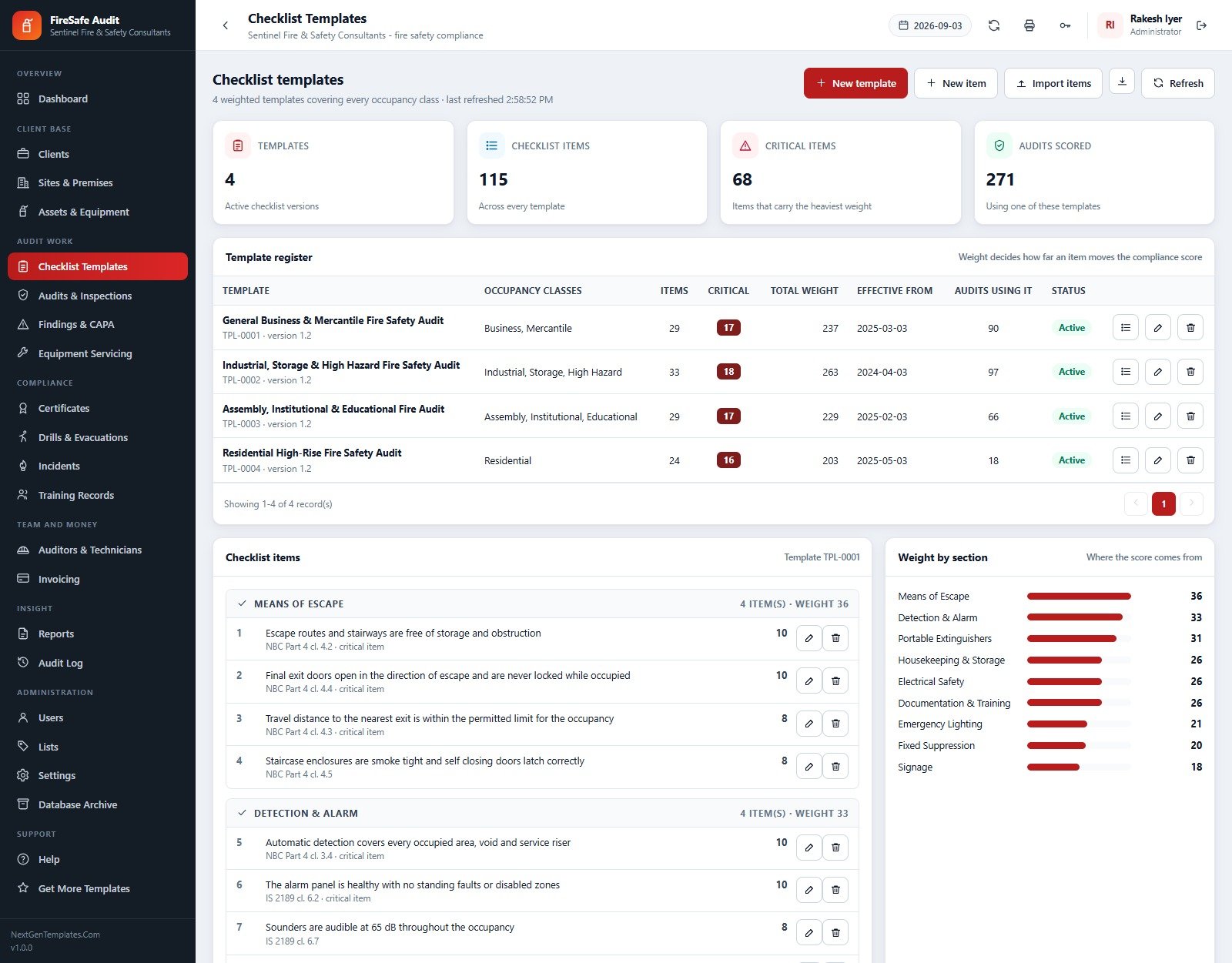
- Four weighted checklist templates, 115 items, 68 of them critical. One template per occupancy family – General Business & Mercantile, Industrial/Storage/High Hazard, Assembly/Institutional/Educational, and Residential High-Rise – each versioned with an effective-from date and grouped into nine weighted sections.
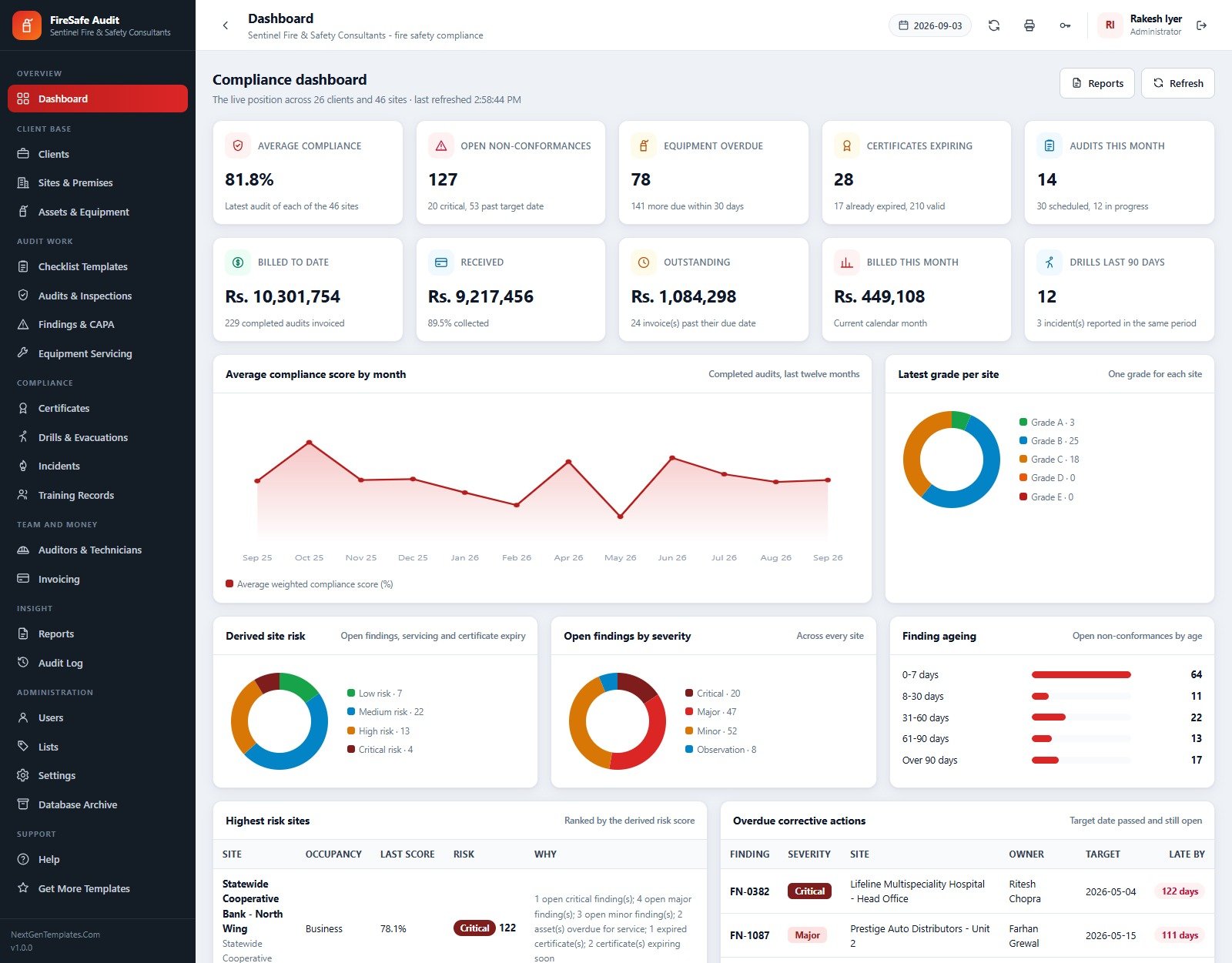
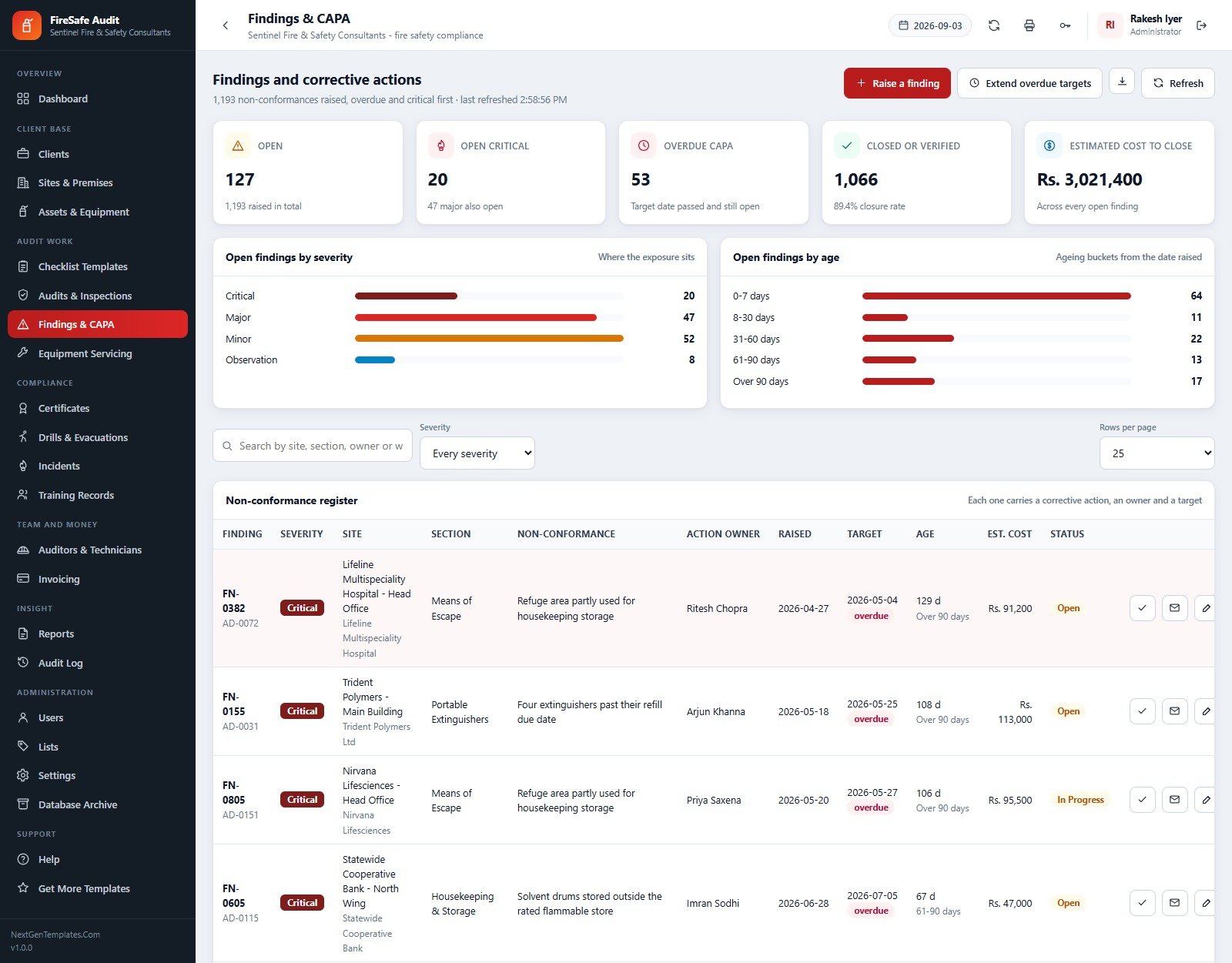
- Non-conformance register with CAPA ageing. 1,193 findings raised, 127 still open (20 critical, 47 major, 52 minor, 8 observation), 53 past their target date, an 89.4% closure rate and an estimated cost to close of Rs 3,021,400 – bucketed 0-7, 8-30, 31-60, 61-90 and over 90 days.
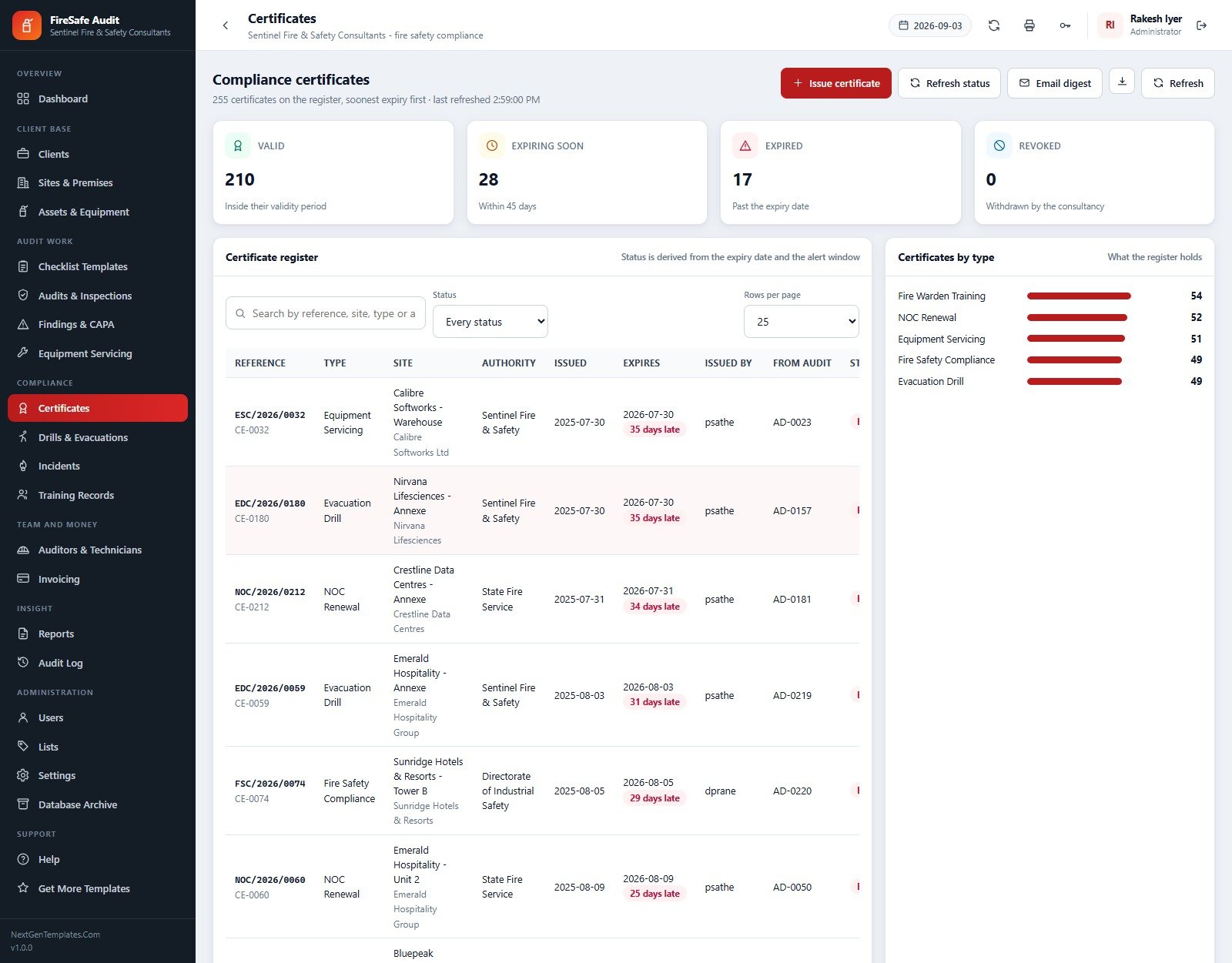
- Certificate expiry alerting. 255 certificates across five types with status derived from the expiry date and your alert window: 210 valid, 28 expiring inside 45 days, 17 expired, 0 revoked.
- Drill and incident logging. 134 evacuation drills with alarm and last-out times (evacuation time is computed, not typed), an 8.8-minute average and 79.7% average turnout; 60 incidents including 11 actual fires and Rs 6,934,300 of reported damage.
- Fire warden training records. 116 sessions, 1,241 people trained, 1,140 passed, certificates that lapse two years after the session and three already lapsed.
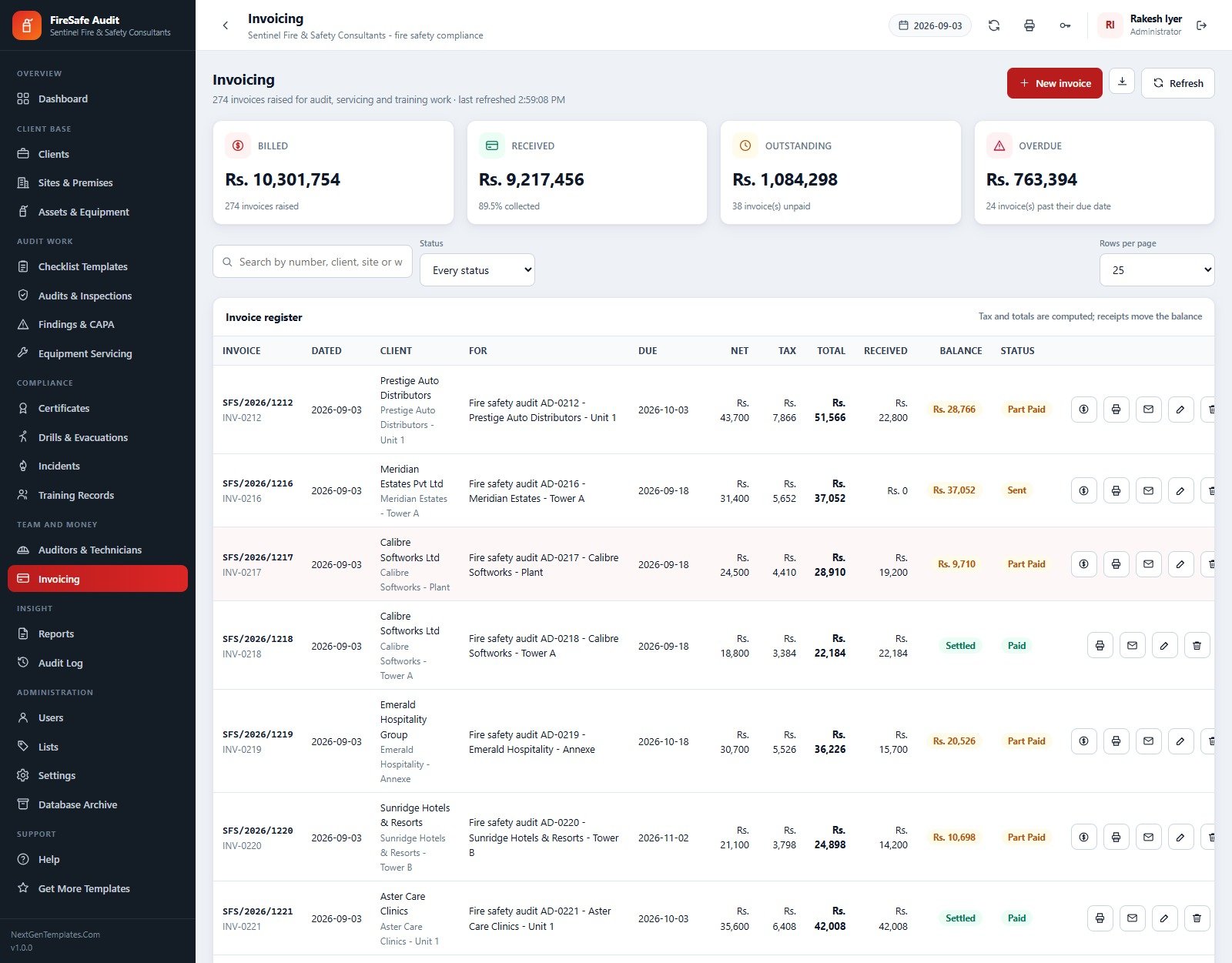
- Invoicing that follows the audit work. 274 invoices raised against audits, servicing and training – Rs 10,301,754 billed, 89.5% collected, Rs 1,084,298 outstanding and Rs 763,394 genuinely overdue, with tax and totals computed and receipts moving the balance.
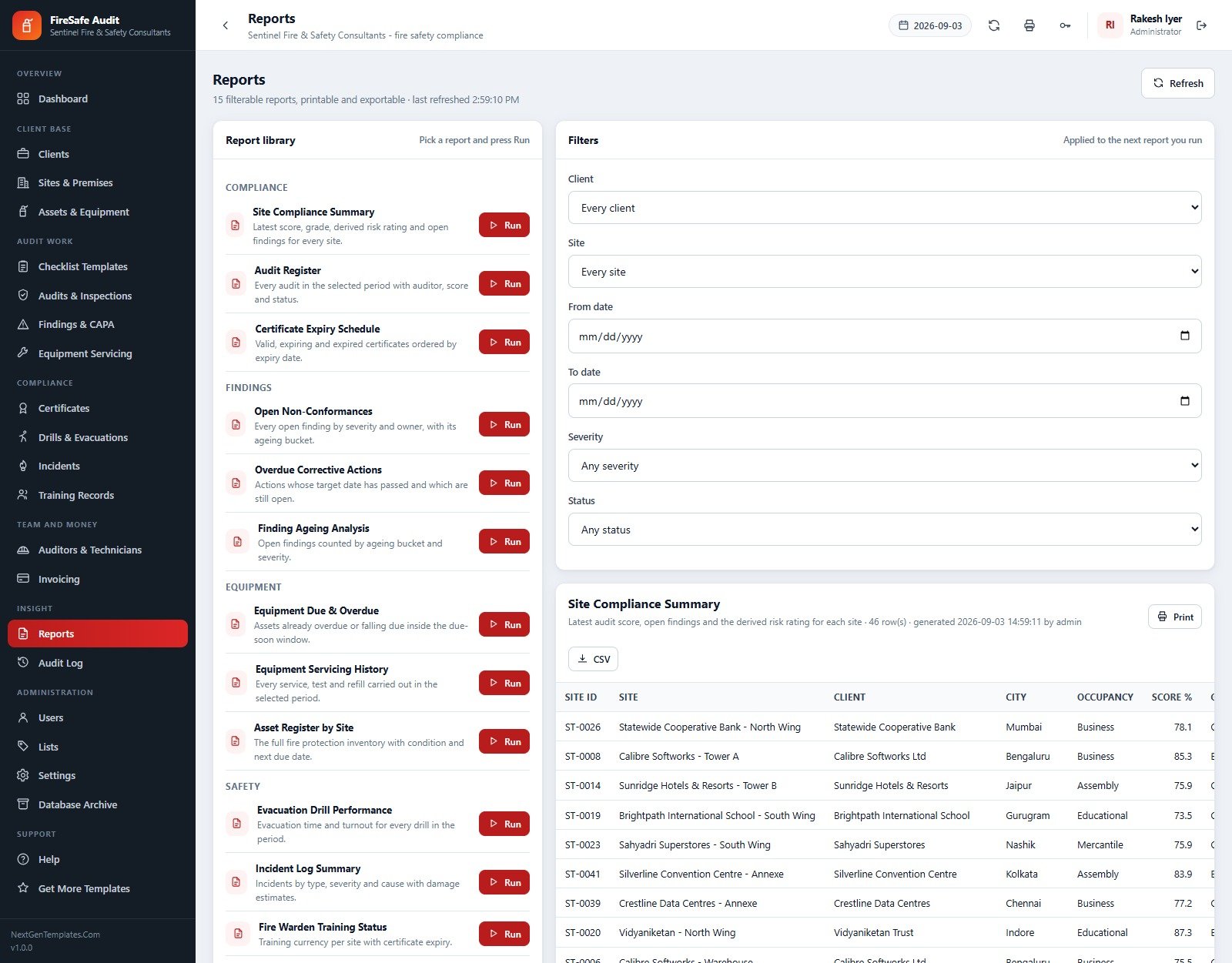
- 15 filterable reports, printable and CSV-exportable. Site Compliance Summary, Audit Register, Certificate Expiry Schedule, Open Non-Conformances, Overdue Corrective Actions, Finding Ageing Analysis, Equipment Due & Overdue, Equipment Servicing History, Asset Register by Site, Evacuation Drill Performance, Incident Log Summary and Fire Warden Training Status among them.
- One permission map drives the sidebar and every server-side guard. A role that cannot see a screen cannot call its server functions either. Administrator 42 permissions, Compliance Manager 36, Lead Auditor 26, Safety Technician 15, Accounts 13, Client Liaison 12.
- 195-row audit log and a staged database archive. Every create, update, delete, approval and email is recorded with user, table, record and channel. The archive copies the whole database to Drive first, registers the copy, and only then removes eligible closed rows – master data is never touched.
What’s Inside the Fire & Safety Audit Management System Web App
The download is a ZIP holding three things: Code.cs.txt (the full Apps Script server code), Index.txt (the single-page front end) and a step-by-step user manual PDF. There is nothing to install and no add-on to authorise beyond your own script.
The 22 screens
| Group | Screens |
|---|---|
| Overview | Dashboard – ten KPI cards, the twelve-month compliance trend, latest grade per site, derived site risk, open findings by severity, finding ageing, highest-risk sites and overdue corrective actions |
| Client base | Clients, Sites & Premises, Assets & Equipment |
| Audit work | Checklist Templates, Audits & Inspections, Findings & CAPA, Equipment Servicing |
| Compliance | Certificates, Drills & Evacuations, Incidents, Training Records |
| Team and money | Auditors & Technicians, Invoicing |
| Insight | Reports, Audit Log |
| Administration | Users, Lists, Settings, Database Archive |
| Support | Help, Get More Templates |
The 21 tables and what setup seeds into them
| Table | Seeded rows | Table | Seeded rows |
|---|---|---|---|
| Audit_Results | 7,104 | Certificates | 255 |
| Assets | 1,677 | Audit_Log | 193 |
| Findings | 1,193 | Lists | 179 |
| Equipment_Service | 900 | Drills | 134 |
| Invoices | 274 | Training | 116 |
| Audits | 271 | Incidents | 60 |
| Checklist_Items | 115 | Sites | 46 |
| Clients | 26 | Settings | 38 |
| Auditors | 14 | Users | 7 |
| Checklist_Templates | 4 | Sessions / Archive_Register | 0 (created in use) |
Nine occupancy classes (Assembly, Business, Educational, Industrial, Institutional, Mercantile, Residential, Storage, High Hazard) and 179 dropdown values across 30 lists mean you can re-point the system at a new market without touching the code.
Fire Safety Audit Management System vs. Spreadsheets vs. Paid EHS SaaS – Where This Fits
| This Web App | Google Sheets / Excel workbook | Paid EHS SaaS (Intelex, Cority, SafetyCulture Premium) | |
|---|---|---|---|
| Cost | $39.99 one-off, source included | Free to $30 for a template | $20-$60 per user per month, usually with a platform fee |
| Platform | Google Apps Script web app on your own Google account | Spreadsheet file | Vendor-hosted cloud |
| Setup time | ~15 minutes, then one staged setup run | Minutes | Days to weeks, often with paid onboarding |
| Real-time team collaboration | Yes – concurrent multi-user with 12-hour sessions | Yes, but everyone sees every row | Yes |
| Mobile access | Yes – responsive in any browser, no app store | Clumsy on phones | Yes, native apps |
| Customisable fields | Yes – 179 list values plus full source code | Yes | Only what the vendor exposes |
| Share with link | Yes – one /exec URL for the whole team | Yes | Login required |
| Year-1 cost at 5 users | $39.99 | $0-$30 | $1,200-$3,600 |
| Role-based server-side guards | Yes – 6 roles, the same map guards the UI and the server | No – sheet protection only | Yes |
| Weighted scoring with N/A exclusion | Yes, built in | Formula work you maintain yourself | Usually yes, on the higher tiers |
| Derived site risk from live findings | Yes – eight weighted contributors | No | Sometimes, as a paid module |
| You own the data and the code | Yes – one Sheet in your Drive | Yes | No – export on their terms |
The honest read: if you audit two buildings a year, a spreadsheet is enough. If you are a 50-person consultancy with regulatory reporting obligations across three countries, buy the SaaS. This sits in the wide middle – an independent consultancy or an in-house safety team running dozens of sites who need registers, scoring, CAPA chasing and certificate alerting without a recurring bill.
Who This Template Is For – and Who It’s Not For
A strong fit
- Independent fire safety consultancies running scheduled audits across a client portfolio and invoicing for the work.
- Facilities and estates teams with a multi-site property portfolio who need one register of extinguishers, doors, detectors, pumps and hydrants with service dates that chase themselves.
- Fire equipment servicing companies who already visit the assets and want the servicing history, dockets and certificates in the same place as the audit findings.
- Compliance managers in hospitality, healthcare, education and manufacturing answering to an insurer or a regulator with evidence rather than assertions.
Not a fit
- You need offline data capture on site. This is a browser app – it needs a connection. If your auditors work in basements and plant rooms with no signal, a native offline-first inspection app is the right tool.
- You need photo evidence attached to every checklist line. The system has Drive folders for site plans, audit photos and finding evidence, but it is not a photo-first inspection product.
- You need SSO, 2FA or SOC 2 attestation. Authentication here is username and password with salted SHA-256 hashes and 12-hour sessions. That is solid for a small team; it is not an enterprise identity story.
- You audit a single building. The registers, the risk engine and the invoicing are built for a portfolio. One site does not need this much machinery.
- You want a hosted service with a support SLA. You are buying source code you deploy and own. Email support is included; a 24-hour SLA is not.
How to Use the Fire & Safety Audit Management System Web App
- Open the live demo first. Sign in as
aprakash/Liaise@2025to see the read-only client view, then asadmin/Admin@2025to see all 22 screens. Ten seconds of that tells you more than any feature list. - Create a new Apps Script project at script.google.com and name it. Paste
Code.cs.txtintoCode.gs, add an HTML file named exactlyIndex(capital I, no extension) and pasteIndex.txtinto it. - Deploy as a Web app – Deploy > New deployment > Web app, Execute as Me, Who has access Anyone. Authorise the permission prompt; the “unverified app” warning is normal for your own script.
- Run setup once. Press “Run first-time setup” on the sign-in card, or run
setup()from the editor. It builds the Sheet database, creates all 21 tables and seeds 12,606 rows. Setup is staged and resumable – if it hits the six-minute execution limit it queues a continuation trigger and carries on by itself. - Sign in as admin and change the password immediately using the key icon in the top bar.
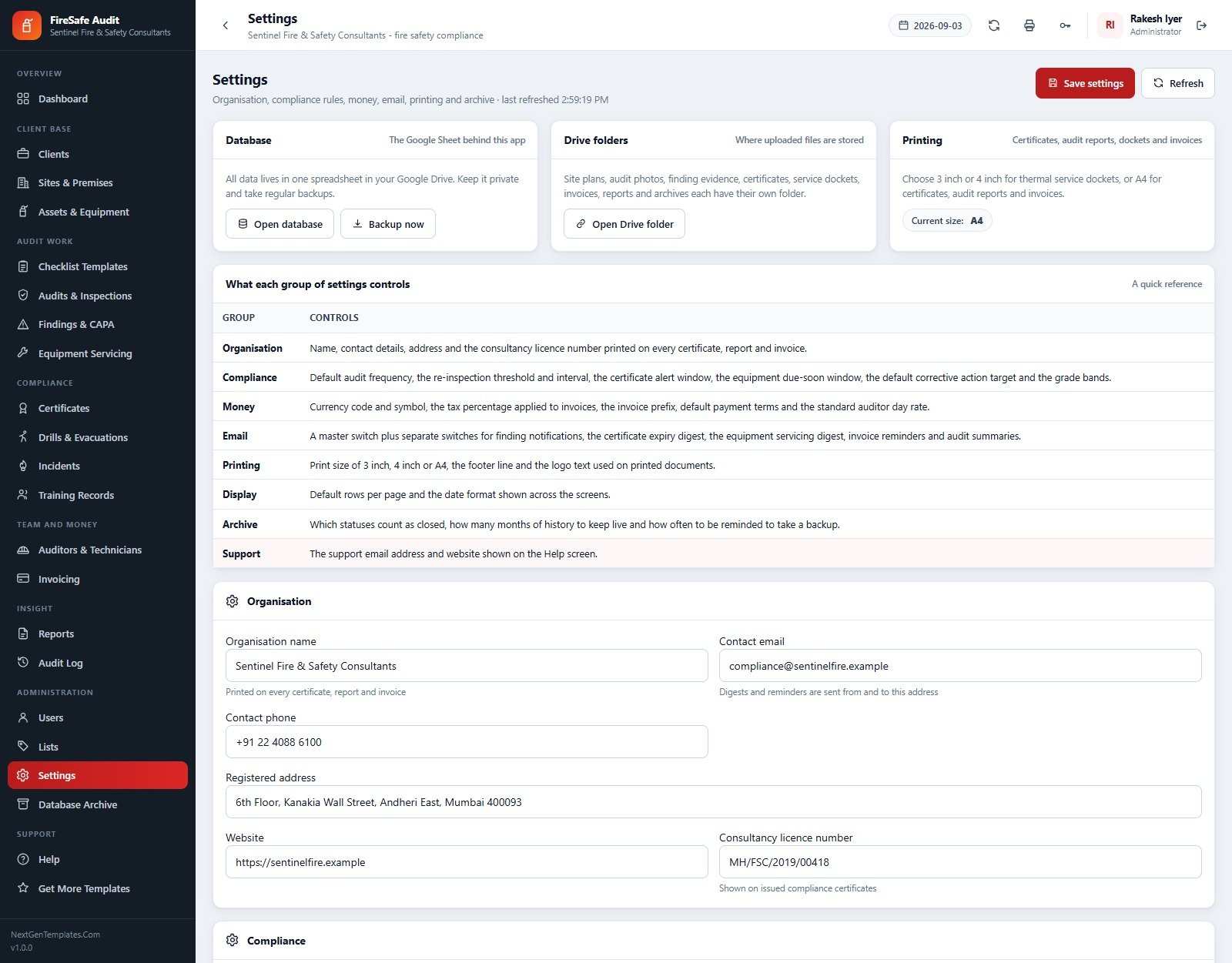
- Set your organisation details in Settings. Name, address, phone, email and consultancy licence number print on every certificate, report and invoice. Then set your currency symbol, tax percent, invoice prefix and day rate under Money, and your compliance rules – audit frequency, re-inspection threshold, certificate alert window, equipment due-soon window and grade bands.
- Create real user accounts for your staff and delete the seeded ones you do not need.
- Import your own data through the Import buttons on Clients, Sites, Assets, Checklist Items and Auditors – or edit the seeded records if the shapes already suit you.
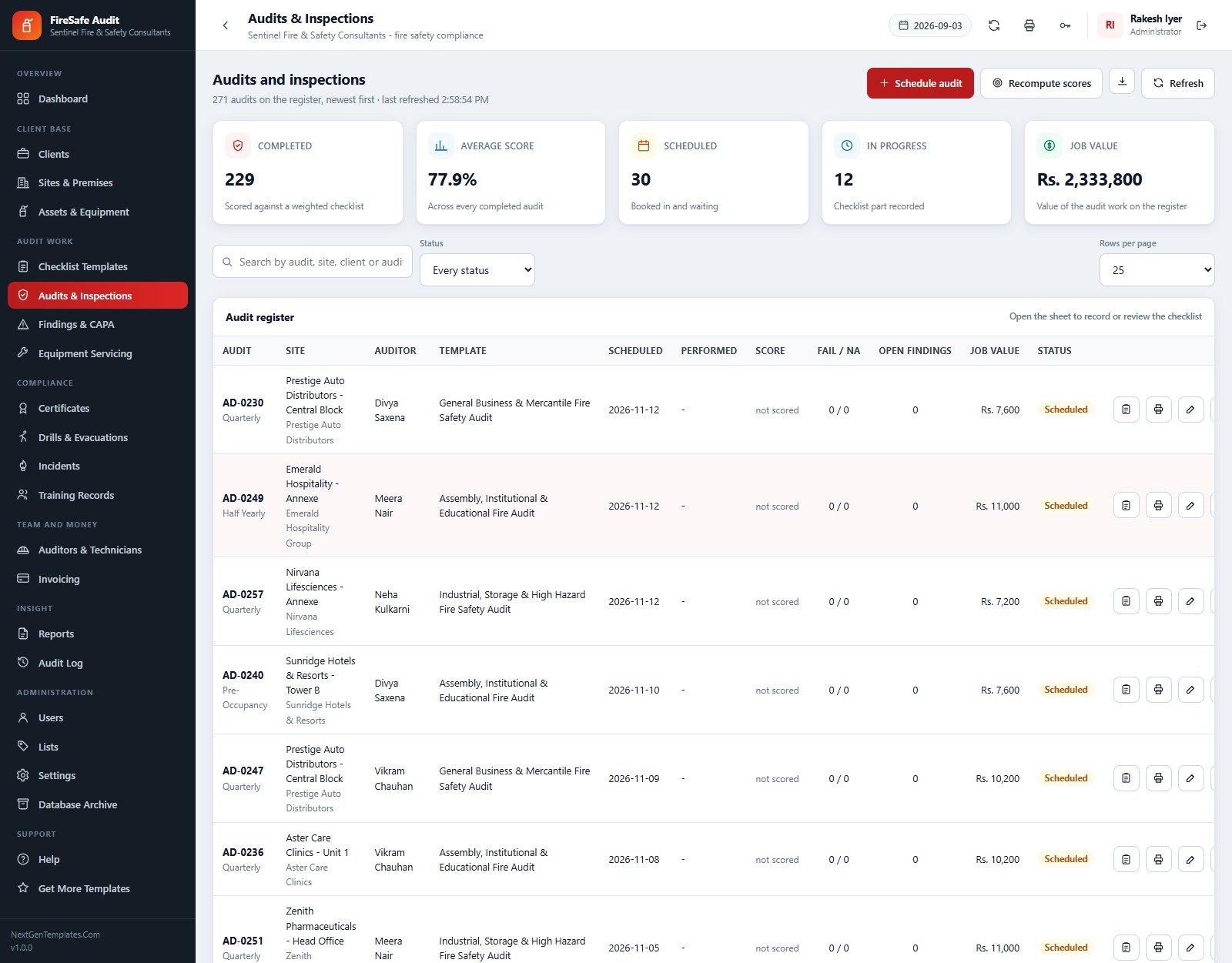
- Run your first audit. Schedule it, open the audit sheet, record each item as Pass, Fail or Not Applicable, complete the audit, and watch the score, the site grade and the derived risk rating recompute themselves.
Real-World Use Cases
Meera, Compliance Manager at a 14-person fire safety consultancy
Meera runs 46 sites for 26 clients. Every Monday she opens the dashboard, reads “127 open non-conformances, 53 past target date” and works the Overdue Corrective Actions panel top-down: FN-0382 at Lifeline Multispeciality Hospital, critical, 122 days late. She emails the action owner straight from the findings row, extends the targets she genuinely cannot hit, and exports the Open Non-Conformances report to CSV for the client review call. What used to be a Sunday evening with four spreadsheets is now twenty minutes.
Deepak, Lead Auditor, on site at a high-rise
Deepak opens the audit sheet for AD-0230 on his phone in the lobby. The Industrial, Storage & High Hazard template loads its 33 items grouped by section. He marks the sprinkler zone items Not Applicable because the building has none – and the score is not punished for it. Two failures on escape routes become findings with owners and target dates before he leaves the building, and the site’s risk rating moves from High to Critical while he is still in the car park.
Neha, Accounts, at month end
Neha filters Invoicing to overdue and finds 24 invoices worth Rs 763,394. Each one links back to the audit it was raised for, so when a client queries SFS/2026/1212 she can show them audit AD-0212, its score, its findings and the day rate that produced the Rs 51,566 total. She records the receipt, the balance moves, and the dashboard’s collected percentage updates on the next refresh.
Frequently Asked Questions
Can I try it before buying?
Yes. The live demo above is the real system with all 12,606 seeded rows in place, and every one of the six roles has a published login. Nothing is hidden behind the purchase. Sign in as the Client Liaison to see the read-only view, then as the Administrator to see all 22 screens.
Where is my data stored, and who can see it?
In one Google Sheet inside your own Google Drive, created by the setup routine. Nobody at NextGenTemplates has access to it. The web app runs as you (“Execute as: Me”), so the Sheet stays private while your team reaches it only through the app and only through the screens their role allows.
Do I need to know Apps Script to run this?
No. Deployment is copy, paste, deploy, authorise, press setup – the manual walks through it with screenshots. You only need Apps Script if you want to change the code, which you can, because you have all of it. One thing to remember: after any edit you must go to Deploy > Manage deployments > New version, or your users keep seeing the old build.
How many users can it handle?
It is built for a consultancy or in-house team – the seed ships seven accounts across six roles and the system has no seat limit. What it does have is Google Apps Script’s quotas: a six-minute execution limit per call, which is why setup is staged and resumable. In day-to-day use a team of ten to twenty will not notice a ceiling; a hundred concurrent auditors would.
The seeded checklist items reference Indian codes. Can I use this elsewhere?
Yes, with one honest caveat. The 115 shipped checklist items cite NBC Part 4 and IS 2189 clauses, and the seed uses Rupees. The currency symbol, tax percent and every dropdown value are settings you change in minutes. The clause references are text on the checklist items themselves – re-point them to NFPA 10/25/72, BS 5839 or your local code by editing the items, which takes an afternoon and is the same work any product would demand.
Does the compliance score handle buildings that lack certain systems?
That is the point of the weighting. Score = passed weight / applicable weight, and any item you mark Not Applicable is removed from both the numerator and the denominator. A warehouse with no fixed suppression is not scored against a suppression section it never had. Grades fall out at A 90%+, B 80%+, C 70%+, D 60%+ and E below.
What is actually in the download?
A ZIP containing Code.cs.txt, Index.txt and the user manual PDF. No installer, no dependencies, no add-on to authorise. The manual covers deployment, first-run setup, every module, the reports, printing and the editor commands including resetAdminPassword() if you ever lock yourself out.
About the Author
Built by PK – Microsoft Certified Professional with 15+ years of Excel, Google Sheets, and Power BI experience. Founder of NextGenTemplates, reaching 300K+ subscribers across YouTube channels. Every template is hand-built and tested before release.
Explore Related Templates
- Alarm Monitoring Service Management System Web App – the closest sibling: monitoring contracts, signal handling and engineer dispatch for the detection side of life safety.
- Auditing Firm Management System Web App – the same audit-engagement shape applied to financial audit practices.
- Incident Tracker and Report Web App – a lighter, standalone incident register if you only need the incident half.
- Workplace Safety KPI Dashboard in Google Sheets – a board-level safety scorecard to sit above this system.
- Public Safety Dashboard in Google Sheets – incident, response and coverage analytics for public sector safety teams.
- Fire Safety Equipment Checklist in Excel – the $3.99 paper-replacement if you are not ready for a full system yet.
- Browse the full Web Apps category or the Google Sheets templates collection.
Get the Fire & Safety Audit Management System Today
Open the live demo, sign in as any of the six roles, and see whether the weighted scoring and derived risk engine match how you already work. If they do, the download gives you the source, the manual and 12,606 rows of seeded data to practise on – one payment, no subscription, and a fire safety audit management system that stays yours.
Last updated: 6 September 2026. Questions before you buy? Email [email protected].
































Reviews
There are no reviews yet.