

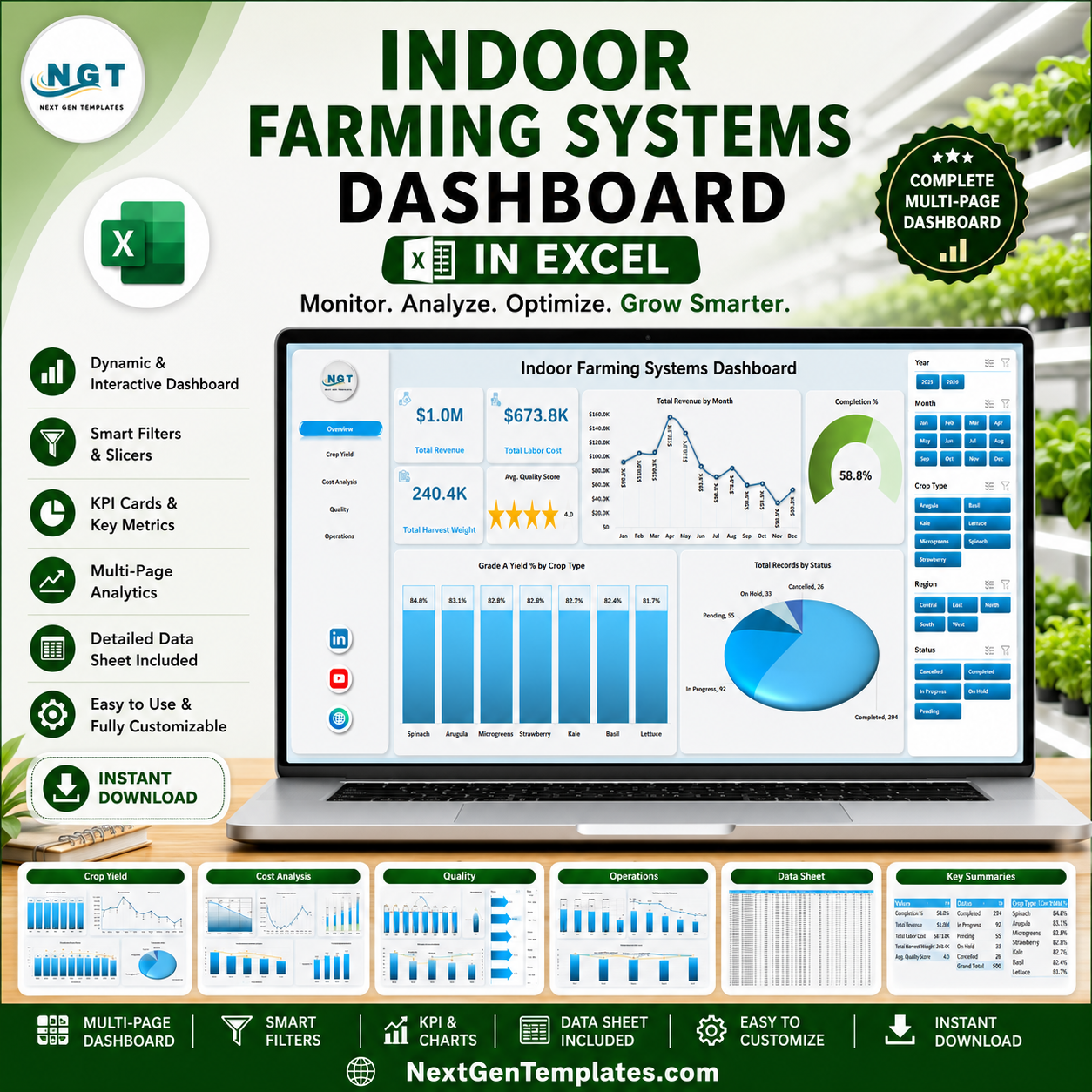


Indoor Farming Systems Dashboard in Excel helps farm owners, CEA operators, crop managers, and agribusiness analysts track revenue, labor cost, harvest weight, quality score, completion rate, Grade A yield, downtime, technician performance, zones, farm sites, crop types, and growing systems in one editable workbook. Indoor farms often manage 100+ production records across sites, zones, crops, technicians, statuses, and months, but reporting becomes slow when the data sits in separate files. This Excel dashboard gives you 5 analysis pages, a structured data sheet, a pivot-backed support sheet, slicers, KPI cards, and ready charts. Instant download. One-time payment. Editable Excel file. No monthly farm analytics subscription.
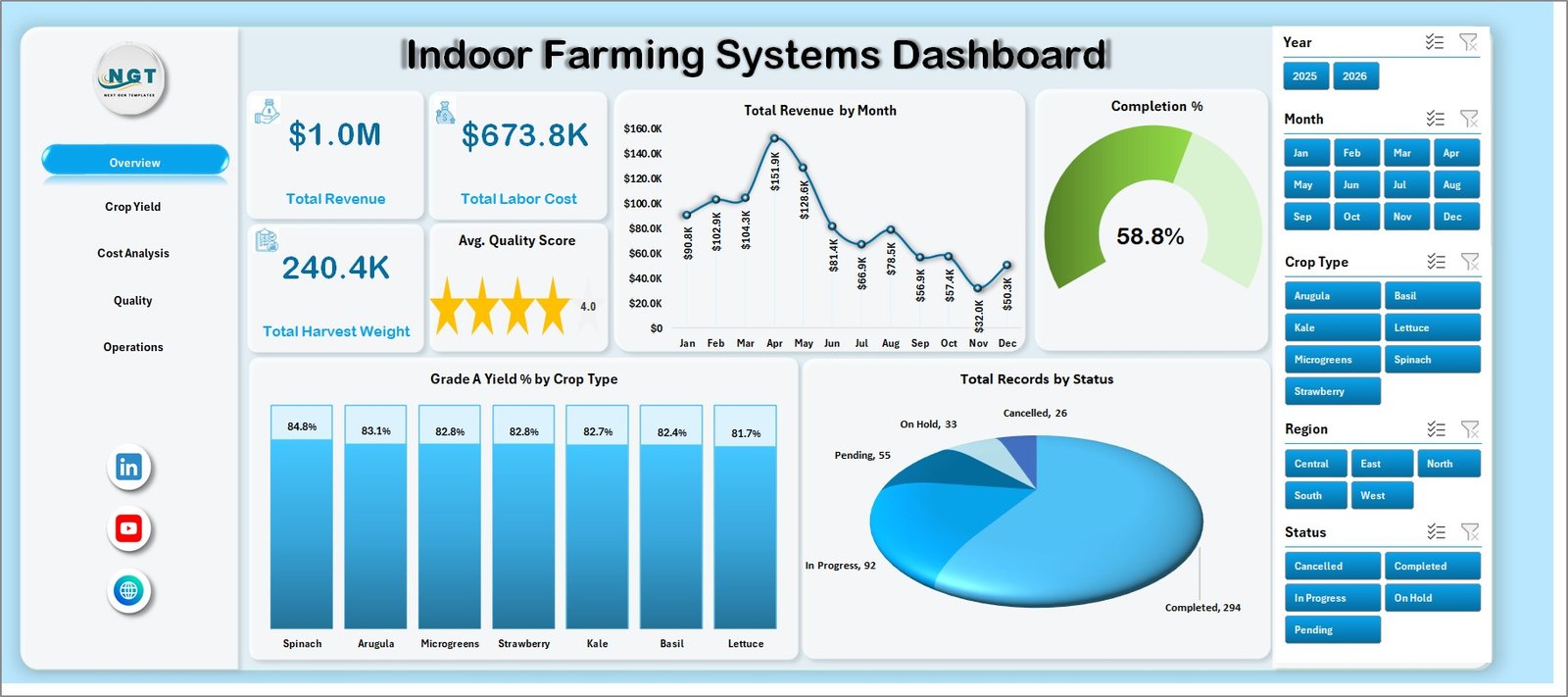
Indoor Farming Systems Dashboard in Excel
Key Features of Indoor Farming Systems Dashboard in Excel
- 5 dashboard pages for Overview, Crop Yield, Cost Analysis, Quality, and Operations.
- Executive KPI cards for Total Revenue, Total Labor Cost, Total Harvest Weight, and Avg. Quality Score.
- Crop yield analytics by growing system, crop type, farm site, zone, and month.
- Cost review comparing energy cost, labor cost, revenue, growing system, region, and farm site.
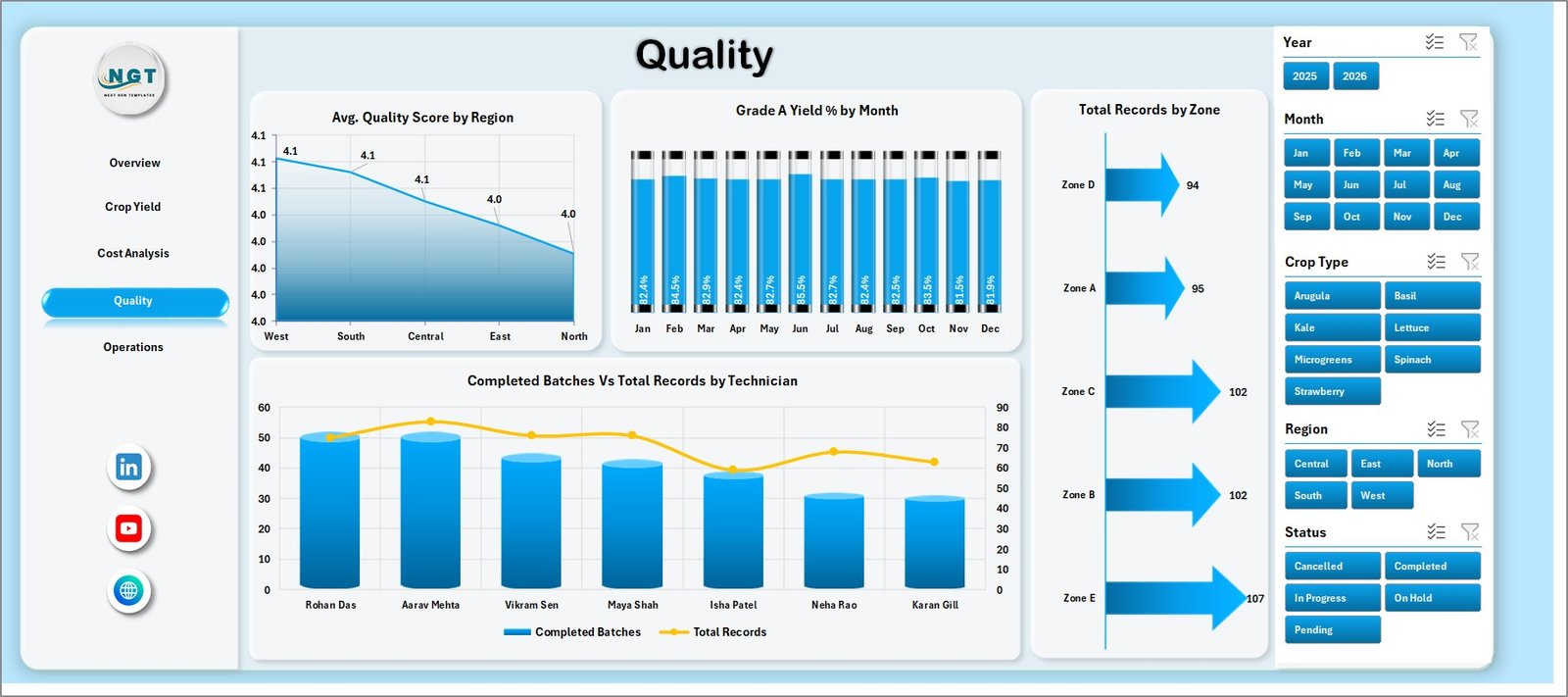
- Quality monitoring for quality score, Grade A yield percentage, zone records, and technician output.
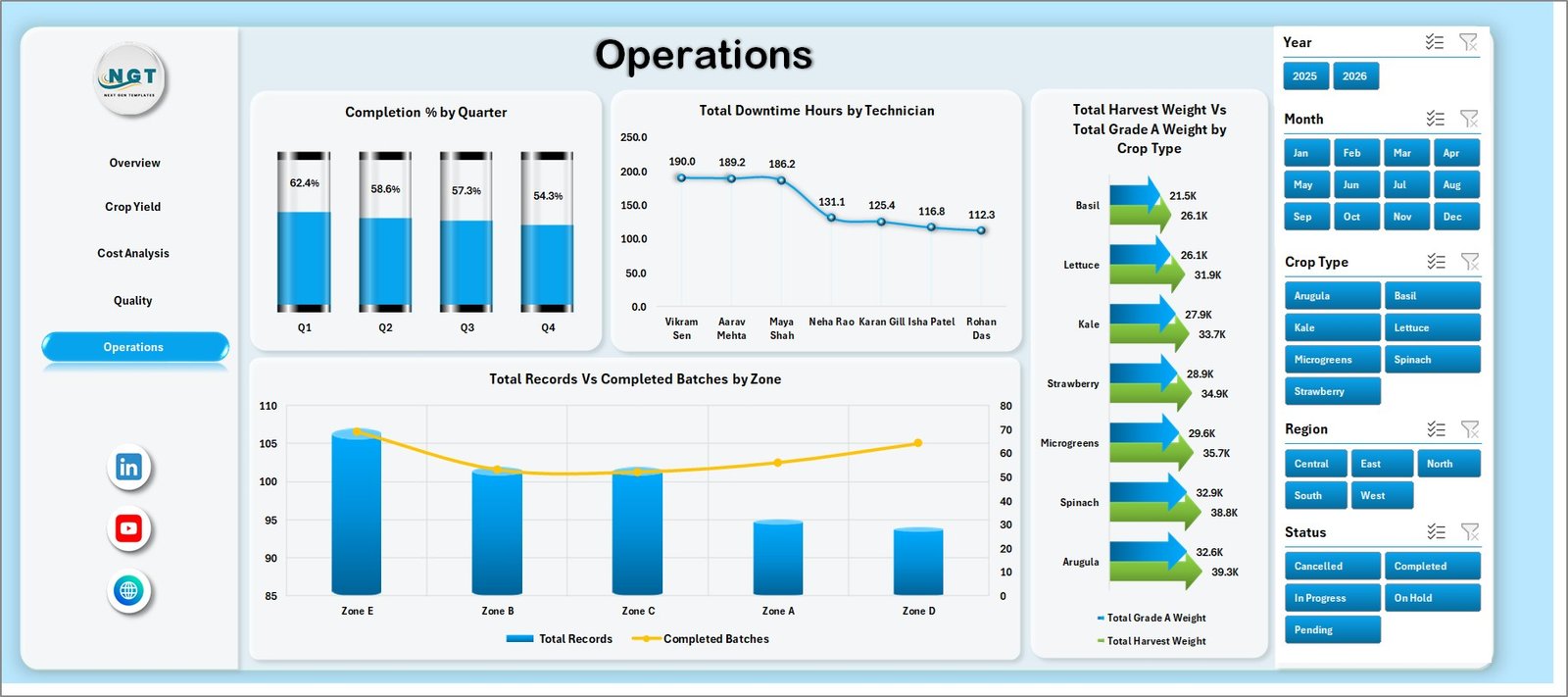
- Operations tracking for completion percentage, downtime, completed batches, harvest weight, and Grade A weight.
- Slicers and filters so users can view specific regions, crop types, zones, technicians, months, and statuses quickly.
- Data and support sheets for repeatable data entry, pivot refresh, and dynamic chart updates.
What’s Inside the Indoor Farming Systems Dashboard in Excel
1. Overview Page
The Overview page gives management a fast read on indoor farm performance. The top cards show Total Revenue, Total Labor Cost, Total Harvest Weight, and Avg. Quality Score so users can review financial, production, and quality health before opening deeper analysis tabs.
Total Revenue by Month: This chart shows how revenue changes month by month. It helps users spot seasonal demand patterns and periods where indoor production is generating stronger commercial results.
Completion %: This visual summarizes the share of completed batches or activities. It helps operations teams understand whether production flow is on track or needs follow-up.
Grade A Yield % by Crop Type: This chart compares premium yield percentage across crop types. It helps crop managers identify which crops are producing the best market-grade output.
Total Records by Status: This chart shows how many records sit in each operational status. It helps teams monitor active, completed, delayed, or pending work at a glance.
2. Crop Yield
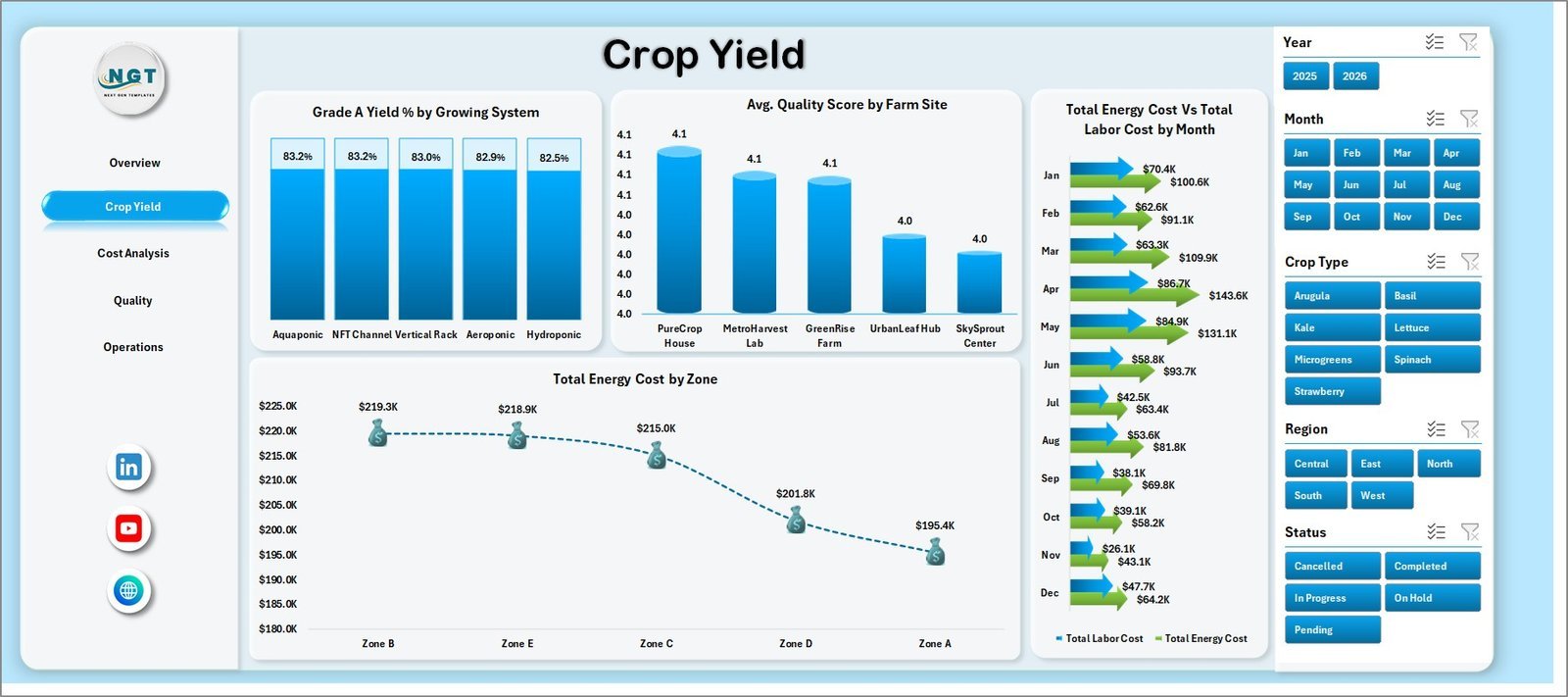
The Crop Yield page focuses on production performance. Grade A Yield % by Growing System compares quality output across systems, Avg. Quality Score by Farm Site highlights site-level consistency, Total Energy Cost vs Total Labor Cost by Month explains cost movement over time, and Total Energy Cost by Zone shows where energy spending is concentrated.
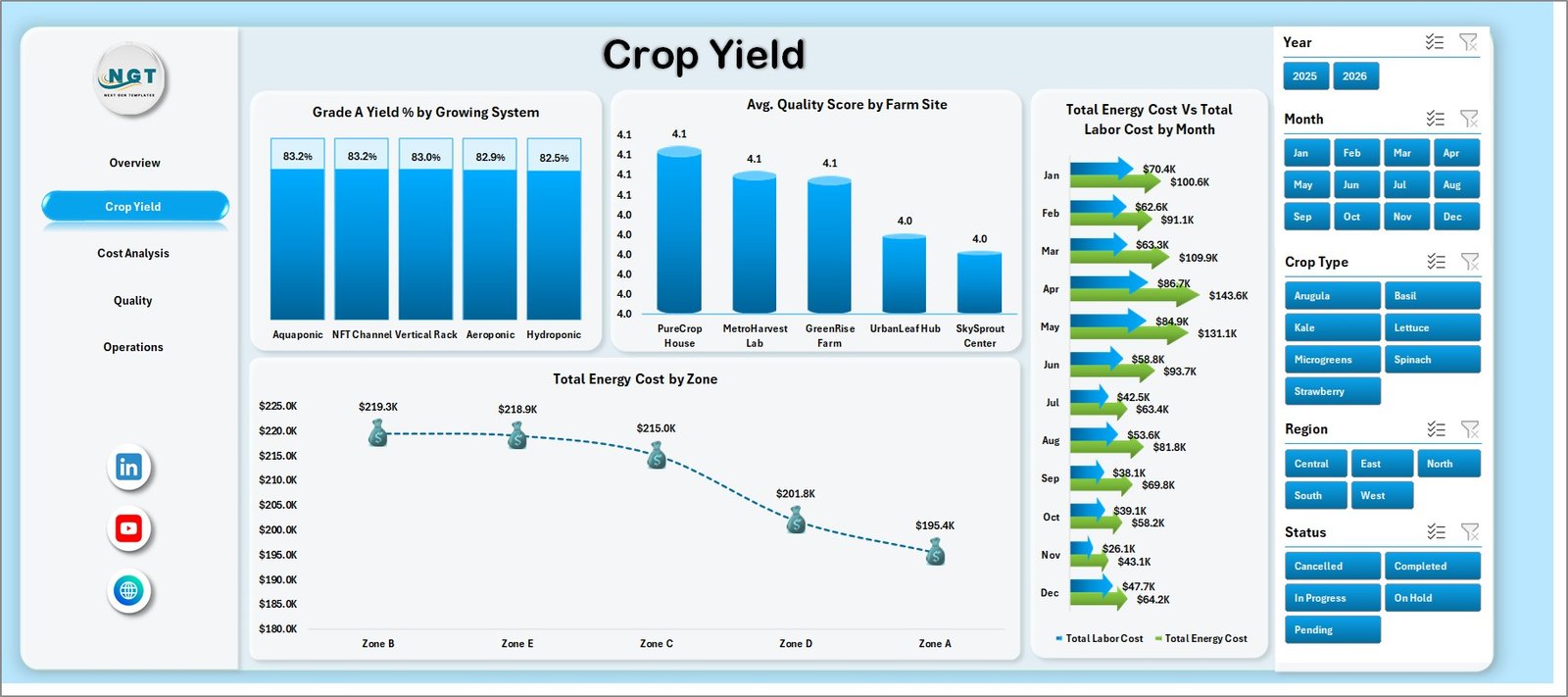
Crop Yield
3. Cost Analysis
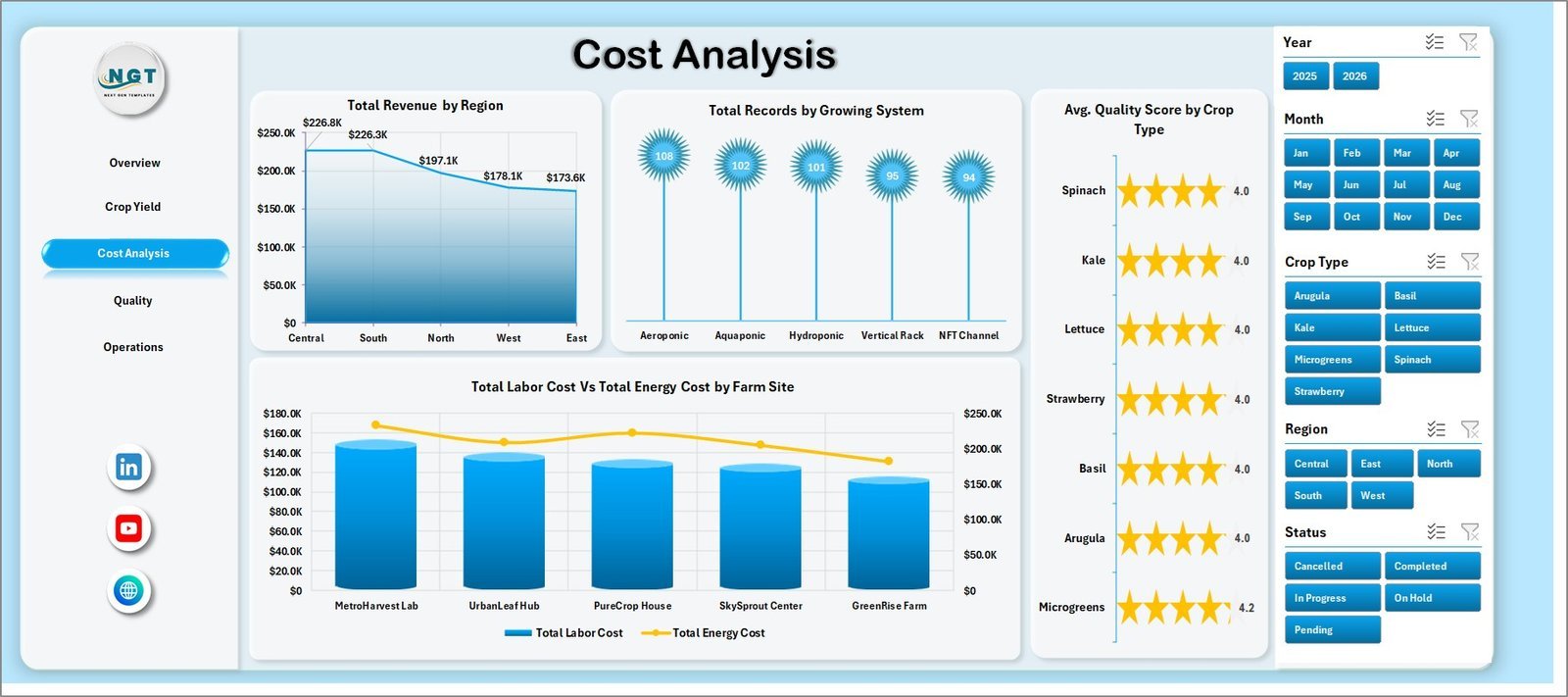
The Cost Analysis page helps finance and operations teams understand the cost structure of indoor farming. It includes Total Revenue by Region, Total Records by Growing System, Avg. Quality Score by Crop Type, and Total Labor Cost vs Total Energy Cost by Farm Site.
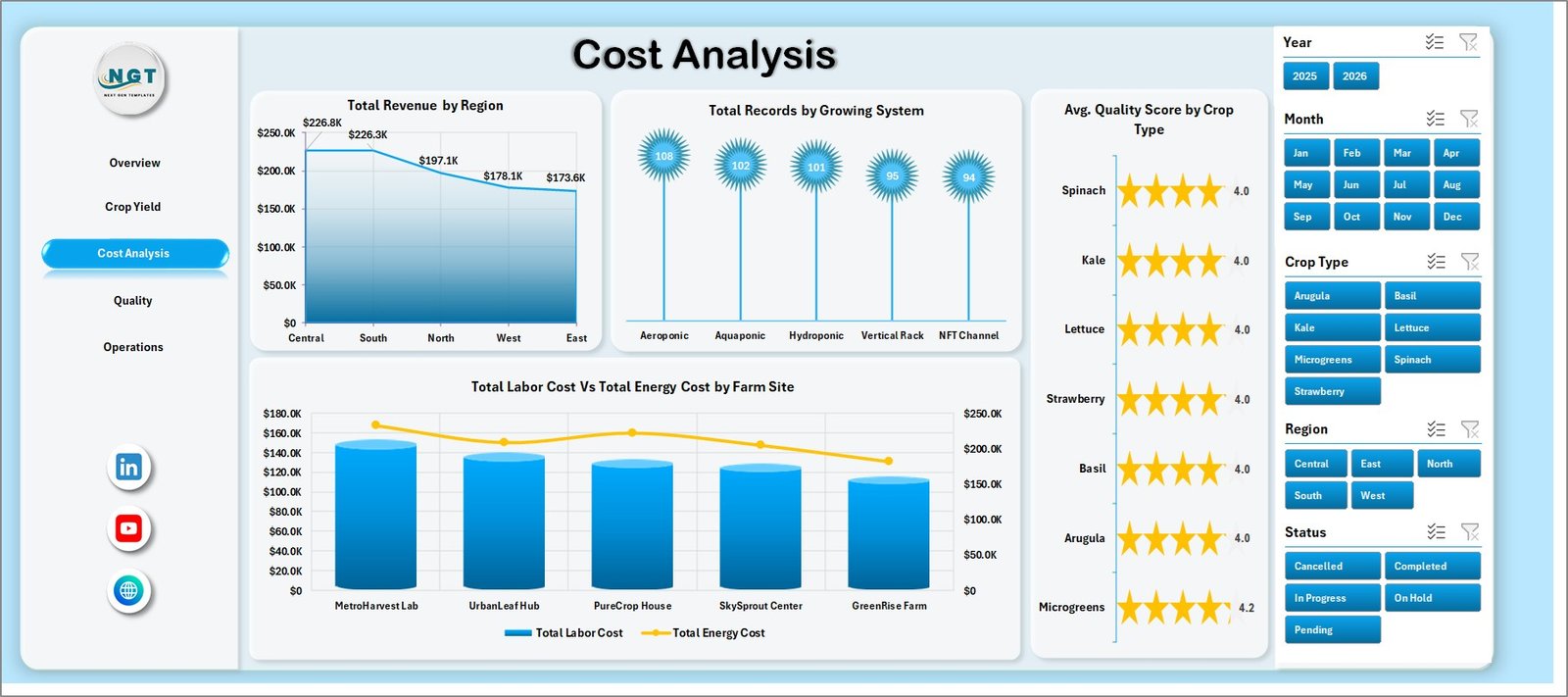
Cost Analysis
4. Quality
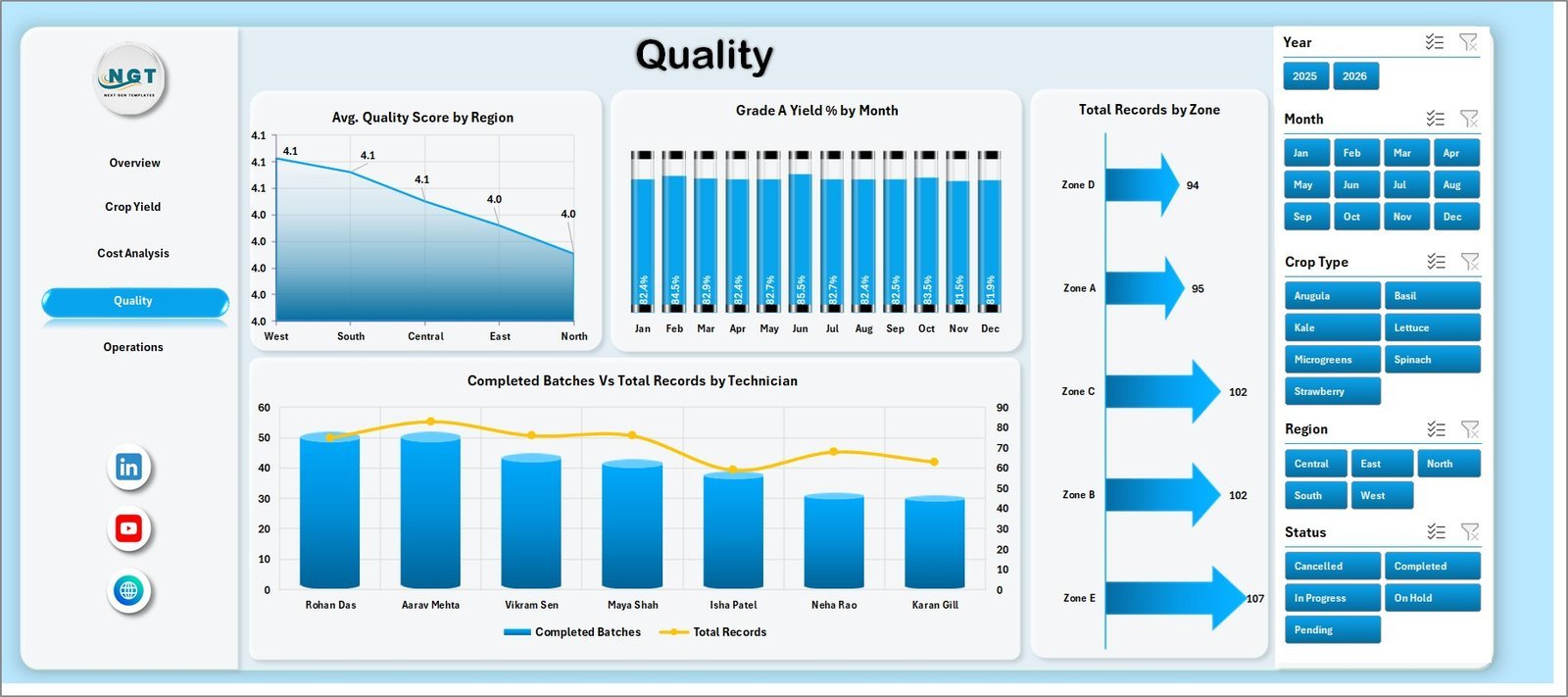
The Quality page connects crop quality, yield grade, zone volume, and technician performance. Avg. Quality Score by Region compares quality by geography, Grade A Yield % by Month shows trend movement, Total Records by Zone reviews activity volume, and Completed Batches vs Total Records by Technician shows productivity by person.
Quality
5. Operations
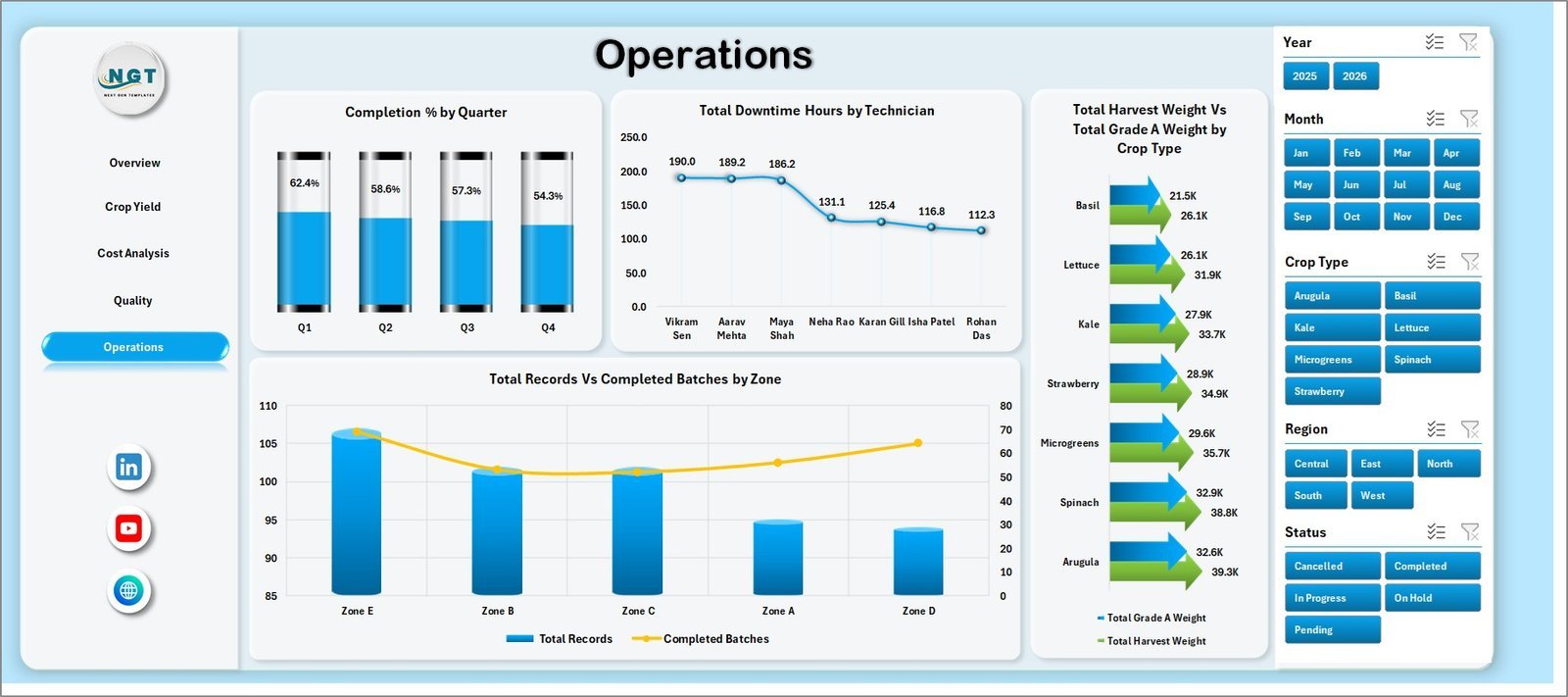
The Operations page is built for daily and weekly performance review. Completion % by Quarter shows progress trends, Total Downtime Hours by Technician highlights execution issues, Total Harvest Weight vs Total Grade A Weight by Crop Type compares output quality, and Total Records vs Completed Batches by Zone shows zone-level throughput.
Operations
6. Data Sheet Tab
The Data sheet is the input layer. Add indoor farming records in the same format as the sample data, then refresh the workbook so cards, slicers, pivot tables, and dashboard charts update.

Data Sheet tab
7. Support Sheet
The Support sheet contains pivot tables used to build the dashboard dynamically. After updating the Data sheet, go to the Excel Data ribbon and click Refresh All. All pivots and charts refresh together, and this sheet can be hidden during normal use.

Support sheet tab
Indoor Farming Systems Dashboard in Excel vs. Google Sheets vs. Paid Farm SaaS – Where This Fits
| Feature | This Excel Dashboard | Google Sheets Alternative | Paid Farm SaaS |
|---|---|---|---|
| Cost | $17.99 one-time | Low software cost, but dashboard build is manual | Monthly or annual subscription |
| Platform | Microsoft Excel | Browser-based spreadsheet | Vendor cloud system |
| Setup time | Replace data and refresh | Build formulas, pivots, and charts | Onboarding and configuration |
| Collaboration | Available through OneDrive or SharePoint | Native real-time collaboration | Usually included by plan |
| Custom fields | Editable workbook, pivots, charts, and sheets | Editable but manual | Depends on vendor permissions |
| Year-1 cost at 5 users | $17.99 plus Microsoft licensing if needed | Low license cost plus build time | Often hundreds or thousands |
| Indoor farm metrics | Built around revenue, labor, energy, harvest, quality, yield, and operations | Must be designed manually | Depends on product module |
Who This Template Is For – and Who It’s Not For
Best for: indoor farm owners, vertical farm teams, greenhouse operators, CEA analysts, crop managers, quality leads, operations managers, and consultants who use Excel for recurring farm performance reporting.
Not for: teams that need live climate automation, IoT sensor control, ERP integration, inventory purchasing workflows, payroll, compliance management, or a custom database application.
How to Use the Indoor Farming Systems Dashboard in Excel
- Download and unzip the product file.
- Open the workbook in Microsoft Excel.
- Review the sample records in the Data sheet.
- Replace sample records with your indoor farm data using the same column structure.
- Click Refresh All from the Excel Data ribbon.
- Use slicers to filter by month, region, site, crop type, growing system, zone, technician, or status.
- Review Overview, Crop Yield, Cost Analysis, Quality, and Operations pages.
- Keep the Support sheet hidden if end users only need the dashboard and Data sheet.
Real-World Use Cases
Priya, indoor farm owner: Priya reviews revenue, labor cost, harvest weight, and quality score before weekly planning meetings.
Marco, operations manager: Marco compares downtime by technician and completion percentage by quarter to find where execution needs follow-up.
Elena, agribusiness consultant: Elena uses crop yield, energy cost, labor cost, region, site, and Grade A yield views when preparing client review reports.
Frequently Asked Questions
What does this Excel dashboard track?
It tracks revenue, labor cost, energy cost, harvest weight, Grade A weight, Grade A yield percentage, quality score, completion percentage, downtime hours, crop type, growing system, region, farm site, zone, technician, month, quarter, and status.
Do I need advanced Excel skills?
No. Replace the sample data, click Refresh All, and use slicers to analyze the dashboard. Advanced users can also edit the pivots, charts, and sheet layout.
Can I use my own indoor farming data?
Yes. Add your records to the Data sheet in the same format and refresh the workbook so all pages update.
Can I hide the Support sheet?
Yes. The Support sheet contains pivot tables and can be hidden after setup.
Is this a farm management system?
No. It is an Excel analytics dashboard for reporting and review. It does not replace automation, inventory, ERP, or compliance systems.
Is this a subscription?
No. It is a one-time downloadable Excel template purchase.
About the Author
Built by PK – Microsoft Certified Professional with 15+ years of Excel, Google Sheets, and Power BI experience. Founder of NextGenTemplates, reaching 300K+ subscribers across YouTube channels. Every template is hand-built and tested before release.
Explore Related Templates
Pair this workbook with Greenhouse Farming Dashboard in Excel, Vertical Farming Dashboard in Excel, and Agriculture and Farm Dashboard in Excel. Browse more Excel Dashboard templates and MS Excel templates.
Download the Indoor Farming Systems Dashboard in Excel today and start reviewing revenue, labor cost, energy cost, harvest weight, quality, Grade A yield, completion, downtime, and operations in one editable workbook.
Last updated: June 22, 2026





























Reviews
There are no reviews yet.