

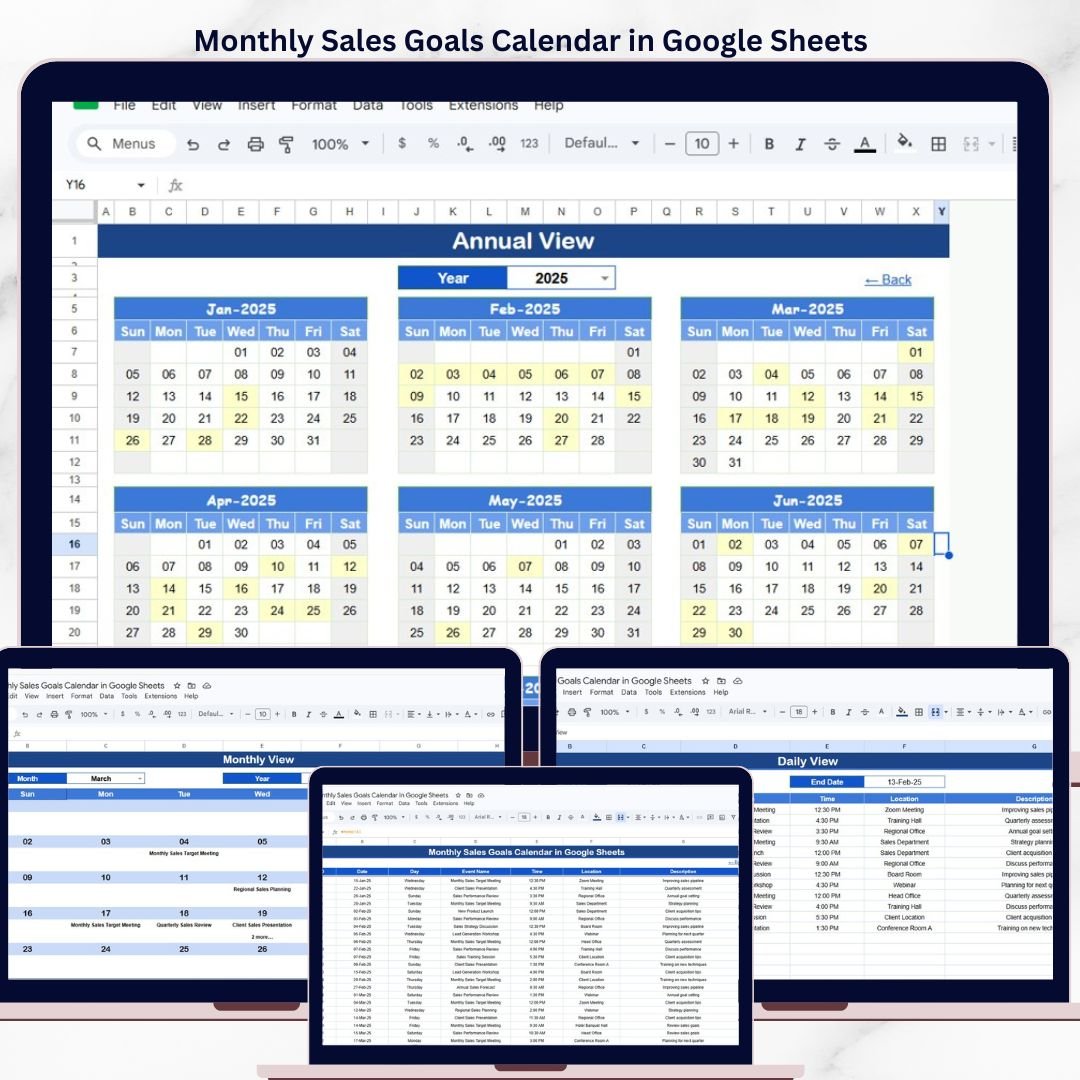

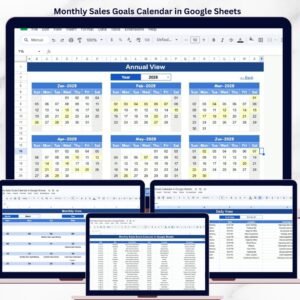
The Monthly Sales Goals Calendar in Google Sheets organizes sales targets, events, and deadlines across 5 interactive sheets with 4 navigation views — Annual, Monthly, Daily, and Events. Setup takes under 10 minutes: enter your sales events, goals, and meetings into the Events sheet, and every calendar view updates automatically.Monthly Sales Goals Calendar in Google Sheets
🌍 Join 8,400+ teams in 40+ countries using NextGenTemplates to replace paid SaaS tools with one-time-purchase Excel, Google Sheets, Power BI, and HTML templates.Monthly Sales Goals Calendar in Google Sheets
✅ Instant download · One-time payment · No subscription · No per-user fees · Lifetime access
🔑 Key Features of Monthly Sales Goals Calendar in Google Sheets
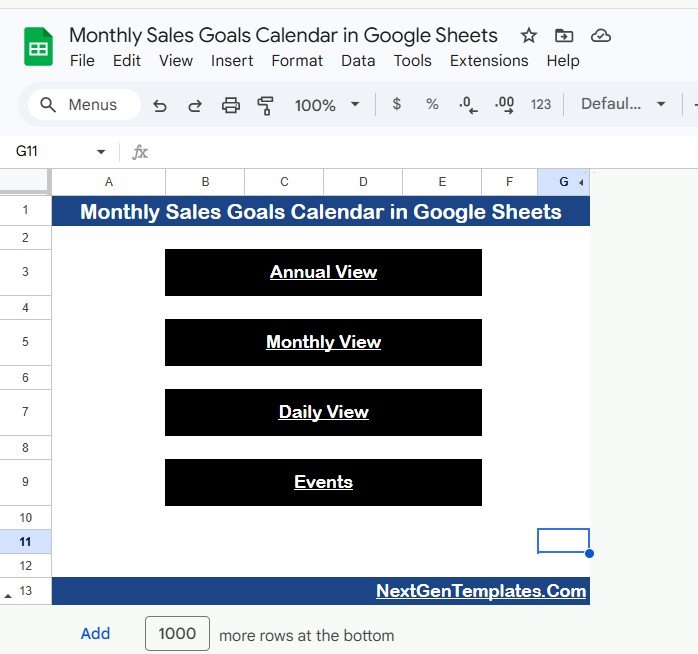
📅 4-View Navigation System – Switch between Annual, Monthly, Daily, and Events views from a single Home sheet with clickable navigation buttons. Each view serves a different planning need — from bird’s-eye annual planning to granular daily event tracking.
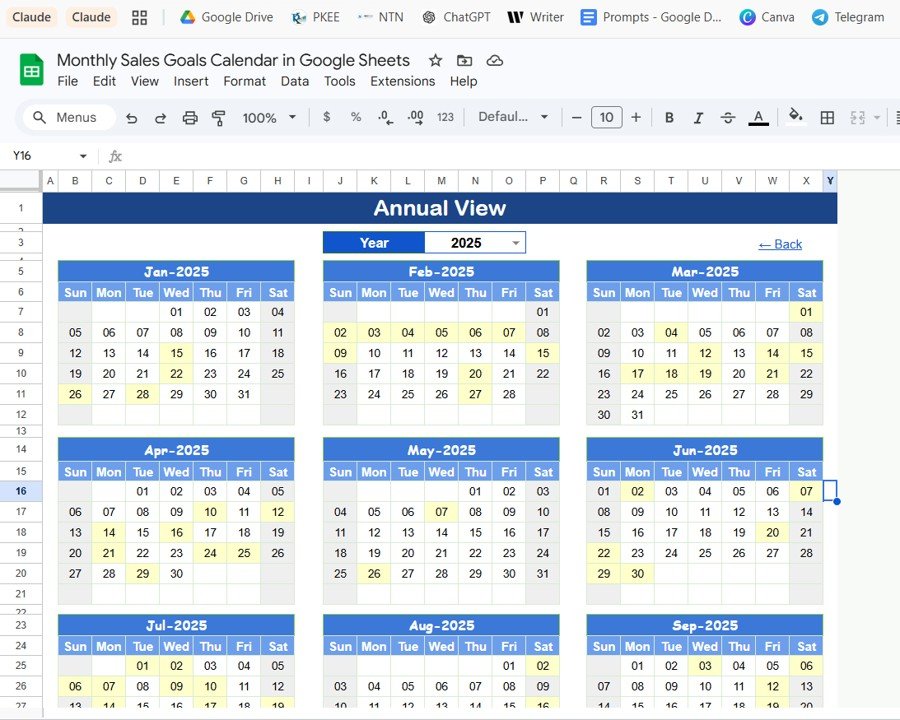
📊 Annual Calendar View – Displays all 12 months in a single sheet, giving sales managers a full-year overview of sales goals, key deadlines, and promotional events at a glance. This is the view you use for quarterly planning sessions and annual target-setting.
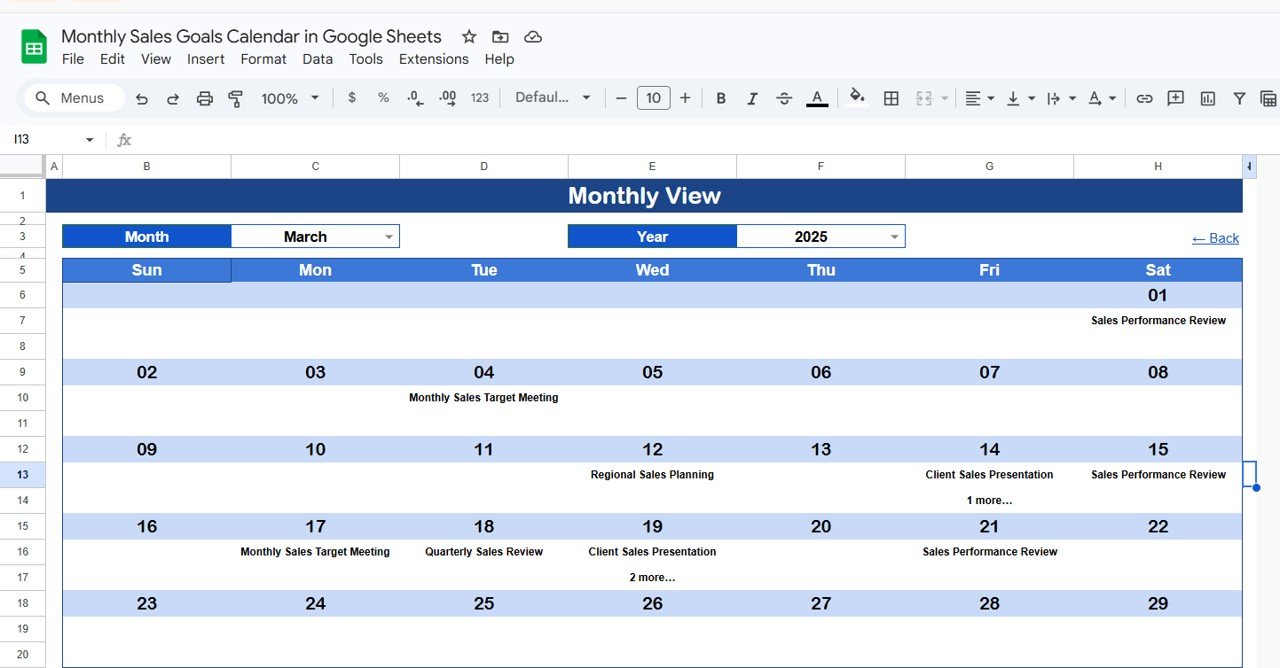
🗓️ Dynamic Monthly Calendar – Select any month and year from dropdowns, and the calendar rebuilds automatically. Each date cell shows the first scheduled event, and when more than one event exists on a date, it displays “more than 1…” so you never miss overlapping sales activities.
📋 Daily View with Date Range Filter – Enter a start date and end date to see all events within that period in a detailed list format. Double-click any date cell to open Google Sheets’ built-in date picker. This is ideal for weekly sales meeting prep or sprint planning.
🗃️ Events Database Sheet – The central data hub where you record every sales event with 7 fields: auto-generated ID, Date, Day, Event Name, Time, Location, and Description. All other views pull from this single source of truth.
 Monthly Sales Goals Calendar in Google Sheets
📦 What’s Inside the Monthly Sales Goals Calendar
This Google Sheets calendar template includes 5 worksheets designed for sales teams tracking monthly goals:
📌 Home Sheet – An index page with 4 navigation buttons: Annual View, Monthly View, Daily View, and Events. Click any button to jump directly to the corresponding sheet.
Home Sheet📌 Annual View Sheet – Shows all 12 months in a compact calendar layout. Use this to map out the entire sales year — mark product launch dates, quarterly targets, trade shows, and seasonal promotions.
 Annual View Sheet
📌 Monthly View Sheet – A single-month calendar for the selected month and year. Dropdowns at the top let you switch months and years. Each date cell shows 1 event, and dates with multiple events display “more than 1…” as a quick indicator.
 Monthly View Sheet
📌 Daily View Sheet – Lists all events within a selected date range. Set the Start Date and End Date at the top (double-click to open the date picker), and the sheet filters events automatically. Columns include Date, Day, Event Name, Time, Location, and Description.
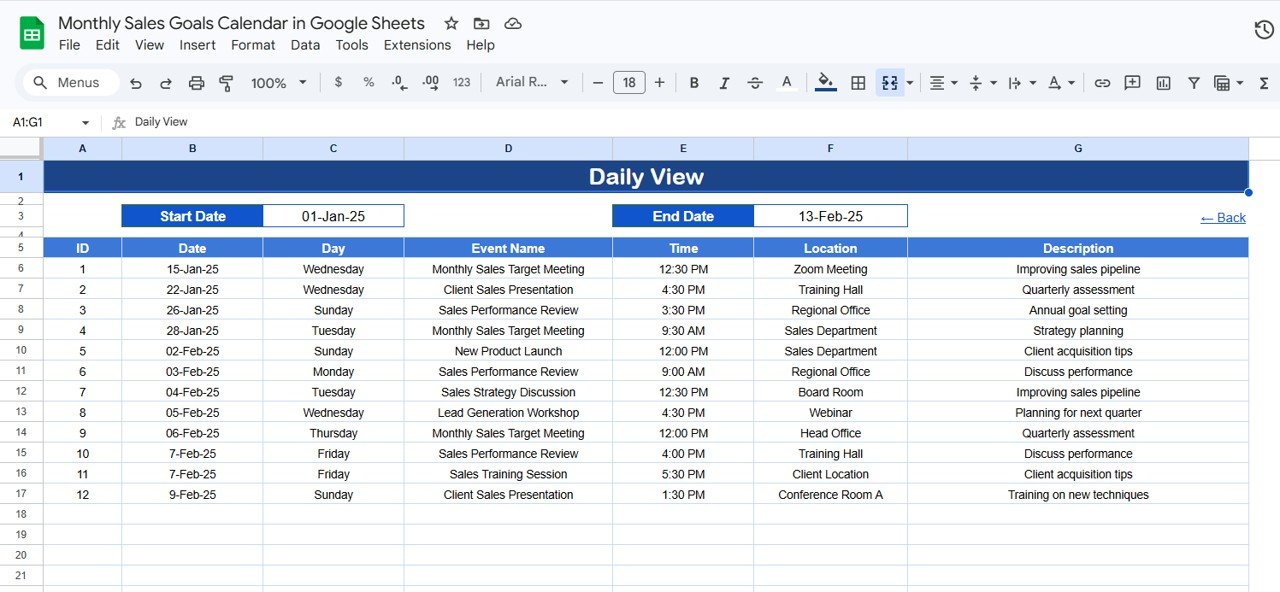 Daily View Sheet
📌 Events Sheet – The database where all sales events are stored. Each row captures: ID (auto-generated), Date, Day (Sunday, Monday, etc.), Event Name, Time, Location, and Description. Add new events manually by filling in the next available row.
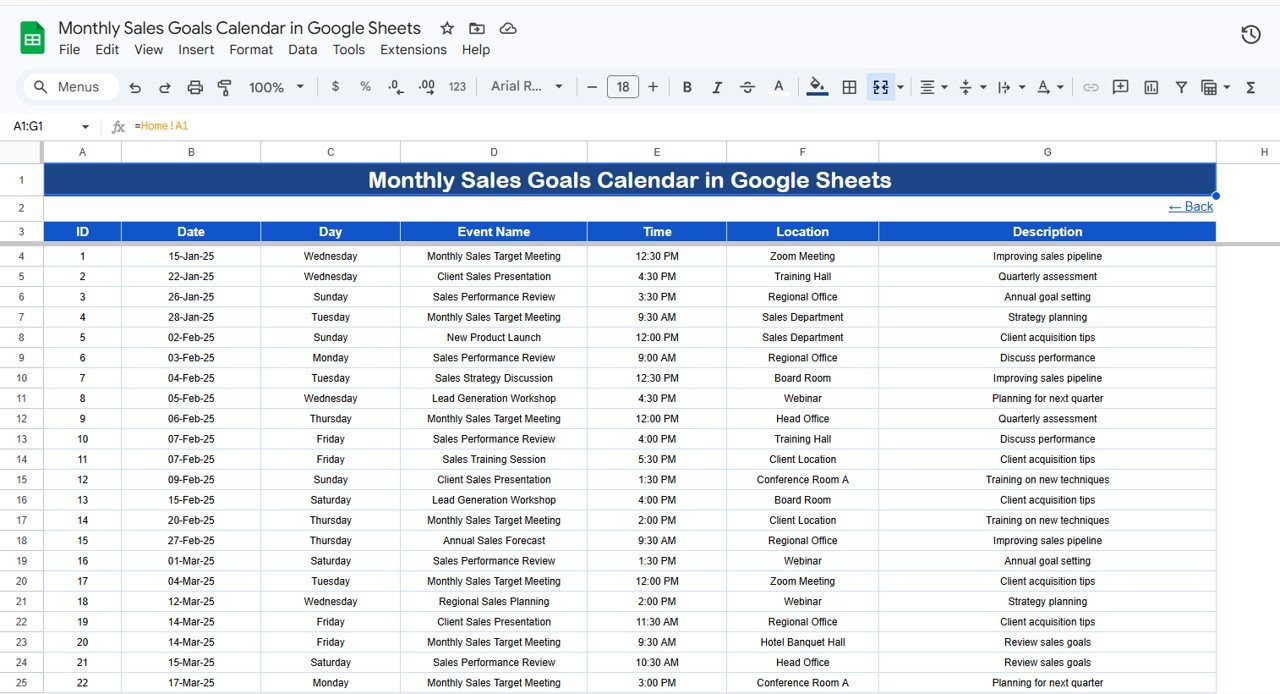 Events Sheet
📊 Monthly Sales Goals Calendar vs. Microsoft Excel Calendar vs. Salesforce — Where This Fits
| Feature | Monthly Sales Goals Calendar (Google Sheets) | Microsoft Excel Calendar Template | Salesforce Calendar |
|---|---|---|---|
| Cost | $4.99 one-time | $4.99–$9.99 one-time | $25–$300/user/month |
| Platform | Google Sheets (browser-based) | Microsoft Excel (desktop) | Cloud SaaS |
| Setup Time | Under 10 minutes | 10–15 minutes | Days to weeks |
| Real-Time Team Collaboration | ✅ Built-in (Google Sheets) | ❌ Requires OneDrive/SharePoint | ✅ Built-in |
| Mobile Access | ✅ Google Sheets app | ⚠️ Limited on mobile Excel | ✅ Salesforce app |
| Customizable Fields | ✅ Fully editable | ✅ Fully editable | ⚠️ Admin configuration needed |
| Share with Link | ✅ One-click sharing | ❌ Email attachment | ⚠️ License required per viewer |
| Year-1 Cost at 5 Users | $4.99 total | $4.99 total + Excel license | $1,500–$18,000 |
| Annual + Monthly + Daily Views | ✅ All 3 included | ⚠️ Varies by template | ✅ Built-in |
For sales teams that want a structured goal-tracking calendar without paying per-user SaaS fees, the Monthly Sales Goals Calendar in Google Sheets sits in the sweet spot.
👥 Who This Template Is For — and Who It’s Not For
✅ This template is built for:
- Sales managers at 5–200 person teams who need a visual calendar for monthly targets, follow-ups, and deadlines
- Small business owners tracking promotional events, product launches, and seasonal sales cycles
- Freelancers and solo consultants scheduling client calls, demos, and proposal deadlines
- Startup founders who need a shared sales calendar without paying for Salesforce or HubSpot
❌ This template is NOT for:
- Enterprise sales teams needing CRM-integrated pipeline automation with Salesforce/HubSpot
- Teams requiring automated email triggers or workflow rules tied to calendar events
- Organizations that need SOC 2 compliance and enterprise-grade audit trails
⚙️ How to Use the Monthly Sales Goals Calendar
1️⃣ Open the template – Follow the PDF guide in your download to create your own editable copy in Google Drive.
2️⃣ Go to the Events sheet – Enter your sales events with Date, Event Name, Time, Location, and Description. The ID and Day columns auto-populate.
3️⃣ Navigate using the Home sheet – Click the Annual View, Monthly View, or Daily View buttons to jump to the view you need.
4️⃣ Use Monthly View for focused planning – Select a Month and Year from the dropdowns. The calendar shows your events for that specific month.
5️⃣ Use Daily View for weekly prep – Set a date range to see all upcoming events in list format. Double-click the date cells to open the date picker.
6️⃣ Share with your team – Click Share in Google Sheets and send the link to your sales team for real-time collaboration.
💼 Real-World Use Cases
Mike manages a 15-person B2B sales team at a SaaS startup. He uses the Monthly Sales Goals Calendar to plot quarterly revenue targets, track demo bookings, and schedule pipeline reviews. Before this template, the team relied on scattered Google Calendar invites — now every deadline and target lives in one shared sheet that the whole team edits together.
Priya runs a boutique e-commerce brand with seasonal product launches. She uses the Annual View to map all 4 seasonal campaigns, the Monthly View to coordinate social media pushes and flash sales, and the Events sheet to log every promotional activity. The template replaced a paid project management tool that cost her $12/month per user.
Carlos is a real estate agent tracking open houses, client follow-ups, and closing deadlines. He enters every showing, inspection, and contract deadline into the Events sheet, then uses the Daily View to prepare for each week. The date-range filter saves him 30 minutes of manual calendar scanning every Monday morning.
❓ Frequently Asked Questions
How many events can the Monthly Sales Goals Calendar track?
The Monthly Sales Goals Calendar in Google Sheets has no hard limit on events. You can add hundreds of sales events, meetings, and deadlines to the Events sheet. All views — Annual, Monthly, and Daily — update automatically as you add new rows.
Can I customize the fields in the Events sheet?
Yes. The Events sheet includes 7 default columns: ID, Date, Day, Event Name, Time, Location, and Description. You can add additional columns such as Sales Rep, Priority, or Revenue Target without breaking the calendar views.
Does the Monthly View show all events on a single date?
The Monthly View displays the first event on each date cell. If a date has more than one event, it shows “more than 1…” as an indicator. Switch to the Daily View with that date range to see all events in full detail.
How does this compare to Salesforce for tracking sales goals?
Salesforce offers CRM-integrated calendars starting at $25/user/month. The Monthly Sales Goals Calendar in Google Sheets costs $4.99 one-time for unlimited users. For teams that need a visual calendar without pipeline automation, this template delivers the same planning functionality at a fraction of the cost.
Can my whole team edit this calendar at the same time?
Yes. Google Sheets supports real-time collaboration. Share the template link with your sales team, and everyone can add, edit, and view events simultaneously — no extra licenses or per-user fees required.
How long does setup take?
Setup takes under 10 minutes. Open the PDF guide, click the Google Sheets copy link, and start entering your sales events. The template comes pre-formatted with sample data you can replace immediately.
Is this template compatible with Google Sheets mobile app?
Yes. The Monthly Sales Goals Calendar works on the Google Sheets mobile app for both iOS and Android. You can view events, add new entries, and switch between views from your phone or tablet.
👤 About the Author
Built by PK — Microsoft Certified Professional with 15+ years of Excel, Google Sheets, and Power BI experience. Founder of NextGenTemplates, reaching 300K+ subscribers across YouTube channels (@PK-AnExcelExpert, @NextGenTemplates, @NeoTechNavigators). Every template is hand-built and tested before release.
🔗 Explore Related Templates
📌 Budget Tracking Calendar in Google Sheets – Track monthly budgets and expenses alongside your sales calendar for a complete financial planning view.
📌 Trade Show & Conference Calendar in Google Sheets – Plan trade shows, conferences, and industry events that feed into your sales pipeline.
📌 Seasonal Promotions Calendar in Google Sheets – Map seasonal campaigns and promotions that align with your monthly sales goals.
📌 Dealer Network KPI Dashboard in Google Sheets – Monitor dealer performance KPIs alongside your sales goal calendar for data-driven territory management.
Browse all Google Sheets Dashboard Templates and Calendar Templates on NextGenTemplates.
📖 Click here to read the Detailed Blog Post
🎥 Visit our YouTube channel for step-by-step video tutorials
👉 YouTube.com/@NextGenTemplates
Compatibility and Requirements
- Works in Google Sheets. You need a free Google account and a web browser.
- The Monthly and Daily views use dropdowns and date pickers. Google explains dropdowns in Create an in-cell dropdown list.






Reviews
There are no reviews yet.