

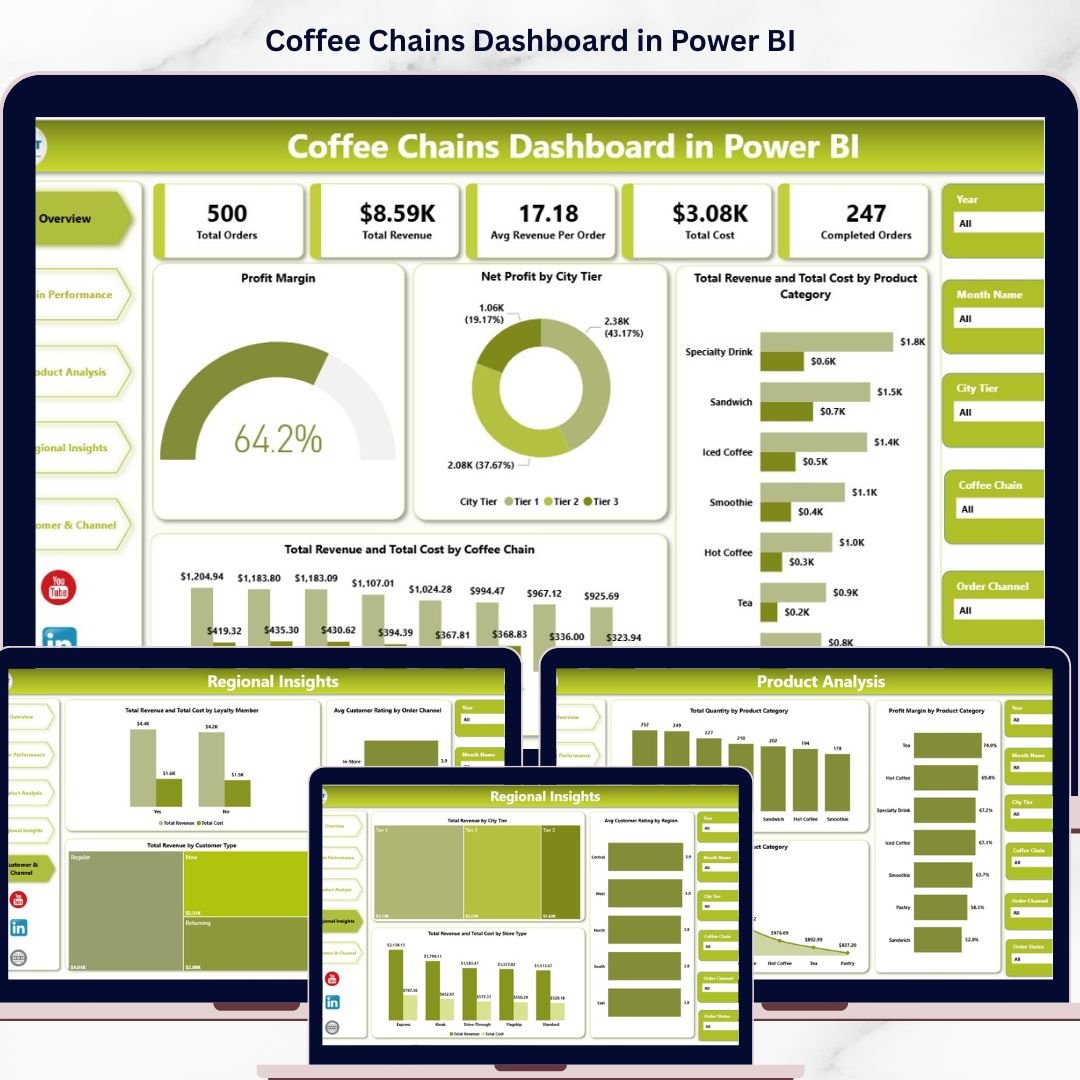
Coffee Chains Dashboard in Power BI is a powerful, interactive analytics template built for coffee chain owners, franchise managers, retail analysts, and F&B consultants who want to monitor order performance, revenue trends, profitability, product analysis, regional insights, and customer channel behavior across multiple coffee chain outlets. This Power BI dashboard includes 5 interactive pages covering Overview, Chain Performance, Product Analysis, Regional Insights, and Customer & Channel analytics — giving you 360-degree visibility into your coffee business operations from a single .pbix file.
Whether you manage a single coffee shop or an entire franchise network, this Power BI Dashboard Template transforms raw sales and operations data into actionable visual insights instantly. Simply connect your data source, refresh, and start analyzing. If you prefer an Excel-based solution, check out our Coffee Chains Dashboard in Excel as well.
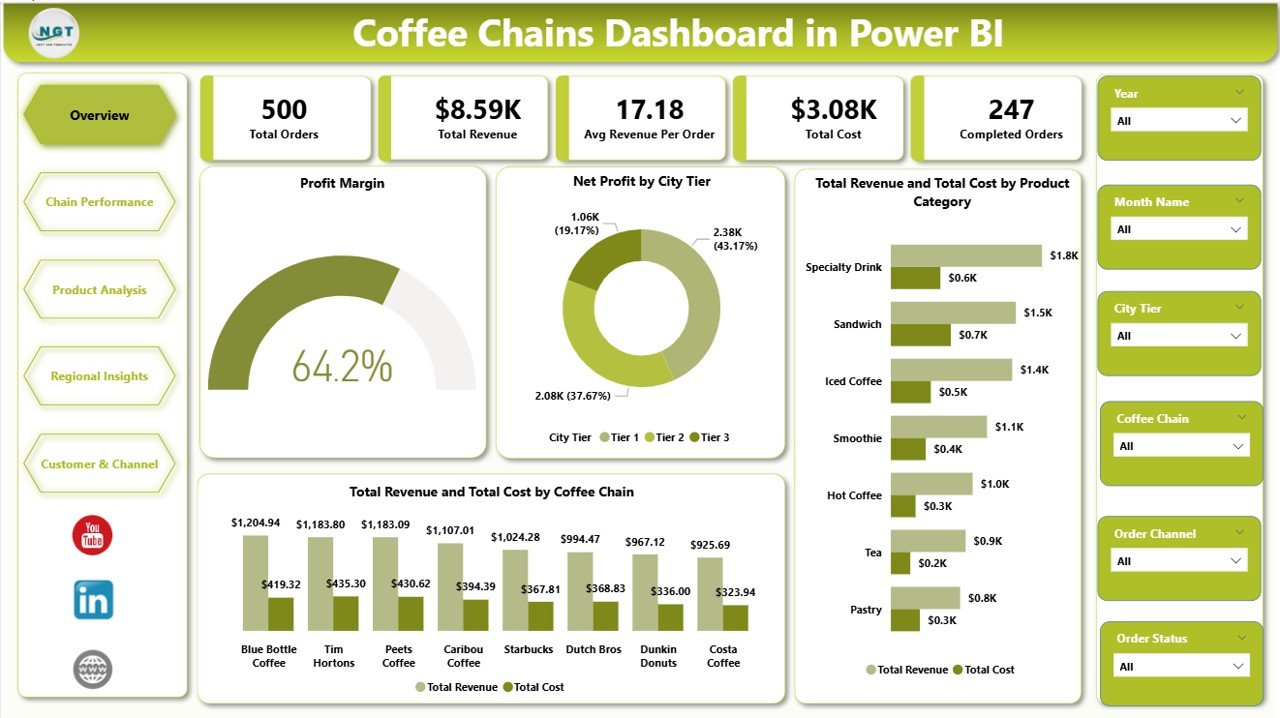 Coffee Chains Dashboard in Power BI
🔑 Key Features of Coffee Chains Dashboard in Power BI
📊 5 Interactive Dashboard Pages — Overview, Chain Performance, Product Analysis, Regional Insights, and Customer & Channel pages deliver comprehensive analytics for your coffee chain operations in a single Power BI file. This dashboard tracks 5 key metrics including Total Orders, Total Revenue, Avg Revenue Per Order, Total Cost, and Completed Orders.
📈 Dynamic KPI Cards on Overview — Instantly view Total Orders, Total Revenue, Avg Revenue Per Order, Total Cost, and Completed Orders at the top of the Overview page for a quick executive summary of your coffee business health.
🎛 Multiple Slicers for Quick Filtering — Apply dynamic filters across the entire dashboard to drill down into specific coffee chains, product categories, regions, city tiers, customer types, and order channels instantly.
📉 Profit Margin Tracking — The Overview page features a dedicated Profit Margin analysis alongside Net Profit by City Tier, Total Revenue and Total Cost by Product Category, and Total Revenue and Total Cost by Coffee Chain for comprehensive profitability insights.
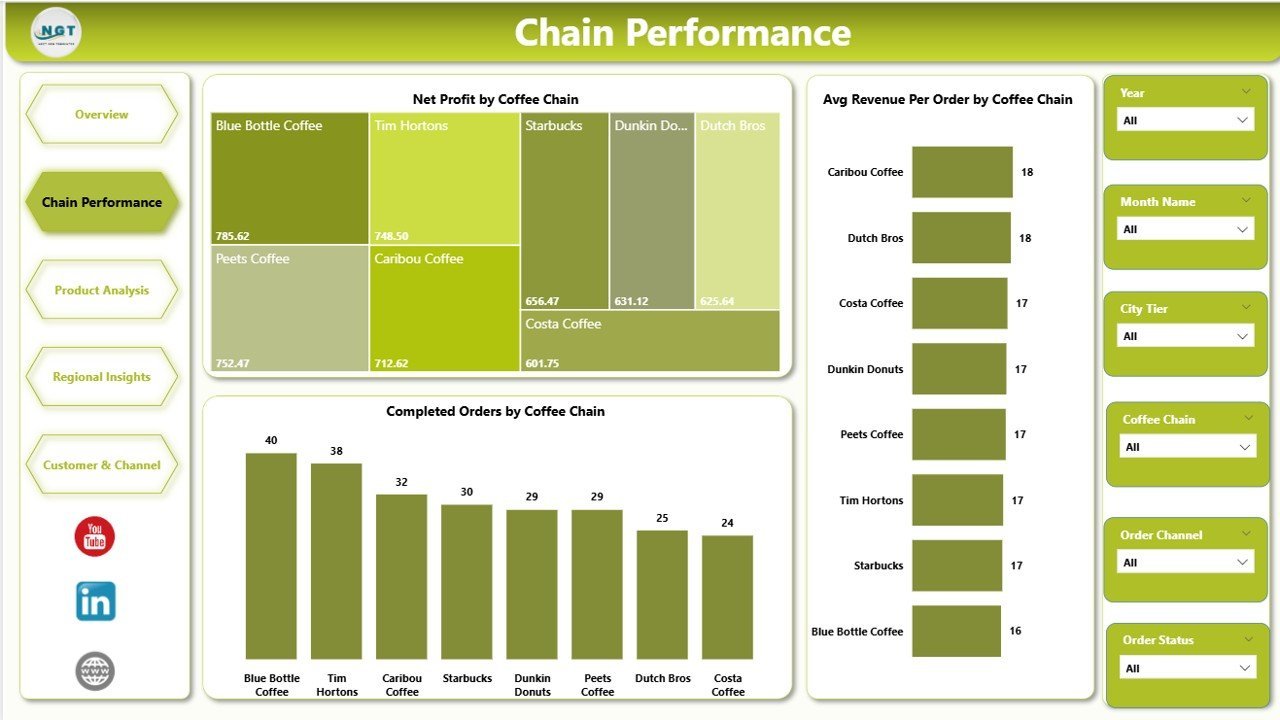
☕ Multi-Chain Comparison — The Chain Performance page compares Net Profit by Coffee Chain, Avg Revenue Per Order by Coffee Chain, and Completed Orders by Coffee Chain to identify top-performing and underperforming outlets.
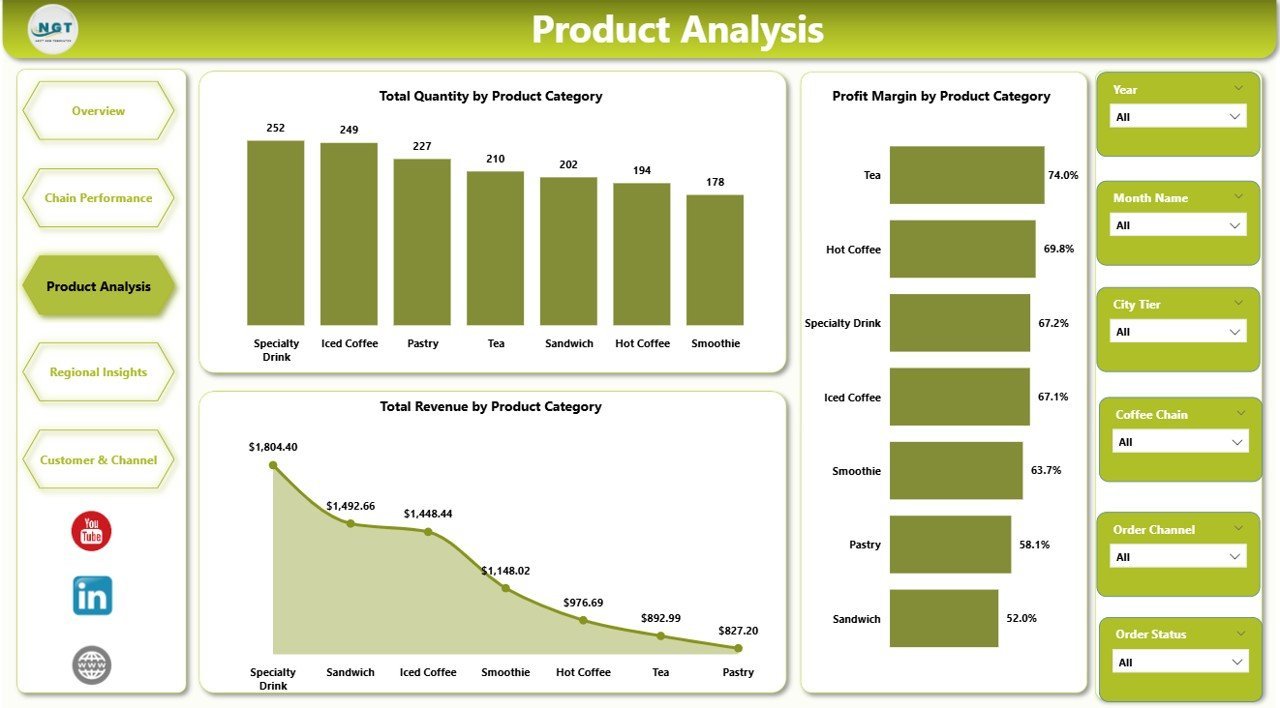
🛍 Product-Level Profitability — The Product Analysis page breaks down Total Quantity by Product Category, Profit Margin by Product Category, and Total Revenue by Product Category to pinpoint your best-selling and most profitable items.
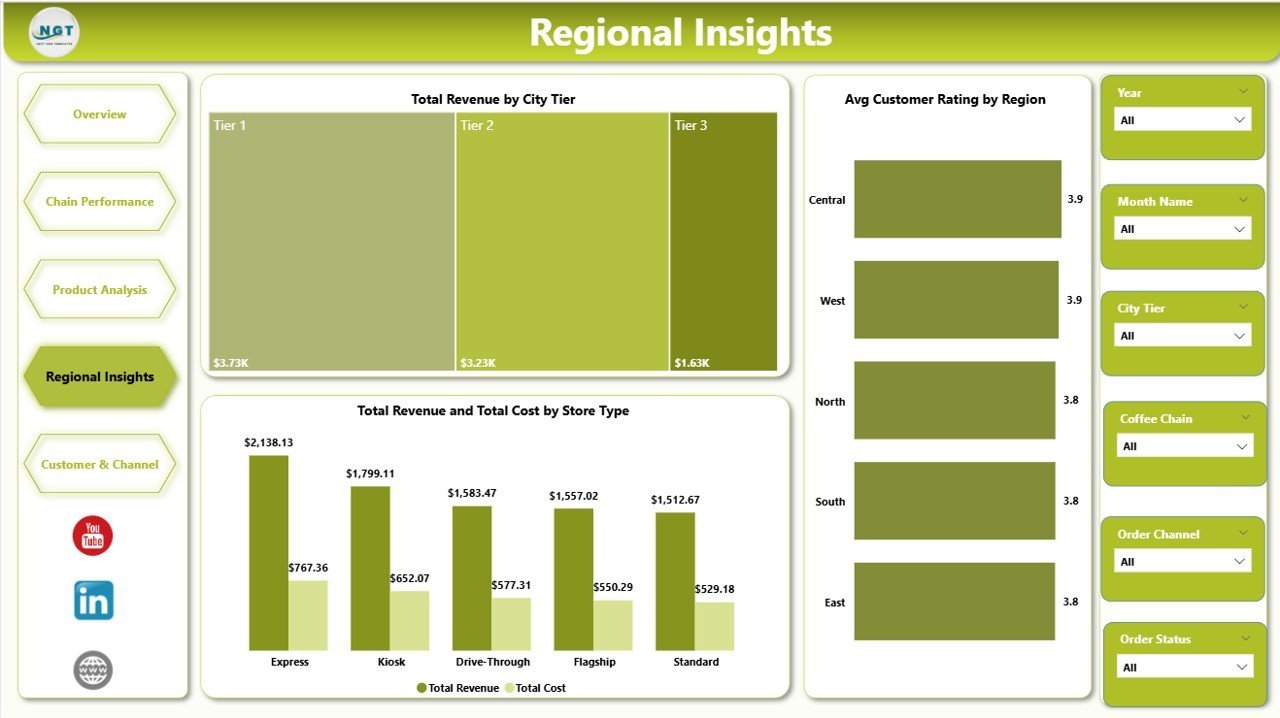
🌍 Regional & Store Analytics — The Regional Insights page visualizes Total Revenue by City Tier, Avg Customer Rating by Region, and Total Revenue and Total Cost by Store Type for geographic performance benchmarking.
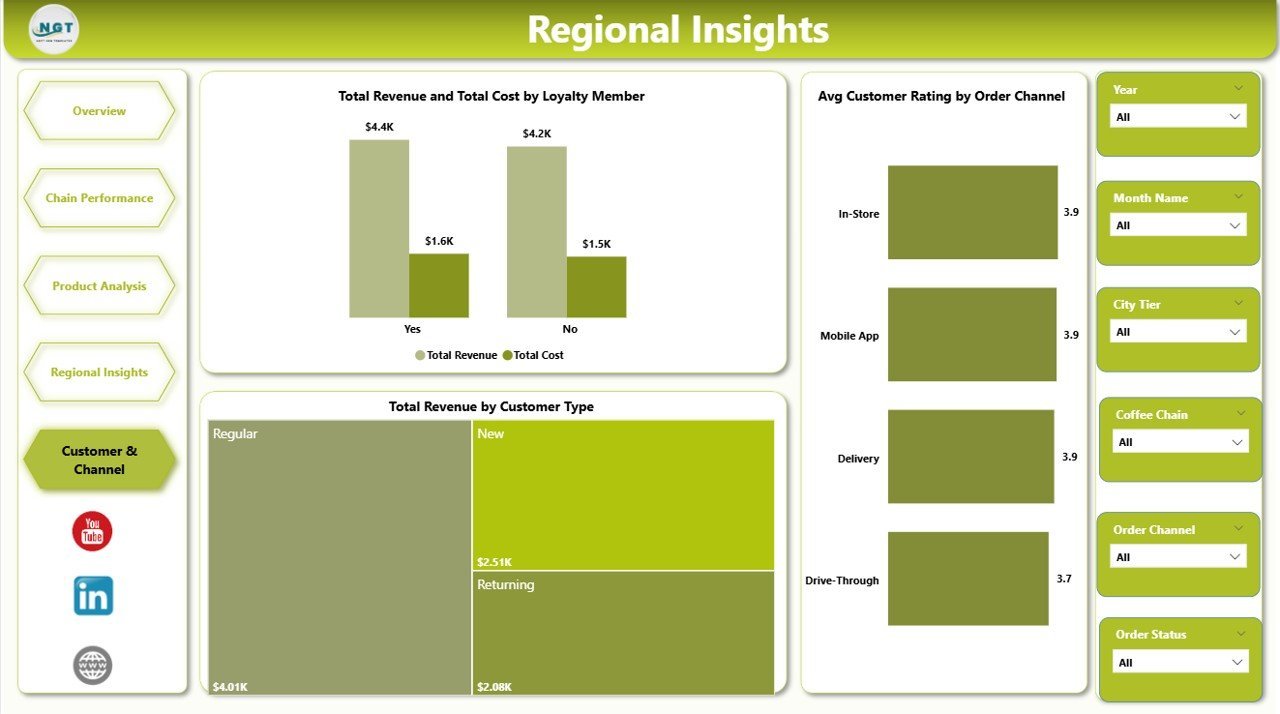
👥 Customer Segmentation — The Customer and Channel page analyzes Total Revenue and Total Cost by Loyalty Member, Avg Customer Rating by Order Channel, and Total Revenue by Customer Type to understand how revenue flows through different customer segments.
⚡ Instant Data Refresh — Simply update your data source and click Refresh in Power BI Desktop to see every chart and visual update instantly across all 5 dashboard pages.
🔧 No Coding Required — Designed for immediate use by anyone familiar with Power BI Desktop. Just open the .pbix file, connect your data, and start analyzing.
📦 What’s Inside the Coffee Chains Dashboard in Power BI
This Power BI dashboard template includes 5 interactive page tabs designed for comprehensive coffee chain analytics:
📊 1 — Overview Page — Displays 5 KPI cards (Total Orders, Total Revenue, Avg Revenue Per Order, Total Cost, Completed Orders) along with charts showing Profit Margin analyzing overall profitability, Net Profit by City Tier comparing profitability across metropolitan and non-metropolitan areas, Total Revenue and Total Cost by Product Category showing revenue and cost distribution across product lines, and Total Revenue and Total Cost by Coffee Chain comparing financial performance across different chain brands. Multiple slicers allow instant filtering across all dimensions.
Overview Page📊 2 — Chain Performance — Deep-dive into chain-level metrics with Net Profit by Coffee Chain revealing which chains generate the highest profits, Avg Revenue Per Order by Coffee Chain comparing average ticket sizes across chains, and Completed Orders by Coffee Chain measuring order fulfillment efficiency across different brands.
 Chain Performance
📊 3 — Product Analysis — Product-level analytics featuring Total Quantity by Product Category comparing sales volumes across coffee product types, Profit Margin by Product Category identifying the most profitable product lines, and Total Revenue by Product Category tracking revenue contribution from each category.
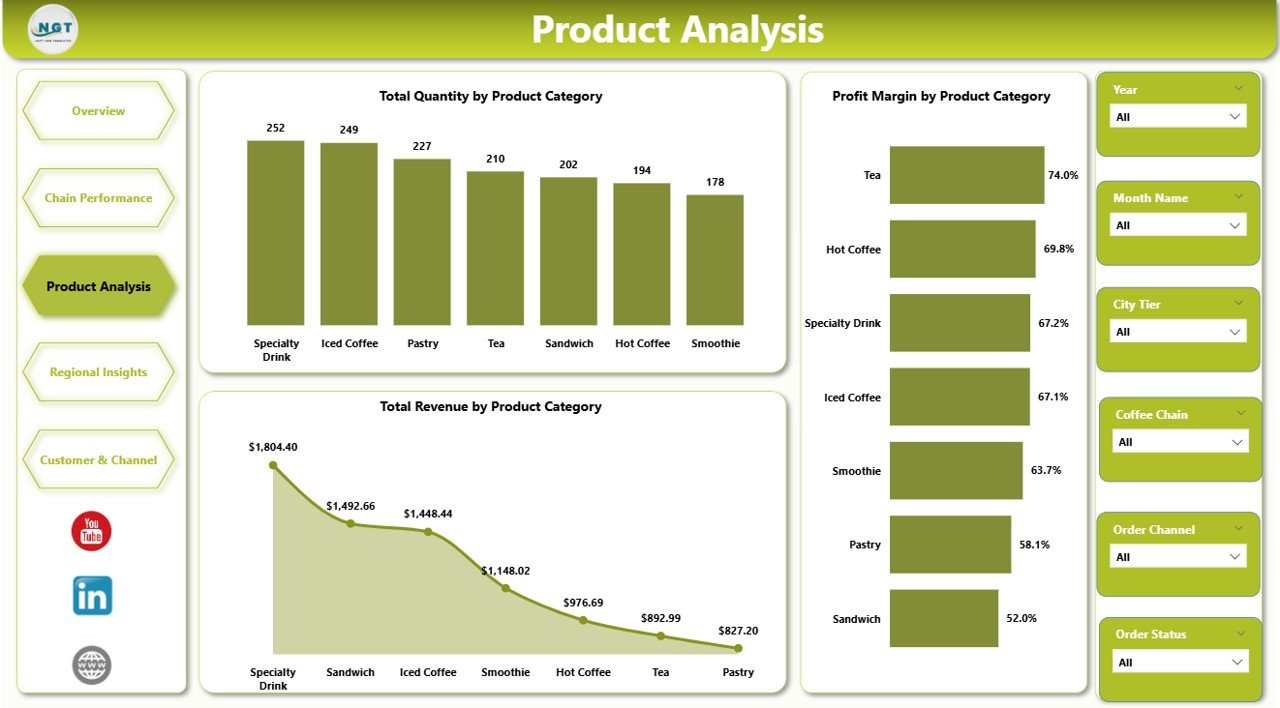 Product Analysis
📊 4 — Regional Insights — Geographic performance analysis with Total Revenue by City Tier showing how revenue distributes across metro and non-metro markets, Avg Customer Rating by Region measuring customer satisfaction across geographic areas, and Total Revenue and Total Cost by Store Type comparing performance of different store formats.
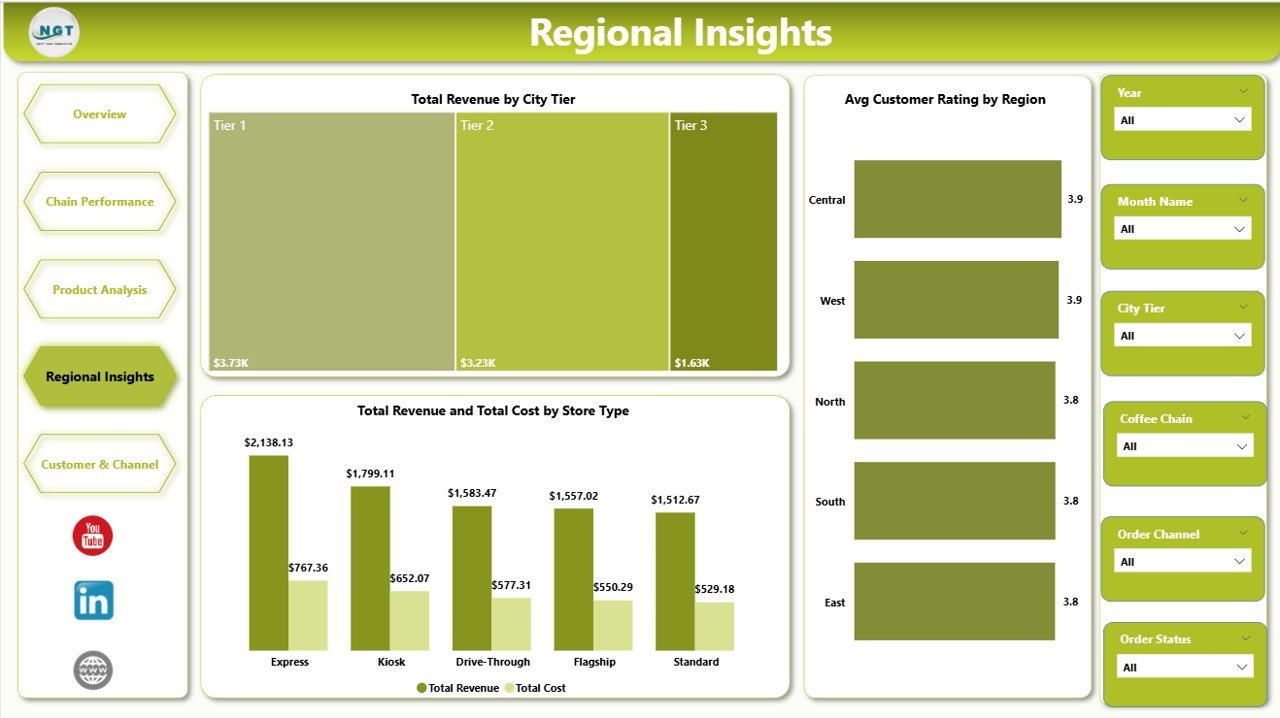 Regional Insights
📊 5 — Customer and Channel — Customer segmentation analytics featuring Total Revenue and Total Cost by Loyalty Member analyzing the financial impact of loyalty programs, Avg Customer Rating by Order Channel comparing satisfaction across different ordering methods, and Total Revenue by Customer Type understanding how different customer segments contribute to total revenue.
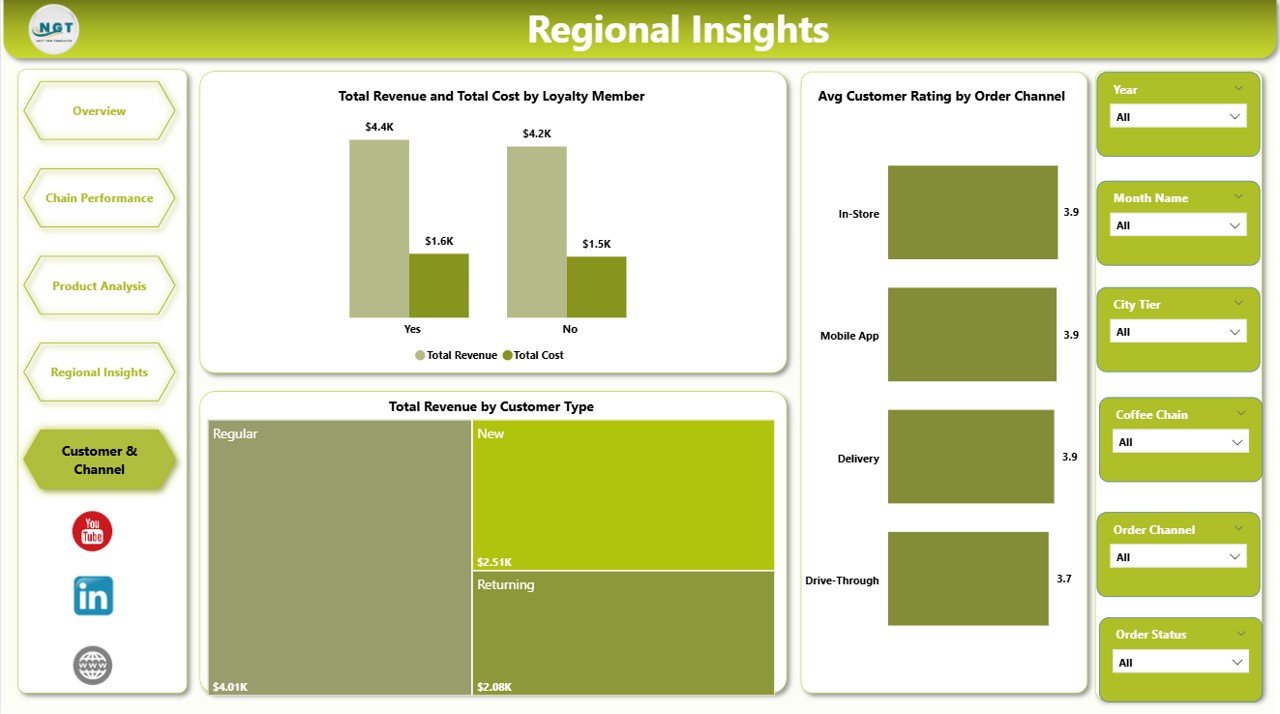 Customer and Channel
⚙️ How to Use the Coffee Chains Dashboard in Power BI
1️⃣ Download and Open — Unzip the file and open the .pbix file in Power BI Desktop (free download from Microsoft).
2️⃣ Connect Your Data Source — Replace the sample data with your own coffee chain transaction data in the connected data source.
3️⃣ Refresh the Dashboard — Go to Home tab and click Refresh to update all visuals instantly.
4️⃣ Explore Dashboard Pages — Navigate through Overview, Chain Performance, Product Analysis, Regional Insights, and Customer & Channel for complete insights.
5️⃣ Apply Slicers — Filter by coffee chain, product category, city tier, region, store type, customer type, or order channel to focus on specific segments.
👥 Who Can Benefit from This Coffee Chains Dashboard in Power BI
☕ Coffee Chain Owners & Franchise Managers — Monitor performance across multiple outlets and identify growth opportunities.
📊 Business Analysts & Data Analysts — Quickly analyze coffee sales data with pre-built interactive Power BI visuals.
🏢 Operations Managers — Track order completion rates, revenue per order, and regional performance effortlessly.
📈 Marketing Teams — Understand customer segments, loyalty patterns, and channel-wise revenue to optimize campaigns.
💰 Finance Teams — Monitor profit margins, cost breakdowns, and revenue trends for strategic planning.
🍽 F&B Consultants — Use this as a client-ready reporting tool for coffee business consulting engagements.
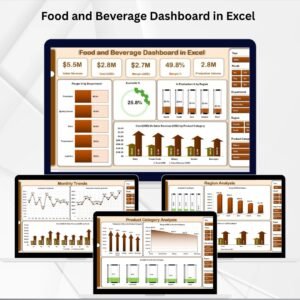
Explore more Power BI Dashboard Templates and Food and Beverage Dashboard in Excel for complementary analytics.
❓ Frequently Asked Questions
What KPIs does the Coffee Chains Dashboard in Power BI track?
The Coffee Chains Dashboard in Power BI tracks 5 key performance indicators on the Overview page: Total Orders, Total Revenue, Avg Revenue Per Order, Total Cost, and Completed Orders. Additional analytics across 5 pages include Profit Margin, Net Profit by City Tier, revenue and cost comparison by Product Category and Coffee Chain, product quantity and profitability analysis, regional revenue distribution, customer rating by region and channel, and loyalty member impact analysis.
Do I need advanced Power BI skills to use this dashboard?
No. Simply open the .pbix file in Power BI Desktop, replace the sample data with your own coffee chain records, and click Refresh. All charts and visuals update automatically with zero coding required.
Can I compare multiple coffee chains in this dashboard?
Yes. The Chain Performance page is specifically designed to compare Net Profit, Avg Revenue Per Order, and Completed Orders across different coffee chain brands side by side.
How is this different from the Coffee Chains Dashboard in Excel?
The Power BI version offers more interactive filtering, automatic visual updates, drill-through capabilities, and the ability to publish and share dashboards online. The Excel version uses pivot tables and slicers. Both track the same coffee chain metrics. Check our Coffee Chains Dashboard in Excel if you prefer spreadsheet-based analytics.
What Power BI version is required?
This template works with Power BI Desktop which is available as a free download from Microsoft. You can also publish it to Power BI Service for sharing with your team if you have a Power BI Pro or Premium license.
🔗 Explore Related Templates
🔹 Coffee Chains Dashboard in Excel — The Excel-based version with pivot-powered charts and slicers for the same coffee chain analytics.
🔹 Food and Beverage Dashboard in Excel — Comprehensive analytics for the entire food and beverage industry.
🔹 Power BI Dashboard Templates — Browse our full collection of Power BI dashboards for various industries.
📖 Click here to read the Detailed Blog Post
🎥 Visit our YouTube channel to learn step-by-step video tutorials
👉 YouTube.com/@NextGenTemplates































Reviews
There are no reviews yet.