



Managing employee IDs and access requests manually creates delays, security risks, and data inconsistency. Emails, spreadsheets, and approvals scattered across teams make access governance difficult and error-prone.
The Employee ID & Access Request Management System V1.0 solves this problem with a professional, Excel VBA-based desktop application that centralizes employee access requests, user management, permissions, and reporting in one secure system.
This is a ready-to-use digital product, ideal for organizations that want structured access control without investing in costly enterprise software.
🚀 Why Choose This System?
Centralize all employee access requests
Control user permissions with role-based access
Reduce manual effort and approval delays
Improve security and audit readiness
Work entirely offline in Excel
Because it is built on Excel and VBA, your team can start using it immediately—no installation, no learning curve, and no subscription fees.
🔑 Key Features & Functionality
🔐 Secure Login System
Built-in Login Form
Separate Admin and User roles
Password-protected access
Default Login Credentials
Admin → Username: Admin1 | Password: abcd
User → Username: User1 | Password: abcd
🧭 Main Dashboard (Control Center)

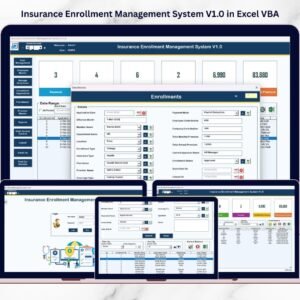
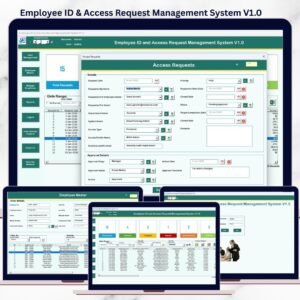
Central List Box to display all access requests
Dynamic date and column filters
Sort records instantly for quick review
🛠️ Full Record Management
➕ Add New Access Requests
✏️ Update Existing Records (single click or double-click)
🗑️ Delete Records securely
📤 Export filtered data to a new Excel file
📝 Access Request Form
Structured data entry form
Ensures clean, consistent, and validated data
Reduces manual errors significantly
📂 Advanced Navigation Menu
🏢 Firm Information
Update company details that reflect across reports.
👥 User Management (Admin Only)
Add, update, delete users
Reset passwords
Change credentials
📋 Manage Lists
Add or delete dropdown values
Customize the system easily
👤 Employee Master
Maintain structured employee records for accurate access tracking.
📊 Reports
Generate Excel reports by date range
Perfect for audits and reviews
🔐 User Access Control (Admin Only)
Assign permissions by role
Control visibility of forms and features
🚪 Logout
Auto-saves all data
Closes Excel safely
📧 Email Us & 🌐 Visit Website
Get support or customization help
Explore more Excel & VBA tools
💼 Who Is This Tool For?
This digital product is ideal for:
HR Teams
IT Administrators
Admin & Operations Teams
Small and Medium Businesses
Corporate Offices
Compliance & Audit Teams
If you currently manage access requests using emails or spreadsheets, this system will transform your workflow instantly.
✅ Key Advantages
🧩 Centralized access management
⏱️ Saves time and manual effort
🔒 Improves access security
📉 Reduces data errors
💰 No recurring cost
🧠 Built on Excel (familiar & trusted)
🖥️ System Requirements & Compatibility (Important)
✔ Windows 10 and above
✔ Microsoft Excel 2010 and above
✔ Excel Desktop Application only
❌ Not compatible with Mac
❌ Not supported on Mobile or Tablet devices
🎯 Best Use Case Scenarios
Employee onboarding access tracking
IT system access requests
Role-based permission control
Internal audits and compliance reviews
Admin-level access governance
📦 What You Get
Fully functional Excel VBA tool
Ready-to-use forms and dashboards
Secure role-based login system
Structured reports and exports
Editable and customizable Excel file
🏁 Final Thoughts
The Employee ID & Access Request Management System V1.0 is a smart, cost-effective, and professional solution for organizations that want better access control without complex software.
If you want to replace chaos with control, manual work with automation, and risk with structure, this digital product is the perfect fit.
Visit our YouTube channel to learn step-by-step video tutorials
🔗 Click here to read the Detailed blog post
Watch the step-by-step video tutorial:
Frequently Asked Questions
Do I need to enable macros?
Yes. The system is built on Excel VBA, so open it in Excel desktop on Windows and enable macros when Excel asks. Microsoft explains how to enable or disable macros in Microsoft 365 files.
What can an Admin do that a User cannot?
User Management and User Access Control are Admin only. An Admin can add, update and delete users, reset passwords and set which forms and features each role can see.
Can I export the access request records?
Yes. Export the filtered list to a new Excel file, or generate an Excel report for a date range from the Reports menu.
Can I change the dropdown values?
Yes. Use Manage Lists to add or delete the values that appear in the dropdowns on the access request form.
Related Access and Employee Templates
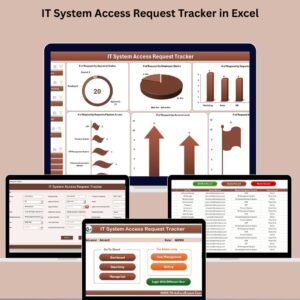
- IT System Access Request Tracker in Excel: a simpler tracker for system access requests.
- Office Key Access Request Tracker in Excel: log key and door access requests.
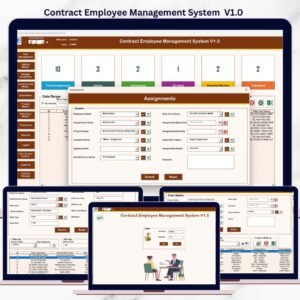
- Contract Employee Management System V1.0: another Excel VBA system for HR teams.
- Employee Identification Card Request Tracker in Google Sheets: ID card requests in Google Sheets.
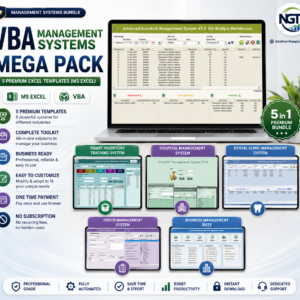
- VBA Management Systems Mega Pack: 5 Excel VBA management systems.
Browse all Excel VBA tools or the Excel HR and payroll templates.








Reviews
There are no reviews yet.