



The Financial Audit Preparation Checklist Template in Excel is an essential tool for businesses and organizations preparing for financial audits. Whether you’re a finance professional, business owner, or accounting team member, this checklist will help you stay organized and ensure that every detail is covered before the audit process begins.
This easy-to-use, customizable Excel template helps you track all necessary steps for audit preparation, from gathering financial documents to ensuring compliance with accounting standards. With built-in reminders and progress tracking, you can ensure that your financial records are complete and accurate, reducing the risk of errors and complications during the audit process.
Key Features of the Financial Audit Preparation Checklist Template in Excel
📋 Comprehensive Audit Preparation
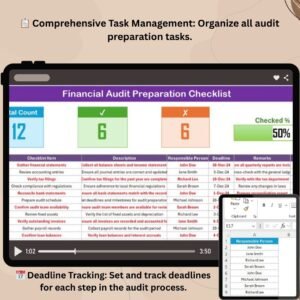
Track all essential tasks, including the collection of financial statements, bank reconciliations, tax filings, and more, ensuring that everything is in order before the audit.
⚡ Real-Time Progress Tracking
Monitor the status of your audit preparation with real-time tracking features and task completion indicators, making it easy to stay on schedule.
📅 Deadline & Task Management
Set deadlines for each task and track progress toward completion. Stay organized and make sure that all required documents are ready in time for the audit.
🔄 Customizable for Your Needs
Adapt the template to meet your specific audit requirements. Add or modify tasks based on your organization’s size, industry, or audit process.
📊 Audit Readiness Dashboard
Visualize your audit preparation progress with a dynamic dashboard that summarizes completed tasks, upcoming deadlines, and critical items to address.
🖥️ Simple, User-Friendly Interface
With a clean, easy-to-navigate design, this checklist makes audit preparation simple and efficient, even for teams with minimal experience in audit procedures.
Why You’ll Love the Financial Audit Preparation Checklist Template in Excel

✅ Efficient Audit Preparation
Organize all the necessary tasks and documents for audit preparation, ensuring you’re fully prepared when the audit begins.
✅ Stay on Schedule
Track deadlines and milestones to make sure your audit preparation stays on track and all necessary documents are in place.
✅ Real-Time Tracking & Updates
Use progress bars and task completion indicators to monitor your audit preparation status in real-time.
✅ Customizable for Your Business
Modify the checklist to fit your unique audit process, whether for small businesses or large organizations with complex financial structures.
✅ Audit-Ready Documentation
Ensure that your financial records are complete, organized, and easy to present during the audit process.
What’s Inside the Financial Audit Preparation Checklist Template in Excel?
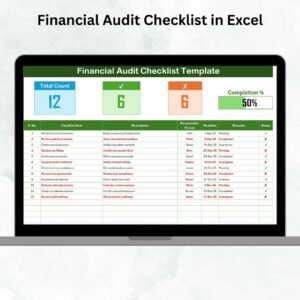
- Audit Task Overview: A comprehensive list of tasks to complete for audit preparation, including document collection and compliance checks.
- Real-Time Progress Tracker: Visual progress bars to track the completion of each task and deadline.
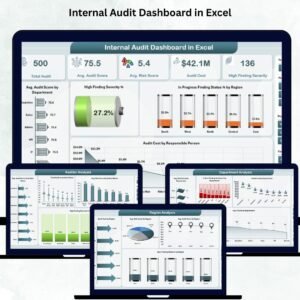
- Audit Readiness Dashboard: A summary dashboard that tracks the overall audit preparation progress, upcoming deadlines, and pending tasks.
- Deadline Management: Track deadlines for each task, ensuring everything is completed on time.
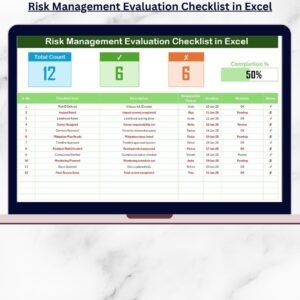
- Compliance Checklist: Ensure that all necessary compliance steps are completed prior to the audit.
How to Use the Financial Audit Preparation Checklist Template in Excel
1️⃣ Download the Template: Get instant access to your Excel file after purchase.
2️⃣ Customize the Checklist: Add your specific tasks, deadlines, and responsible team members for each audit preparation step.
3️⃣ Track Progress: Use the progress tracker and dashboard to monitor task completion and deadlines.
4️⃣ Stay Organized: Ensure that all necessary documents and steps are completed in a timely manner before the audit.
Who Can Benefit from the Financial Audit Preparation Checklist Template in Excel?
🔹 Accountants & Auditors
🔹 Finance Teams
🔹 Small Business Owners
🔹 Large Enterprises
🔹 Compliance Officers
🔹 Tax Advisors & Consultants
Make your financial audit process smooth, organized, and efficient with this customizable Excel checklist template.
Click here to read the Detailed blog post
Visit our YouTube channel to learn step-by-step video tutorials
Youtube.com/@PKAnExcelExpert
Compatibility and Requirements
- Works in Microsoft Excel desktop (Excel 2016 or later, or Microsoft 365).
- New to Excel? Microsoft’s Excel for Windows training covers the basics.
Frequently Asked Questions
Which tasks does it cover?
Audit preparation steps such as collecting financial statements, bank reconciliations, tax filings and compliance checks.
How do I track progress?
Progress bars and task completion indicators show each task’s status, and the Audit Readiness Dashboard sums up completed tasks, upcoming deadlines and pending items.
Can I change the task list?
Yes. Add or edit tasks to fit your organization’s size, industry or audit process.
Can I assign tasks?
Yes. Set a deadline and a responsible team member for each step.
Is there a Google Sheets version?
Yes. The Financial Audit Preparation Checklist in Google Sheets covers the same job in Google Sheets.
Related Audit Templates
- Financial Audit Preparation Checklist in Google Sheets: the same checklist in Google Sheets
- Financial Audit Checklist in Excel: a financial audit checklist in Excel
- Internal Audit Compliance Checklist in Excel: an internal audit compliance checklist
- Internal Audit Dashboard in Excel: an internal audit dashboard in Excel
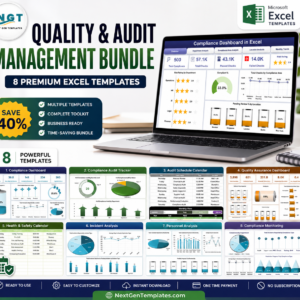
- Quality & Audit Management Bundle: 8 quality and audit templates for Excel
Browse all Excel checklists or the Excel financial tools.






















Reviews
There are no reviews yet.