



Managing customer feedback is crucial for businesses that want to enhance customer satisfaction and improve their services. Our Customer Feedback Checklist Template in Excel is designed to streamline the feedback collection, analysis, and resolution process. This easy-to-use template ensures that every piece of customer input is properly addressed, helping businesses improve their operations efficiently.
This Excel-based checklist template allows you to track customer feedback, assign responsibilities, and monitor progress effectively. Whether you are managing surveys, handling complaints, or reviewing product requests, this template helps you organize and streamline the entire process.
Key Features of the Customer Feedback Checklist Template
Our Customer Feedback Checklist Template in Excel comes with two structured worksheets, making the feedback management process simple and efficient.
1. Customer Feedback Checklist Sheet

The primary worksheet where all customer feedback-related tasks are listed, tracked, and monitored.
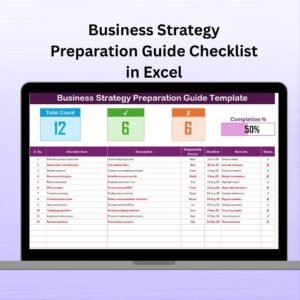
✔️ Top Section: Progress Cards At the top of this sheet, you’ll find visually appealing progress cards displaying:
- Total Count: The total number of checklist items.
- Checked Count: The number of tasks marked as completed.
- Crossed Count: The number of pending tasks that need attention.
- Progress Bar: A quick visual tracker to monitor task completion.
✔️ Checklist Table This section includes:
- Serial No.: Auto-generated to maintain the order of tasks.
- Checklist Item: A short description of the feedback-related activity.
- Description: A detailed explanation of the task.
- Responsible Person: Dropdown menu for easy assignment.
- Deadline: Due date to complete the task.
- Remarks: Additional notes or observations.
- Status: Marked as ✔ (completed) or ✘ (pending).
2. List Sheet
A secondary worksheet that stores the names of responsible persons, which are used in the dropdown selection for easier task assignment.
Benefits of the List Sheet:
- Avoids manual data entry errors.
- Provides a structured format for assigning tasks.
- Ensures consistency across the feedback tracking process.
Why Use the Customer Feedback Checklist Template?
This Excel-based checklist offers multiple benefits, making it an essential tool for businesses:
✅ Streamlined Workflow: Ensures no customer feedback is overlooked, leading to better decision-making.
✅ Enhanced Accountability: Assigning tasks ensures that each feedback item is resolved by the right person.
✅ Real-Time Tracking: The progress cards and checklist status provide instant insights into task completion.
✅ Customizable Fields: Adapt the template to match your business needs by adding more tasks, columns, or specific KPIs.
✅ Automated Dropdown List: Speeds up task assignment and maintains data accuracy.
How to Use the Customer Feedback Checklist Template?
Getting started with this template is simple:
Step 1: Populate the Checklist Table
- Add feedback-related tasks in the Checklist Item column.
- Provide detailed information in the Description column.
- Use the Responsible Person dropdown list to assign tasks.
Step 2: Set Deadlines and Status Updates
- Specify the completion date in the Deadline column.
- Use the Remarks section for progress updates.
- Mark tasks as ✔ (Completed) or ✘ (Pending).
Step 3: Monitor Feedback Progress
- Use the progress cards at the top to track overall completion.
- Review pending tasks to ensure timely action.
Step 4: Customize as Needed
- Add more checklist items, responsible persons, or new tracking fields based on your business needs.
Who Can Benefit from This Template?
Our Customer Feedback Checklist Template in Excel is ideal for: ✔ Customer Service Teams – Track customer complaints and resolutions.
✔ Marketing Teams – Analyze survey responses and brand sentiment.
✔ Product Development Teams – Manage feature requests and product feedback.
✔ Business Owners & Managers – Get a structured view of customer concerns and improvements.
Frequently Asked Questions (FAQs)
❓ Can I customize the template to add more fields?
✔ Yes, the template is fully customizable to fit your business needs.
❓ Does the template automatically calculate progress?
✔ Yes, the progress cards and status columns update as you complete tasks.
❓ Is this template suitable for small businesses?
✔ Absolutely! It is perfect for both small and large businesses looking for an organized way to manage customer feedback.
Get the Customer Feedback Checklist Template Today!
Take control of your customer feedback process with this easy-to-use Excel template. Whether you’re handling complaints, surveys, or feature requests, this checklist will help you organize, assign, and track progress efficiently.
Click hare to read the Detailed blog post
Visit our YouTube channel to learn step-by-step video tutorials
Compatibility and Requirements
- Works in Microsoft Excel desktop (Excel 2016 or later, or Microsoft 365).
- The Responsible Person column uses a dropdown filled from the List sheet. Microsoft explains dropdowns in Create a drop-down list.
More Questions About This Template
Which sheets are included?
Two sheets: the Customer Feedback Checklist sheet and the List sheet.
How do I assign a task to someone?
Add the person’s name to the List sheet, then pick it from the Responsible Person dropdown on the checklist row.
What does the checklist table record for each item?
Each row has a serial number, a checklist item, a description, a responsible person, a deadline, remarks and a status marked as completed or pending.
What do the progress cards at the top show?
They show the total count, the checked count and the crossed count of tasks, plus a progress bar for completion.
Is there a Google Sheets version?
Yes. See the Customer Feedback Checklist in Google Sheets.
Related Customer Feedback Templates
- Customer Feedback Checklist in Google Sheets: the same checklist for Google Sheets
- Customer Feedback Tracker in Excel: log each piece of feedback in a tracker
- Customer Feedback Review Checklist in Excel: a checklist for reviewing feedback
- Customer Feedback KPI Dashboard in Excel: a KPI view of feedback results
- Customer Complaint Tracker in Excel: track complaints through to resolution
Browse all Excel checklist templates.






Reviews
There are no reviews yet.