

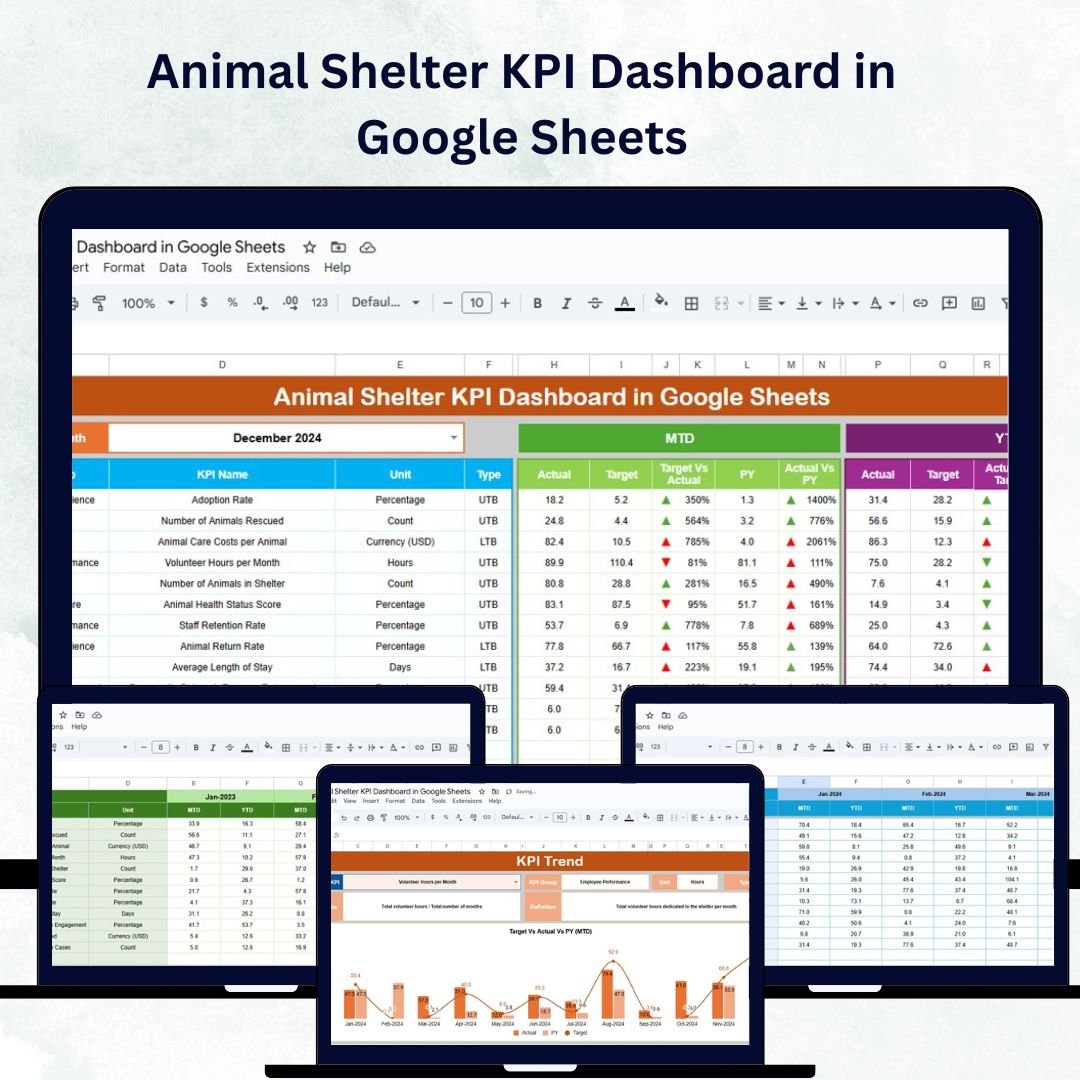

Managing an animal shelter effectively requires constant visibility into operations, from adoptions and medical checkups to volunteer contributions. The Animal Shelter KPI Dashboard in Google Sheets is a ready-to-use, fully customizable solution designed to track, analyze, and optimize every aspect of shelter performance — all within one interactive spreadsheet. 🐕🐈✨
Built for shelter managers, veterinarians, and volunteers, this dashboard simplifies complex reporting by bringing real-time insights and trend analysis to your fingertips. With visual dashboards, clear KPI definitions, and automated comparisons, it enables data-driven decisions to improve animal welfare and operational efficiency.
🔑 Key Features of the Animal Shelter KPI Dashboard
📋 1. Dashboard Sheet Tab
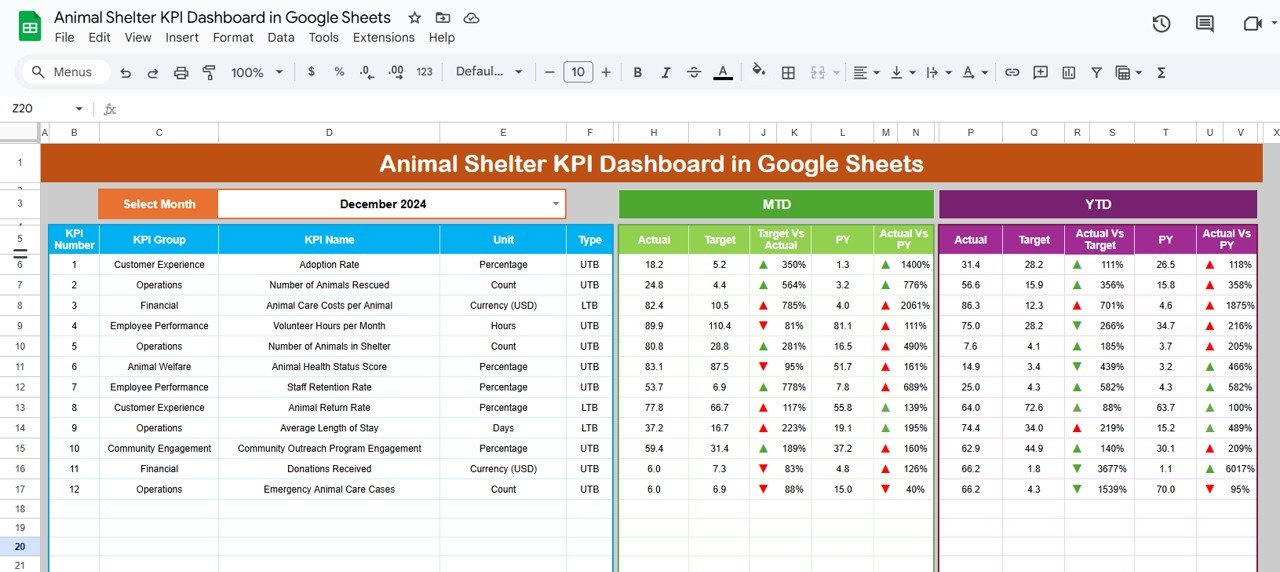
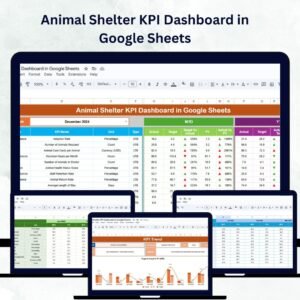
This is the heart of the tool — your one-stop view for performance tracking.
Month Selector (D3): Pick any month to instantly view updated metrics.
MTD (Month-to-Date) KPIs: Shows Actual vs Target vs Previous Year data with color-coded arrows 📈📉
YTD (Year-to-Date) KPIs: Aggregated results across the year for big-picture visibility.
KPIs Tracked: Adoptions, Intake, Volunteer Hours, Medical Checks, and more.
Visual cues make it easy to see which metrics are improving and which need attention.
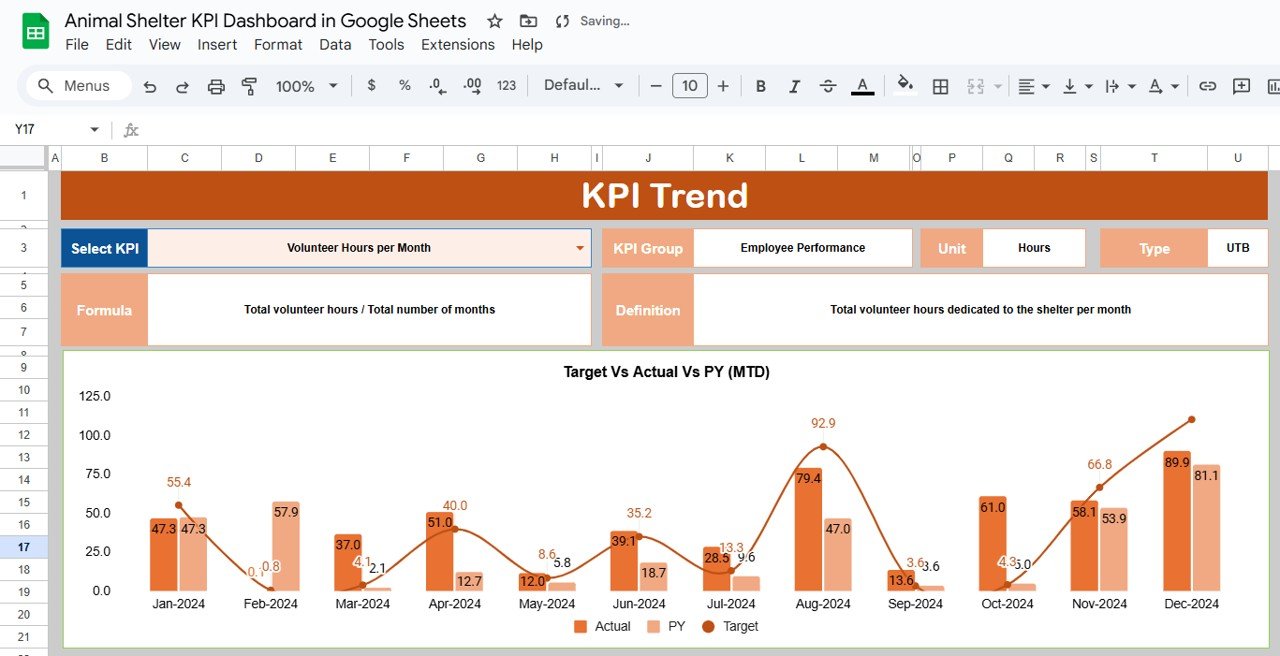
📈 2. KPI Trend Sheet Tab
Drill deeper into individual KPI performance.
Choose a KPI from the dropdown (C3) to view detailed trends 📊
Displays KPI Group, Unit, Formula, and Type (UTB or LTB)
View historical trends over months to identify progress or concerns
Perfect for analyzing adoption trends, volunteer growth, or medical compliance rates.
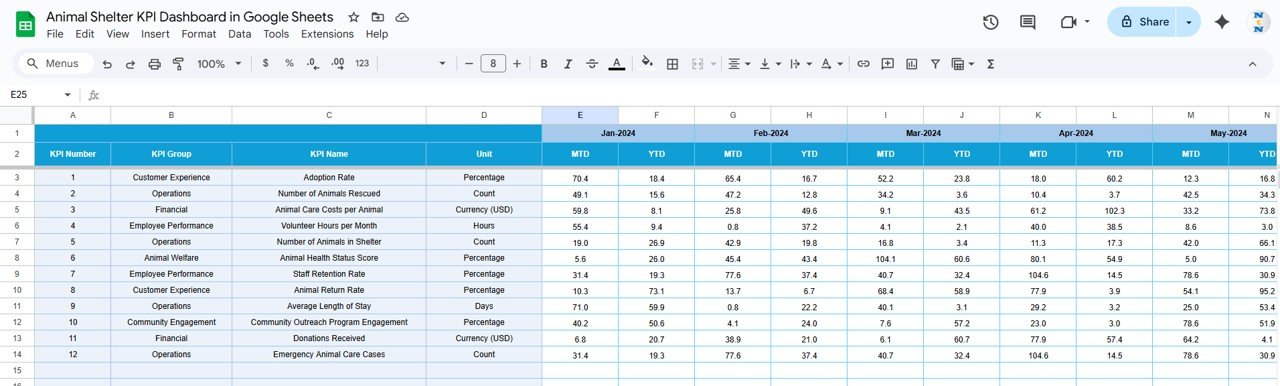
📑 3. Actual Numbers Sheet Tab
Keep your data fresh and accurate.
Record monthly actuals for each KPI (MTD & YTD)
Update the first month of the year dynamically (E1)
Reflects changes instantly across all sheets
Real-time data entry = real-time results.
🎯 4. Target Sheet Tab
Set measurable goals for your shelter.
Input MTD and YTD targets for each KPI
Compare actual results with targets side-by-side
Identify performance gaps and improvement areas
This helps shelters stay aligned with annual objectives.
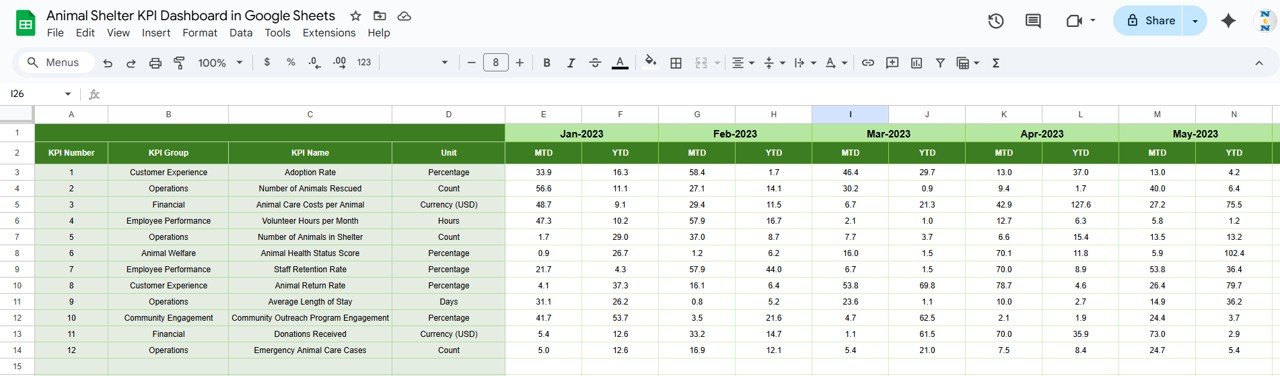
📆 5. Previous Year Numbers Sheet Tab
Keep historical context for smarter planning.
Log previous year’s results for comparison
Spot seasonal adoption patterns and intake spikes
Review YoY growth easily with visual indicators
Historical analysis made simple.
📘 6. KPI Definition Sheet Tab
Maintain transparency across your metrics.
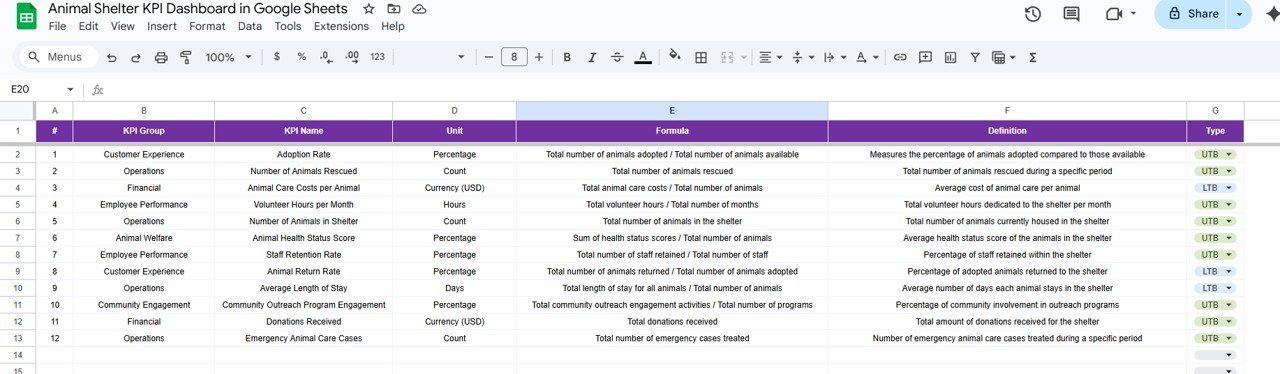
Record each KPI’s Name, Group, Unit, Formula, and Definition
Define KPI Type: UTB (Upper-the-Better) or LTB (Lower-the-Better)
Keeps reporting consistent across staff and volunteers
A perfect reference point for training new employees or volunteers.
🐕 Example KPIs You Can Track
🏠 Total Adoptions (UTB): Animals adopted into new homes
🐾 Intake Count (UTB): Total animals received
❤️ Medical Check Compliance (UTB): % of animals medically cleared
🙌 Volunteer Hours (UTB): Total hours contributed
🔁 Return Rate (LTB): Percentage of animals returned post-adoption
⭐ Satisfaction Score (UTB): Adopter or volunteer feedback rating
Each KPI includes a unit, formula, and performance type for clarity.
📦 What’s Inside the Dashboard
✅ Interactive Dashboard Sheet – Visual KPI overview
✅ Trend Analysis Tab – In-depth metric evaluation
✅ Data Entry Tabs – For Actual, Target, and Previous Year data
✅ KPI Definition Sheet – Clear documentation for reference
✅ Auto-Updating Charts & Indicators – Real-time results
✅ Pre-Filled Example Data – Start exploring immediately
🧑💼 Who Can Benefit
🎯 Shelter Managers – Oversee operations and performance trends
🎯 Veterinary Teams – Monitor animal health and medical compliance
🎯 Volunteers & Coordinators – Track hours and engagement
🎯 Nonprofit Boards – Review outcomes and impact reports
🎯 Grant Managers – Use clean data for reporting and funding proposals
🧪 How to Use the Animal Shelter KPI Dashboard
Input Data: Enter monthly figures in Actual, Target, and Previous Year sheets.
Select Month: Use the dropdown on the Dashboard tab for instant updates.
Analyze Trends: Open the KPI Trend tab to review performance over time.
Compare Results: Check Target vs Actual and Year-over-Year improvements.
Share Insights: Collaborate with your team through Google Sheets sharing.
💡 Within minutes, you’ll transform how your shelter tracks performance and drives improvements.
🌟 Why Choose This Dashboard
🧾 All-in-one KPI management for animal shelters
📊 Real-time visuals for faster decision-making
🕵️ Transparent data tracking with clear definitions
🐾 Customizable structure for any shelter size or focus
🌍 Collaborative access for staff and volunteers
💡 Data-driven planning for better animal outcomes
The Animal Shelter KPI Dashboard in Google Sheets is your ultimate solution for tracking success, improving processes, and maximizing your impact — one paw at a time. 🐾❤️
🔗 Click here to read the Detailed blog post
Watch the step-by-step video Demo:
🔗 Visit our YouTube channel to learn step-by-step video tutorials
Compatibility and Requirements
- Works in Google Sheets. You need a free Google account and a web browser.
- You pick the month from a dropdown on the Dashboard sheet and the KPI from a dropdown on the KPI Trend sheet. Google explains dropdowns in Create an in-cell dropdown list.
Frequently Asked Questions
Which sheets are included?
Six sheets: Dashboard, KPI Trend, Actual Numbers, Target, Previous Year Numbers and KPI Definition.
How do I update the dashboard?
Enter your monthly figures in the Actual Numbers sheet, your goals in the Target sheet and last year’s results in the Previous Year Numbers sheet. Then choose a month on the Dashboard sheet and it updates.
Which KPIs does it track?
Adoptions, intake, medical checks, volunteer hours, return rate and satisfaction score. Each KPI has a unit, a formula and a type (Upper-the-Better or Lower-the-Better) listed in the KPI Definition sheet.
Can I compare this year with last year?
Yes. The Dashboard shows actual, target and previous year values side by side for both month-to-date and year-to-date, with color-coded arrows.
Is there an Excel version?
Yes. See the Animal Shelter KPI Dashboard in Excel.
Related Animal Shelter and KPI Templates
- Animal Shelter KPI Dashboard in Excel: the same dashboard for Excel
- Animal Shelter KPI Scorecard in Excel: a scorecard view of shelter metrics
- Animal Shelter Management System Web App: a web app for running shelter records
- Veterinary Clinic KPI Dashboard in Google Sheets: a related animal care dashboard
- Nonprofit & NGO Operations Bundle: 7 Excel and Google Sheets templates for nonprofits
Browse all Google Sheets KPI dashboards.



























Reviews
There are no reviews yet.