



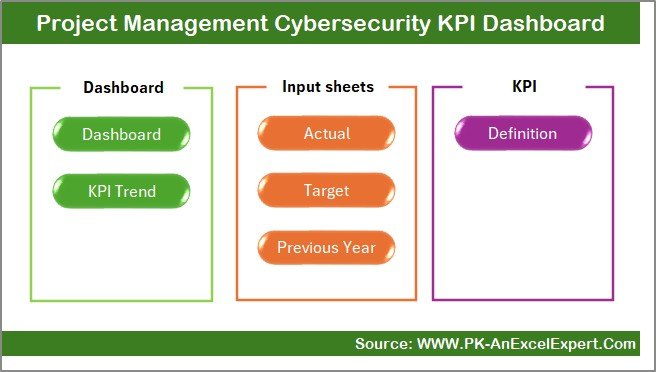
The Project Management Cybersecurity KPI Dashboard in Excel is a comprehensive and powerful tool designed for project managers and cybersecurity professionals to track and optimize key performance indicators (KPIs) related to cybersecurity projects. This Excel-based dashboard offers a centralized solution for monitoring the effectiveness of cybersecurity initiatives, ensuring that projects remain on track, within budget, and in compliance with security standards.
Whether you are working on large-scale enterprise security implementations or managing smaller cybersecurity projects, this tool provides actionable insights into key areas such as risk assessment, incident response, system vulnerabilities, and project completion status. With intuitive features and easy-to-use visualizations, this dashboard helps you manage your cybersecurity projects more effectively, identify potential issues, and take proactive measures.
Key Features of the Project Management Cybersecurity KPI Dashboard in Excel
📊 Comprehensive KPI Tracking
Track critical cybersecurity KPIs such as risk mitigation, incident response time, system vulnerabilities, and compliance rates. The dashboard gives you a clear view of each project’s progress and health.
🔐 Security Incident Tracking
Monitor security incidents and breaches, including their severity, status, and time to resolution. This feature helps you ensure quick responses and track the overall effectiveness of your cybersecurity protocols.
📝 Project Progress Monitoring
Keep track of your cybersecurity project’s milestones, deadlines, and completion status with visual indicators such as Gantt charts and progress bars.
⚡ Real-Time Data Integration
Integrate real-time data from your cybersecurity tools and platforms to keep the dashboard up-to-date, ensuring that you always have the latest information at your fingertips.
🖥 Customizable KPIs & Metrics
Customize the dashboard to meet the specific needs of your cybersecurity projects. Add your own KPIs or adjust existing ones based on the objectives of your project.
📅 Time-Based Analysis
Evaluate performance over time, including trends in incident response and risk mitigation efforts, to identify areas for improvement and drive proactive changes.
Why You’ll Love the Project Management Cybersecurity KPI Dashboard in Excel
✅ Centralized Security Management
Track all aspects of your cybersecurity project in one place. This dashboard centralizes the data and gives you a clear overview of key metrics.
✅ Enhance Risk Management
Quickly identify and address potential security risks through real-time tracking of system vulnerabilities, risk assessments, and incident responses.
✅ Improve Project Efficiency
Monitor project timelines and ensure all security tasks are completed on time, within scope, and on budget. Optimize resource allocation and workflow management.
✅ Visualize Security Data
Use intuitive visualizations to interpret complex cybersecurity data, making it easier to communicate project status and performance to stakeholders.
✅ Customizable for Your Needs
Adapt the dashboard to your specific cybersecurity project needs, including adding new KPIs or adjusting metrics as your project evolves.
What’s Inside the Project Management Cybersecurity KPI Dashboard in Excel?
Cybersecurity KPIs: Track metrics like risk mitigation, system vulnerabilities, and incident response times.
Project Progress Monitoring: Keep track of project milestones and deadlines.
Security Incident Tracking: Monitor incident severity, status, and resolution times.
Time-Based Analysis: Evaluate trends in security performance over different time periods.
Customizable KPIs & Metrics: Tailor the dashboard to suit your project’s unique needs.
Real-Time Data Integration: Connect data sources to keep your dashboard up-to-date.
How to Use the Project Management Cybersecurity KPI Dashboard in Excel
1️⃣ Download the Template: Access your cybersecurity project management dashboard immediately.
2️⃣ Integrate Data Sources: Connect your cybersecurity tools to the dashboard for real-time performance tracking.
3️⃣ Track KPIs: Monitor the status of risk mitigation, incident response, and other critical KPIs.
4️⃣ Evaluate Performance: Use time-based analysis to track trends and identify areas for improvement.
5️⃣ Optimize Project Management: Make data-driven decisions to improve cybersecurity project performance and mitigate risks.
Who Can Benefit from the Project Management Cybersecurity KPI Dashboard in Excel?
🔹 Cybersecurity Project Managers
🔹 IT Security Professionals
🔹 Data Protection Officers
🔹 Risk Management Teams
🔹 Security Analysts & Engineers
🔹 Technology Companies & Enterprises
🔹 Consultants Specializing in Cybersecurity
Ensure the success of your cybersecurity projects with the Project Management Cybersecurity KPI Dashboard in Excel. Track performance, manage risks, and optimize project timelines—all in one place.
Click here to read the Detailed blog post
Visit our YouTube channel to learn step-by-step video tutorials
Youtube.com/@PKAnExcelExpert
Watch the step-by-step video Demo:
Compatibility and Requirements
- Works in Microsoft Excel desktop (Excel 2016 or later, or Microsoft 365).
- Microsoft’s guide Create a chart from start to finish explains how Excel charts work if you want to change one.
Frequently Asked Questions
Which KPIs does the Project Management Cybersecurity KPI Dashboard track?
Cybersecurity KPIs such as risk mitigation, incident response time, system vulnerabilities and compliance rates, plus security incidents by severity, status and time to resolution.
Can I follow project milestones too?
Yes. It tracks project milestones, deadlines and completion status with visual indicators such as Gantt charts and progress bars.
Can I add my own KPIs?
Yes. You can add KPIs or adjust the existing ones as the objectives of your security project change.
Is there a demo video?
Yes. The step-by-step video above shows the dashboard in use.
Related Cybersecurity Templates
- Cybersecurity KPI Dashboard in Excel: a general cybersecurity KPI dashboard in Excel
- Cybersecurity Incident KPI Dashboard in Excel: focus on security incidents
- Cybersecurity Risk Assessment KPI Dashboard in Excel: KPIs for cybersecurity risk assessment
- Cybersecurity KPI Dashboard in Power BI: cybersecurity KPIs in Power BI
- IT and Cybersecurity Operations Bundle: IT and security templates in one bundle
Browse all Excel KPI dashboards or the Excel IT templates.



















Reviews
There are no reviews yet.