


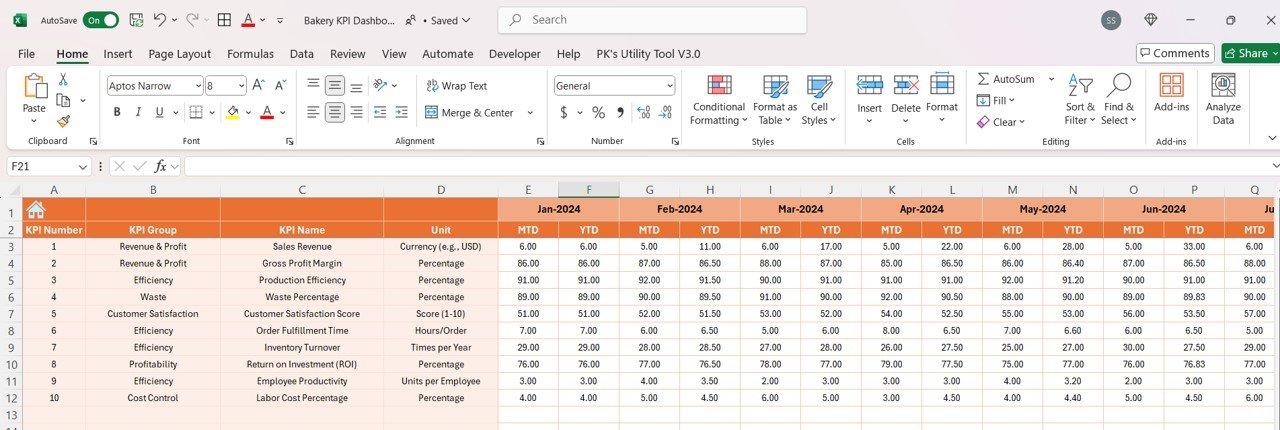



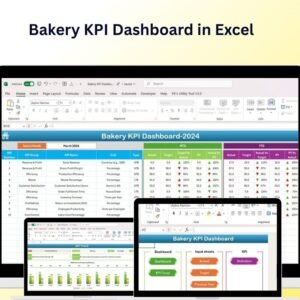
The Bakery KPI Dashboard in Excel is a must-have tool for bakery owners, managers, and business analysts who want to streamline bakery operations and track key performance indicators (KPIs). This Excel-based dashboard enables you to monitor important aspects of your bakery business, including sales, inventory, production efficiency, and customer satisfaction. Whether you’re managing a small local bakery or a large chain, this tool helps you optimize performance, improve operational efficiency, and grow your business.
With customizable features and real-time tracking, this dashboard allows you to stay on top of your bakery’s performance and make data-driven decisions that drive growth.

Key Features of the Bakery KPI Dashboard in Excel:
🍞 Sales Performance Tracking
Track bakery sales across different categories, including bread, pastries, cakes, and beverages, to measure revenue and product demand.
📦 Inventory Management
Monitor stock levels, including raw materials and finished products, to ensure you never run out of key ingredients or overstock on finished goods.
⚙️ Production Efficiency
Measure production efficiency by tracking production output, labor costs, and ingredient usage to ensure the smooth operation of your bakery.
💬 Customer Satisfaction Tracking
Monitor customer feedback and satisfaction levels to understand what customers love about your bakery and where improvements are needed.
📊 Profitability and Cost Tracking
Analyze costs related to ingredients, labor, and overhead to calculate profit margins and ensure your bakery is operating efficiently and profitably.
🚀 Why You’ll Love the Bakery KPI Dashboard in Excel:
✅ Track Sales Performance – Monitor the sales of different bakery products to understand consumer preferences and adjust your inventory and production accordingly.
✅ Manage Inventory Effectively – Track inventory levels for both raw materials and finished products, ensuring optimal stock levels and reducing waste.
✅ Optimize Production Efficiency – Measure production efficiency to improve operations, reduce costs, and enhance output.
✅ Enhance Customer Satisfaction – Track customer feedback and satisfaction to ensure your bakery meets customer expectations and builds loyalty.
✅ Monitor Profitability – Track costs, profit margins, and overhead to ensure your bakery operates profitably and sustainably.
✅ Customizable and Interactive – Fully customizable to suit the needs of your bakery, with interactive charts and real-time tracking for smarter decision-making.
What’s Inside the Bakery KPI Dashboard in Excel:
Sales Performance: Track sales data for each product category (bread, pastries, cakes, etc.) to assess performance and adjust product offerings.
Inventory Management: Monitor the stock levels of raw materials and finished goods, ensuring that your bakery maintains optimal inventory.
Production Efficiency: Track production output, labor costs, and ingredient usage to ensure efficient and cost-effective operations.
Customer Satisfaction: Record and analyze customer feedback and satisfaction ratings to continuously improve your bakery’s offerings.
Cost and Profitability Tracking: Monitor ingredient costs, labor costs, and overhead to calculate profit margins and ensure your bakery is profitable.
Custom Reports: Generate reports summarizing key metrics such as sales, costs, and production efficiency to inform business decisions.
How to Use the Bakery KPI Dashboard in Excel:
1️⃣ Download the Template – Instantly access your Excel file upon purchase.
2️⃣ Input Sales and Inventory Data – Enter your bakery’s sales data and inventory levels to start tracking your KPIs.
3️⃣ Monitor Production Efficiency – Track the number of products produced, labor costs, and ingredient usage to optimize production efficiency.
4️⃣ Track Customer Feedback – Monitor customer satisfaction and feedback to identify areas for improvement.
5️⃣ Generate Reports – Create customized reports summarizing key performance metrics to make informed decisions and improve your bakery operations.
Who Can Benefit from the Bakery KPI Dashboard in Excel:
Bakery Owners and Managers
Bakery Production Teams
Retail and Wholesale Bakery Operators
Financial Analysts for Bakeries
Inventory Managers
Marketing and Sales Teams
Customer Experience Teams
Bakery Consultants
The Bakery KPI Dashboard in Excel is the perfect tool for bakeries looking to optimize their operations, monitor performance, and ensure profitability. By tracking sales, production, inventory, and customer satisfaction, this dashboard helps you make data-driven decisions that lead to business growth.
Click here to read the Detailed blog post
https://www.pk-anexcelexpert.com/bakery-kpi-dashboard-in-excel/
Visit our YouTube channel to learn step-by-step video tutorials
Youtube.com/@PKAnExcelExpert
Compatibility and Requirements
- Works in Microsoft Excel desktop (Excel 2016 or later, or Microsoft 365).
- The KPIs are shown in interactive charts. Microsoft explains Excel charts in Create a chart from start to finish.
Frequently Asked Questions
What does the Bakery KPI Dashboard track?
It tracks sales by product category such as bread, pastries and cakes, inventory of raw materials and finished goods, production efficiency, customer satisfaction, and costs and profit margins.
How do I add my own data?
Enter your bakery’s sales data and inventory levels, then add production output, labor costs and ingredient usage. Use the dashboard to monitor the KPIs.
Can I create reports from it?
Yes. It includes custom reports that summarize sales, costs and production efficiency.
Can I change it to fit my business?
Yes. The template is fully customizable, so you can adjust it to the KPIs and data you use.
Is there a Google Sheets version?
Yes. The Bakery KPI Dashboard in Google Sheets covers the same KPIs in a browser.
Related Bakery and Food Templates
- Bakery KPI Dashboard in Google Sheets: the same dashboard in Google Sheets
- Bakery Business Dashboard in Excel: a full dashboard for a bakery business
- Bakery KPI Scorecard in Excel: score bakery KPIs against targets
- Food and Beverage KPI Dashboard in Excel: KPIs for a food and beverage business
- KPI Dashboard Library (Excel): 15 Excel KPI dashboards in one download
Browse all Excel KPI dashboards or the Excel dashboards.





























Reviews
There are no reviews yet.