



The Shipping Accuracy KPI Dashboard in Excel is an essential tool for businesses looking to monitor and improve their shipping processes. This dashboard provides real-time tracking of key performance indicators (KPIs) such as order accuracy, delivery times, and shipping errors. By having clear insights into shipping performance, businesses can streamline their operations, reduce errors, and enhance customer satisfaction.
This Excel-based dashboard is designed to give shipping managers and logistics teams an easy way to monitor their operations, track performance metrics, and optimize the shipping process. Whether you’re an e-commerce business, a logistics provider, or a supply chain manager, this tool ensures that your shipping operations run smoothly and efficiently.
Key Features of the Shipping Accuracy KPI Dashboard in Excel
📦 Shipping Accuracy Tracking
Track the accuracy of shipped orders by comparing the number of correct shipments to the total number of orders. This metric helps identify areas for improvement in the shipping process.
⏱ Delivery Time Monitoring
Monitor the time it takes to ship orders from dispatch to delivery. Track performance against expected delivery times to ensure that customers receive their orders promptly.
📉 Shipping Error Rate Tracking
Measure the frequency of errors, such as incorrect items or missed deliveries. This KPI helps businesses minimize mistakes and improve the overall quality of their shipping operations.
📊 Order Status Overview
Gain a comprehensive view of order statuses, including processed, shipped, and delivered orders. The dashboard enables you to keep track of where each order is in the shipping process.
📈 Time-Based Performance Analysis
Analyze shipping performance over different time periods (daily, weekly, monthly). This helps identify trends, seasonal patterns, and areas of inefficiency that need attention.
🔄 Real-Time Data Integration
Integrate real-time data from your shipping systems for accurate and up-to-date insights. This ensures that you have the most current information to make decisions and improve performance.
Why You’ll Love the Shipping Accuracy KPI Dashboard in Excel

✅ Track Shipping Performance
Monitor and improve the accuracy of your shipments, ensuring that customers receive the correct products in a timely manner.
✅ Minimize Shipping Errors
Track shipping errors and take proactive measures to reduce mistakes in the shipping process, leading to higher customer satisfaction.
✅ Optimize Delivery Times
Monitor delivery times to identify delays and improve the efficiency of your shipping operations, ensuring faster delivery and better customer experiences.
✅ Gain Actionable Insights
Use data-driven insights to improve your shipping process and reduce errors, costs, and delays.
✅ Customizable & Scalable
The dashboard is fully customizable, allowing you to tailor it to fit your business’s specific shipping KPIs. It’s scalable for businesses of all sizes, from small e-commerce stores to large logistics operations.
What’s Inside the Shipping Accuracy KPI Dashboard in Excel?
Shipping Accuracy Tracking: Track the percentage of accurate shipments versus total orders.
Delivery Time Monitoring: Monitor how long it takes to ship orders and ensure timely deliveries.
Shipping Error Rate Tracking: Measure the rate of shipping errors and take corrective actions.
Order Status Overview: Get a clear view of the status of each order.
Time-Based Performance Analysis: Analyze shipping performance over time to identify patterns and areas for improvement.
Real-Time Data Integration: Integrate your shipping system data for accurate, up-to-date reporting.
How to Use the Shipping Accuracy KPI Dashboard in Excel
1️⃣ Download the Template: Get the Shipping Accuracy KPI Dashboard in Excel instantly.
2️⃣ Input Shipping Data: Enter your shipping data such as order number, delivery date, and status.
3️⃣ Track KPIs & Performance: Monitor the accuracy, delivery times, and error rates for each shipment.
4️⃣ Analyze Trends & Patterns: Use time-based analysis to track shipping performance over different periods.
5️⃣ Improve Shipping Operations: Use the insights from the dashboard to streamline your shipping process, reduce errors, and optimize delivery times.
Who Can Benefit from the Shipping Accuracy KPI Dashboard in Excel?
🔹 E-commerce Businesses
🔹 Logistics & Supply Chain Managers
🔹 Warehouse Managers
🔹 Shipping Teams & Delivery Services
🔹 Operations Managers
🔹 Business Owners & Entrepreneurs
🔹 Customer Service Teams
Track your shipping performance, minimize errors, and improve customer satisfaction with the Shipping Accuracy KPI Dashboard in Excel. Streamline your shipping process, reduce delivery delays, and ensure accurate shipments every time.
Click here to read the Detailed blog post
Visit our YouTube channel to learn step-by-step video tutorials
Youtube.com/@PKAnExcelExpert
Compatibility and Requirements
- Works in Microsoft Excel desktop (Excel 2016 or later, or Microsoft 365).
- You enter shipping data such as order number, delivery date and status in the workbook.
- New to Excel charts? Microsoft explains the basics in Create a chart from start to finish.
Frequently Asked Questions
Which KPIs does the dashboard track?
Shipping accuracy, delivery time, shipping error rate and order status across processed, shipped and delivered orders.
Can I view results by period?
Yes. You can analyze shipping performance daily, weekly and monthly to spot trends.
How is shipping accuracy measured?
It compares the number of correct shipments to the total number of orders.
Can I add my own shipping KPIs?
Yes. The dashboard is customizable, so you can fit it to your own shipping KPIs.
Related Shipping and Logistics Templates
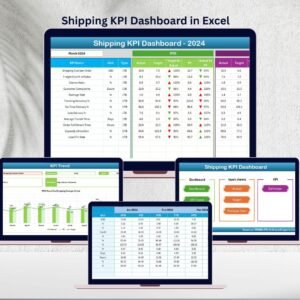
- Shipping KPI Dashboard in Excel: wider shipping KPIs
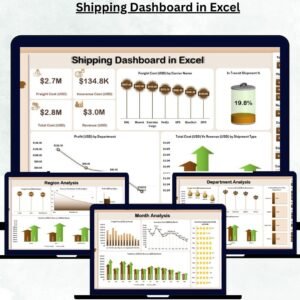
- Shipping Dashboard in Excel: a full shipping dashboard
- Shipping KPI Dashboard in Power BI: for Power BI reporting
- Warehouse Management KPI Dashboard in Excel: warehouse KPIs before dispatch
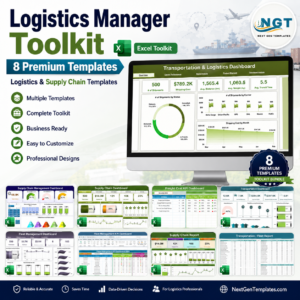
- Logistics Manager Toolkit: 8 logistics templates in one bundle
Browse all Excel KPI dashboards or the Excel logistics templates.






























Reviews
There are no reviews yet.