



The Exit Interview KPI Dashboard in Excel is a powerful tool designed to help HR teams and managers analyze and track key metrics related to employee exits. This Excel-based dashboard allows you to monitor exit interview responses, identify trends, and make data-driven decisions to improve retention and workplace culture.
By tracking key performance indicators (KPIs) such as reasons for leaving, satisfaction levels, and feedback themes, this dashboard provides valuable insights into why employees leave and how you can enhance your organization’s retention strategy. It’s the perfect tool to ensure you capture meaningful feedback and use it to drive improvements in your organization.
Key Features of the Exit Interview KPI Dashboard in Excel:
📊 Employee Exit Reasons Tracking
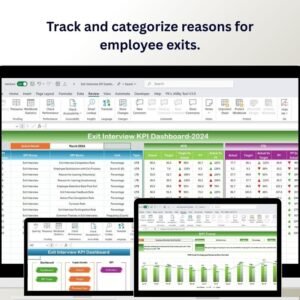
Track and categorize reasons why employees are leaving the company, such as career advancement, compensation, work-life balance, or management issues, to identify patterns and areas for improvement.
📝 Exit Interview Feedback Monitoring
Monitor feedback from exit interviews to understand employee satisfaction, job roles, and overall company culture. This data helps HR teams address potential issues and improve retention.
📅 Time-to-Exit Analysis
Track the time between when an employee submits their resignation and their final day, helping you assess and improve the exit process.
💡 Employee Satisfaction Scores
Monitor employee satisfaction during the exit interview to assess how satisfied employees are with their overall experience at the company.
📈 Trend Analysis and Reporting
Analyze trends in employee exits over time, identify recurring issues, and generate insightful reports to help make informed decisions on retention strategies.
🚀 Why You’ll Love the Exit Interview KPI Dashboard in Excel:

✅ Track Exit Reasons – Easily categorize and monitor the reasons why employees leave, helping you address key areas impacting employee retention.
✅ Identify Improvement Areas – Use feedback from exit interviews to improve workplace culture, management practices, and employee satisfaction.
✅ Optimize the Exit Process – Track the time-to-exit and streamline the process to ensure smoother transitions and improved employee experiences.
✅ Generate Reports for Decision Making – Produce detailed, customizable reports that summarize key exit metrics to support strategic decisions.
✅ Data-Driven Retention Strategies – Use insights from the dashboard to inform retention efforts, reduce turnover, and create a more engaging workplace.
✅ Customizable and User-Friendly – The dashboard is fully customizable to meet your specific exit interview tracking needs and is simple to use.
What’s Inside the Exit Interview KPI Dashboard in Excel:
Exit Reasons Tracking: Monitor and categorize the reasons for employee exits, identifying patterns and areas that need attention.
Feedback and Satisfaction Monitoring: Track employee satisfaction scores and feedback themes, ensuring you capture valuable insights from each exit interview.
Time-to-Exit Tracking: Measure the time it takes for employees to complete their exit process, identifying areas for improvement in the resignation and offboarding procedures.
Employee Retention Analysis: Track trends in employee exits over time, providing insights into retention challenges and potential solutions.
Custom Reports: Generate tailored reports to analyze the data collected, helping management and HR teams make data-driven decisions to improve retention strategies.
How to Use the Exit Interview KPI Dashboard in Excel:
1️⃣ Download the Template – Instantly access your Excel file upon purchase.
2️⃣ Input Exit Interview Data – Enter data such as employee exit reasons, satisfaction scores, and feedback from exit interviews.
3️⃣ Track Exit Metrics – Use the dashboard to monitor employee exit reasons, time-to-exit, and satisfaction levels in real-time.
4️⃣ Analyze Trends – Track trends in exit reasons, satisfaction scores, and employee turnover over time to identify recurring issues.
5️⃣ Generate Reports – Create detailed reports to present exit interview data to HR teams, managers, or senior leadership for decision-making.
Who Can Benefit from the Exit Interview KPI Dashboard in Excel:
HR Managers
Recruitment Teams
Employee Engagement Teams
Department Heads
Operations Managers
Business Owners
Retention and Culture Specialists
The Exit Interview KPI Dashboard in Excel is an essential tool for HR teams and managers looking to improve their employee retention strategies, understand exit trends, and create a more positive work environment. By analyzing feedback from exiting employees, this tool helps you address key issues that could be affecting your organization’s turnover rate.
Click here to read the Detailed blog post
https://www.pk-anexcelexpert.com/exit-interview-kpi-dashboard-in-excel/
Visit our YouTube channel to learn step-by-step video tutorials
Youtube.com/@PKAnExcelExpert
Compatibility and Requirements
- Works in Microsoft Excel desktop (Excel 2016 or later, or Microsoft 365).
- New to Excel? Microsoft has a free guide: Excel for Windows training.
Frequently Asked Questions
What does the Exit Interview KPI Dashboard track?
It tracks exit reasons, employee satisfaction scores and feedback themes, time to exit and employee retention trends.
What data do I enter?
You enter exit interview data such as exit reasons, satisfaction scores and feedback.
Can I see turnover trends?
Yes. You can follow trends in exit reasons, satisfaction scores and employee turnover over time to spot recurring issues.
Is there a Google Sheets version?
Yes. The Exit Interview KPI Dashboard in Google Sheets tracks the same exit metrics.
Related Exit Interview and Turnover Templates
- Exit Interview KPI Dashboard in Google Sheets: the same dashboard in Google Sheets
- Exit Interview Form Template in MS Word and Google Docs: a free exit interview form for Word and Google Docs
- Employee Turnover Dashboard in Excel: a full employee turnover dashboard in Excel
- Employee Offboarding Tracker in Excel: track employee offboarding in Excel
- HR Director Toolkit: 10 HR templates in one download
Browse all Excel KPI dashboards or the Excel HR and payroll templates.
































Reviews
There are no reviews yet.