



The Apartment Hunting Checklist in Excel is an essential tool for individuals or families looking to find the perfect apartment. This Excel-based checklist helps you stay organized and keep track of all the important factors when searching for an apartment, from location preferences and amenities to budget and lease terms. Whether you’re a first-time renter or an experienced apartment seeker, this checklist ensures that you make a well-informed decision, covering everything you need to consider before signing a lease.
With customizable categories, interactive checkboxes, and detailed tracking, this tool helps you compare various apartments and narrow down your options, making the apartment hunting process simple and stress-free.

Key Features of the Apartment Hunting Checklist in Excel:
🏠 Apartment Comparison
Track essential apartment details such as rent, amenities, location, size, and lease terms to help you compare and choose the best option for your needs.
💰 Budget Management
Keep track of monthly rent costs, utilities, deposits, and other fees, ensuring that you stay within your budget throughout the apartment search.
📍 Location and Neighborhood Insights
Evaluate the apartment’s location, proximity to work, schools, public transportation, and other key amenities to ensure it fits your lifestyle.
📋 Lease Terms and Conditions Tracking
Document the details of the lease agreement, including rental period, renewal options, security deposit, pet policies, and other essential clauses.
🔍 Amenities and Features
List and evaluate apartment amenities like parking, gym facilities, pet policies, and other features to compare multiple properties effectively.
🚀 Why You’ll Love the Apartment Hunting Checklist in Excel:
✅ Stay Organized – Track all the essential apartment details such as rent, location, amenities, and lease terms in one easy-to-use Excel sheet.
✅ Make Informed Decisions – Use the checklist to compare multiple apartments and make data-driven decisions that meet your needs and preferences.
✅ Keep Track of Your Budget – Easily monitor rent costs, utilities, deposits, and fees to stay within your budget and avoid any financial surprises.
✅ Evaluate Location and Amenities – Make sure your new home is in the right location with easy access to work, schools, public transport, and your favorite shops.
✅ Simplify the Process – With everything organized in one place, this checklist eliminates the stress of keeping track of all the details during your apartment search.
✅ Customizable and Easy-to-Use – The Excel checklist is simple to navigate and fully customizable, allowing you to adjust it to fit your personal preferences.
What’s Inside the Apartment Hunting Checklist in Excel:
- Apartment Comparison: Track and compare apartment details like size, rent, amenities, and location to help you choose the best one.
- Budget Tracker: Monitor your apartment budget, including rent, utilities, and other hidden fees, to ensure that you stay within your financial limits.
- Neighborhood and Location Evaluation: Rate apartments based on proximity to work, transportation options, schools, grocery stores, and other key locations.
- Lease Terms Tracker: Document important lease terms like security deposit, lease duration, renewal options, and other essential contract details.
- Amenities Checklist: List and compare apartment features such as parking availability, pet policies, gym, laundry facilities, and more.
- Customizable Fields: Add or modify fields as needed to track specific details that are important for your apartment search.
How to Use the Apartment Hunting Checklist in Excel:
1️⃣ Download the Template – Access your Excel file instantly upon purchase.
2️⃣ Input Apartment Details – Add information about apartments you’re considering, such as rent, size, and amenities.
3️⃣ Track Budget – Monitor your monthly rent, utilities, and any other fees or deposits to stay within your budget.
4️⃣ Evaluate Locations – Use the location evaluation section to rate each apartment based on proximity to essential services and transportation.
5️⃣ Compare Apartments – Use the checklist to easily compare apartments, considering both objective criteria and personal preferences.
Who Can Benefit from the Apartment Hunting Checklist in Excel:
- First-Time Renters
- Families Looking for New Apartments
- Students Searching for Apartments Near Campus
- Relocating Professionals
- Real Estate Agents Helping Clients Find Apartments
- Property Managers and Landlords
- People Looking for Temporary or Short-Term Rentals
The Apartment Hunting Checklist in Excel is the ultimate tool for anyone looking to find the perfect apartment. It helps you stay organized, compare options, manage your budget, and ultimately make an informed decision on where to live.
Click here to read the Detailed blog post
https://www.pk-anexcelexpert.com/apartment-hunting-checklist-in-excel/
Visit our YouTube channel to learn step-by-step video tutorials
Youtube.com/@PKAnExcelExpert
Compatibility and Requirements
- Works in Microsoft Excel desktop (Excel 2016 or later, or Microsoft 365).
- New to Excel? Microsoft has a free guide: Excel for Windows training.
Frequently Asked Questions
What can I compare with this checklist?
You can compare apartments by size, rent, amenities, location and lease terms side by side.
Does it help with my budget?
Yes. The budget tracker covers rent, utilities and other fees or deposits so you can stay within your limits.
Can I rate the neighborhood?
Yes. You can rate each apartment on how close it is to work, transportation, schools, grocery stores and other key places.
Can I add my own fields?
Yes. You can add or change fields to track the details that matter most in your search.
Related Rental and Moving Templates
- Moving Out Checklist Template in Excel: plan your move out step by step
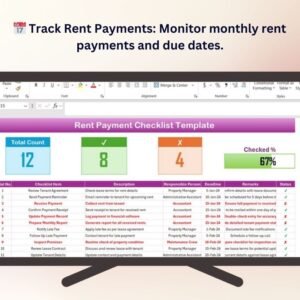
- Rent Payment Checklist Template in Excel: keep track of rent payments once you sign
- Rent Payment Checklist in Google Sheets: track rent payments in Google Sheets
- Checklist & SOP Pack: 12 checklist templates in one download
Browse all Excel checklists or the Google Sheets checklists.



























Reviews
There are no reviews yet.