



The Project Management Schedule Checklist in Excel is a comprehensive tool designed to help project managers, team leaders, and organizations efficiently plan, track, and manage their projects. This Excel-based checklist ensures that all tasks, milestones, and deadlines are clearly defined, organized, and monitored throughout the project lifecycle, allowing for smooth project execution and successful completion.
This template is ideal for businesses and teams working on complex projects or those with tight deadlines. The checklist helps you stay on top of project timelines, prioritize tasks, assign responsibilities, and track progress. It’s perfect for a wide range of projects, including product development, marketing campaigns, event planning, and more.
Key Features of the Project Management Schedule Checklist in Excel
📅 Task & Milestone Tracking
Track every task, milestone, and project phase to ensure timely completion. Break down larger tasks into manageable subtasks and assign deadlines for each to maintain steady progress.
📝 Timeline Management
Use the Excel checklist to build a clear project timeline. Define the start and end dates for each task, and visualize your project’s timeline to ensure that no deadlines are missed.
🔄 Responsibility Assignment
Assign project tasks to specific team members. Keep track of who is responsible for each task, ensuring accountability and clarity in project execution.
📊 Progress Monitoring
Monitor the progress of each task with easy-to-understand status indicators. Quickly identify completed, in-progress, and pending tasks, and address delays promptly.
⚙️ Customizable Task Categories
Customize the checklist to fit the specific needs of your project. Add or modify task categories, priorities, and deadlines to reflect your project’s requirements.
📈 Project Overview Dashboard
Use the built-in dashboard to get an overview of your project’s status, including completion percentages, remaining tasks, and key milestones.
Why You’ll Love the Project Management Schedule Checklist in Excel

✅ Stay Organized & On Track
With a clear overview of all tasks and milestones, the checklist ensures that no step is overlooked, helping you stay on top of every aspect of the project.
✅ Improve Team Collaboration
Clearly define responsibilities for each task, fostering accountability and better communication among team members. This helps ensure that everyone is on the same page.
✅ Efficient Time Management
Track task timelines and milestones to make sure the project stays on schedule. Adjust tasks and timelines as needed to keep the project moving forward efficiently.
✅ Reduce Project Delays
With real-time progress tracking, you can identify potential delays early and take corrective action before they become a larger issue, helping to keep the project on track.
✅ Customizable to Your Needs
Tailor the checklist to fit the specifics of your project. Whether you’re planning an event or managing a software development project, the checklist can be customized to meet your needs.
What’s Inside the Project Management Schedule Checklist in Excel?
- Task & Milestone Tracking: Break down projects into manageable tasks with deadlines.
- Timeline Management: Set task timelines and visualize project progress.
- Responsibility Assignment: Assign tasks to team members for clear accountability.
- Progress Monitoring: Track task completion status and project progress.
- Customizable Categories: Adjust task categories and priorities for your specific project needs.
- Project Overview Dashboard: Get a quick summary of project completion and pending tasks.
How to Use the Project Management Schedule Checklist in Excel
1️⃣ Download the Template: Get the Project Management Schedule Checklist in Excel instantly.
2️⃣ Add Project Tasks & Milestones: List all project tasks and milestones with due dates.
3️⃣ Assign Responsibilities: Assign tasks to specific team members for clarity and accountability.
4️⃣ Track Progress: Update task statuses regularly to monitor progress and stay on schedule.
5️⃣ Adjust Timelines & Tasks: Modify timelines and tasks as the project evolves to maintain flexibility.
Who Can Benefit from the Project Management Schedule Checklist in Excel?
🔹 Project Managers & Team Leaders
🔹 Small & Medium Enterprises (SMBs)
🔹 Large Corporations with Complex Projects
🔹 Event Planners & Coordinators
🔹 Marketing & Product Development Teams
🔹 Construction & Engineering Teams
🔹 Freelancers & Consultants Managing Projects
Ensure successful project completion with the Project Management Schedule Checklist in Excel. Keep track of every task, monitor milestones, and maintain clear communication throughout your project’s lifecycle.
Click here to read the Detailed blog post
Visit our YouTube channel to learn step-by-step video tutorials
Youtube.com/@PKAnExcelExpert
Compatibility and Requirements
- Works in Microsoft Excel desktop (Excel 2016 or later, or Microsoft 365).
- You can customize task categories, priorities and deadlines in the checklist. Microsoft explains the basics in Excel for Windows training.
Frequently Asked Questions
What can I track with this checklist?
You can track tasks, milestones and deadlines, the team member responsible for each task, and the status of every task: completed, in progress or pending.
Can I assign tasks to team members?
Yes. Each task can be assigned to a specific team member, so it is clear who is responsible for what.
Does it include a project overview?
Yes. The built-in dashboard summarizes completion percentages, remaining tasks and key milestones.
Can I change the task categories and priorities?
Yes. You can add or modify task categories, priorities and deadlines to fit your project.
Is there a Google Sheets version?
Yes. See the Project Management Checklist in Google Sheets.
Related Project Management Templates
- Project Management Checklist in Google Sheets: a project checklist for Google Sheets
- Project Progress Tracker in Excel: follow task progress in Excel
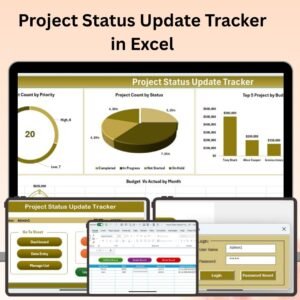
- Project Status Update Tracker in Excel: record regular status updates
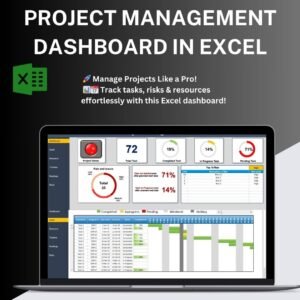
- Project Management Dashboard in Excel: a dashboard view of your project
- Project Management Pro Bundle: 9 project templates in one download
Browse all Excel checklists and Excel project management templates.































Reviews
There are no reviews yet.