



The Employee Offboarding To-Do List in Excel is a streamlined, user-friendly tool designed to help HR departments and managers efficiently manage the employee offboarding process. Whether an employee is leaving voluntarily, retiring, or being terminated, this Excel-based checklist ensures that all necessary steps are completed smoothly, reducing the risk of oversight and ensuring compliance with company policies.
The tracker is designed to ensure that every task—from the return of company property to conducting exit interviews—is handled properly and on time. With the ability to assign tasks to different departments and set deadlines, it ensures a comprehensive and organized offboarding process that benefits both the employee and the company.
Key Features of the Employee Offboarding To-Do List in Excel
📋 Detailed Offboarding Checklist
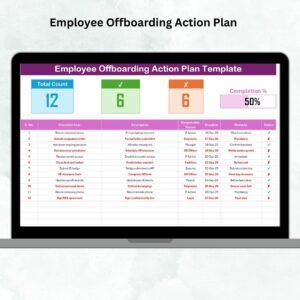
The template provides a comprehensive to-do list that covers every step of the offboarding process. From collecting company assets like computers and keys to completing exit interviews, this checklist ensures all tasks are completed before the employee departs.
📝 Task Assignment & Progress Tracking
Easily assign offboarding tasks to the relevant departments (HR, IT, Facilities, etc.). Track the progress of each task to ensure nothing is missed and deadlines are met.
⚙️ Exit Interview Tracking
Track the status of exit interviews and feedback forms, ensuring that all necessary documents are collected and reviewed before the employee’s last day.
🔑 Asset Return Monitoring
Ensure all company property, such as laptops, phones, keys, and uniforms, is returned in a timely manner. The tool allows you to track which assets have been returned and which are still pending.
⏱ Time-Based Reminders & Deadlines
Set deadlines for each task and receive reminders when tasks are due. This ensures that all offboarding activities are completed in a timely manner, preventing any delays in the process.
📈 Reporting & Insights
Generate reports to analyze the completion of offboarding tasks and monitor employee departures. Use these insights to improve future offboarding processes and address any recurring issues.
Why You’ll Love the Employee Offboarding To-Do List in Excel

✅ Comprehensive & Organized
Track all offboarding tasks, from asset return to final documentation, in one centralized location. Stay organized and ensure no steps are overlooked.
✅ Improved Task Management & Accountability
Assign tasks to relevant departments and track their progress, ensuring that each department is on track with their responsibilities.
✅ Ensure Compliance
Ensure compliance with company policies and legal requirements by completing all necessary offboarding steps. This includes asset recovery, exit interviews, and documentation.
✅ Minimize Errors & Delays
By tracking tasks and setting deadlines, you reduce the likelihood of errors and delays, ensuring a smooth offboarding experience for both the employee and the company.
✅ Flexible & Customizable
The tracker is highly customizable to fit the unique offboarding process of your organization. Add additional tasks, adjust categories, and modify due dates as needed.
What’s Inside the Employee Offboarding To-Do List in Excel?
- Comprehensive Offboarding Checklist: A detailed list of tasks for the entire offboarding process.
- Task Assignment & Progress Tracking: Assign tasks to departments and track their completion.
- Exit Interview Tracking: Track the status and completion of exit interviews.
- Asset Return Monitoring: Monitor the return of company property.
- Time-Based Reminders: Set deadlines and get reminders for each offboarding task.
- Reporting & Analytics: Generate reports to monitor task completion and employee departures.
How to Use the Employee Offboarding To-Do List in Excel
1️⃣ Download the Template: Access the Employee Offboarding To-Do List in Excel instantly.
2️⃣ Input Employee Details: Add the departing employee’s information, such as their role, department, and last working day.
3️⃣ Assign Tasks & Deadlines: Assign specific offboarding tasks to different departments and set deadlines for completion.
4️⃣ Track Progress & Completion: Monitor the completion of each task and ensure that nothing is overlooked.
5️⃣ Generate Reports & Improve Processes: Use the reporting features to analyze task completion and improve future offboarding processes.
Who Can Benefit from the Employee Offboarding To-Do List in Excel?
🔹 HR Managers & HR Teams
🔹 IT & Facilities Managers
🔹 Business Owners & Executives
🔹 Compliance & Legal Departments
🔹 Small & Medium Businesses (SMBs)
🔹 Large Enterprises with Complex Offboarding Processes
Streamline and simplify the employee offboarding process with the Employee Offboarding To-Do List in Excel. Track tasks, monitor asset return, and ensure compliance, all while improving your organization’s overall offboarding strategy.
Click here to read the Detailed blog post
Visit our YouTube channel to learn step-by-step video tutorials
Youtube.com/@PKAnExcelExpert
Compatibility and Requirements
- Works in Microsoft Excel desktop (Excel 2016 or later, or Microsoft 365).
- New to Excel? Microsoft’s free Excel for Windows training covers the basics.
Frequently Asked Questions
What tasks does the offboarding to-do list cover?
Asset returns such as laptops, phones, keys and uniforms, exit interviews and feedback forms, final documentation, and other steps each department must finish before the employee leaves.
Can I assign tasks to other departments?
Yes. You can assign each task to HR, IT, Facilities or another team, set a deadline and track its progress.
Can I add my own steps?
Yes. You can add tasks, change categories and adjust due dates to match your company’s own offboarding process.
What employee details do I enter?
The departing employee’s role, department and last working day, then the tasks and deadlines for each department.
Related Offboarding and HR Templates
- Employee Offboarding Tracker in Excel: a fuller offboarding tracker in Excel
- Employee Offboarding Planner Checklist in Excel: plan each exit step by step
- Employee Offboarding Checklist in Google Sheets: an offboarding checklist in Google Sheets
- Employee Offboarding Tracker in Google Sheets: track several exits at once in Google Sheets
- HR Director Toolkit: HR templates in one toolkit
Browse all Excel HR and payroll templates or the Excel checklists.
































Reviews
There are no reviews yet.