





🌬️ Key Features of Wind Energy KPI Dashboard in Google Sheets 🌬️
The Wind Energy KPI Dashboard in Google Sheets is a powerful, customizable tool designed to help you monitor and analyze key performance indicators (KPIs) related to wind energy generation. Whether you’re managing a small wind turbine or a large wind farm, this dashboard allows you to track essential metrics such as energy production, operational efficiency, maintenance costs, and ROI. It consolidates data in an intuitive, visually appealing format that provides real-time insights for stakeholders in the wind energy sector.
This ready-to-use template is built on Google Sheets, offering flexibility, real-time data updates, and collaboration features, making it a cost-effective solution for wind energy management.
📝 What’s Inside the Wind Energy KPI Dashboard 📝
The Wind Energy KPI Dashboard includes several key sheets to track critical data and performance metrics:
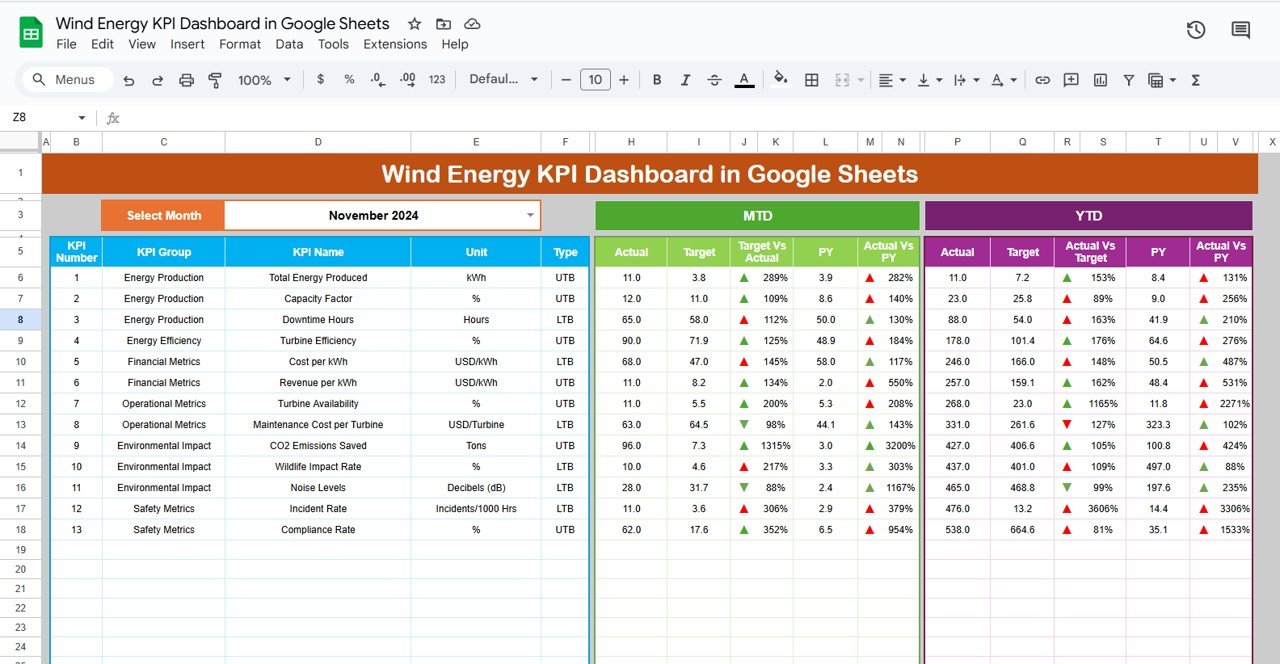
Dashboard Sheet Tab
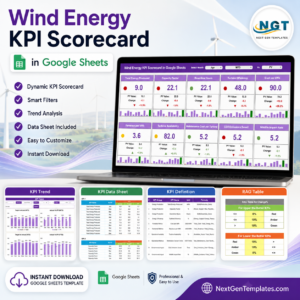
Key Metrics Cards: Get an instant overview of your performance with cards displaying:
Energy Generated (kWh): Total energy produced by your wind system.
Efficiency: Measures the overall efficiency of the wind energy system.
Maintenance Costs ($): Tracks the costs associated with maintenance.
ROI ($): Shows the return on investment for your wind energy assets.
Capacity Factor (%): Measures the actual energy produced vs. the maximum potential energy.
Dynamic Charts: Visualize performance over time with various charts:
Energy Generation by Month: Track energy production trends.
Operational Efficiency Over Time: Monitor improvements or declines in system efficiency.
Cost vs. Energy Generation: Compare maintenance costs with energy generation.
Performance by Wind Turbine: Analyze performance by individual turbines.
KPI Trend Sheet Tab
Trend Analysis: Track the performance of individual KPIs over time and make data-driven decisions.
KPI Group, Unit, Type: Understand how each KPI is grouped (e.g., energy, cost, maintenance), the unit of measurement (e.g., kWh, dollars), and whether it’s “Lower the Better” (LTB) or “Upper the Better” (UTB).
Actual Numbers Sheet Tab
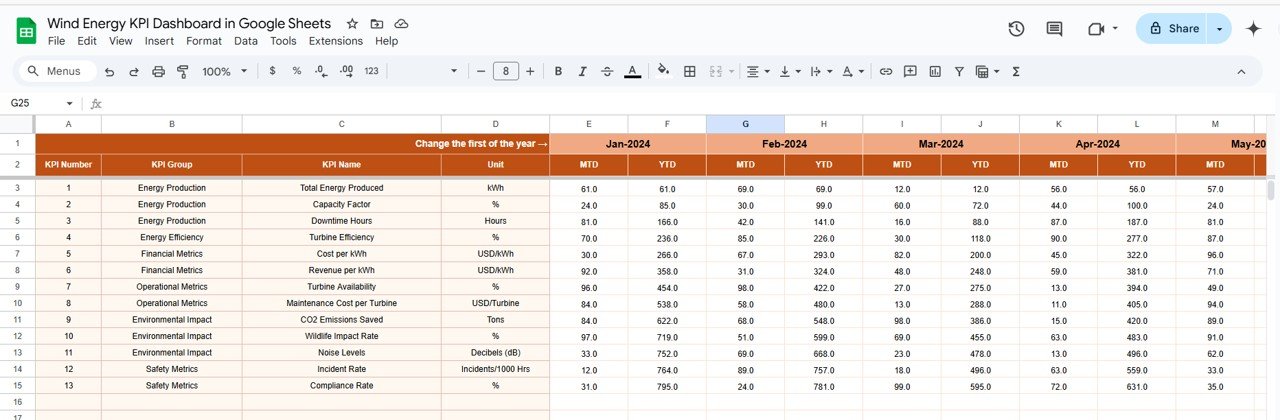
Data Entry: Enter actual values for MTD (Month-to-Date) and YTD (Year-to-Date) performance.
Automatic Data Update: The dashboard refreshes automatically with updated values for real-time monitoring.
Target Sheet Tab
Set Targets: Enter target values for each KPI (monthly and YTD) to measure actual performance against goals.
Previous Year Number Sheet Tab
Historical Comparison: Enter data for the previous year to compare performance and identify areas for improvement.
KPI Definition Sheet Tab
Detailed Definitions: Learn about each KPI with clear definitions, formulas, and how they relate to wind energy management.
⚙️ How to Use the Wind Energy KPI Dashboard ⚙️
Input Data: Enter actual performance metrics into the Actual Numbers Sheet to track MTD and YTD performance.
Set Targets: Define target values in the Target Sheet to compare against actual performance.
Visualize Data: Use the Dashboard Sheet to view KPIs, trends, and charts for real-time analysis.
Monitor Trends: Regularly update data to track long-term performance and identify areas for improvement using the KPI Trend Sheet.
🌍 Who Can Benefit from This Wind Energy KPI Dashboard 🌍
Wind Farm Operators: Track energy production, system efficiency, and maintenance costs across multiple turbines.
Energy Analysts: Use the dashboard to analyze performance trends and generate insights for long-term planning.
Project Managers: Monitor operational efficiency, costs, and ROI to optimize project outcomes.
Sustainability Officers: Ensure that wind energy systems are performing sustainably by tracking key metrics like energy generation and environmental impact.
Investors and Stakeholders: Assess the profitability and performance of wind energy investments to make informed decisions.
🌟 Benefits of Using the Wind Energy KPI Dashboard 🌟
Real-Time Monitoring: Keep track of your wind energy system’s performance in real-time, allowing you to make quick adjustments and optimizations.
Easy-to-Understand Visuals: The dashboard includes charts and conditional formatting, providing a clear visual representation of performance.
Efficiency Optimization: Identify areas where energy production or operational costs can be improved to boost overall efficiency.
Financial Tracking: Monitor financial performance metrics such as maintenance costs and ROI to ensure that your wind energy systems are cost-effective.
Customizable: Tailor the dashboard to meet your specific needs, whether you’re managing a small turbine or a large wind farm.
Click here to read the detailed blog post
Watch the step-by-step video Demo:
Visit our YouTube channel to learn step-by-step video tutorials
Compatibility and Requirements
- Works in Google Sheets. You need a free Google account and a web browser.
- The dashboard uses charts and conditional formatting. Google explains charts in Add & edit a chart or graph.
Frequently Asked Questions
Which sheets are included?
Six sheets: Dashboard, KPI Trend, Actual Numbers, Target, Previous Year Number and KPI Definition.
What do the cards on the Dashboard show?
Energy Generated (kWh), Efficiency, Maintenance Costs ($), ROI ($) and Capacity Factor (%).
Which charts are included?
Energy Generation by Month, Operational Efficiency Over Time, Cost vs. Energy Generation and Performance by Wind Turbine.
How are KPIs classified?
Each KPI has a group, a unit such as kWh or dollars, and a type: Lower the Better (LTB) or Upper the Better (UTB).
Is there an Excel or Power BI version?
Yes. See the Wind Energy KPI Dashboard in Excel and the Wind Energy KPI Dashboard in Power BI.
Related Wind and Renewable Energy Templates
- Wind Energy KPI Dashboard in Excel: the same KPIs in Excel
- Wind Energy KPI Dashboard in Power BI: the Power BI edition
- Wind Energy KPI Scorecard in Google Sheets: a scorecard view in Google Sheets
- Wind Energy Farms KPI Dashboard in Power BI: KPIs for wind farm operators
- Energy & ESG Sustainability Bundle: 8 energy templates in one download
Browse all Google Sheets KPI dashboards.










Reviews
There are no reviews yet.