

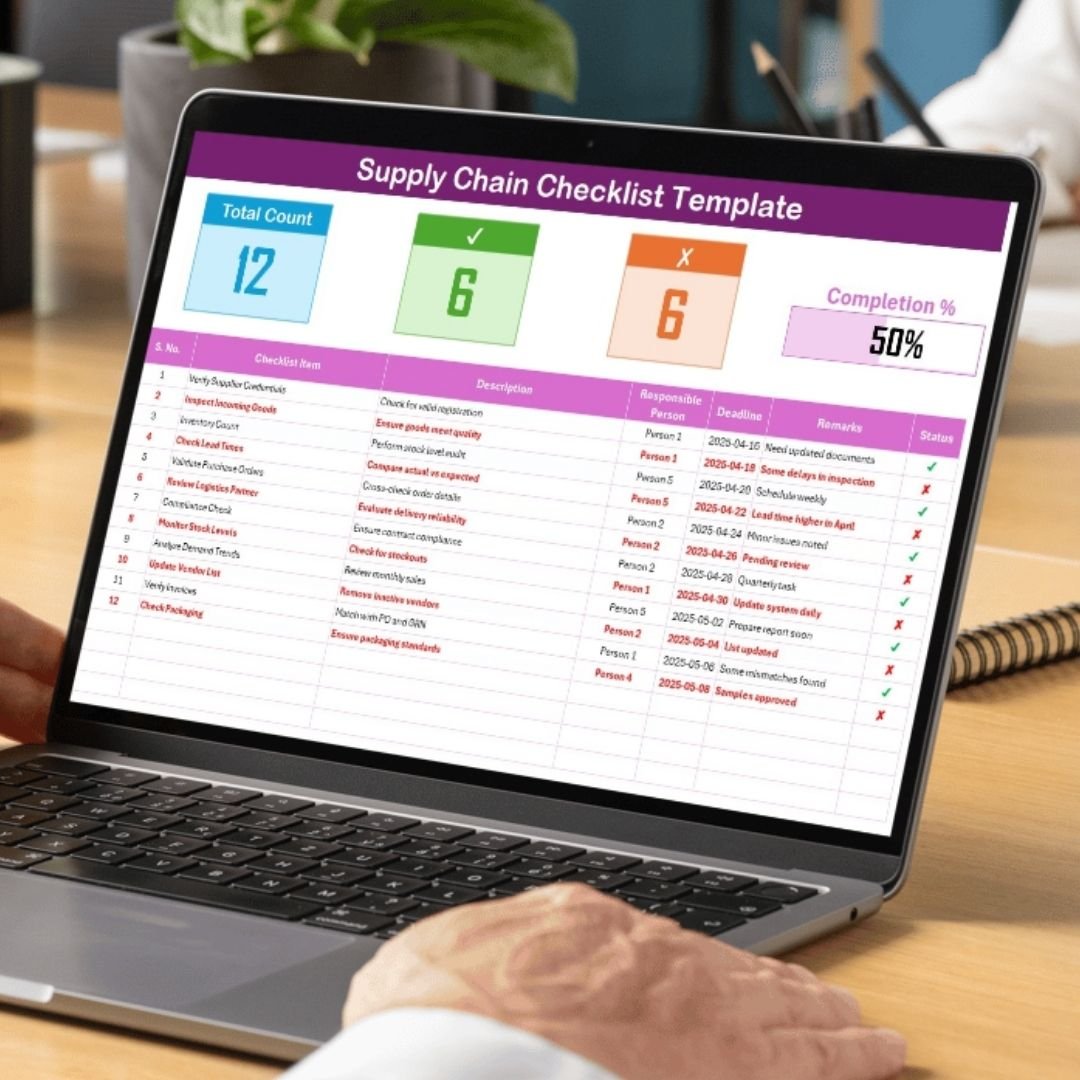

The Supply Chain Checklist in Excel is an essential tool for businesses looking to streamline their supply chain management process. This easy-to-use, Excel-based checklist helps supply chain managers, procurement teams, and logistics professionals stay organized by tracking critical supply chain tasks and ensuring that everything runs smoothly.
From vendor management to inventory tracking and delivery schedules, this checklist allows you to monitor every step of your supply chain. It helps identify bottlenecks, improve efficiency, and ensure timely product delivery, contributing to an optimized supply chain operation. Whether you’re managing small-scale operations or large enterprise supply chains, this template is scalable and customizable to suit your needs.
Key Features of the Supply Chain Checklist in Excel
📋 Comprehensive Supply Chain Tracking
Track all essential supply chain processes, including procurement, inventory management, vendor relationships, and delivery schedules. Stay on top of every step to avoid delays and inefficiencies.
🔄 Vendor Management
Monitor the performance of your vendors. Track deliveries, payment terms, and lead times to ensure that vendors are meeting your expectations. Keep communication clear and on schedule to prevent disruptions.
📦 Inventory Tracking
Easily track stock levels, reorder points, and product availability. Ensure that inventory levels are optimized, reducing the risk of overstocking or stockouts.
🚚 Logistics & Shipping Management
Track the status of shipments, delivery schedules, and transportation costs. Stay informed of any delays or issues with logistics and take immediate action to prevent any disruptions.
📅 Time-Based Monitoring
Track tasks and milestones over time to assess supply chain performance. Use time-based monitoring to identify trends and ensure that everything is progressing according to plan.
⚙️ Customizable Checklist
Adapt the checklist to fit the specific needs of your organization. Add new tasks, columns, or features based on your unique supply chain processes.
Why You’ll Love the Supply Chain Checklist in Excel

✅ Organize All Supply Chain Tasks
Track every stage of your supply chain in one easy-to-manage place, from procurement to delivery. Stay organized and keep all key information at your fingertips.
✅ Enhance Vendor & Inventory Management
Keep track of vendor performance and manage inventory effectively to avoid disruptions and maintain smooth operations.
✅ Improve Delivery & Logistics
Track delivery schedules, shipping costs, and performance to improve logistics efficiency and reduce operational delays.
✅ Boost Efficiency & Compliance
Track compliance with vendor agreements, inventory protocols, and shipping timelines to reduce risk and improve supply chain efficiency.
✅ Scalable & Customizable
Adapt the checklist to suit businesses of any size. Whether you’re a small business or a large corporation, the checklist is flexible enough to meet your needs.
What’s Inside the Supply Chain Checklist in Excel?
Comprehensive Task Tracking: Monitor tasks related to procurement, inventory, logistics, and vendor management.
Vendor Management: Track vendor performance, deliveries, and payment terms.
Inventory Tracking: Manage stock levels and reorder points to avoid overstocking or stockouts.
Shipping & Delivery Management: Track delivery schedules and logistics performance.
Time-Based Monitoring: Track and analyze supply chain performance over time.
Customizable Checklist: Tailor the checklist to meet your specific supply chain requirements.
How to Use the Supply Chain Checklist in Excel
1️⃣ Download the Template: Instantly access the Supply Chain Checklist in Excel.
2️⃣ Set Up Supply Chain Tasks: Input tasks, deadlines, and vendors into the checklist.
3️⃣ Monitor Inventory & Logistics: Track stock levels, reorder points, and shipping schedules.
4️⃣ Evaluate Vendor Performance: Monitor vendor performance to ensure timely deliveries and quality service.
5️⃣ Analyze Supply Chain Trends: Use time-based analysis to evaluate supply chain performance and identify areas for improvement.
Who Can Benefit from the Supply Chain Checklist in Excel?
🔹 Supply Chain Managers & Procurement Teams
🔹 Logistics & Distribution Managers
🔹 Inventory Managers & Warehouse Teams
🔹 Small & Medium Enterprises (SMBs)
🔹 Large Enterprises with Complex Supply Chains
🔹 E-commerce Businesses & Retailers
🔹 Business Owners & Operations Managers
Optimize your supply chain management with the Supply Chain Checklist in Excel. Track key tasks, monitor inventory, manage vendor relationships, and ensure smooth logistics to streamline operations.
Click here to read the Detailed blog post
Visit our YouTube channel to learn step-by-step video tutorials
Youtube.com/@PKAnExcelExpert






























Reviews
There are no reviews yet.