



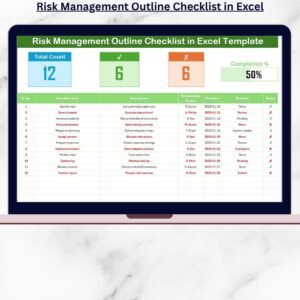
The Risk Management Planner Checklist in Excel is an essential tool for businesses, project managers, and risk management professionals. This Excel-based checklist helps organizations systematically identify, assess, and mitigate risks across various areas of operations. Whether you’re managing a project, a business, or a specific department, this tool allows you to plan, track, and manage risks effectively, ensuring your team stays ahead of potential threats and disruptions.
The checklist includes risk assessment templates, mitigation strategies, action plans, and risk prioritization tools, enabling you to manage risks proactively and improve decision-making. The simple yet comprehensive structure helps you stay organized, assess potential risks, and put in place strategies to minimize the impact of risks on your business operations.
Key Features of the Risk Management Planner Checklist in Excel
🔍 Risk Identification & Assessment
Easily identify potential risks within your business or project by using a structured approach to assess the severity and likelihood of risks. Categorize risks into different types such as operational, financial, strategic, and compliance risks.
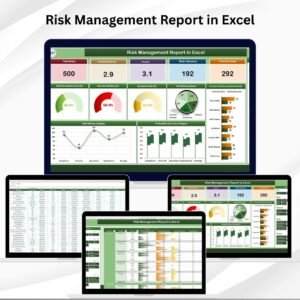
📊 Risk Impact & Likelihood Matrix
Use a risk impact and likelihood matrix to prioritize risks based on their potential impact and the probability of occurrence. This feature helps you focus on high-priority risks that require immediate attention.
⚙️ Mitigation Strategies & Action Plans
Develop and implement effective risk mitigation strategies. Track the actions and steps taken to minimize or eliminate identified risks, and ensure that mitigation efforts are on schedule.
📅 Time-Based Risk Tracking
Track the status of risk management tasks over time. Monitor mitigation efforts, deadlines, and updates to ensure timely action is taken, and the risks are properly managed.
📈 Customizable Risk Metrics
Customize the risk metrics according to your organization’s needs. Add specific risk categories, update the matrix, and track metrics that are relevant to your unique business environment.
📝 Risk Monitoring & Review
Regularly monitor and review risk management progress with this checklist. Use it as a living document to ensure ongoing risk assessment and mitigation, providing transparency for stakeholders.
Why You’ll Love the Risk Management Planner Checklist in Excel

✅ Organized & Structured Risk Management
This checklist simplifies the process of identifying, assessing, and managing risks. You’ll stay organized and ensure that no critical risk is overlooked.
✅ Efficient Risk Mitigation
Track and manage risk mitigation strategies and action plans to ensure timely resolution of high-priority risks. This will help reduce the likelihood of unforeseen issues affecting your operations.
✅ Prioritize & Focus on Critical Risks
Use the impact and likelihood matrix to focus your efforts on the risks that could potentially cause the most damage. Manage these risks first for maximum protection.
✅ Customizable for Any Business or Project
Whether you’re managing a small project, business operations, or enterprise-level risk management, this tool is customizable to fit your needs. Adjust the checklist and metrics to align with your specific risk management goals.
✅ Time-Based Tracking & Progress Monitoring
Ensure that risks are continuously monitored and tracked throughout their life cycle. The time-based approach allows for proactive mitigation and regular updates to stakeholders.
What’s Inside the Risk Management Planner Checklist in Excel?
- Risk Identification & Categorization: Identify and categorize risks into operational, financial, strategic, and more.
- Risk Assessment Matrix: Use a risk matrix to prioritize and assess the severity and likelihood of risks.
- Mitigation Strategies & Action Plans: Develop actionable steps to reduce or eliminate risks.
- Time-Based Risk Tracking: Monitor risk mitigation tasks over a defined period.
- Customizable Risk Metrics: Tailor the checklist and risk categories to fit your business needs.
- Risk Monitoring & Review: Track the progress of risk mitigation strategies and review risks regularly.
How to Use the Risk Management Planner Checklist in Excel
1️⃣ Download the Template: Instantly access the Risk Management Planner Checklist in Excel.
2️⃣ Input Risk Data: Identify and categorize risks relevant to your business or project.
3️⃣ Track & Assess Risks: Use the risk matrix to assess the severity and likelihood of each risk.
4️⃣ Develop Mitigation Strategies: Create action plans for risk mitigation and monitor progress.
5️⃣ Review & Monitor Risks: Regularly review the status of risks and update strategies as necessary.
Who Can Benefit from the Risk Management Planner Checklist in Excel?
🔹 Risk Management Teams
🔹 Project Managers & Team Leaders
🔹 Business Owners & Entrepreneurs
🔹 Compliance & Legal Departments
🔹 Financial Analysts & Consultants
🔹 Small & Medium Businesses (SMBs)
🔹 Large Corporations with Complex Risk Management Needs
Ensure that your business or project remains resilient by proactively managing risks with the Risk Management Planner Checklist in Excel. Identify, assess, and mitigate risks effectively to reduce potential threats and protect your organization’s future.
Click here to read the Detailed blog post
Visit our YouTube channel to learn step-by-step video tutorials
Youtube.com/@PKAnExcelExpert
Watch the step-by-step video Demo:
Compatibility and Requirements
- Works in Microsoft Excel desktop (Excel 2016 or later, or Microsoft 365).
- New to Excel? Microsoft’s Excel for Windows training covers the basics.
Frequently Asked Questions
Which risk types can I record?
You can categorize risks as operational, financial, strategic, compliance and more, and add your own categories.
How do I decide which risks to handle first?
The impact and likelihood matrix rates each risk, so the high-priority risks stand out for immediate attention.
Can I track mitigation actions?
Yes. You record mitigation strategies and action plans for each risk and follow their deadlines and status over time.
Can I change the risk metrics?
Yes. You can add risk categories, update the matrix and track the metrics that fit your business.
Is there a dashboard version?
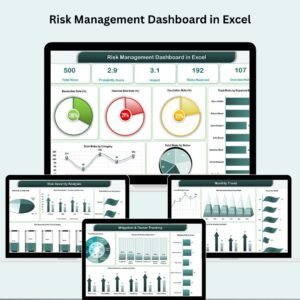
Yes. For charts and KPIs, see the Risk Management Dashboard in Excel.
Related Risk Management Templates
- Risk Management Dashboard in Excel: risk KPIs and charts in Excel
- Risk Management Dashboard in Google Sheets: a risk dashboard in Google Sheets
- Risk Management Checklist in Excel: another risk checklist in Excel
- Risk Management Action Plan Checklist in Excel: focused on mitigation actions
- Checklist & SOP Pack: 12 checklist templates in one download
Browse all Excel checklists or the Excel project management templates.

























Reviews
There are no reviews yet.