



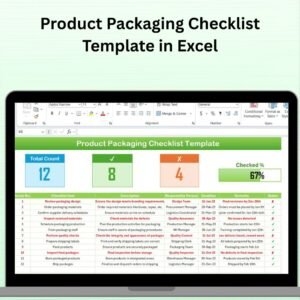
The Product Packaging Checklist Template in Excel is a comprehensive tool designed to help businesses streamline their packaging process. Whether you are in retail, e-commerce, or manufacturing, this Excel-based checklist ensures that all the necessary steps are followed to guarantee the quality and safety of your product packaging.
From labeling to packing, this template helps track every essential aspect of packaging, including materials, product dimensions, quality control, and safety standards. By organizing the packaging process in one place, you ensure consistent quality, improve operational efficiency, and meet regulatory requirements, all while reducing errors.
Key Features of the Product Packaging Checklist Template in Excel
📋 Comprehensive Task List
The checklist includes all key steps required for product packaging, such as material selection, product protection, labeling, and documentation. Each task is clearly outlined, and you can assign responsibilities and track progress.
📦 Packaging Material Monitoring
Track the type of packaging materials used (e.g., boxes, bubble wrap, labels) and ensure they are in stock, properly stored, and compliant with product safety standards.
📏 Dimensions & Weight Tracking
Monitor the dimensions and weight of the packaged product to ensure it fits within size and weight restrictions, reducing the risk of shipping issues and increasing efficiency.
🔑 Quality Control Tracking
Ensure that all necessary quality control steps are completed before final packaging. This includes checking for defects, ensuring proper sealing, and confirming the accuracy of product labeling.
📅 Time-Based Monitoring
Track packaging tasks over time. Monitor the time taken to complete each packaging step and identify areas where delays may occur.
⚙️ Customizable Checklist
The template is fully customizable, allowing you to add or modify fields to suit your product packaging requirements. You can adapt it to handle different product types, industries, and packaging needs.
Why You’ll Love the Product Packaging Checklist Template in Excel

✅ Ensure Consistent Packaging Quality
Track every aspect of the packaging process to ensure products are properly packaged and meet quality standards every time.
✅ Improve Operational Efficiency
Stay organized by managing all packaging tasks in one place. This reduces errors, minimizes delays, and speeds up the packaging process.
✅ Easily Monitor Packaging Materials
Track inventory and usage of packaging materials to prevent shortages or excess, ensuring that the right materials are always available.
✅ Enhance Packaging Compliance
Ensure your products comply with safety, environmental, and regulatory standards by following a structured and thorough checklist.
✅ Customizable to Fit Your Needs
Adapt the checklist to suit your specific packaging requirements, whether for small or large-scale operations.
What’s Inside the Product Packaging Checklist Template in Excel?
Comprehensive Task List: Track packaging steps such as material selection, labeling, and inspection.
Packaging Material Monitoring: Ensure proper material usage and availability.
Dimensions & Weight Tracking: Monitor product size and weight to meet packaging guidelines.
Quality Control Tracking: Track and ensure quality checks are done at every stage.
Time-Based Performance Tracking: Analyze packaging time and identify delays.
Customizable Fields: Adapt the checklist to meet the specific needs of your products.
How to Use the Product Packaging Checklist Template in Excel
1️⃣ Download the Template: Instantly access the Product Packaging Checklist Template in Excel.
2️⃣ Set Up Your Packaging Tasks: Add your packaging tasks, assign responsibilities, and set deadlines for each task.
3️⃣ Track Materials & Inventory: Monitor the materials used in packaging, and ensure they meet safety and quality standards.
4️⃣ Monitor Product Dimensions & Weight: Ensure that packaged products are within acceptable size and weight limits.
5️⃣ Complete Quality Control Checks: Track quality control steps and ensure the packaging meets quality standards before shipment.
Who Can Benefit from the Product Packaging Checklist Template in Excel?
🔹 E-commerce & Retail Businesses
🔹 Manufacturing Companies
🔹 Packaging Departments & Operations Teams
🔹 Quality Control & Compliance Managers
🔹 Logistics & Shipping Companies
🔹 Small & Medium Enterprises (SMBs)
🔹 Large Enterprises with Packaging Needs
Ensure your product packaging process is efficient, organized, and compliant with the Product Packaging Checklist Template in Excel. Streamline tasks, track materials, and improve packaging quality to deliver exceptional products to your customers.
Click here to read the Detailed blog post
Visit our YouTube channel to learn step-by-step video tutorials
Youtube.com/@PKAnExcelExpert
Compatibility and Requirements
- Works in Microsoft Excel desktop (Excel 2016 or later, or Microsoft 365).
Frequently Asked Questions
Which packaging steps does the checklist cover?
It covers material selection, product protection, labeling and documentation, and you can assign responsibilities and deadlines to each task.
Can I record package size and weight?
Yes. The Dimensions and Weight Tracking section records the size and weight of each packaged product so it stays within shipping limits.
Does it include quality checks?
Yes. Quality Control Tracking covers checks for defects, proper sealing and label accuracy before final packaging.
Can I change the fields for my own products?
Yes. The template is fully customizable, so you can add or modify fields for different product types and packaging needs.
Related Packaging Templates
- Product Packaging Checklist in Google Sheets: the same checklist in Google Sheets
- Packaging Sustainability KPI Dashboard in Excel: track packaging sustainability KPIs
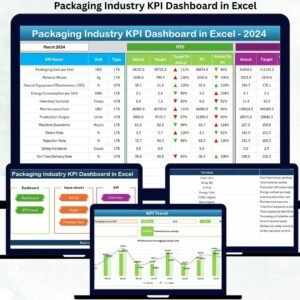
- Packaging Industry KPI Dashboard in Excel: KPIs for packaging operations
- Packaging Industry Dashboard in Excel: a data dashboard for packaging businesses
- Checklist & SOP Pack: a bundle of 12 Excel and Google Sheets checklists
Browse all Excel checklists or the Excel quality control templates.
























Reviews
There are no reviews yet.