

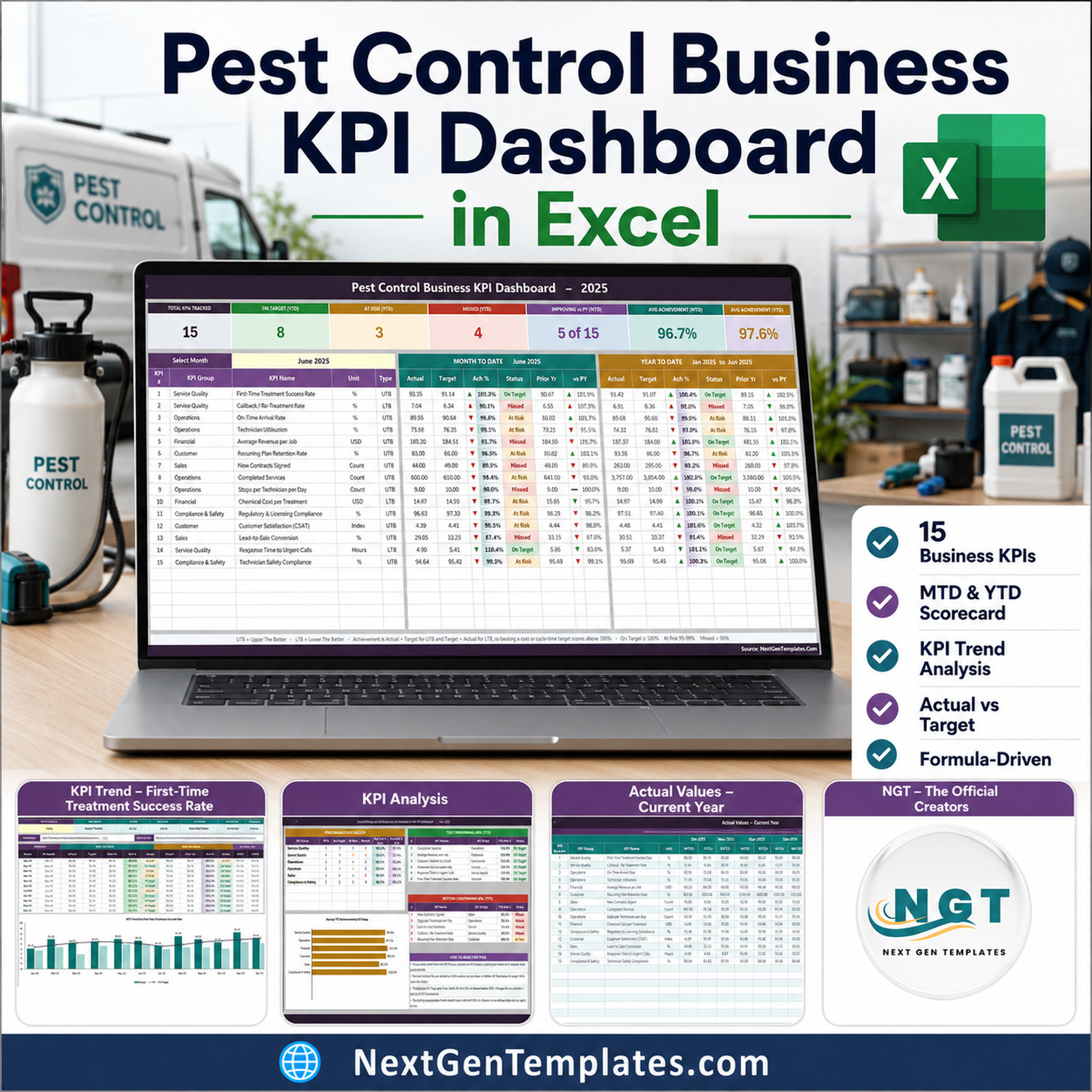

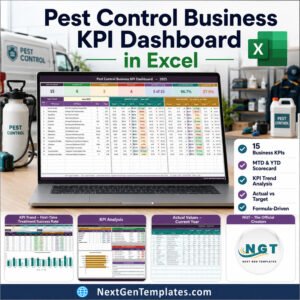
The Pest Control Business KPI Dashboard in Excel tracks 15 pest-control KPIs across 6 KPI groups on 11 worksheets, with a month picker that redraws seven summary cards, a full MTD and YTD scorecard, a twelve-month trend page and a group roll-up page. Every number is a plain worksheet formula – no macros, no Power Query, no Power Pivot, no add-ins. Setup takes about ten minutes: type your monthly numbers on three input sheets and the whole scorecard follows.
🌍 Join 8,400+ teams in 40+ countries using NextGenTemplates to replace paid SaaS tools with one-time-purchase Excel, Google Sheets, Power BI and HTML templates.
✅ Instant download · One-time payment · No subscription · No per-user fees · Lifetime access
This is the Excel KPI Dashboard line – a month-picker scorecard with traffic lights, a KPI Trend page and a KPI Analysis page. It is not the analytical Pest Control Dashboard in Excel, which slices job-level records with pivots and slicers, and it is not the ten-KPI Excel KPI Scorecard line. Names across the three families look alike; the products do not. If you want a monthly board pack that says which of fifteen metrics beat target, this is the one.
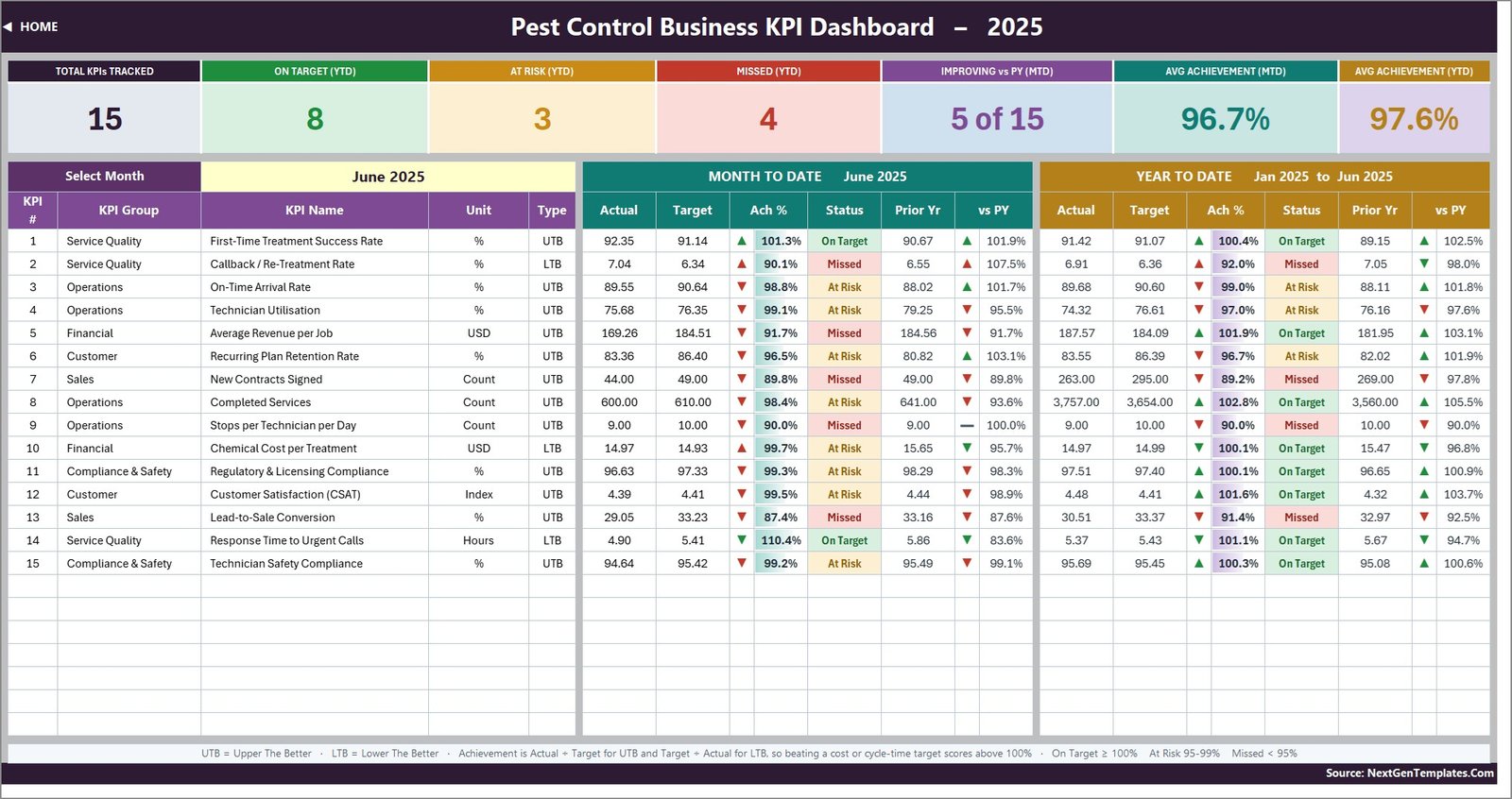
🔑 Key Features of the Pest Control Business KPI Dashboard in Excel
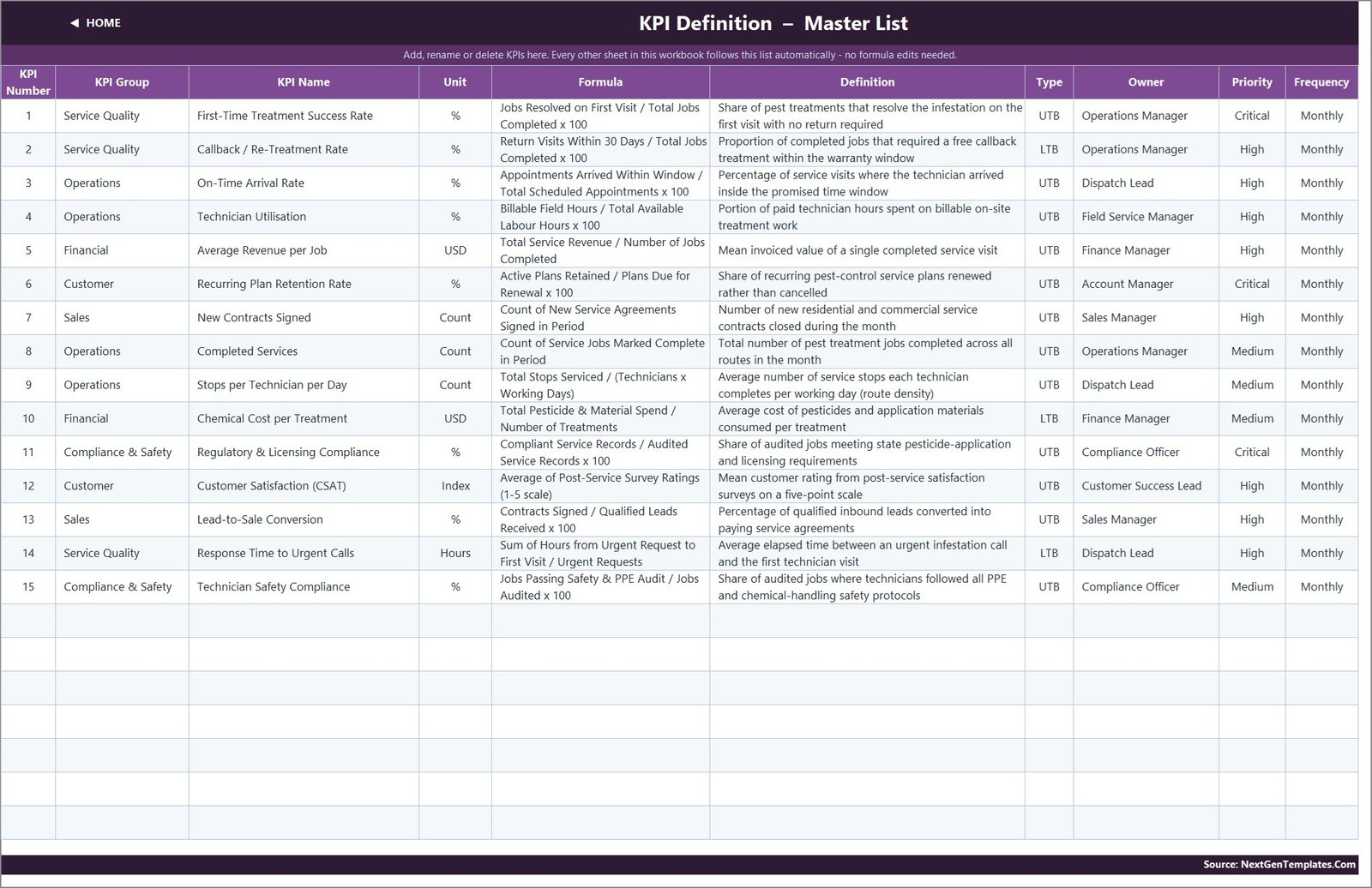
🔹 15 pest-control KPIs, already written. First-Time Treatment Success Rate, Callback / Re-Treatment Rate, On-Time Arrival Rate, Technician Utilisation, Average Revenue per Job, Recurring Plan Retention Rate, New Contracts Signed, Completed Services, Stops per Technician per Day, Chemical Cost per Treatment, Regulatory & Licensing Compliance, Customer Satisfaction (CSAT), Lead-to-Sale Conversion, Response Time to Urgent Calls and Technician Safety Compliance – each with a unit, a formula, a definition, an owner and a priority.
🔹 One month dropdown drives everything. Cell D6 on the KPI Dashboard sheet lists the twelve months of your reporting year. Pick one and the seven summary cards, all fifteen KPI rows and the entire KPI Analysis page recalculate. There is no refresh step and no query to run.
🔹 Direction-aware scoring on every row. Twelve KPIs are typed UTB (Upper The Better) and three are typed LTB (Lower The Better) – Callback / Re-Treatment Rate, Chemical Cost per Treatment and Response Time to Urgent Calls. Achievement is Actual divided by Target for a UTB KPI and Target divided by Actual for an LTB one, so beating a cost or a response-time target scores above 100% instead of looking like a miss.
🔹 MTD and YTD side by side. Each KPI row carries actual, target, achievement %, status, prior year and year-on-year movement twice over – once for the selected month and once for the year to date. That is 12 comparison columns per KPI without a single pivot table.
🔹 Traffic lights you can re-band. Status is On Target from 100%, At Risk from 95% to 99% and Missed below 95%. Those thresholds sit in the formulas in columns L and U on the KPI Dashboard sheet, so a business with tighter governance edits two formulas rather than rebuilding the file.
🔹 Add a sixteenth KPI without touching a formula. The sheets are wired for 22 KPI rows. Type a new KPI on the KPI Definition sheet – number, group, name, unit, formula, definition, type, owner, priority, frequency – and the three input sheets, the scorecard, the trend page and the analysis page pick it up on their own.
📦 What Is Inside the Pest Control Business KPI Dashboard in Excel
Page 1: Home
A navigation page split into three columns – dashboard pages, the input sheets you edit, and reference material – plus a short summary of what the workbook does. Every tile is a hyperlink, and every sheet has a HOME link back.
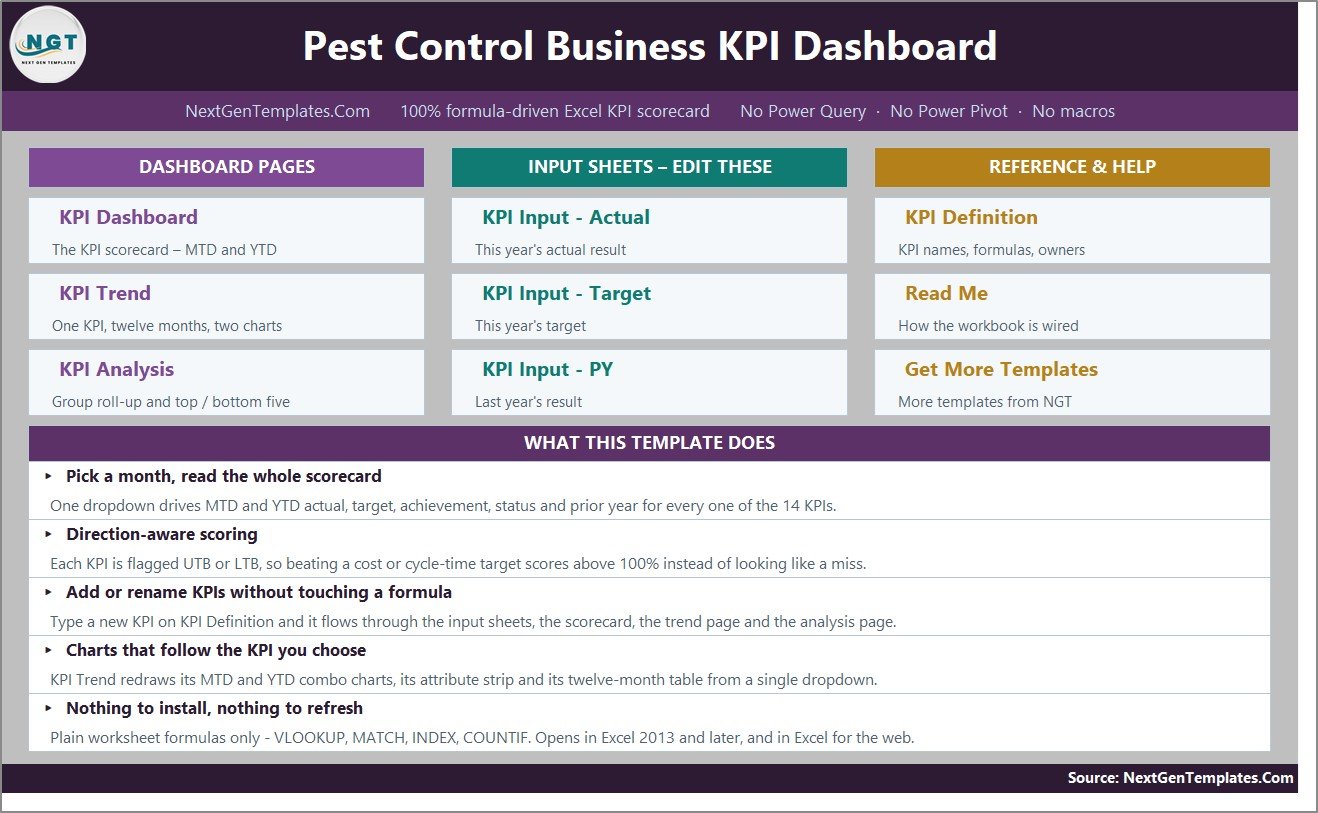
Page 2: KPI Dashboard – the scorecard
Seven summary cards across the top, then one row per KPI. In the shipped sample – reporting year 2025, June selected – the cards read 15 total KPIs, 8 On Target, 3 At Risk, 4 Missed on a year-to-date basis, 5 of 15 improving against prior year for the month, 96.7% average MTD achievement and 97.6% average YTD achievement.
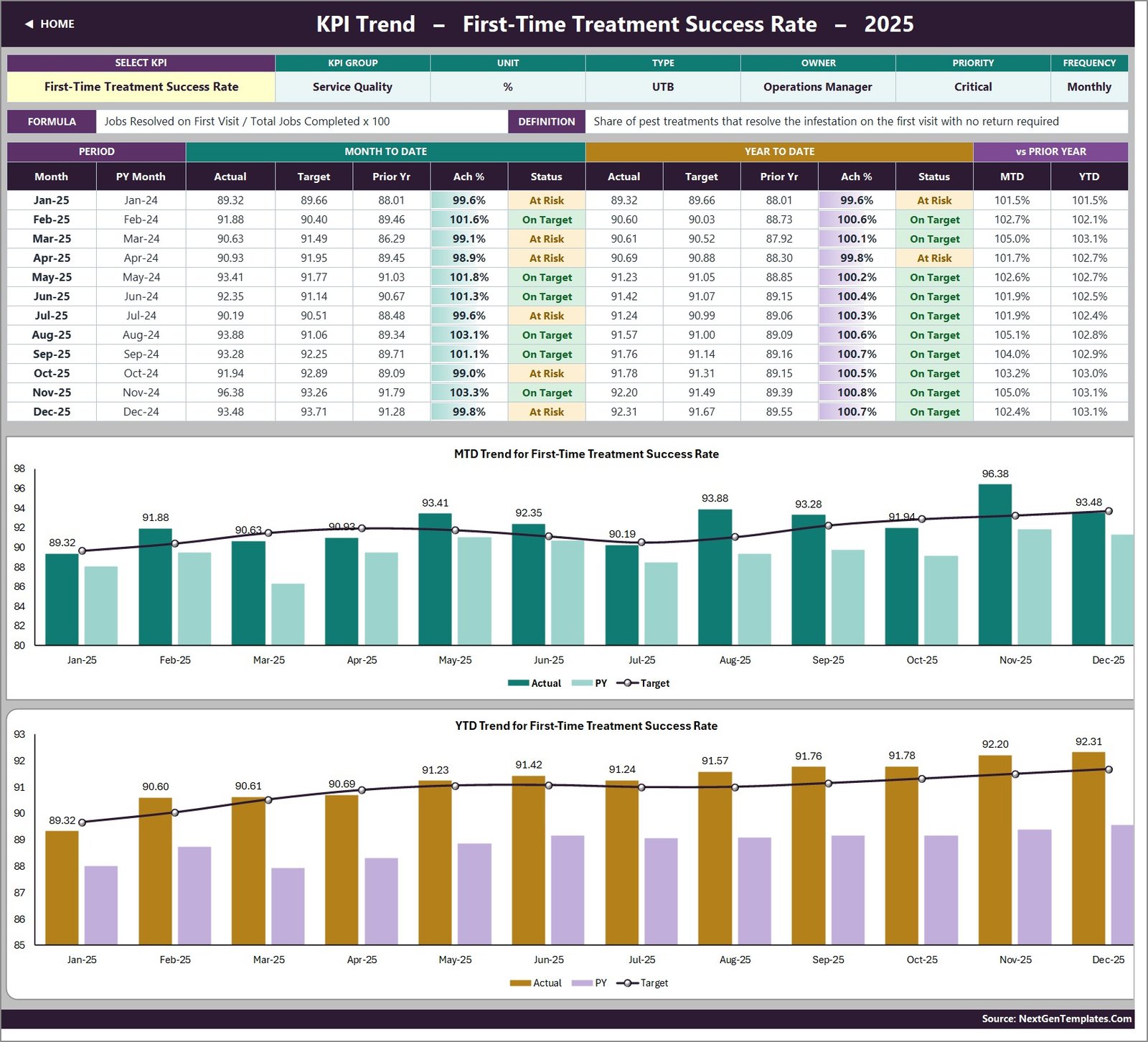
Page 3: KPI Trend
Choose any one KPI from a dropdown in cell B4 and this page shows its group, unit, type, owner, priority and frequency, its formula and definition, a twelve-month table of MTD and YTD actual, target, prior year, achievement and status, and two combo charts – actual and prior-year columns with a target line.
Page 4: KPI Analysis
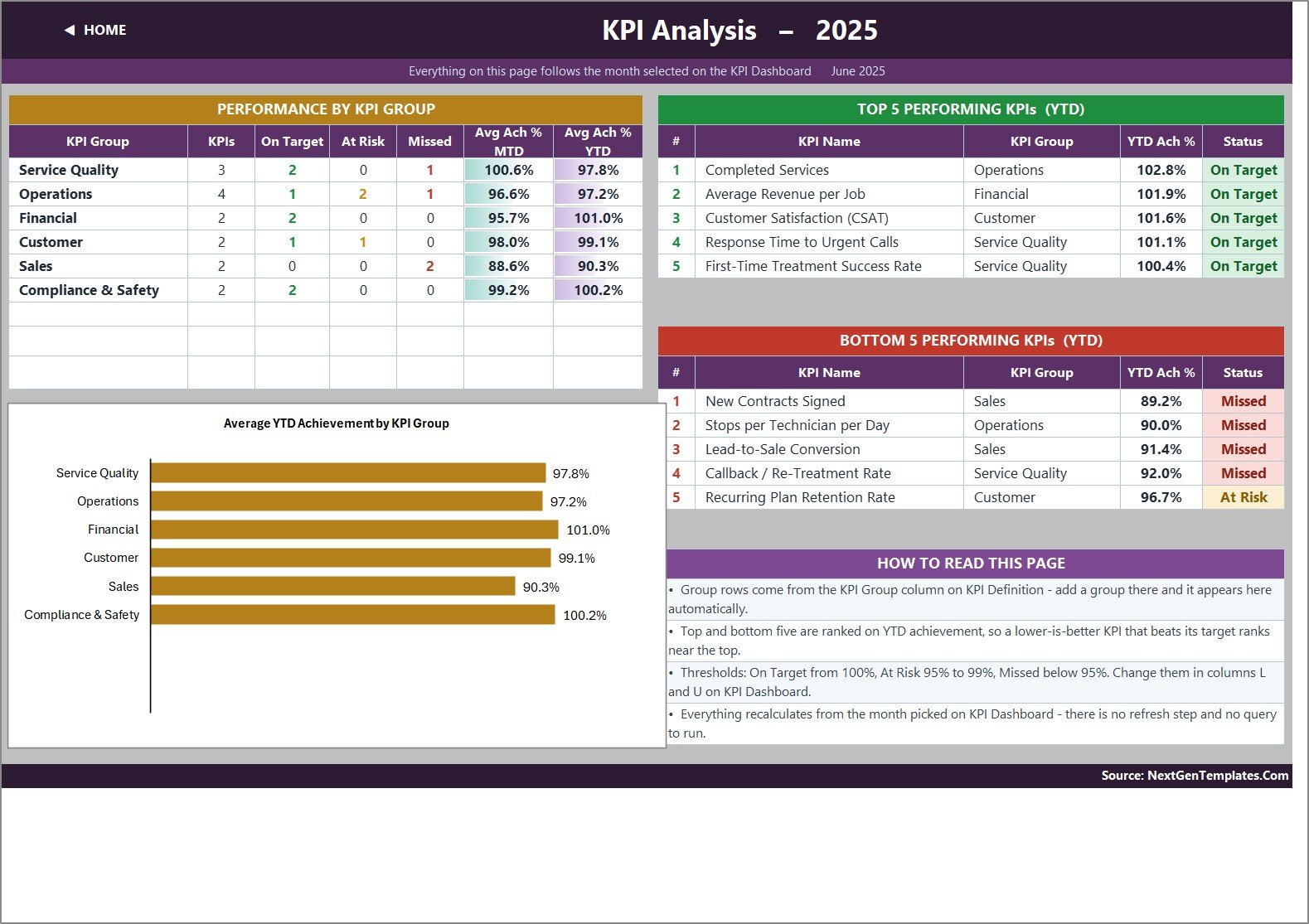
Achievement rolled up by KPI group with a bar chart, plus Top 5 and Bottom 5 performing KPIs for the year to date. In the sample the six groups carry 3, 4, 2, 2, 2 and 2 KPIs, and Sales sits lowest at 90.3% average YTD achievement while Financial leads at 101.0%.
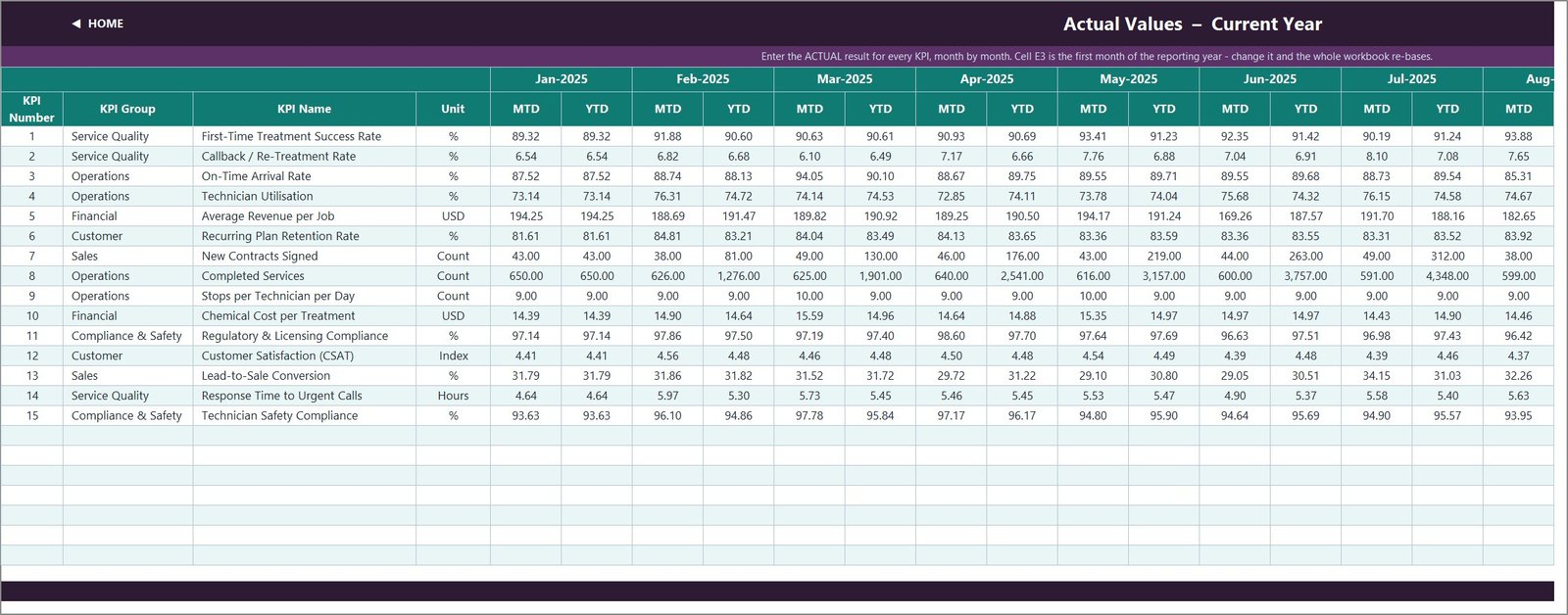
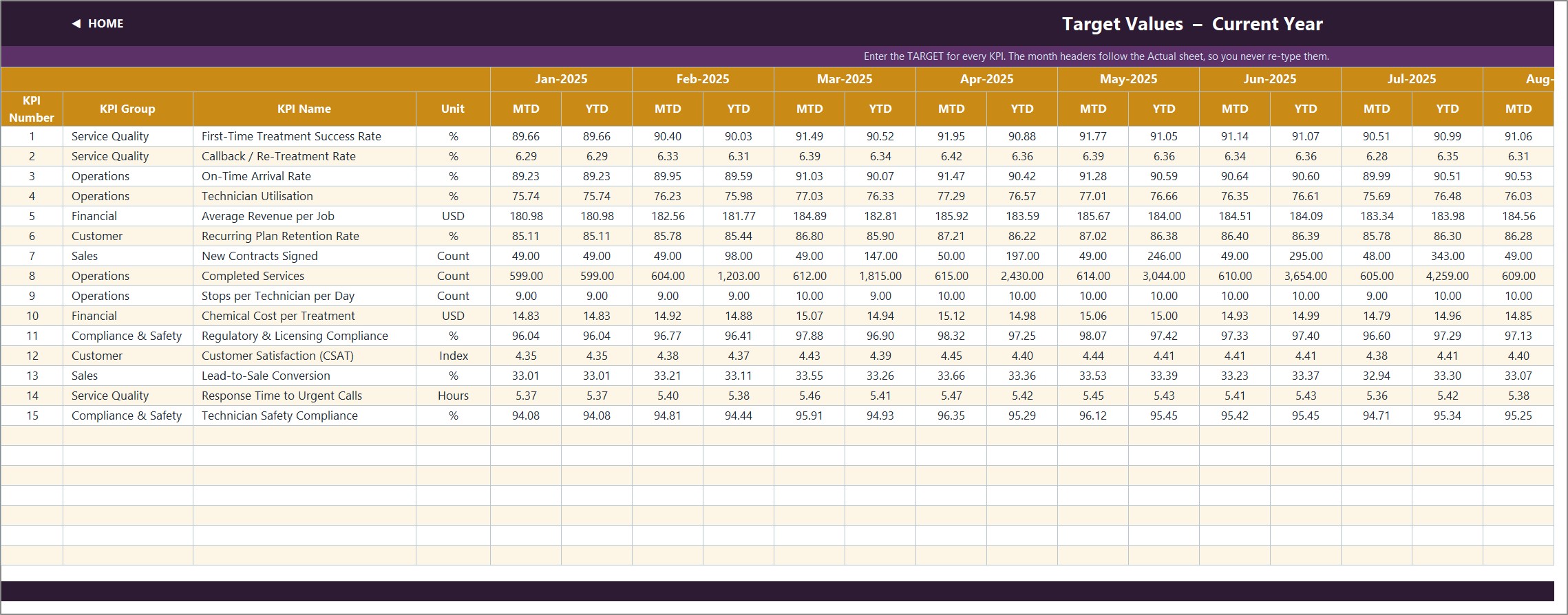
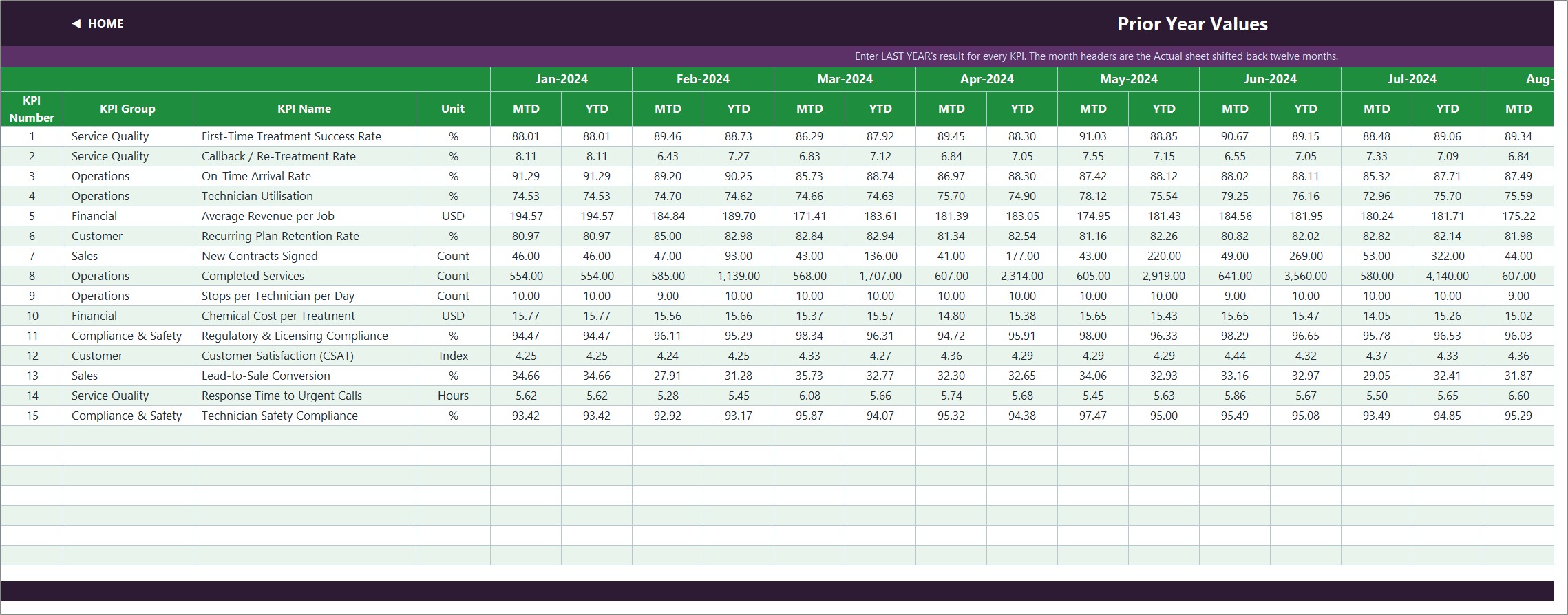
Pages 5, 6 and 7: KPI Input – Actual, Target and Prior Year
The only three sheets you normally type in. Each holds an MTD and a YTD column for all twelve months, for every KPI. Cell E3 on the Actual sheet is the first month of the reporting year – change it and the Target sheet, the Prior Year sheet, the month dropdown and every sheet title re-base.
Page 8: KPI Definition – the master list
The one sheet that governs the rest. Ten columns per KPI: number, group, name, unit, formula, definition, type (UTB or LTB), owner, priority and frequency. Rename a KPI here and every other sheet follows; clear a row and the dashboard row goes blank and the cards recount.
Pages 9 and 10: Read Me and Get More Templates
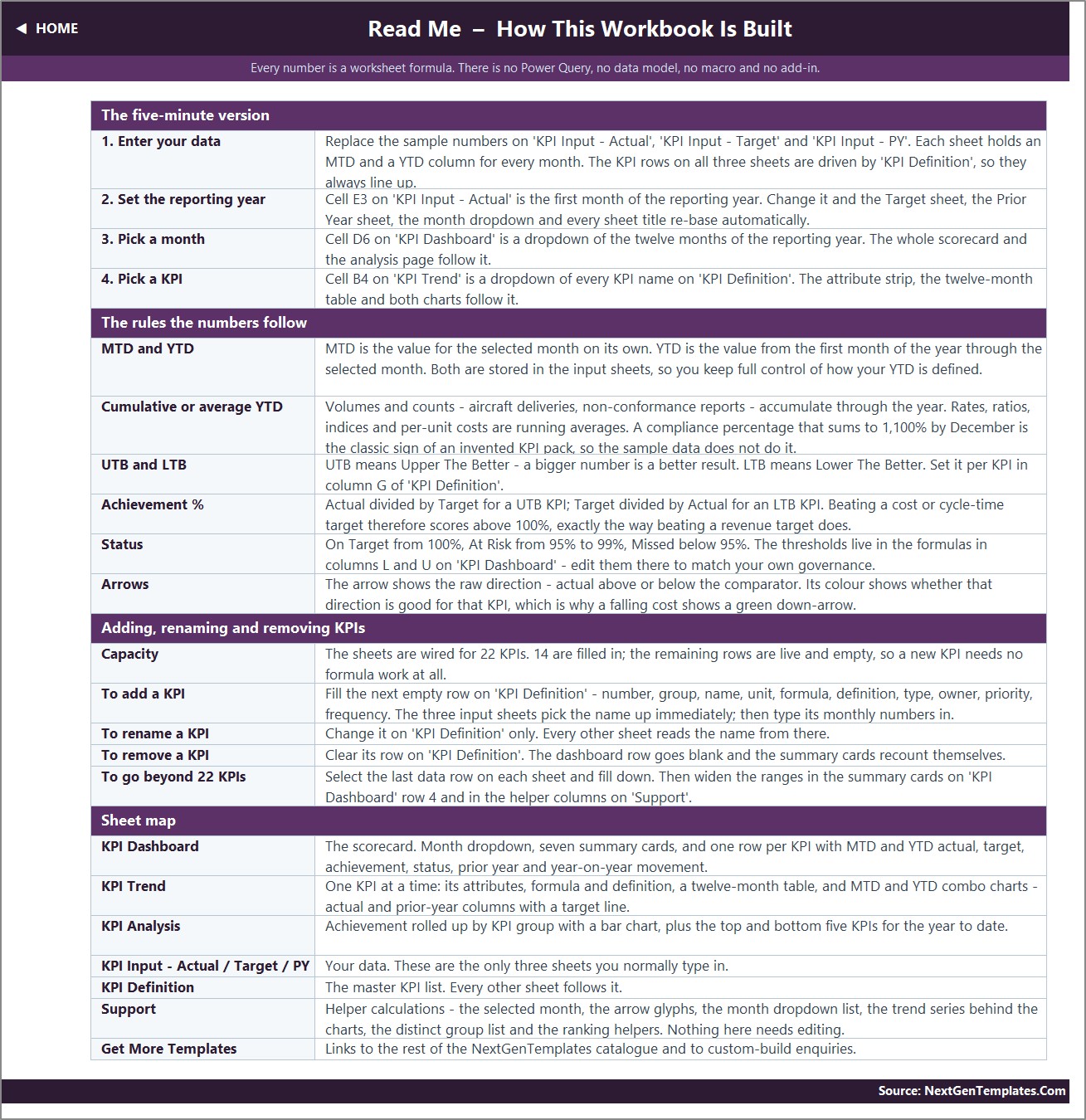
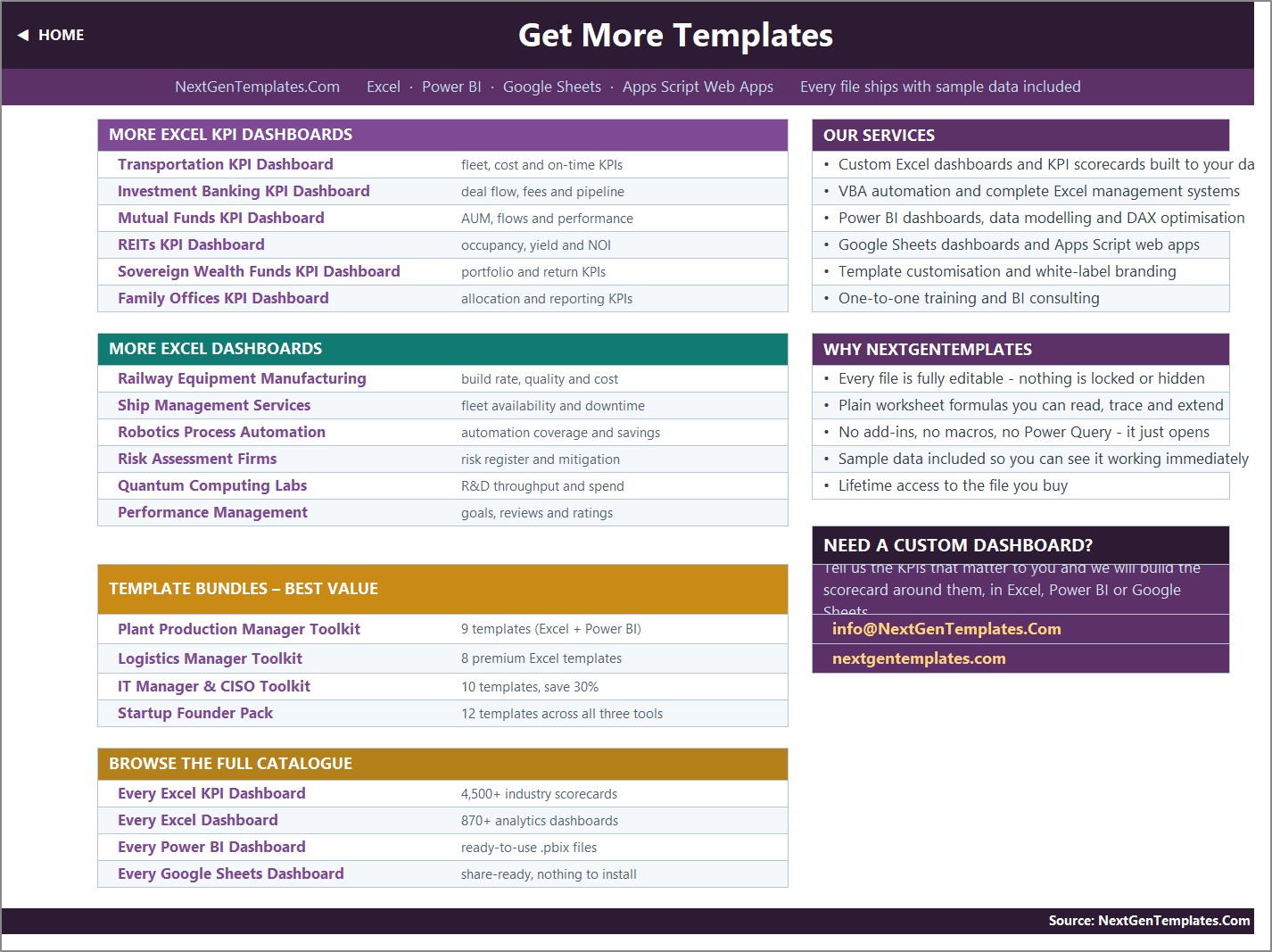
Read Me explains the five-minute setup, the MTD and YTD rules, UTB and LTB, the achievement formula, the status bands and how to add, rename or remove a KPI. Get More Templates links to the wider NextGenTemplates catalogue. A hidden Support sheet holds the helper calculations and needs no editing.
📊 Pest Control Business KPI Dashboard in Excel vs. a Google Sheets Scorecard vs. Paid Field-Service SaaS
| Feature | Pest Control Business KPI Dashboard in Excel | Google Sheets KPI scorecard | PestPac / ServiceTitan / Jobber |
|---|---|---|---|
| Cost | $12.99 one-time ✅ | $8.99-$13.99 one-time | $49-$300 / user / month |
| Platform | Excel 2013+ and Excel for the web | Browser only | Vendor cloud |
| Setup time | About 10 minutes ✅ | About 10 minutes | Weeks of onboarding |
| Works offline | Yes ✅ | No | No |
| Real-time team collaboration | Via OneDrive or SharePoint | Yes ✅ | Yes |
| Direction-aware UTB / LTB scoring | Yes, per KPI ✅ | Yes, per KPI | Varies by vendor |
| Editable traffic-light thresholds | Yes – two formulas ✅ | Yes | Admin-configurable |
| Add your own KPI | Type a row, no formula work ✅ | Type a row | Custom fields, sometimes paid |
| Year-1 cost at 5 users | $12.99 ✅ | $8.99-$13.99 | $2,940-$18,000 |
For a pest-control operator who wants a monthly KPI board pack without paying per technician per month, the Pest Control Business KPI Dashboard in Excel sits in the sweet spot.
👥 Who This Template Is For – and Who It Is Not For
✅ This template is built for:
- Owners and operations managers of residential and commercial pest-control firms with roughly 3 to 60 technicians
- Branch and regional managers who report a monthly scorecard upward and want MTD next to YTD on one screen
- Franchise operators who need the same fifteen metrics reported the same way across locations
- Anyone already exporting monthly totals out of a field-service system who wants a clean board pack rather than another login
❌ This template is NOT for:
- Anyone wanting job-level or customer-level records – this workbook stores monthly KPI numbers only, with no customer, address, technician-name, chemical, application or job table anywhere in it
- Teams needing route scheduling, dispatch, invoicing or a technician mobile app – buy a field-service platform for that
- Anyone expecting the file to manage pesticide compliance, applicator licensing, product registration, re-entry intervals or safety records – it does none of that (see the FAQ below)
- Anyone who wants pivot tables and slicers over raw job data – the analytical Pest Control Dashboard in Excel is the right product
⚙️ How to Use the Pest Control Business KPI Dashboard in Excel
- Unzip the download and open the workbook in Microsoft Excel. Start on the Read Me sheet.
- Open KPI Definition and edit the fifteen KPI rows to match the metrics your business actually reports. Set each one UTB or LTB in the Type column.
- Set cell E3 on KPI Input – Actual to the first month of your reporting year. Every other sheet re-bases from it.
- Type your monthly MTD and YTD numbers on KPI Input – Actual, then the same on KPI Input – Target and KPI Input – PY.
- Go to KPI Dashboard and pick a month in cell D6. The cards, the fifteen rows and the KPI Analysis page follow it.
- Open KPI Trend and pick any KPI in cell B4 to see its twelve-month table and both combo charts.
- If your governance uses different bands, edit the thresholds in the formulas in columns L and U on KPI Dashboard.
💼 Real-World Use Cases
Marcus runs a 14-technician pest-control firm in Texas. On the first Monday of each month he types last month’s totals onto the three input sheets, picks the month, and screenshots the scorecard for his ops meeting. Callback / Re-Treatment Rate is typed LTB, so when it fell the sheet showed him a green down-arrow rather than a red one.
Priya manages four branches for a regional franchise. She keeps one copy of the workbook per branch with identical KPI Definition sheets, so Stops per Technician per Day and First-Time Treatment Success Rate mean the same thing everywhere. The KPI Analysis page tells her in one look which of the six KPI groups is dragging a branch down.
Dan is a solo operator with two subcontracted technicians. He only cares about six of the fifteen metrics, so he cleared the rows he did not want on KPI Definition – the dashboard rows went blank and the summary cards recounted themselves, with no formula editing at all.
❓ Frequently Asked Questions
What KPIs does the Pest Control Business KPI Dashboard in Excel track?
It ships 15 KPIs in 6 groups: Service Quality (first-time treatment success, callback rate, urgent response time), Operations (on-time arrival, technician utilisation, completed services, stops per technician per day), Financial (average revenue per job, chemical cost per treatment), Customer (recurring plan retention, CSAT), Sales (new contracts signed, lead-to-sale conversion) and Compliance & Safety (two audit percentages).
Does this template handle pesticide compliance, applicator licensing or safety records?
No. The Pest Control Business KPI Dashboard in Excel carries two Compliance & Safety KPIs – Regulatory & Licensing Compliance and Technician Safety Compliance – and both are simply percentages you calculate elsewhere and type in. The workbook stores no chemical, product-registration, application-record, licence, re-entry-interval or audit data, and it is not a compliance or safety management system.
Do I need macros, Power Query or Power Pivot?
No. The Pest Control Business KPI Dashboard in Excel is 100% worksheet formulas – VLOOKUP, MATCH, INDEX, COUNTIF and SUMPRODUCT. There is no macro, no data model, no query and no add-in, so it opens in Excel 2013 and later and in Excel for the web with nothing to enable.
How long does setup take?
About ten minutes if your monthly numbers are already to hand. Set the reporting-year cell, paste your MTD and YTD figures onto the three input sheets, then pick a month. Renaming the fifteen sample KPIs to your own wording is a five-minute pass on the KPI Definition sheet.
How does this compare to PestPac or ServiceTitan?
Those are operating systems that run scheduling, dispatch and invoicing at roughly $49-$300 per user per month. The Pest Control Business KPI Dashboard in Excel does none of that – it is a $12.99 one-time reporting layer that turns whatever monthly totals you already have into a board-ready scorecard. Most buyers use both.
Can I add or remove KPIs?
Yes. The sheets are wired for 22 KPI rows and 15 are filled, so seven are live and empty. Fill the next row on KPI Definition and the input sheets, the scorecard, the trend page and the analysis page pick it up automatically. To go past 22, fill the last row down on each sheet and widen the summary-card ranges.
Is the workbook editable, or is anything locked?
Everything is editable. No sheet is password-protected, no formula is hidden, and the hidden Support sheet can be unhidden and read. You buy the file, not a licence to a service.
👤 About the Author
Built by PK – Microsoft Certified Professional with 15+ years of Excel, Google Sheets and Power BI experience. Founder of NextGenTemplates, reaching 300K+ subscribers across YouTube channels (@PK-AnExcelExpert, @NextGenTemplates, @NeoTechNavigators). Every template is hand-built and tested before release.
🔗 Explore Related Templates
Also available as: the same fifteen-KPI scorecard is being prepared as the Pest Control Business KPI Dashboard in Power BI, and a Google Sheets edition of this dashboard is in preparation as well.
- Pest Control Business KPI Scorecard in Google Sheets – the shorter ten-KPI scorecard line, same trade, different structure.
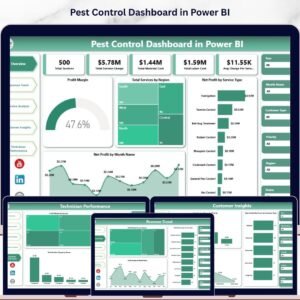
- Pest Control Dashboard in Excel – the analytical line, with pivots and slicers over job-level records rather than a monthly scorecard.
- Pest Control Dashboard in Power BI – the same analytical build for Power BI Desktop.
- Plumbing Business KPI Dashboard in Excel – the identical month-picker structure for a plumbing operation.
- Septic Tank Service KPI Scorecard in Excel – a neighbouring field-service trade.
Browse more KPI Dashboard templates and Excel templates.
📖 Click here to read the Detailed Blog Post
🎥 Visit our YouTube channel for step-by-step video tutorials
👉 YouTube.com/@NextGenTemplates
📅 Last updated: September 2026
Watch the demo video:
Compatibility and Requirements
- Works in Microsoft Excel desktop (Excel 2016 or later, or Microsoft 365). The workbook uses plain worksheet formulas, so there is nothing to enable.
- The month on the KPI Dashboard sheet and the KPI on the KPI Trend sheet are picked from dropdowns. Microsoft explains them in Create a drop-down list.






























Reviews
There are no reviews yet.